

模型与 MCP
待识别

rea
morluto
Reverse engineer anything with agents, from app behavior down to native binaries.
PROJECT TOPICS
INSTALL REFERENCE
dsh plugin --profile web add github:zhihuz123/dsh-todos
该命令指向仓库当前默认分支;尚无绑定当前 commit 的完整验证结果。
PROJECT README


DeepSeek Harness 的持久工作区待办面板。
English | 中文
把「这次怎么做」留在会话里,把「接下来做什么」留在工作区。
dsh-todos 解决的是跨会话的待办问题:Agent 在会话里发现的后续工作、你明确承诺的下一步、暂时不做的想法,都可以落到 workspace 的 Plan / Backlog 里,第二天、下一个会话、甚至重启 Host 之后仍然在。
早期版本(
0.2.0),已在 Desktop0.2.2-rc.1/ macOS 上验证。
仓库名是dsh-todos,安装用的包名是dsh-plugin-todos(npm 上的dsh-todos已被占用)。
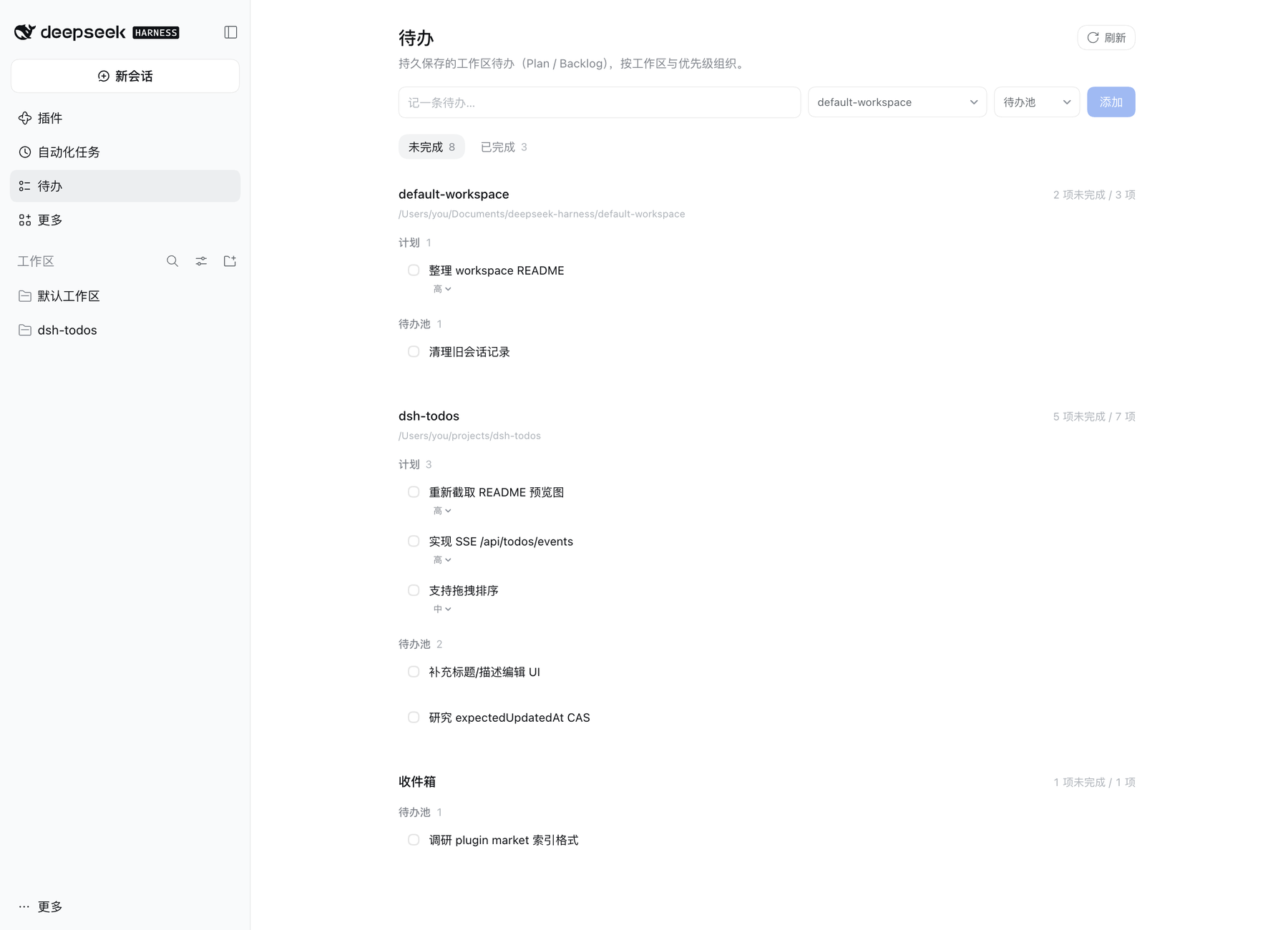
DSH 官方的 todo_write 是当前这一轮的执行清单:它回答“这次怎么做”,turn/start 时清空。它不负责“明天还要做什么”。
dsh-todos 补的是另外两层:
Session todo_write   这次怎么做(当前轮,临时)
Workspace Plan       已经决定接下来做什么(持久,用户明确承诺)
Workspace Backlog 值得以后做什么(持久,暂未承诺)三者不自动同步。这是有意设计:两套 source of truth 互相追赶,最后一定有一边失真。
todo_add / todo_update、/todo 命令。sourceSessionId,可从条目打开来源会话。要求 DSH >= 0.2.1-rc.1 < 0.3.0(engines.dsh);已在 Desktop 0.2.2-rc.1(macOS)上验证。
dsh plugin --profile web add dsh-plugin-todos刷新 DSH Web,侧边栏会出现「待办」;之后可在 设置 → 插件 里启停。
方式 A(推荐,无需退出 Desktop):侧边栏 插件 → Add plugin,输入 dsh-plugin-todos。Host 先读取包清单确认是 bundle,再安装并自动启用,刷新页面即可。
方式 B(完全退出 Desktop 后):
"/Applications/DeepSeek Harness.app/Contents/Resources/runtime/cli/bin/dsh" \
  plugin --profile desktop add dsh-plugin-todos
desktop profile 由 Electron 管理,必须用 Desktop 自带的 CLI(带 manageDesktopProfile 和内置 pnpm),不要用外部 npm 全局的 dsh。安装会写入 ~/.dsh/profiles/desktop/package.json 的 dependencies 和 dsh.profile.bundles,重新打开 Desktop 后生效。
git clone git@github.com:zhihuz123/dsh-todos.git
cd dsh-todos
npm install
npm run build
dsh plugin --profile web add "file:$PWD"
file: 依赖是硬链接:在 checkout 里 npm run build 会原地重写 lib/*.js,profile 中的副本随之更新;Host 半边由 HMR 重载,客户端半边刷新页面即可。Desktop 也可以用同样的 file: spec 装本地目录。
兼容性:engines.dsh 决定安装许可,不需要版本豁免;peerDependencies 是声明性的,安装时 pnpm 可能打印 missing peer 警告——那些包由 DSH 运行时提供,不是故障。Desktop 上已验证安装、bundle 启用、面板渲染和 composer,完整的增删改流程与 /todo 命令尚未逐项 smoke test。
npm install
npm run build
npm testdsh web;client-hmr 会推新 bundle,刷新页面即可;顶部 composer 支持:
[ 标题 ] [ 位置:Workspace / 收件箱 ] [ 类型:Plan / Backlog ] [ 添加 ]/todo 命令在会话里直接输入,不经过模型,也不会开启新一轮对话:
/todo <text>              → Backlog
/todo add <text>          → Backlog(标题以 plan/backlog 开头时用)
/todo backlog <text>      → Backlog
/todo plan <text>         → Plan(默认 high)
例如:
/todo Fix authentication bug
/todo plan Implement SSE
/todo backlog Investigate flaky test
/todo add plan the migration
命令结果以命令卡片显示在会话里。它只负责记录,不会让 Agent 开始执行;要执行请再发一条消息。
Inbox 里的 /todo plan 会直接报错,而不是静默降级。
todo_add({ title, bucket?, description?, priority? })
todo_update({ id, status?, bucket?, title?, description?, priority? })
todo_add 不接受 workspaceId:Host 从当前 session 的 workspace membership → 父 session → cwd 最长前缀 → Inbox 解析。
Agent 的写入规则由 system prompt 和 tool description 共同约束:
pending / in_progress
        │ complete
        ▼
    completed ── restore ──▶ pending
        │
        ├─ delete           单条永久删除
        └─ clear completed  按 workspace 批量永久删除
没有 archived 状态;Completed 本身就是历史,清理才是删除。
Overview UI ── fetch /api/todos* ──┐
                                   ├── Connection Fetch(Harness 鉴权 + Host/Origin fence)
Agent ── todo_add / todo_update ───┤
User  ── /todo command ────────────┤
                                   ▼
                              TodoService
                                   │
                          storageDomain: workspace_todos
                                   │
todos 表ctx.connection.fetch,只有 owner Peer 能到达;cookie、Host/Origin、CSRF 由 Connection 统一处理,没有插件 token。type Scope =
| { type: 'workspace'; workspaceId: string } // 稳定 UUID
| { type: 'inbox' } // 明确语义,不是 null
interface Todo {
id: string
scope: Scope
bucket: 'plan' | 'backlog'
title: string
description?: string
status: 'pending' | 'in_progress' | 'completed'
priority?: 'low' | 'medium' | 'high' // Plan 必有;Backlog 无
order: number // 同优先级内的手动顺序
sourceSessionId?: string
createdBy: 'user' | 'agent' | 'system'
createdAt: number
updatedAt: number
completedAt?: number
}全部在 /api/todos 下,返回统一信封:
{ "ok": true, "value": { "todos": [] } }
{ "ok": false, "error": { "code": "todo/not-found", "message": "..." } }| 方法 | 路径 | 作用 |
|---|---|---|
| GET | /api/todos |
列出全部工作区待办 |
| POST | /api/todos/create |
{ scope, bucket?, title, description?, priority? } |
| POST | /api/todos/update |
{ id, ...patch }(status/bucket/title/description/priority) |
| POST | /api/todos/clear-completed |
{ scope },永久删除该 workspace/Inbox 的已完成;返回 { deleted } |
| POST | /api/todos/delete |
{ id } |
无 cookie → 401;错误 Origin → 403;都来自 Connection,不是本插件。
high | medium | low,创建时默认 high;plan 会被降级为 Backlog,返回 downgraded: true;order;Backlog 按 order;API 和 Overview 使用同一顺序。todo_write;这是刻意选择。todo_update 已支持)。/todo 命令尚未逐项 smoke test。0.2.1-rc.x 的 API 面实现,已在 0.2.2-rc.1 上验证;升级 DSH 前仍需验证 connection.fetch、storageDomain、workspaceRegistry、tools、commands。dsh-plugin-todos@0.2.0)/todo 命令/api/todos/events,带 snapshot + revision 和轮询 fallbackexpectedUpdatedAt CASnpm install
npm run build # src/host -> lib/index.js;src/client -> lib/client.js
npm test # schema/service/tools/routes/commands + derive + store + bundle SSR目录:
src/host/
  schema.js        zod schema + defineDomain('workspace_todos')
  service.js       TodoStore:list/create/update/delete/validate/order
  scope.js         session → workspace/inbox 解析
  routes.js        Connection Fetch exact routes
  tools.js         todo_add / todo_update
  commands.js      /todo 命令解析与 Host handler
  guidance.js      三层次 system prompt
  index.js         Cordis service / tools / routes / commands 装配
src/client/
  api.js           /api/todos fetch 客户端
  workspace-store.js  可见性轮询、mutation 后强制刷新
  derive.js        workspace 分组 / 当前 workspace
  index.jsx        Overview、composer、Plan/Backlog、已完成
  styles.js        设计 token 样式
test/
  host.test.mjs
  workspace-store.test.mjs
  derive.test.mjs
render.test.mjsMIT. See LICENSE.
CLASSIFICATION EVIDENCE
系统优先读取 GitHub Topics,再与站内分类词典和词根规则比对。当前命中: deepseek-harness。
morluto
Reverse engineer anything with agents, from app behavior down to native binaries.

deepseek-ai
DeepSeek Harness: Everything is a Plugin.

nexu-io
The 1st Collaborative AI Design Agent Workspace. Local-first and open source. Create motion, prototypes, websites, apps, dashboards, presentations, images, and videos with your team and AI agents. Share work, exchange feedback, and iterate together in one workspace.