模型与 MCP
待识别

rea
morluto
Reverse engineer anything with agents, from app behavior down to native binaries.

zhengkaixing/dsh-conversation-queue
Cap how many DeepSeek Harness conversations run at once: extra conversations wait in a FIFO queue instead of piling up model requests, with a bottom status strip for memory, commit memory and disk usage plus a plugins-page card to change the limit.
PROJECT TOPICS
INSTALL REFERENCE
dsh plugin --profile web add github:zhengkaixing/dsh-conversation-queue
该命令指向仓库当前默认分支;尚无绑定当前 commit 的完整验证结果。
PROJECT README
给 DeepSeek Harness 用的并发闸门:限制同时运行的对话数量,超出的对话先来后到排队,等前面的回合结束后自动放行;顺手在界面底部挂一条内存 / 提交内存 / 磁盘状态条。
为 32G 内存这类“两个对话一起跑就可能被系统 kill”的机器设计。不再让第 3、第 4 个对话同时发请求,而是让它们静默排队——排队时既不调模型、也不组装上下文,几乎不占内存。

shell.bottom):内存、提交内存、每块固定盘剩余、运行中 / 排队数、当前上限。− / + 调整上限。& '<DSH 安装目录>\resources\runtime\cli\bin\dsh.cmd' plugin --profile web add github:zhengkaixing/dsh-conversation-queue装完重启一次 DSH(新增的浏览器端 bundle 与 HTTP 路由都是启动时挂载的)。
GitHub 拉不动的网络可以走 Gitee 镜像(同一份代码、同样的历史):
& '<DSH 安装目录>\resources\runtime\cli\bin\dsh.cmd' plugin --profile web add https://gitee.com/zhengkaixing/dsh-conversation-queue.git插件市场只认 GitHub 仓库地址,Gitee 镜像只是给装不上的网络用的,不参与上架。
在 DSH 的插件市场里搜 dsh-conversation-queue 点安装即可——市场条目指向这个 GitHub 仓库,效果和上面的 github: 命令完全一样。市场列表由 awesome-dsh-plugin 维护,每次打开时实时拉取。
上架状态:已上架(PR #12526 已于 2026-11-07 合并)。条目文件是 data/plugins/zhengkaixing__dsh-conversation-queue.yml,在 awesome-dsh-plugin.com 或 DSH 插件市场里搜
dsh-conversation-queue都能找到。
没有发布 npm 包,别用
dsh plugin add dsh-conversation-queue(会去 registry 找同名包)。
& '<DSH 安装目录>\resources\runtime\cli\bin\dsh.cmd' plugin --profile web add 'link:C:/path/to/dsh-conversation-queue'dsh plugin add 会把这个包写进 profile 的 package.json、追加到 dsh.profile.bundles 并跑一次 pnpm。
改完插件代码需要重启 DSH 才会生效(HMR 只重载配置,不重载插件代码)。
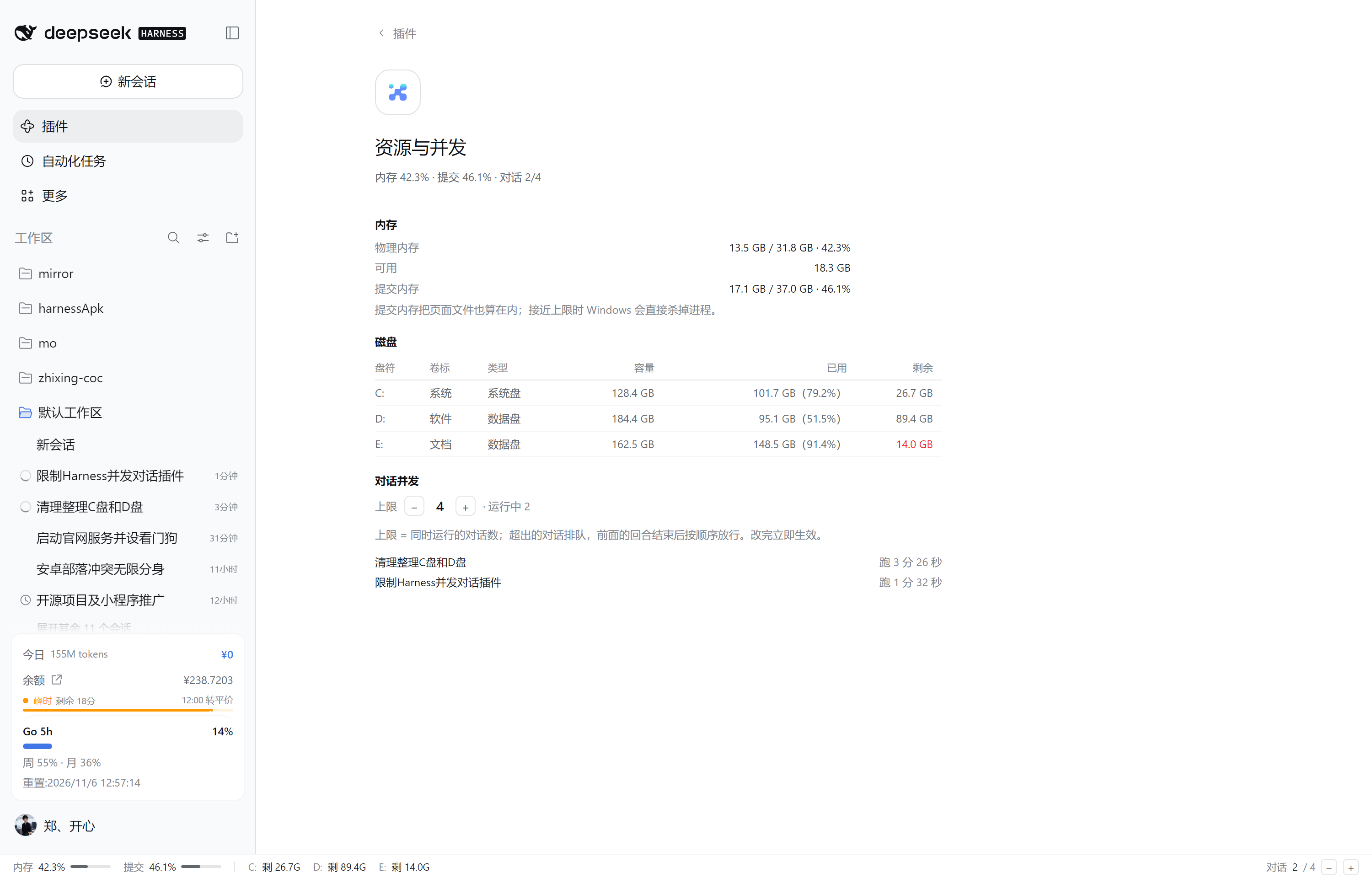
内存 60% ▓▓▓░░ 提交 89% ▓▓▓▓▓ C: 剩 24.0G D: 剩 89.4G E: 剩 14.0G 对话 2 / 3 · 排队 1 − +GET /dsh-resource/status,同源、不额外开端口。≥80% 显示琥珀色,≥88% 显示红色。“提交内存”是最该盯的指标:它把页面文件算在内,接近上限时 Windows 会直接杀进程。− / + 立刻改并发上限(写 settings,1.5 秒内生效)。| 悬浮在盘符上 | 悬浮在“对话”上 |
|---|---|
 |
 |
Sidebar → Plugins → 资源与并发:内存 / 磁盘 / 对话并发三段,带表格和 − +。
配置写在插件自带的 cordis.patch.yml 里:
- insert:
    - id: conversation-queue
      name: 'dsh-conversation-queue'
      config:
        enabled: true        # 总开关,false = 完全不限制
        maxConcurrent: 2     # 同时允许运行的对话数;32G 内存建议 2,紧张就 1
        queueSubagents: false
        statusFile: ''       # 留空 = $DSH_HOME/conversation-queue.json
        settingsFile: ''     # 留空 = $DSH_HOME/conversation-queue.settings.json
        logAdmissions: true  # 每次放行 / 排队是否写日志
也可以在 ~/.dsh/profiles/web/cordis.patch.yml 里用同一个 id 覆盖(建议把需要的字段写全):
- id: conversation-queue
  config:
maxConcurrent: 3// %USERPROFILE%\.dsh\conversation-queue.settings.json
{ "maxConcurrent": 3, "source": "dsh-ui" }maxConcurrent(1~8 的整数)和 enabled;没写的字段沿用配置默认值,文件删掉或清空也回到默认值。maxConcurrent: 0 会被忽略并保持当前上限(避免手滑把上限打回 1 或半写入导致乱跳)。− +、设置页的 − +、直接编辑这个文件。| 方法 | 路径 | 说明 |
|---|---|---|
| GET | /dsh-resource/status |
{ ok, time, platform, memory, disks, gate } |
| POST | /dsh-resource/limit |
body { "maxConcurrent": 3 },可选 { "enabled": false };非法值 400 |
memory = { totalBytes, availBytes, usedBytes, usedPercent, commitLimitBytes, commitUsedBytes, commitPercent, load, sampler };
disks[] = { name, label, fileSystem, system, totalBytes, freeBytes, usedBytes, usedPercent };
gate = { enabled, maxConcurrent, running, waiting, active: [{ id, title, turn, runningMs }], queue: [{ id, title, position, waitingMs }] }。
两个接口都经由宿主自己的 HTTP 服务,沿用它的鉴权(同源可用)。
memory.sampler 是 ok / starting / error: …:提交内存靠一个常驻 PowerShell 采样进程提供(ELECTRON_RUN_AS_NODE 下 Node 拿不到 process.getSystemMemoryInfo),启动后 1~2 秒才有值。
Get-Content "$env:USERPROFILE\.dsh\conversation-queue.json"{
"running": 2,
"waiting": 1,
"maxConcurrent": 2,
"enabled": true,
"configured": { "enabled": true, "maxConcurrent": 2 },
"active": [{ "id": "session-...", "title": "整理插件文档", "turn": 3, "runningMs": 12480 }],
"queue": [{ "position": 1, "id": "session-...", "title": "重构设置页", "turn": 1, "waitingMs": 5300 }],
"totals": { "admitted": 12, "queued": 5 },
"lastEvent": "loaded"
}maxConcurrent / enabled 是当前生效值,configured 是 YAML 默认值。lastEvent 变成 unloaded 说明插件已卸载或重载失败。$env:USERPROFILE\.dsh\conversation-queue.boot.log 记录插件是否被加载(只有 import 没有 apply-ok 就是加载失败,会带 apply-failed 和堆栈)。conversation-queue: 能看到每次放行 / 释放 / 排队。node test.mjs # 13 项单元检查
node ..\..\_scratch\dsh-queue\rig\integration.mjs # 11 项(真实 cordis 4.0.5 派发)
node ..\..\_scratch\dsh-queue\rig\settings.mjs # 10 项(运行期改上限)
node ..\..\_scratch\dsh-queue\rig\routes.mjs # 36 项(HTTP 接口 / 晚就绪注册 / 卸载回收)
node ..\..\_scratch\dsh-queue\rig\client-load.mjs # 17 项(浏览器模块契约)
node ..\..\_scratch\dsh-queue\rig\client-dom.mjs # 27 项(jsdom 真挂载、点击、失败态)rig 里用 react / jsdom 以及从 app.asar 抽出来的 @deepseek-ai/cordis、@deepseek-ai/cosmokit(file: 依赖)。
CLASSIFICATION EVIDENCE
系统优先读取 GitHub Topics,再与站内分类词典和词根规则比对。当前命中: deepseek、deepseek-harness。
morluto
Reverse engineer anything with agents, from app behavior down to native binaries.

deepseek-ai
DeepSeek Harness: Everything is a Plugin.

nexu-io
The 1st Collaborative AI Design Agent Workspace. Local-first and open source. Create motion, prototypes, websites, apps, dashboards, presentations, images, and videos with your team and AI agents. Share work, exchange feedback, and iterate together in one workspace.