
模型与 MCP
待识别

rea
morluto
Reverse engineer anything with agents, from app behavior down to native binaries.
PROJECT TOPICS
INSTALL REFERENCE
dsh plugin --profile web add github:zhaoqiminggg/dsh-approval-translator
该命令指向仓库当前默认分支;尚无绑定当前 commit 的完整验证结果。
PROJECT README
A DeepSeek Harness plugin that puts an Explain this action button under the permission approval dialog — and answers it in plain language.
Also searched as: approval dialog explainer, approval explainer, risk explainer, approval translator.
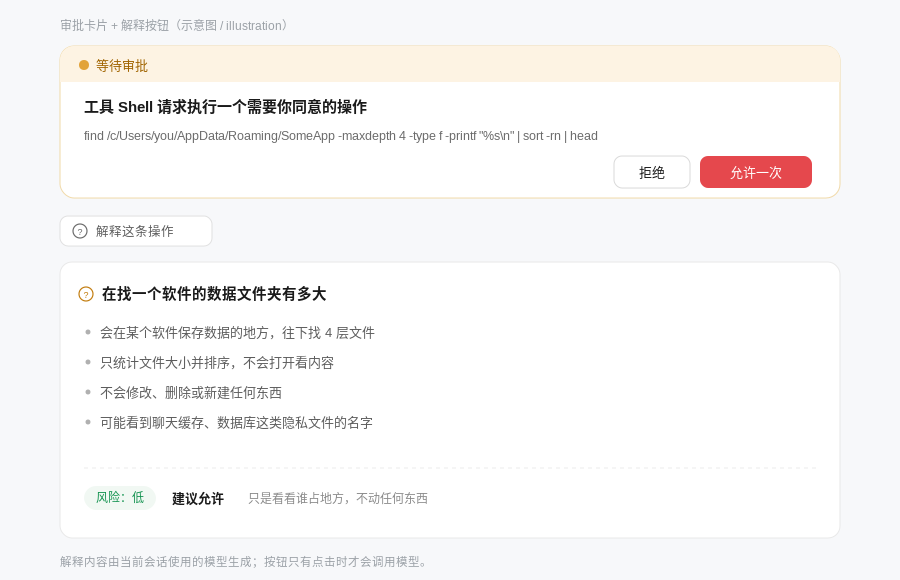
When your permission mode is anything but full access, DSH asks before the agent runs a command, edits a file, or calls a privileged tool. The dialog shows a tool name and the raw argument: a shell command, a JSON blob, a filesystem path.
If you are not a programmer, that is exactly the moment you have to approve something you cannot read — and the safe answer is "reject", which stalls the work.
This plugin adds one button below the dialog. Clicking it sends that operation to the model of the current session and renders a short explanation:
The approval dialog itself is untouched: Reject, Allow once, Enter, Esc, focus handling and accessibility still come from DSH's own component. This plugin only appends content below it.
In the app — open the Plugins page, choose Add plugin (添加插件), and paste one of:
dsh-approval-translator
https://github.com/zhaoqiminggg/dsh-approval-translator
Then refresh the page (Ctrl+R) once.
With the CLI:
# from npm — fastest, no build step
dsh plugin --profile <your-profile> add dsh-approval-translator

# or straight from GitHub source
dsh plugin --profile <your-profile> add github:zhaoqiminggg/dsh-approval-translator
(Pick the profile your host actually runs — desktop for DSH Desktop, web for a plain dsh web.)
From a local checkout — install the directory itself, which is also the development workflow:
dsh plugin --profile <your-profile> add /absolute/path/to/dsh-approval-translatorThe button only exists while an approval is pending; in full-access mode there is no dialog and nothing to explain.
callId is cached on both the host and the client: clicking twice on the same dialog reuses the answer.Language: explanations are generated in Simplified Chinese. The prompt is written for people who cannot read English or command-line syntax. Making it follow the UI language is on the roadmap.
Two halves, no build step, no dependencies.
Host half — index.js
Registers one internal session command, dsh-approval-translator-explain, hidden from the slash-command list and from the chat log. On invocation it resolves the correlated tool/call event from the session log by callId — and only when no callId is supplied does it fall back to the newest call of the same tool, so a mismatched id can never make it explain a different operation. It then builds a prompt from the tool name, the raw arguments and the user's last message, and streams the model:
llm.prepareCall(...) with a configure callback that picks model.reasoning.efforts[0], so the cheapest available effort is used; falls back to plain llm.stream if preparation fails;text-delta and block-end text, so adapters that only deliver complete blocks still work;Client half — client.js
Takes over the composer chain slot only for approvals:
ctx.slots.inject('conversation.composer', () => ctx.slots.register({
  name: 'conversation.composer',
  priority: 0.5,           // after pending questions (0), before the built-in approval panel (1)
  select: ({ pendingInteraction }) =>
    pendingInteraction?.kind === 'approval' && typeof pendingInteraction.answer === 'function'
      ? pendingInteraction : null,
  ...
}, ApprovalExplainer))
Inside, the official dialog is rendered through props.renderFactorySlot('conversation.approval.card', …) — the same inputs the shipped panel passes — and the button plus result panel are appended below it, wrapped in an error boundary. If the factory cannot be rendered, a minimal fallback panel keeps Reject / Allow once reachable.
0.2.2-rc.1 and its stable slot APIs (conversation.composer, conversation.approval.card).npm test # offline smoke tests: host command flow + client rendering logic (fake React, fake ctx)
npm run check # syntax + JSON validationLayout:
index.js            host half (command + model call)
client.js           client half (slot registration + UI)
cordis.patch.yml    bundle patch
locale/{zh,en}.json plugin-manager title and description
icon.svg            plugin icon
docs/preview.svg    the illustration above
scripts/            offline smoke tests
Bump the version in package.json, keep CHANGELOG.md current, and refresh the page after client-side changes (index.js changes need a host restart).
MIT © zhaoqiminggg
CLASSIFICATION EVIDENCE
系统优先读取 GitHub Topics,再与站内分类词典和词根规则比对。当前命中: deepseek-harness。
morluto
Reverse engineer anything with agents, from app behavior down to native binaries.

deepseek-ai
DeepSeek Harness: Everything is a Plugin.

nexu-io
The 1st Collaborative AI Design Agent Workspace. Local-first and open source. Create motion, prototypes, websites, apps, dashboards, presentations, images, and videos with your team and AI agents. Share work, exchange feedback, and iterate together in one workspace.