
其他
完整应用

deepseek-harness
deepseek-ai
DeepSeek Harness: Everything is a Plugin.
PROJECT TOPICS
INSTALL REFERENCE
dsh plugin --profile web add github:zhang-guo-wen/dsh-worktree
该命令指向仓库当前默认分支;尚无绑定当前 commit 的完整验证结果。
PROJECT README
English | 中文
DeepSeek Harness (dsh) is the open-source agent harness from DeepSeek AI, where nearly every capability is a plugin on Cordis. It is in developer preview and iterating fast, so expect compatibility-breaking changes (docs, 0.1.7-alpha.*); this plugin is a standalone third-party package that resolves @deepseek-ai/* from the running host.
A session working directory is frozen when the session is created, so working in an isolated Git worktree meant building the checkout and starting a session by hand; this plugin does both from one check on the New Session screen.
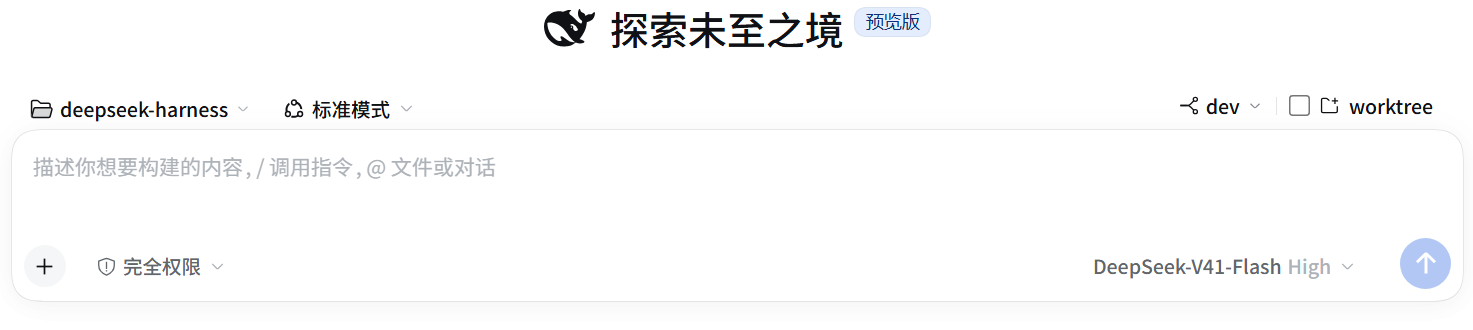 Ticking
 worktree at the right end of the 选择工作区 / 模式 row creates the checkout and starts the session inside it.
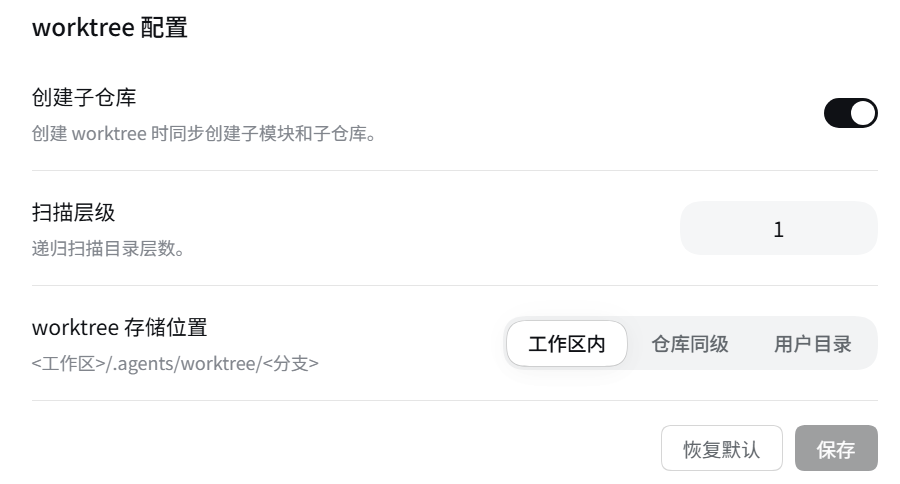 设置 → Worktree: 创建子仓库, 扫描层级, and worktree 存储位置, with 恢复默认 / 保存.
npx @deepseek-ai/dsh plugin --profile web add @guowenzhang/dsh-worktreeFrom the npm registry: https://www.npmjs.com/package/@guowenzhang/dsh-worktree — restart the host afterwards; local checkouts, git sources and troubleshooting are in AGENTS.md.
On the New Session screen, the 选择工作区 / 模式 row grows a second capsule at its right end: ⑂ <branch> ▾ │ ☐ <add-workspace icon> worktree. The left half is the local branch dropdown — the local branch the new branch starts from, defaulting to the branch of the checkout the session is in, or HEAD when that cannot be read. The list is read only when the menu opens, sorted by most recent commit, and holds refs/heads only: a remote branch or a tag would make git worktree add enter a detached HEAD silently, so neither is offered. The interface never asks for a branch name.
Ticking the worktree half is the whole action, and it runs four steps in order: the checkout is created from the main repository with git worktree add -b <branch> <path> <base> (a session already inside a linked worktree still resolves back to the main repository); the new directory is registered as a workspace; the session is started with that directory as its meta.cwd; and the session is attached to the workspace ledger, because a session belongs to a workspace only through that ledger — without it the session renders as ungrouped and 选择工作区 has no name to display. The browser then refreshes the session catalog and switches to the session, because the Host created it outside the client's Session Controller and navigation refuses an id that has not been catalogued yet.
Ticking is one-way: checking creates the checkout and starts the session, and nothing checks it back off. Failures come in two kinds. The Host refused — the branch name is taken, the directory is not a repository — created nothing: the control returns to unchecked with the reason, and checking again retries. Created but not switched to — navigation failed — keeps that session on the control, so checking again opens it instead of creating a second checkout.
Every session is independent and cannot be changed afterwards: the working directory is frozen in the session header at creation, so the control appears only while the session is still blank (no turn has run). This is a design constraint, not a defect — changing the directory means starting a new session.
The control's state follows the session and its directory:
| State | Control | Why |
|---|---|---|
| Blank session, directory inside the main checkout | Operable | The choice is still open |
| Session already inside a linked worktree | Shown but locked (base + checked) | It is already isolated; one more choice would nest a checkout inside a checkout |
| Session has run at least one turn | Hidden | header.cwd is frozen, and the Host would refuse |
| Directory is not a Git repository | Hidden | There is no repository to isolate |
A locked control offers no change — both segments are disabled and the chevron is collapsed, and the tooltip names the branch the checkout actually holds. After a page refresh the memory that "this checkout was created here" is gone, so the locked control reports the checkout's own branch; that still names its origin, because the branch is <base>-<6 digits>.
设置 → Worktree, titled 「worktree 配置」, is one settings page with three rows in the usual label-left / control-right form:
The footer holds [恢复默认] [保存] together, and a save takes effect without restarting the host, because the new policy is installed onto the running service instance. Leaving the page drops every staged edit.
| Value | Label | Directory |
|---|---|---|
agents (default) |
工作区内 | <workspace>/.agents/worktree/<branch>, inside the workspace tree |
sibling |
仓库同级 | <repo>-wt-<branch>, beside the repository and outside the workspace tree |
home |
用户目录 | ~/.agents/worktree/<branch>, shared by every workspace on the machine |
Three model tools consume the same service, and none of them starts a session — the model creates the checkout, and the product's own new-session flow puts a session inside it. worktree_create creates a linked checkout and returns its path; worktree_list lists the repository's checkouts, main checkout first; worktree_remove removes one, refusing the main checkout and refusing any checkout with uncommitted work unless force is passed.
// inside a session
worktree_create({ branch: 'fix/123' })
worktree_list()
worktree_remove({ path: '/abs/path' })The interface never takes a branch name; the Host derives one. It is the chosen base branch name with / replaced by -, plus 6 random digits — dev-482913 — and worktree-<6 digits> when the base is not a local branch (HEAD, a SHA, origin/x). The base itself is recorded nowhere, but it stays readable, because the workspace title, the checkout directory and git branch all carry the generated name.
git worktree add then fails with its own message, and checking again retries.git status. agents puts the checkout under <workspace>/.agents/worktree/, an untracked directory inside the main checkout. Add .agents/worktree/ to .gitignore or .git/info/exclude, or choose 仓库同级 / 用户目录.~/.agents/worktree/<branch> belongs to no workspace: checkouts of several repositories sit side by side there, and that directory needs its own .gitignore entry when it lands inside a repository.branch to worktree_create when the name matters..git directory counts as a nested repository. A subdirectory that is itself another repository's linked worktree (.git is a file), or a submodule, is not mirrored onto a new branch.file transport permission. protocol.file.allow is Git's own safety switch and this plugin does not override it: a repository whose .gitmodules points at a local path needs the permission granted in git configuration (global or repository-level), or creation fails with Git's own message and rolls back. Submodules over https/ssh are unaffected.dsh-memory and dsh-claude-compat resolve a linked worktree's {project} back to the main repository, so every worktree of one repository shares one memory store, while files and sandbox authorizations stay per-checkout. This is deliberate: what is isolated is files and authorizations, what is shared is knowledge and context.The plugin itself is Apache-2.0 — see LICENSE and NOTICE.
It ships no DeepSeek Harness source: the harness packages are peer dependencies resolved from the running host.
{project} resolution makes one repository's worktrees share one memory store.CLASSIFICATION EVIDENCE
系统优先读取 GitHub Topics,再与站内分类词典和词根规则比对。当前命中: 无有效分类标签。
deepseek-ai
DeepSeek Harness: Everything is a Plugin.

anywhere-labs
为 DeepSeek Harness (DSH) 插件生态打造的现代化桌面端解决方案。万物皆「插件」,桌面本身也是「插件」。

awesome-dsh-plugin
A curated list of plugins for DeepSeek Harness (dsh) · DeepSeek Harness 插件精选列表