
模型与 MCP
待识别

rea
morluto
Reverse engineer anything with agents, from app behavior down to native binaries.
PROJECT TOPICS
INSTALL REFERENCE
dsh plugin --profile web add github:zhan1024/dsh-frontend-replay
该命令指向仓库当前默认分支;尚无绑定当前 commit 的完整验证结果。
PROJECT README
Record the bug. Keep the evidence. Verify the fix.
简体中文 · npm · GitHub · Releases
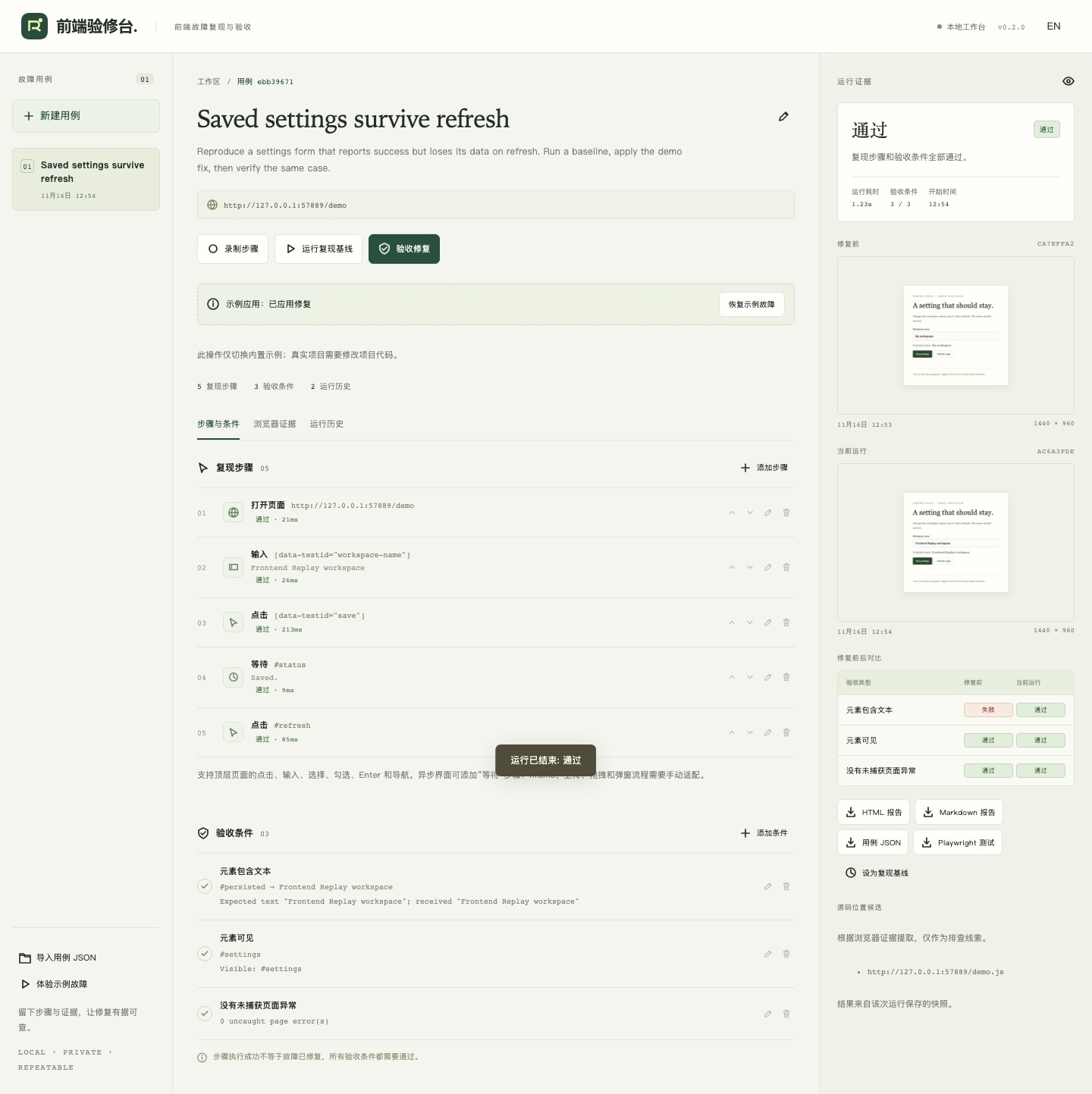
Frontend Replay is a DeepSeek Harness (DSH) plugin and local frontend acceptance workbench. It turns browser interactions into replayable steps, collects screenshots and browser diagnostics, and reruns explicit acceptance conditions after your application changes.
The distinction matters: successful clicks do not prove a fix. Frontend Replay reports passed only when every replay step and every acceptance condition succeeds. A recording or a case with no acceptance conditions is unverified. Every run stores its own case snapshot, so editing a case never rewrites previous evidence. A comparison warns when the steps or conditions changed.
dsh-repro is now dsh-frontend-replay, starting at 0.2.0. Search for the full package name or 前端验修台. If you installed the old plugin, remove it before installing this package to avoid registering the same agent tools twice:
dsh plugin --profile web remove dsh-reproYour .dsh-repro/ cases and evidence remain compatible. The DSH_REPRO_DIR / DSH_REPRO_HEADLESS settings, repro_* tool names and JSON format stay supported. The old dsh-repro CLI is retained as an alias. Historical v0.1.0 packages remain available.
The standalone plugin requires Node.js 22.15+. DSH integration is tested against 0.2.2-rc.1, whose CLI requires Node.js 24.9+; profile installation also needs pnpm 10+.
See the development, publishing, distribution and installation guide (中文) for reproducible commands and current marketplace submission status.
# A prebuilt bundle: no TypeScript build scripts run inside your DSH profile.
dsh plugin --profile web add dsh-frontend-replay@0.2.0

# Install the matching Chromium once.
npm exec --yes --package=dsh-frontend-replay@0.2.0 -- dsh-frontend-replay install-browser
Restart dsh web, then ask:
Open the Frontend Replay workbench. I want to record a frontend bug and verify its fix.
The agent calls repro_open and returns a local workbench URL. Open the complete URL; its #token fragment authorizes your browser session.
The identical prebuilt package is also available as a GitHub release asset:
dsh plugin --profile web add https://github.com/zhan1024/dsh-frontend-replay/releases/download/v0.2.0/dsh-frontend-replay-0.2.0.tgznpm exec --yes --package=dsh-frontend-replay@0.2.0 -- dsh-frontend-replay --openNo DSH installation or model API key is needed for the standalone workbench.
Try the sample bug provides a local settings form that reports a successful save but loses the name on refresh. Run a baseline, select Apply demo fix, then verify the same case. That toggle changes only the bundled sample application, never your project's source.
| Step | Fields |
|---|---|
navigate |
url (absolute HTTP/HTTPS) |
click |
selector |
fill |
selector, value (empty string allowed) |
select |
selector, value (single native select) |
check |
selector, checked |
press |
selector, key |
reload |
none |
wait |
selector, optional value (wait for visible element containing text) |
Selectors use Playwright CSS locator semantics. Prefer a stable [data-testid="save"] or #workspace-name over positional selectors. Before a subsequent click or navigation, replay waits for a preceding write request to receive a response. Explicit Wait steps handle application-specific asynchronous UI changes.
| Condition | Fields / meaning |
|---|---|
visible, hidden |
selector |
text |
selector, nonempty expected substring of rendered text |
url |
nonempty expected URL substring |
request |
expected URL substring, status HTTP status |
no_page_errors |
no uncaught page exceptions |
no_console_errors |
no error-level console messages |
no_failed_requests |
no failed requests or responses with HTTP status >= 400 |
DOM/text/request conditions retry up to the configured timeout. Diagnostics are checked after other conditions, with an initial 350 ms settling window. Frontend Replay is not a monitor for arbitrarily late errors: use an explicit Wait step for the state your application must reach.
| Tool | Purpose |
|---|---|
repro_open |
Start the local workbench and return its authorized URL |
repro_list |
List cases and current recording/run state |
repro_create |
Create a case with structured steps and conditions |
repro_update |
Edit a case, preserving old run snapshots |
repro_record |
Open the target browser and begin manual recording |
repro_stop_recording |
Save actions, diagnostics, and screenshot |
repro_run |
Replay; kind: "baseline" or "verification" |
repro_report |
Read run evidence and a Markdown report |
repro_export |
Export json or playwright |
Example instruction:
Create a Frontend Replay case for http://localhost:5173/settings. Fill
[data-testid="workspace-name"]with “Example”, click[data-testid="save"], wait for#statusto contain “Saved”, then reload. Verify that#persisted-namecontains “Example” and there are no uncaught page errors. Run it as a baseline. After we fix the application, rerun exactly the same case as verification and inspect the report.
The plugin provides evidence and source-location candidates from logs. It does not claim those locations prove the root cause, and does not edit your application automatically. Code changes are performed by your DSH agent through its normal tools.
Default data directory: .dsh-repro under the launching working directory. Set an absolute DSH_REPRO_DIR when using DSH from multiple directories or launching from another application.
export DSH_REPRO_DIR=/absolute/path/to/project/.dsh-repro
dsh web
Profile override ($DSH_HOME/profiles/web/cordis.patch.yml):
- id: dsh-frontend-replay
  config:
    dataDir: /absolute/path/to/project/.dsh-repro
    headless: false
    timeoutMs: 5000
    port: 0
    # executablePath: /path/to/custom/chromium
headless controls recording; replay always uses headless Chromium. port: 0 picks a free loopback port. A profile override replaces the whole config row, so restate fields you want to retain. DSH_REPRO_HEADLESS=1 enables headless recording for automated testing.
Standalone options:
dsh-frontend-replay --port 4317 --data-dir .dsh-repro --open
dsh-frontend-replay --headless --browser-path /path/to/chromium
dsh-frontend-replay install-browser --with-deps # Linux CI / system dependencies${ENV:REPRO_SECRET_1} placeholders. Set the corresponding variable before starting Frontend Replay. Secret inputs and [data-repro-private] elements are masked in screenshots. Common credential patterns in logs and URL queries are redacted; arbitrary page content and screenshots can still contain application data..dsh-repro/ to your project's .gitignore.127.0.0.1, requires a startup token for API access, validates Host and Origin, and serializes recording/replay. Do not share the token-bearing URL.@playwright/test in the receiving project. A case without conditions produces a skipped test. HTML reports embed screenshots; Markdown references artifacts/<run-id>/screenshot.png relative to the data directory.npm ci
npm run browsers
npm run typecheck
npm test
npm run test:e2e
npm run test:dsh
npm pack --dry-runtest:e2e uses real Chromium to record trusted browser interactions, observe a failed baseline, apply the demo fix, and verify the unchanged test. It also checks error diagnostics, cancellation, the workbench UI, responsive layout, and HTML export.
test:dsh packs the plugin, installs the tarball into a temporary DSH profile, and drives repro_create → repro_run → repro_report through the actual agent loop using a deterministic local OpenAI-compatible model. It requires pnpm 10+ and installs DSH on first run. Use DSH_BIN=/path/to/dsh to reuse an installation. If npm is configured with legacy-peer-deps=true, install DSH with that option explicitly disabled so its Cordis peer packages are present.
See product design and release verification in the source repository.
MIT.
CLASSIFICATION EVIDENCE
系统优先读取 GitHub Topics,再与站内分类词典和词根规则比对。当前命中: deepseek-harness。
morluto
Reverse engineer anything with agents, from app behavior down to native binaries.

deepseek-ai
DeepSeek Harness: Everything is a Plugin.

nexu-io
The 1st Collaborative AI Design Agent Workspace. Local-first and open source. Create motion, prototypes, websites, apps, dashboards, presentations, images, and videos with your team and AI agents. Share work, exchange feedback, and iterate together in one workspace.