
模型与 MCP
待识别

rea
morluto
Reverse engineer anything with agents, from app behavior down to native binaries.
PROJECT TOPICS
INSTALL REFERENCE
dsh plugin --profile web add github:zeng5630/dsh-water-reminder
该命令指向仓库当前默认分支;尚无绑定当前 commit 的完整验证结果。
PROJECT README
一个给 DeepSeek Harness Web GUI 用的喝水提醒插件:右下角常驻一颗水位悬浮球,按设定的间隔提醒你喝水。
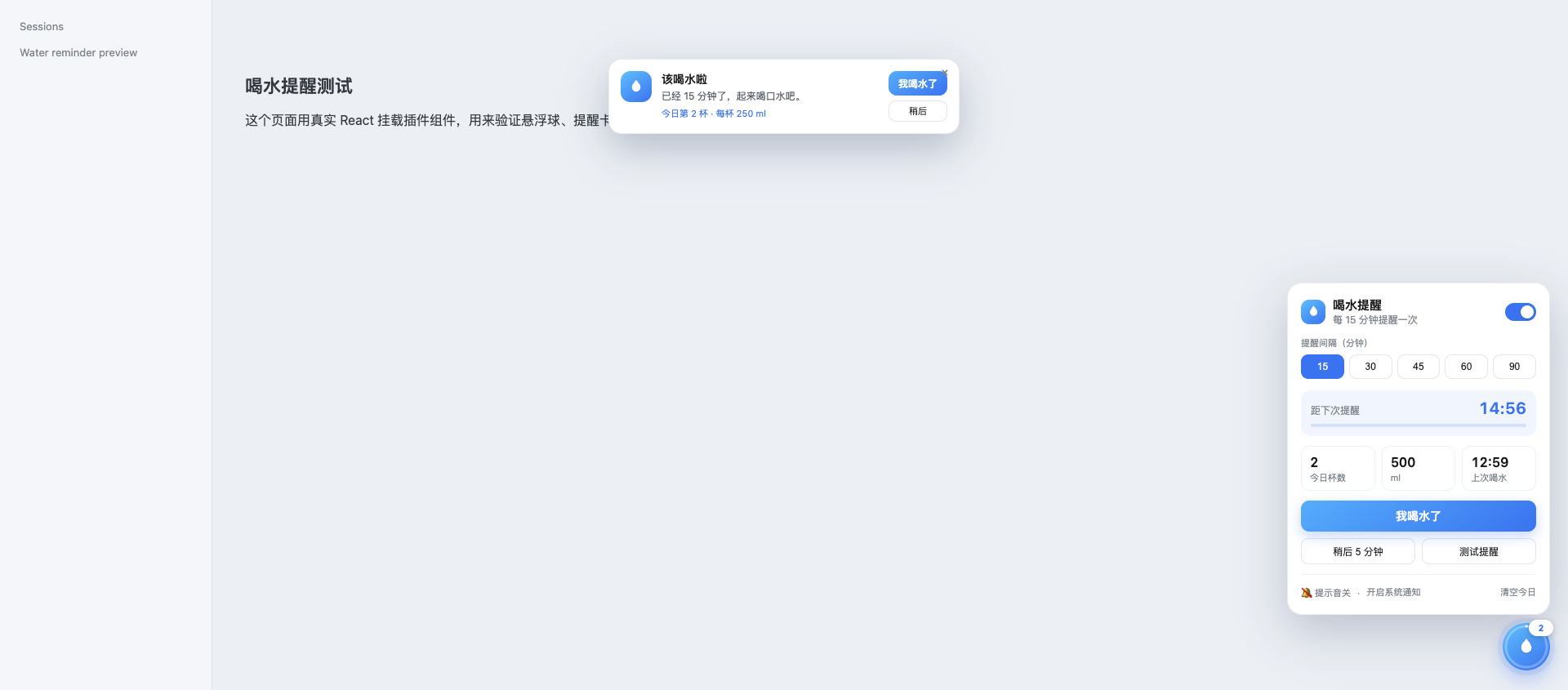
--dsw-alias-* 设计变量,自动跟随明暗主题。dsh-water-reminder/
├── package.json # dsh.bundle + dsh.client 声明
├── cordis.patch.yml # Bundle 补丁:插入 ui-water-reminder 行
├── lib/
│ ├── index.js # Host 端空插件,让 Loader 能发现这个包
│ └── client.js # 浏览器端插件(悬浮球 + 提醒卡片)
├── market/index.json # 插件市场索引(format 1)
├── icon.svg # 市场图标
├── preview.png # 面板预览
└── README.md在 Plugins 页面打开 Experimental plugins,启用 Custom plugin indexes。
切到 Discover,点 Add index source,填入:
https://raw.githubusercontent.com/zeng5630/dsh-water-reminder/main/market/index.json搜索「喝水提醒 / Water Reminder」,点 Install。
安装完成后按提示重启一次 DeepSeek Harness。
在插件目录的上级执行(本机路径按实际修改):
dsh plugin --profile desktop add link:/Users/zengyanjun/Documents/deepseek-harness/default-workspace/dsh-water-reminder然后在 ~/.dsh/profiles/desktop/cordis.patch.yml 末尾追加一行配置:
- id: ui-water-reminder
name: dsh-water-reminder保存后需要重启一次 DeepSeek Harness。新安装的包在宿主启动时才会建立模块映射;HMR 只会热更新已经加载过的插件和配置,无法把运行中的新包挂进当前会话。重启后右下角会出现水滴球。
也可以不写上面的 patch 行,改为把 dsh-water-reminder 加入 package.json 的 dsh.profile.bundles;本包已声明 dsh.bundle.patch,Bundle 层会自动插入同一行。
卸载:
dsh plugin --profile desktop remove dsh-water-reminder并从 cordis.patch.yml 移除对应条目。
CLASSIFICATION EVIDENCE
系统优先读取 GitHub Topics,再与站内分类词典和词根规则比对。当前命中: deepseek-harness。
morluto
Reverse engineer anything with agents, from app behavior down to native binaries.

deepseek-ai
DeepSeek Harness: Everything is a Plugin.

nexu-io
The 1st Collaborative AI Design Agent Workspace. Local-first and open source. Create motion, prototypes, websites, apps, dashboards, presentations, images, and videos with your team and AI agents. Share work, exchange feedback, and iterate together in one workspace.