

模型与 MCP
待识别

rea
morluto
Reverse engineer anything with agents, from app behavior down to native binaries.
PROJECT TOPICS
INSTALL REFERENCE
dsh plugin --profile web add github:zenVibeCoding/dsh-ai-gateway-provider
该命令指向仓库当前默认分支;尚无绑定当前 commit 的完整验证结果。
PROJECT README

Connect any AI gateway to DeepSeek Harness — chat over OpenAI, Anthropic or Gemini protocols, with models, parameters and quota in one place.
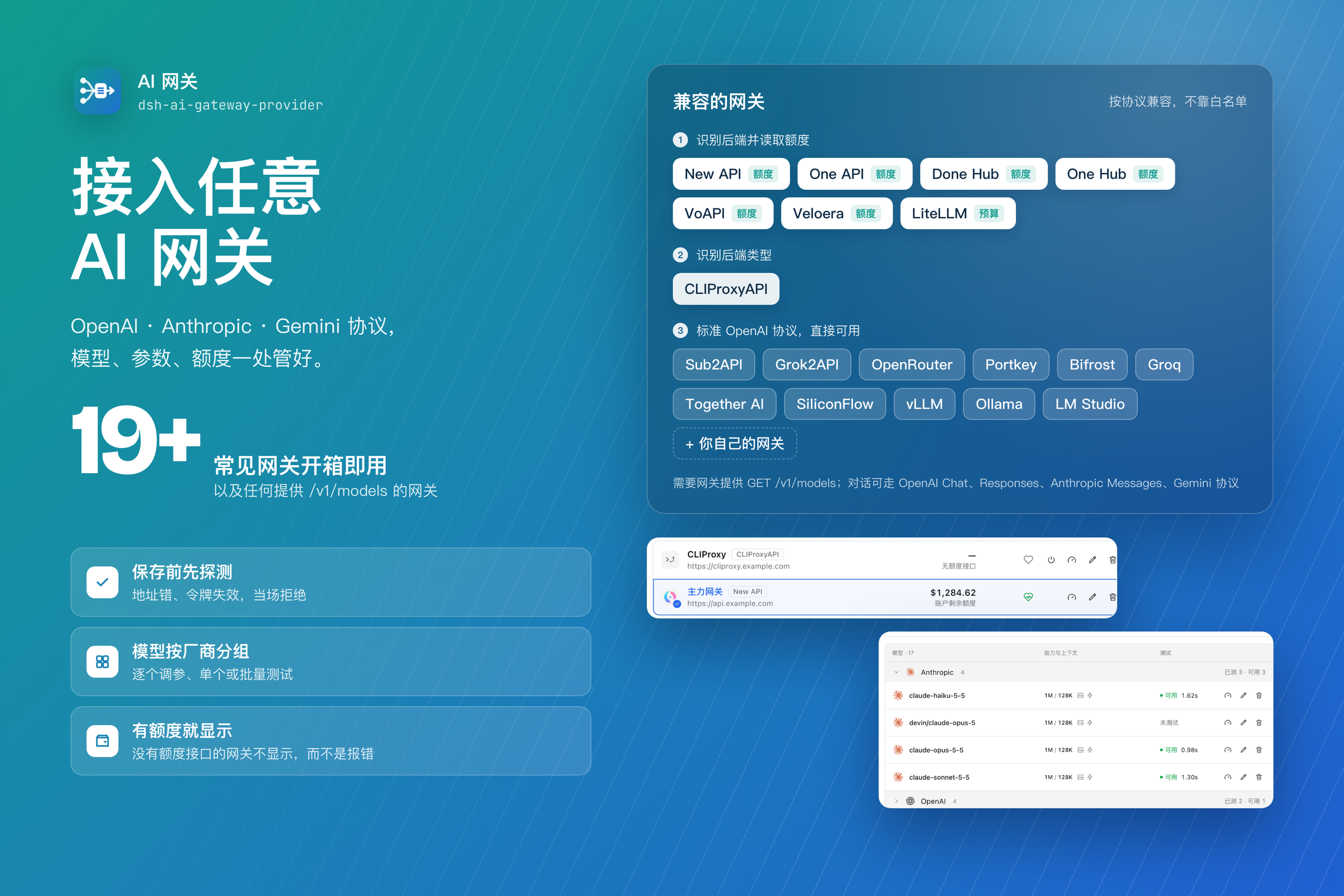
Most providers are the same three endpoints with different names on the box. Instead of a list of supported vendors, this plugin follows the protocol and probes each gateway for what it can actually do: if it speaks /v1/models and /v1/chat/completions, it works — including a gateway nobody has heard of yet.
# in DeepSeek Harness → Settings → Plugins → install by package name
dsh-ai-gateway-provider
Requires DSH ≥ 0.2.1-rc.1 and < 0.3.0. This README describes 0.7.3; the version npm actually serves is whatever npm view dsh-ai-gateway-provider version reports (0.7.2 when this was written), and that result is the one to trust. Existing screenshots are illustrative and may predate the current editor.
devin/claude-opus-5 and claude-opus-5-5 sit together under Anthropic — with a per-group "tested / working" count. Groups collapse, and the grouping can be switched off.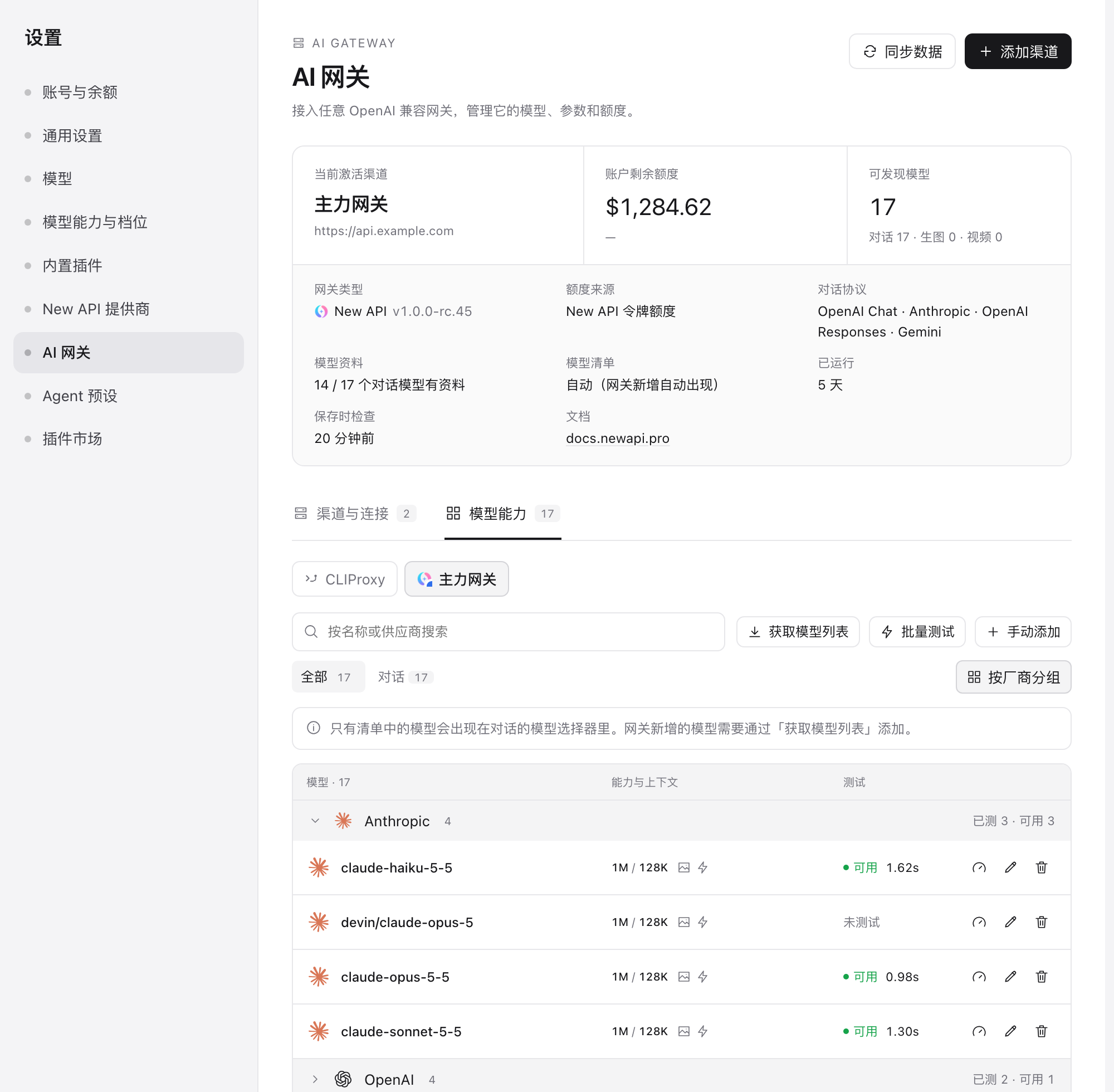
The plugin never needs to recognise a vendor — recognition only decides the icon and which quota endpoint to call.
| Backend | Detected by | Quota |
|---|---|---|
| New API / one-api / done-hub / one-hub / Veloera / VoAPI | GET /api/status (system_name, quota_per_unit) |
GET /api/usage/token/ |
| LiteLLM | GET /key/info answering |
key budget (spend / max_budget) |
| CLIProxyAPI | GET / banner CLI Proxy API Server |
none |
| Anything else that is OpenAI-compatible | GET /v1/models answering |
none |
Wire protocols per model: OpenAI Chat Completions, OpenAI Responses, Anthropic Messages, Gemini. The gateway's supported_endpoint_types decides; the model editor can override.
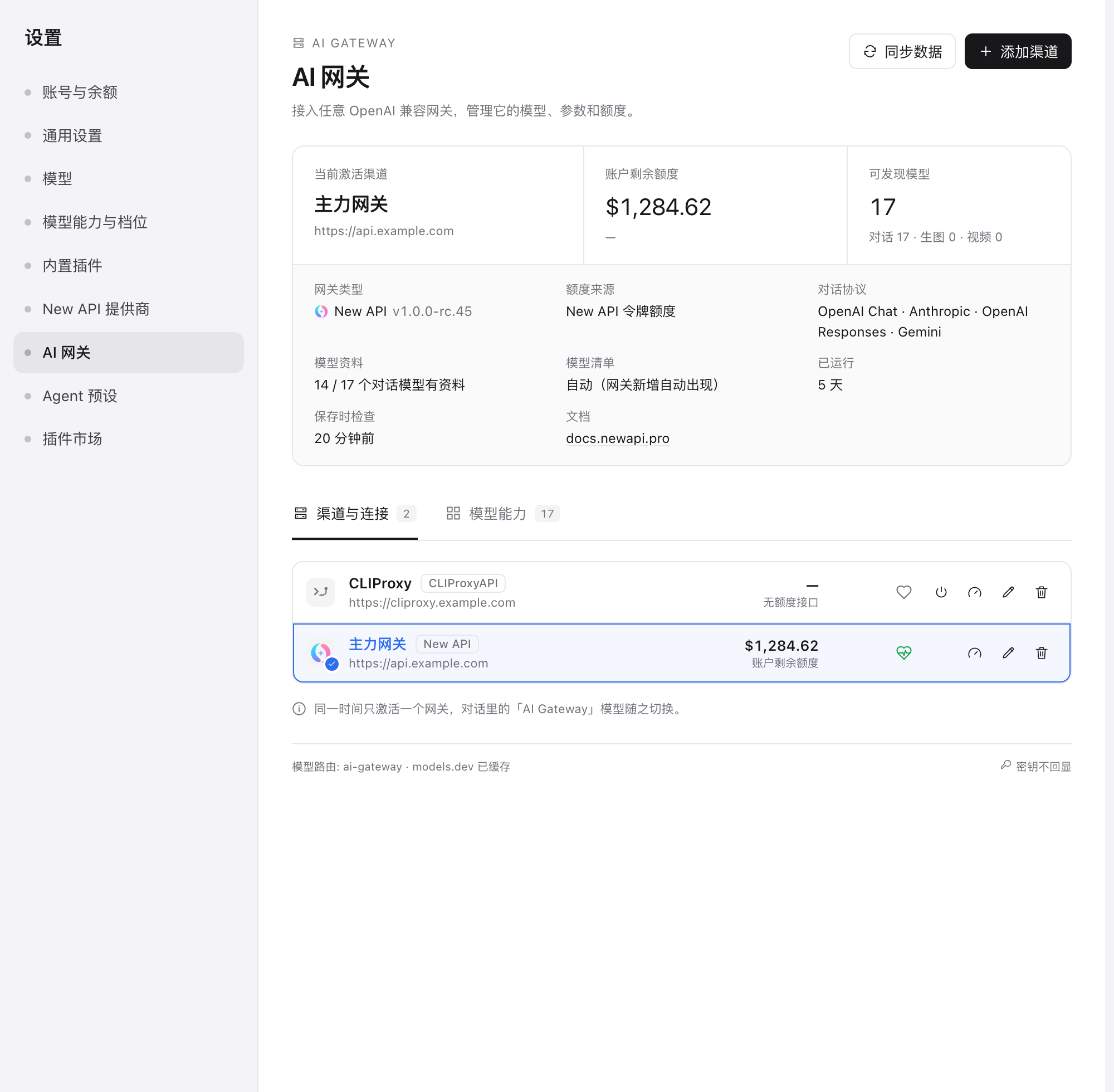
Each saved gateway is registered as its own provider route, so every gateway is usable at the same time — there is nothing to switch between. The model picker groups models by gateway, and the group heading is the gateway's name: two gateways serving the same model id appear as separate rows instead of one shadowing the other.
Routes are assigned once and persisted with the gateway list, so editing or deleting one gateway never shifts another's route. The first gateway keeps the legacy route id ai-gateway and later gateways derive their own (ai-gateway-<slug>), which is why conversations recorded before 0.7.0 still resolve to the gateway they used.
New conversations choose a model like any other provider; after that each conversation remembers its own choice.
The eye button on a gateway card hides that gateway from the conversation model picker. Hiding is reversible and local to the picker: the address, token, per-model settings and history resolution all stay, and the gateway is not asked for quota while hidden. Everything else keeps working — test connection, model tests, model editing and the capability page. Press the same button to bring its models back.
Hiding is not deletion: use the card's delete action when the configuration itself should go.
There is no "active" gateway to select. The old activeChannel value in the config is ignored, and the page no longer has an activate action: every saved gateway is always registered and always usable in chat.
Clicking a row in the gateway list is a viewing action only. It changes which gateway the detail summary and the Model capabilities page describe, and nothing else — chat availability is decided per conversation by the model you pick, not by the row you last clicked.
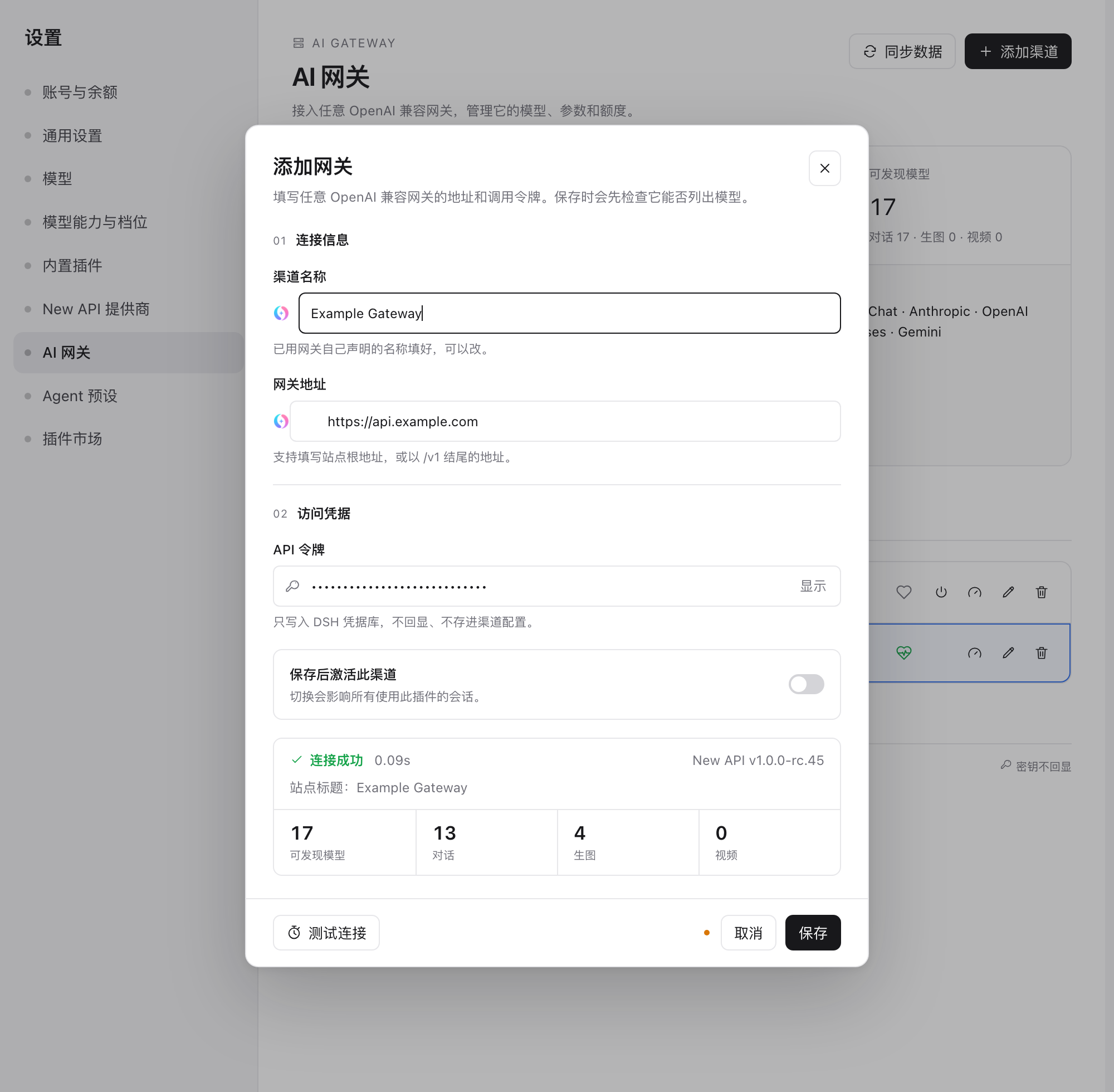
http(s) URL, a Fetch info button appears inline in the address field. It reads public endpoints only — /api/status, the site's home page and its favicon: no token is read or sent, and no model is called. It reports the gateway type, its version, the site title, a suggested name and the icon.Saving still probes the gateway with the real token; the fetch-info button is a preview, not the save check.
Tokens live in the DSH credential store — never in the config, never returned to the page.
Opening the settings page reads no model catalog. The page snapshot carries the gateway list, site identities and quota instead of model entries, so switching tabs or leaving the page open does not fan out model-list requests to every gateway. A gateway's model list is loaded on demand, when you open that gateway (models/list for the selected gateway), and the periodic refresh no longer triggers catalog reads.
Manage models lets you select individual models, a vendor group, or all results matching the current search and type filter. Review the IDs and confirm to remove them from this gateway’s list. Bulk removal keeps custom parameters, and Undo restores the whole selection.
Sync data reloads the currently viewed gateway's model capabilities even when no settings changed. Fetch models also refreshes that gateway's capabilities after discovery, including in automatic mode when every discovered model is already enabled. Neither action requires reopening settings; periodic background snapshots still do not fetch model catalogs.
Fetching a model list also resolves per-model reasoning levels and speed tiers. Reasoning resolution prefers manual mappings, then gateway supported_reasoning_levels / default_reasoning_level, then pi-ai's bundled catalog or family defaults. Those fallbacks are model metadata, not gateway declarations; unrecognised support remains unknown. supports_reasoning_effort_updates only says whether a running turn may change its level (Claude answers false), so it never blanks the level selector. A resolved model also keeps pi-ai's own compat block for that id (for example forceAdaptiveThinking), so a level reaches the upstream as an adaptive effort rather than a thinking-token budget. Only per-model service_tiers / supported_service_tiers establish speed declarations. Discovery never sends billed model probes.
The model editor has independent reasoning and speed switches, with row-based add/remove controls and editable API values. Turning speed off hides the composer control and omits service_tier, including old conversation choices. Turning reasoning selection off removes its level menu. Detection metadata is retained for re-enabling.
Each speed row maps a local selector id to a wire service_tier. Presets are Standard → default, Fast → priority, Ultrafast → ultrafast. Edit their wire values or choose Custom tier, e.g. turbo → vendor-priority. When all detected tiers are present, Add creates a custom row. These per-model/per-gateway mappings persist as allowedServiceTiers and serviceTierMap; OpenAI Chat / Responses requests send the mapped wire value. There is no model-default speed dropdown: choose a tier in the conversation.
OpenAI's Fast mode guide documents fast and priority as equivalent request spellings; the plugin canonicalises fast to priority when comparing declarations and response stamps. Ultrafast mode has model and availability restrictions: its presence as an editor preset does not make it available on every model, account or gateway.
Switching in a conversation: when the current model is an AI Gateway GPT model with speed enabled and per-model declared, response-stamped, or explicitly configured tier evidence, a ⚡ Speed button appears left of the model button in the composer. It selects preset or custom tiers for this conversation, and the menu labels each tier's evidence. The choice applies to this model in this conversation only; other conversations retain their existing model configuration; adding a custom row does not automatically select it. (DSH's model menu has no extension row for plugins, so the control sits beside it.)
How support is decided — per gateway and model, with three kinds of evidence kept apart:
| Evidence | Source | Shown as |
|---|---|---|
| Gateway declaration | per-model service_tiers / supported_service_tiers in the gateway catalog (CLIProxyAPI serves it at /v1/models?client_version=) |
declared tiers in the editor, options marked declared |
| Response stamp | Test sends one tiny request with the tier and reads the returned service_tier |
✓ matching stamp (UI: in effect) / ↓ different stamp / ? no stamp |
| Manual configuration | explicitly configured local-to-wire mapping, not declared or confirmed by a matching response stamp | Configured in the composer menu, with the actual wire value in its tooltip |
Speed support is checked for the exact gateway and upstream model, using its selected OpenAI Chat / Responses protocol. A GPT name only limits this feature's scope; neither names, gateway brands nor models.dev prove speed support. An explicitly empty declaration means "no accelerated tier declared"; absent metadata means unknown. Labels describe declarations, response stamps or manual configuration—not independent proof that the upstream actually accelerated the request. Lower latency is not proof either.
Per gateway:
service_tier unless the channel allows passthrough; a differing or missing response stamp is not by itself a diagnosis of where filtering occurred.One tiny request per model (or per batch), with a very small output cap. Results record the protocol, latency, an output preview and a classified error (no channel, bad token, rate limited, timed out). All four wire protocols are supported: OpenAI Chat Completions, OpenAI Responses, Anthropic Messages and Gemini.
The Gemini test uses exactly the chat URL — POST {gateway}/v1beta/models/{model}:streamGenerateContent?alt=sse with x-goog-api-key — and requires a finishReason; a bare [DONE], or an OpenAI-shaped stream, is not a Gemini success. The Gemini chat path is built on the same /v1beta base, so a gateway that works in chat answers the test the same way.
service_tier records what the gateway reported; it does not prove the upstream really accelerated the request, and shorter latency does not prove it either.GETs; no model is called and nothing is billed by probing.dsh-newapi-provider depend on its own task API. A gateway's image models are listed but not driven from here.npm test # 154 tests against local fake gateways
node scripts/probe.mjs --base <url> # probe from a shell
GATEWAY_KEY=sk-... node scripts/probe.mjs --base <url>MIT
CLASSIFICATION EVIDENCE
系统优先读取 GitHub Topics,再与站内分类词典和词根规则比对。当前命中: llm-provider、deepseek-harness、openai-compatible。
morluto
Reverse engineer anything with agents, from app behavior down to native binaries.

deepseek-ai
DeepSeek Harness: Everything is a Plugin.

nexu-io
The 1st Collaborative AI Design Agent Workspace. Local-first and open source. Create motion, prototypes, websites, apps, dashboards, presentations, images, and videos with your team and AI agents. Share work, exchange feedback, and iterate together in one workspace.