
其他
完整应用

deepseek-harness
deepseek-ai
DeepSeek Harness: Everything is a Plugin.
PROJECT TOPICS
INSTALL REFERENCE
dsh plugin --profile web add github:zdx8637-gitdog/dshmobile
该命令指向仓库当前默认分支;尚无绑定当前 commit 的完整验证结果。
PROJECT README
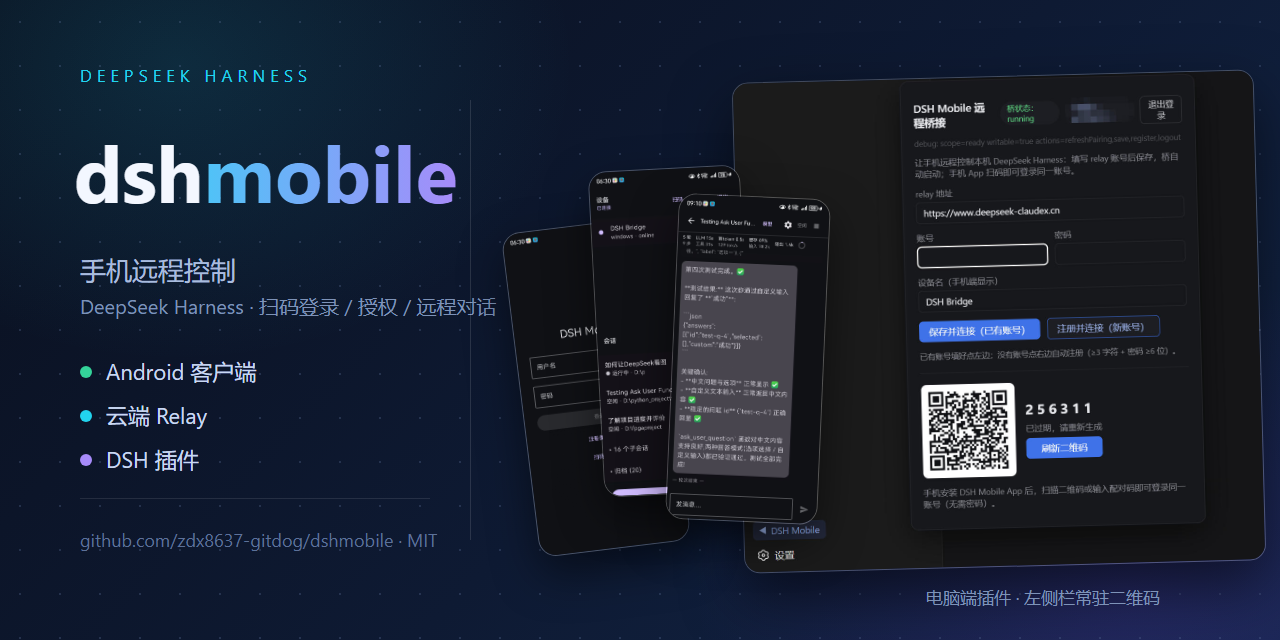
Zero-friction: install the plugin once → scan a QR code → keep working from your phone. A true Remote Client for DSH — no Tailscale, tunnels, port forwarding, NAT, or networking knowledge required, no DSH modifications, cross-platform.
Control your local DeepSeek Harness (DSH) from your phone: scan to pair → device → session tree → chat, approvals, question answering, model switching, file browsing.
┌──────────────┐   WSS    ┌───────────────────┐   WSS    ┌───────────────────────────┐
│ Android App  │ ───────▶ │  Cloud Relay       │ ◀─────── │ PC Bridge (DSH plugin)     │
│ (signed APK) │          │ (hosted service)   │          │ (open source)              │
└──────────────┘          └───────────────────┘          └────────────┬──────────────┘
                                                                       │ 127.0.0.1:3080
                                                             ┌─────────▼──────────┐
                                                             │ DeepSeek Harness   │
                                                             └────────────────────┘
Business content (prompts / replies / sessions / files) is protected by E2EE end-to-end encryption: the relay only sees routing metadata — it can neither read nor tamper with your session content. The connection layer self-heals: after a DSH restart or a network hiccup it re-handshakes automatically, no manual steps required.
| Component | Status | Notes |
|---|---|---|
| PC Bridge / plugin | Open Source (MIT) | plugins/, npm package @zdx8637/dshmobile-bridge |
| Protocol contract | Open | docs/02-protocol.md (single source of truth for the wire format) |
| E2EE design | Open and auditable | docs/plan-e2ee.md (threat model + crypto parameters + handshake) |
| Android App | Signed APK distribution | Download by scanning the QR code |
| Cloud Relay | Hosted service | Auth / routing / audit |
The protocol and crypto implementations are fully public and independently auditable; business content is end-to-end encrypted, and the relay only forwards routing metadata — it cannot read your sessions.
Pick your path first: DSH desktop app 0.2.0 or newer → §A (GUI, recommended); legacy
dsh web (0.1.7) → §B (CLI). Both install the same package
@zdx8637/dshmobile-bridge (current plugin version 1.0.7).
Open the DSH desktop app → plugin manager → click 「添加插件」 (Add plugin);
Paste the package name with an exact version into the input box (its placeholder reads 「输入插件的包名、GitHub 仓库地址或本地目录路径。」 — a GitHub repository URL or a local directory path is accepted there too):
@zdx8637/dshmobile-bridge@1.0.7On the right pick 「安装源」 — npm 官方源 (official npm registry) or 中国大陆镜像源
(Mainland-China mirror) — whichever your network reaches;
Click install;
Restart DSH — the host has to reload the plugin before it takes effect;
Open the panel: a ▶ arrow appears at the bottom of the web sidebar — click to open it (① login / grant code, ② encrypted pairing code).
⚠️ Always pin an exact version (e.g.
@zdx8637/dshmobile-bridge@1.0.7). The profile directory contains apnpm-lock.yaml; when you reinstall by bare package name the lockfile can pin the version back to the old one (measured: npm already served 1.0.2, yet a reinstall still left 1.0.0 installed).
⚠️ Plugins do not auto-update. The dialog says so outright — 「插件安装后,暂不支持自动更新。若需升级,请先卸载再安装新版」. So to upgrade: uninstall in the plugin manager first, then repeat the steps above with the new version number.
dsh web + CLI): install from the CLInpx -y @deepseek-ai/dsh plugin --profile web add @zdx8637/dshmobile-bridge@latest
# after restarting dsh, a ▶ arrow appears at the bottom of the web sidebar — click to open the panelRequires
pnpm(thedsh pluginsubcommand depends on it;corepack enableornpm i -g pnpm). Legacy only: npmlatestfor@deepseek-ai/dshpoints at the 0.1.7 CLI, so this command pulls the 0.1.7dsh plugin. On 0.2.0 or newer use §A (the GUI) instead — the CLI is not the 0.2.0 install path.
Scan the QR code on the PC panel → download the signed APK from the landing page (current version v1.0.0). Then scan in the App: ① first to log in, ② then for E2EE pairing — once paired, a shield badge appears in the device list (E2EE is active). A shield with a slash means plaintext; both are grey — the difference is the shape, not the colour.
The plugin supports the v2 protocol only, i.e. DSH v0.1.5 or newer. The legacy protocol for
older DSH builds was removed entirely in 0.1.0-beta.23.
| DSH version | Plugin behavior |
|---|---|
| v0.1.5 or newer | Full support: /api session auth (launch token → session Cookie), Typert endpoints (session/* etc.), /api/remote.mux stream multiplexing, $events approval/question waterfalls |
| v0.1.0-rc.6 or older | Not supported — upgrade DSH first, then install this plugin |
This is a deliberate narrowing: the dual-protocol branch was a long-standing defect hotspot, since every change had to be verified on both paths. If you are still on a pre-v2 DSH, stay on
0.1.0-beta.22, or upgrade DSH first.
| Path | Contents |
|---|---|
plugins/ |
PC Bridge plugin (host + bridge daemon + web panel), open source |
docs/02-protocol.md |
Relay envelopes, message types, device semantics (wire-format contract) |
docs/plan-e2ee.md |
E2EE v1 design (threat model, cryptography, handshake, pinning) |
docs/e2ee-identity-issues.md |
E2EE identity/pairing investigation (torn-read key regeneration, restart self-heal, etc.) |
docs/bridge-singleton.md |
Bridge single-instance protection: why duplicate bridges fight, the four defence layers, diagnostics |
Android → self-hosted relay → Bridge → DSH. Account
system, monitoring, and scaling remain the operator's concern.This repository contains no real credentials. Android signing keys, relay account passwords, and server SSH credentials live only in local/private channels — always injected via environment variables and referenced as placeholders in docs.
CLASSIFICATION EVIDENCE
系统优先读取 GitHub Topics,再与站内分类词典和词根规则比对。当前命中: 无有效分类标签。
deepseek-ai
DeepSeek Harness: Everything is a Plugin.

anywhere-labs
为 DeepSeek Harness (DSH) 插件生态打造的现代化桌面端解决方案。万物皆「插件」,桌面本身也是「插件」。

walkinglabs
Harness engineering beginner tutorial, from 0 to 1