
文件与数据
渠道适配

WeKnora
Tencent
Open-source LLM knowledge platform: turn raw documents into a queryable RAG, an autonomous reasoning agent, and a self-maintaining Wiki.
PROJECT TOPICS
INSTALL REFERENCE
dsh plugin --profile web add github:zcma11/dsh-vision-plugin
该命令指向仓库当前默认分支;尚无绑定当前 commit 的完整验证结果。
PROJECT README
English documentation: README.en.md
DeepSeek Harness 插件:在聊天输入框上传/粘贴图片,发送时用视觉模型(百炼 DashScope)或 Windows 离线 OCR 转述图片内容,并把描述注入消息:
【解析了提供图片,图片内容是<描述>】
<你的原文>npx @deepseek-ai/dsh plugin --profile web add dsh-vision-plugin或从 GitHub 直接安装:
npx @deepseek-ai/dsh plugin --profile web add github:<你的用户名>/dsh-vision-pluginpnpm 9 注意:若
add报ERR_PNPM_ADDING_TO_ROOT(workspace root 检查),在命令末尾追加--workspace-root:npx @deepseek-ai/dsh plugin --profile web add dsh-vision-plugin --workspace-rootgit 源插件需要 pnpm 允许构建脚本(
prepare),按 pnpm 打印的提示把包名加入$DSH_HOME/profiles/web/pnpm-workspace.yaml的allowBuilds后重试。
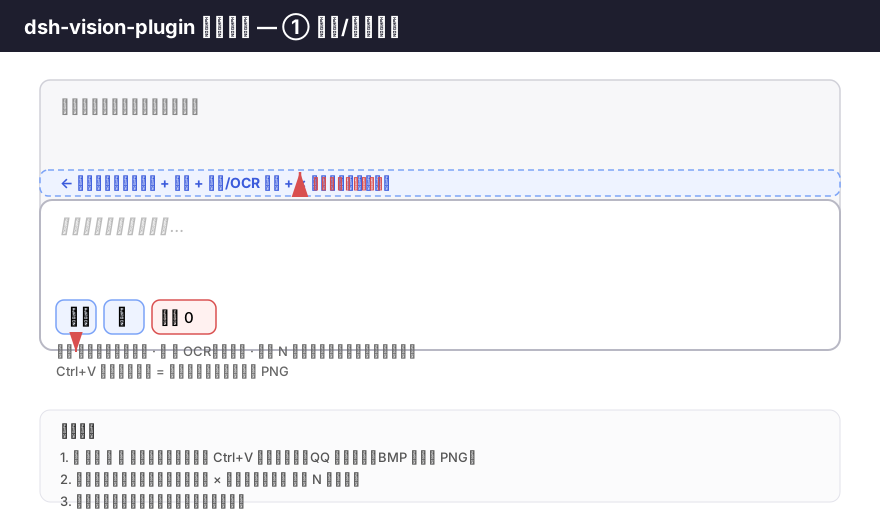
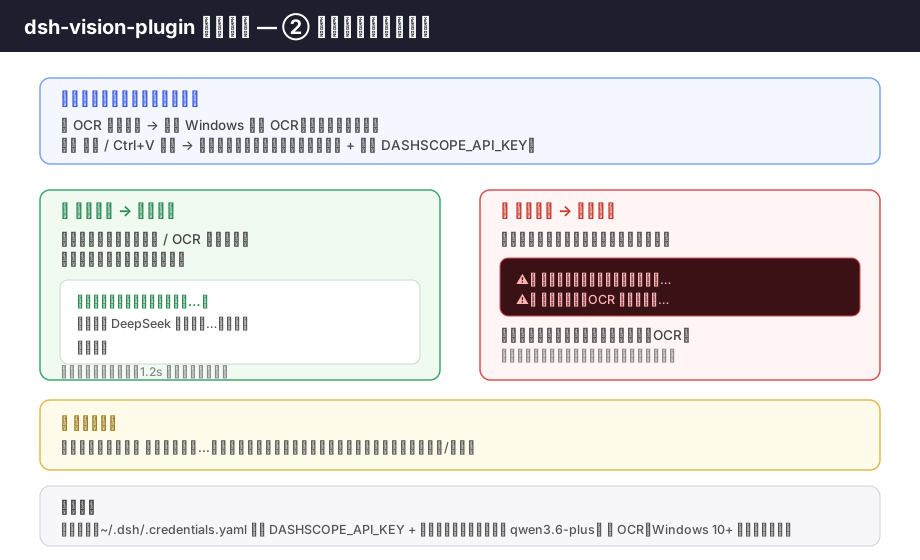
| 上传方式 | 转述方式 |
|---|---|
| 📝 OCR 按钮 | 仅 Windows 内置 OCR(离线、不调模型) |
| 🖼️ 按钮 / Ctrl+V 粘贴 | 仅视觉模型(需先选择模型 + 配置 API Key) |
【解析了提供图片,图片内容是<描述>】 开头,后接你的原文;预览条随后自动清除。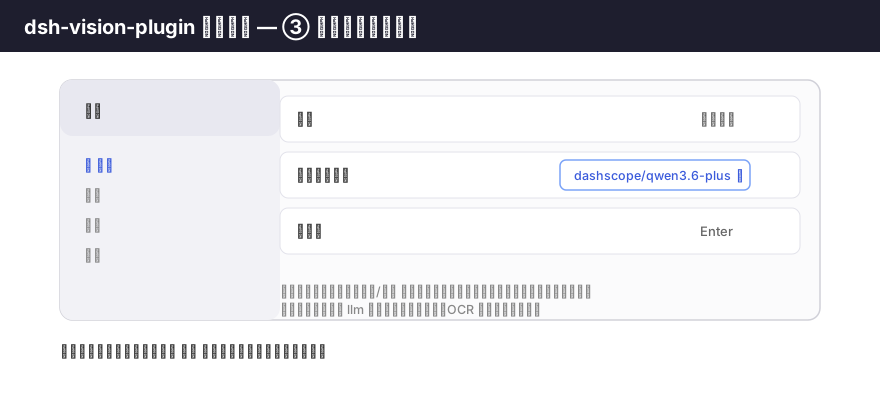
打开 设置 → 通用 → 视觉转述模型,从下拉框选择支持图片输入的模型(如 dashscope/qwen3.6-plus)。
~/.dsh/.credentials.yaml 中配置 DASHSCOPE_API_KEY(阿里云百炼),并在设置中选择支持图片输入的模型(如 qwen3.6-plus)。dsh-vision-plugin/
├── package.json # dsh.bundle.patch + dsh.client 声明
├── cordis.patch.yml # 插件行声明(dsh plugin add 后自动加入 profile bundles)
├── lib/
│ ├── index.js # Host 半部:内存图片存储、vision/OCR 子进程、pre-step 转述注入
│ └── client.js # Client 半部:上传/粘贴、预览条、toast、loading、设置项
├── docs/ # 教程示意图(SVG,GitHub 原生渲染)
└── README.mdfetch 直连 DashScope OpenAI 兼容端点,图片以 data:image/png;base64,… 放入请求体。-EncodedCommand(UTF-16LE base64)内联,结果以 OCR_B64:(UTF-8 base64)行输出,绕开 PowerShell 5.1 的代码页问题。connection(client↔host RPC)、subprocess、credentials、llm、slots、timer(均来自 dsh-base / dsh-web-app 默认 bundle)。lib/*.js 后重新 dsh plugin --profile web add .(相对路径会被锚定到当前目录)。CLASSIFICATION EVIDENCE
系统优先读取 GitHub Topics,再与站内分类词典和词根规则比对。当前命中: vision。
Tencent
Open-source LLM knowledge platform: turn raw documents into a queryable RAG, an autonomous reasoning agent, and a self-maintaining Wiki.

liustack
The first vision plugin for DeepSeek Harness, and the vision bridge for every text-only coding agent. Paste an image, get structured JSON evidence (OCR, layout, semantics). | 全网最强 DeepSeek Harness 外挂视觉插件,为 DeepSeek、GLM 等纯文本模型外挂视觉能力,粘贴图片即得结构化 JSON 证据(OCR、版面、语义)。

Anionex
为纯文本模型"看图“设计更好的视觉工具箱和技能,支持多图理解,图片问答,前端UI还原、GUI 自动化等,并可选无缝接入多个主流agent,直接识别粘贴图片| A vision toolkit and skill designed for text-only llms — image Q&A, long-screenshot OCR, frontend UI restoration, and GUI automation, with optional seamless integration for Codex, Claude Code, Pi, Oh My Pi, and OpenCode