
其他
完整应用

deepseek-harness
deepseek-ai
DeepSeek Harness: Everything is a Plugin.
PROJECT TOPICS
INSTALL REFERENCE
dsh plugin --profile web add github:z953218350/dsh-history-tree
该命令指向仓库当前默认分支;尚无绑定当前 commit 的完整验证结果。
PROJECT README
中文 | English
为 DeepSeek Harness (DSH) Web 界面提供与 Codex 1:1 一致的对话轮次时间线点阵与悬浮历史概览卡片。
当前版本要求 DSH >=0.1.2-alpha.2,并通过 DSH Web Profile 的客户端注入机制加载。


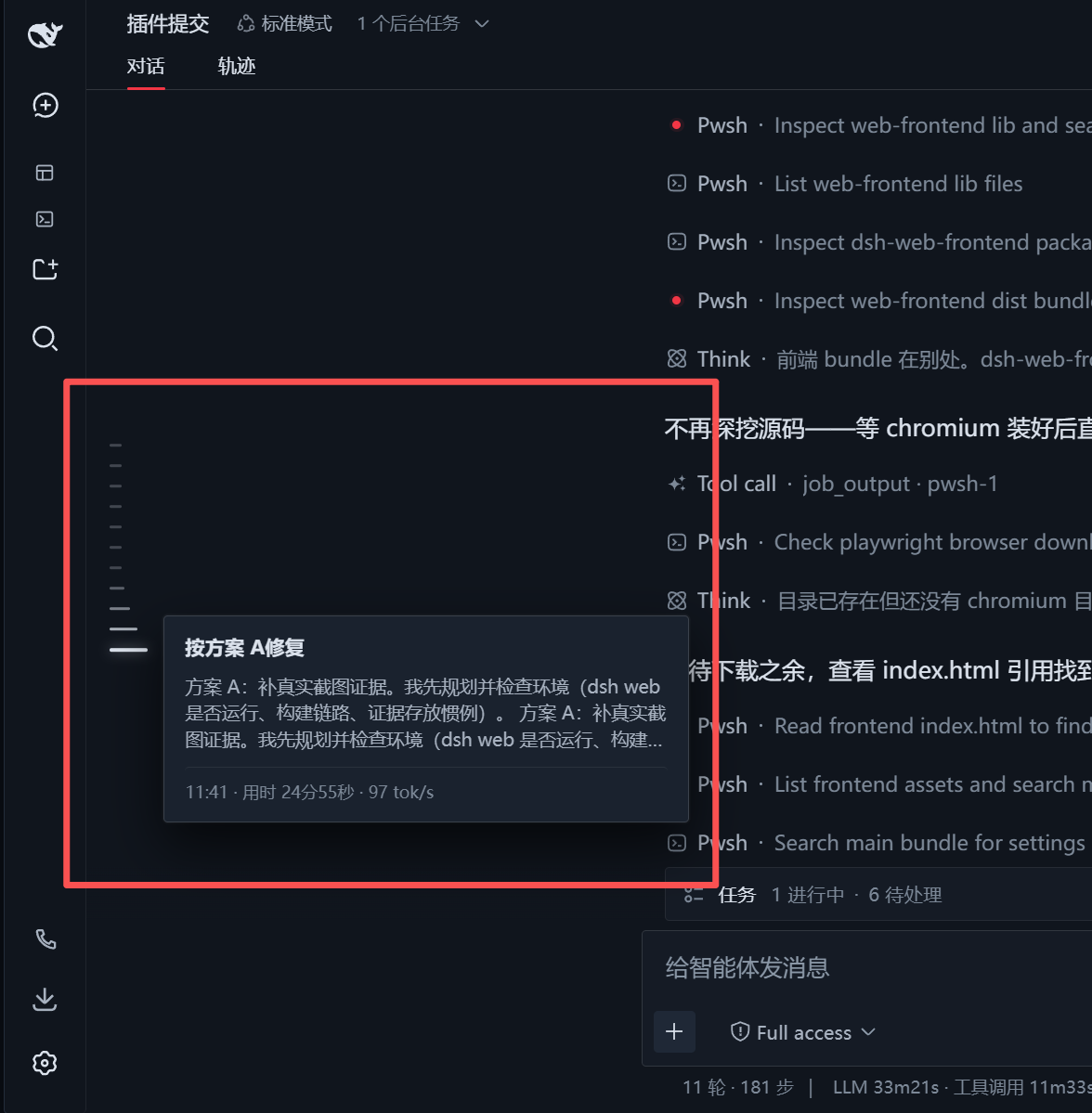
max-height)与鼠标滚轮平滑滚动。DSH 采用 Cordis 模块化微内核架构,你可以通过以下方式安装该插件:
>=0.1.2-alpha.2dsh plugin --profile web add -w dsh-history-tree当前本地兼容版本为 1.0.4。如需固定版本,可执行:
dsh plugin --profile web add -w "dsh-history-tree@1.0.4"# 已设置 DSH_HOME 时
cd "$DSH_HOME/profiles/web"
# 未设置 DSH_HOME 时
cd ~/.dsh/profiles/web
npm i dsh-history-tree
# 或使用 pnpm
pnpm add -w dsh-history-tree安装完成后,请确认 $DSH_HOME/profiles/web/package.json(未设置 DSH_HOME 时为 ~/.dsh/profiles/web/package.json)中的 dsh.profile.bundles 数组已包含 dsh-history-tree:
{
  "name": "dsh-profile-web",
  "private": true,
  "dependencies": {
    "dsh-history-tree": "^1.0.4"
  },
  "dsh": {
    "profile": {
      "bundles": [
        "@deepseek-ai/dsh-base",
        "@deepseek-ai/dsh-web-app",
        "dsh-history-tree"
      ]
    }
  }
}如果你在本地开发该插件,可以使用本地链接方式安装:
# 将本地插件目录以 link 方式添加至 web profile 的依赖中
dsh plugin --profile web add -w "link:/path/to/dsh/plugin/dsh-history-tree"注意:如果执行
add后启动报错提示子包重复声明,请检查$DSH_HOME/profiles/web/package.json(未设置DSH_HOME时为~/.dsh/profiles/web/package.json)中的dsh.profile.bundles数组,确保其中仅包含根包(如dsh-history-tree、@linxin666/dsh-web-ui-all等),避免包含子组件包。
启动 DSH Web 服务:
dsh --profile web
# 或者
dsh web
打开浏览器访问 http://127.0.0.1:3080/,打开任意包含多轮问答的对话,即可在左侧看到垂直居中的时间线点阵。
dsh-history-tree/
├── cordis.patch.yml   # Cordis 插件 Profile 声明补丁
├── package.json       # 模块清单与 client 端 inject 依赖
├── README.md          # 中文说明文档
├── README.en.md       # English documentation
├── docs/
│   └── images/        # 说明文档截图与预览图
└── lib/
    ├── index.js       # Host 端(服务端)入口
    └── client.js      # Client 端(前端鱼眼动效、DOM提取、卡片渲染逻辑)
CLASSIFICATION EVIDENCE
系统优先读取 GitHub Topics,再与站内分类词典和词根规则比对。当前命中: 无有效分类标签。
deepseek-ai
DeepSeek Harness: Everything is a Plugin.

anywhere-labs
为 DeepSeek Harness (DSH) 插件生态打造的现代化桌面端解决方案。万物皆「插件」,桌面本身也是「插件」。

walkinglabs
Harness engineering beginner tutorial, from 0 to 1