
其他
插件

dsh-bili-scroll
c1overzz
DSH 插件:每天替你刷一轮 B站,读字幕挑出值得的、写一份日报,值得的 @ 你
PROJECT TOPICS
INSTALL REFERENCE
dsh plugin --profile web add github:z4yx/dsh-terminal-keypad
该命令指向仓库当前默认分支;尚无绑定当前 commit 的完整验证结果。
PROJECT README

English | 中文
A translucent keypad floating over the DSH Web terminal. It supplies the keys a phone's soft keyboard lacks — Esc, Tab, Ctrl, Enter, a symbol key and the four arrow keys — and sliding outward on an arrow key sends Home / End / Page Up / Page Down. Holding the centre Esc key also drags the pad.
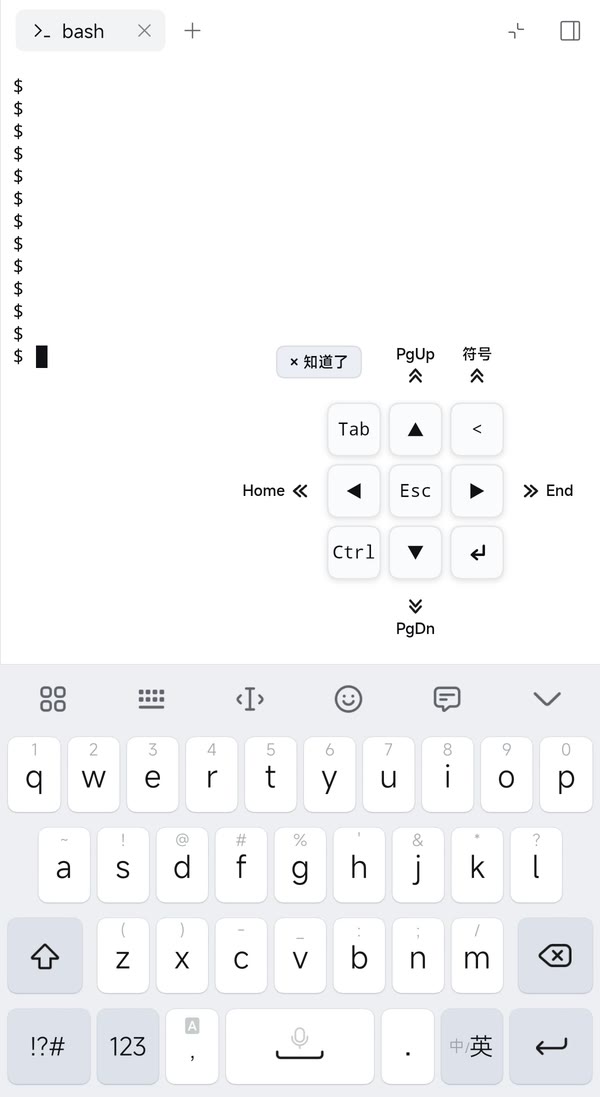
| Cell | Tap / press | Hold | Slide outward, then release |
|---|---|---|---|
| ▲ ▼ ◀ ▶ | move the cursor | keep moving | Page Up / Page Down / Home / End |
| Esc | send Escape | hold and move to drag the pad | — |
| Tab | send Tab | — | — |
\| |
type the current symbol | — | slide up, then release on a symbol |
| Ctrl | arm Ctrl | — | — |
| ↵ | send Enter | — | — |
Press and hold a direction key and it keeps moving: the repeat gets faster the longer you hold, and stops the moment you release.
Touch an arrow and slide it outward, then release:
The key shows the function key's name while you slide, and the arrow itself is not sent first, so a slide never moves the cursor or rewrites your shell history.
The key in the upper-right is not fixed to |. Slide up on it and a small picker
of common terminal symbols opens — pipes, redirects, quotes, brackets, operators
and more. Keep your finger down and slide across it: the key previews the symbol
under your finger. Release on a symbol to type it and keep it for next time;
release anywhere else and the picker closes without typing or changing anything.
A plain press still types the symbol the key holds.
Tap Ctrl — it highlights — and the next key is sent with Control held:
|;c arrives
as Ctrl-C, m as Enter, z as Ctrl-Z, and so on.Ctrl resets after one use; tap it again to cancel. Typing anywhere outside the terminal is never touched.
The first time the pad appears, small double-chevron arrows are drawn around it, blinking gently, with Page Up / Home / End / Page Down beside the four arrow keys and symbol above the symbol key. Press × Got it at the pad's top-left corner and it stays away for good.
Press and hold the centre Esc key and drag. Once the finger has moved a few pixels the press becomes a drag and no Escape is sent; a tap still sends Escape. The pad follows your finger, always stays on screen (including above the soft keyboard), and remembers where you left it.
The pad is made to sit on top of live terminal text without hiding it: the keys are a barely-there tint rather than a solid panel, the text behind stays sharp, and the outline keeps the keys easy to find. It follows the DSH theme, so light, dark and custom theme settings all apply.
It only appears while a terminal is actually on screen, floats against the terminal's lower-right corner by default, and disappears when you switch to another right-sidebar tab.
The package is a DSH bundle; install the directory into the current profile:
plugin_manager action=install_bundle target=/absolute/path/to/terminal-keypadThe profile links this directory, so moving the folder breaks the install — reinstall from the new path if you move it.
Remove it with:
plugin_manager action=remove_bundle target=dsh-terminal-keypadindex.js is the Host half, an empty apply() that exists only so the bundle
row has a Host activation. All behavior lives in client.js.client.js registers one entry into the shell.overlay slot
(id terminal-keypad) and portals its DOM to document.body: the overlay
layer is z-index: 20, below a fullscreen right-sidebar panel at z-index: 40.less and vim switch on DECCKM
(application cursor keys) and expect ESC O A there; a fixed ESC [ A is
ignored by them.ctx.webTerminals.view(sessionId, tabId, contentId).write(data). It reuses the
cached view the sidebar's terminal body already owns, so no second attachment
competes for the terminal; writes are dropped while another page owns input
(the terminal's own "take control" contract)..xterm screen
(getBoundingClientRect intersected with the visual viewport, then
elementFromPoint probes) on gestures and a 500 ms poll, so collapsing and
reopening the right sidebar always brings the pad back.| Key | Bytes |
|---|---|
| Esc | ESC |
| Tab | \t |
| Enter | \r |
\| |
the symbol the key holds (\| by default) |
| ▲ ▼ ◀ ▶ | ESC[A…ESC[D, or ESC OA…ESC OD under DECCKM |
| Ctrl + arrow | ESC[1;5A … ESC[1;5D |
Ctrl + \| |
the symbol's control byte when it has one (0x1C for \|) |
| Home / End | ESC[H / ESC[F, or ESC OH / ESC OF under DECCKM |
| Page Up / Page Down | ESC[5~ / ESC[6~ |
The next character typed into the focused terminal becomes its control byte:
a–z → 0x01–0x1A, [ → ESC, ] → 0x1D, ^ → 0x1E, _ → 0x1F,
@ → 0x00, ? → 0x7F. A keydown capture listener handles physical and
soft keyboards, with a beforeinput fallback for IME input that carries no
usable key.
Constants at the top of client.js:
| Constant | Value | Meaning |
|---|---|---|
CELL / GAP / INSET |
36 / 5 / 12 | cell size, gap and default inset, in px |
TAP_GRACE |
90 ms | delay before an arrow sends, so a slide can replace it |
SWIPE_DISTANCE |
13 px | outward travel that turns an arrow into its function key |
DRAG_DISTANCE |
8 px | movement that turns a press on the centre key into a pad drag |
REPEAT_DELAY |
420 ms | delay before a held arrow starts repeating |
REPEAT_START / REPEAT_MIN |
160 / 80 ms | first repeat period / fastest period |
REPEAT_ACCEL |
0.85 | period multiplier per repeat |
OFFSET_KEY |
dsh-terminal-keypad:offset.v1 |
localStorage key of the drag offset |
SYMBOL_KEY |
dsh-terminal-keypad:symbol.v1 |
localStorage key of the chosen symbol |
HINT_KEY |
dsh-terminal-keypad:hint.v1 |
localStorage key that dismisses the first-run hint |
| File | Purpose |
|---|---|
client.js |
the whole feature: pad, gestures, input |
index.js |
Host activation stub |
cordis.patch.yml |
inserts the terminal-keypad Host row |
package.json |
manifest and dsh.client declaration |
locale/en.json, locale/zh.json |
Plugin Manager title and description |
icon.svg |
plugin icon |
doc/Screenshot_2026-11-14.jpg |
the screenshot above |
MIT — see LICENSE.
CLASSIFICATION EVIDENCE
系统优先读取 GitHub Topics,再与站内分类词典和词根规则比对。当前命中: 无有效分类标签。
c1overzz
DSH 插件:每天替你刷一轮 B站,读字幕挑出值得的、写一份日报,值得的 @ 你

hellowind777
一个自主的高级智能伙伴,不仅分析问题,更持续工作直到完成实现和验证。

xing-shuyin
Just open your browser — get all your work done.