
其他
完整应用

deepseek-harness
deepseek-ai
DeepSeek Harness: Everything is a Plugin.
PROJECT TOPICS
INSTALL REFERENCE
dsh plugin --profile web add github:yyxcnasd/amadeus-for-dsh
该命令指向仓库当前默认分支;尚无绑定当前 commit 的完整验证结果。
PROJECT README
《命运石之门 0》Amadeus —— 牧濑红莉栖(Makise Kurisu)智能助手,DeepSeek Harness 插件。
红发翻盖手机里的她:Live2D 立绘 + 日语语音 + 长期记忆 + 主动来电 + AI 聊天。
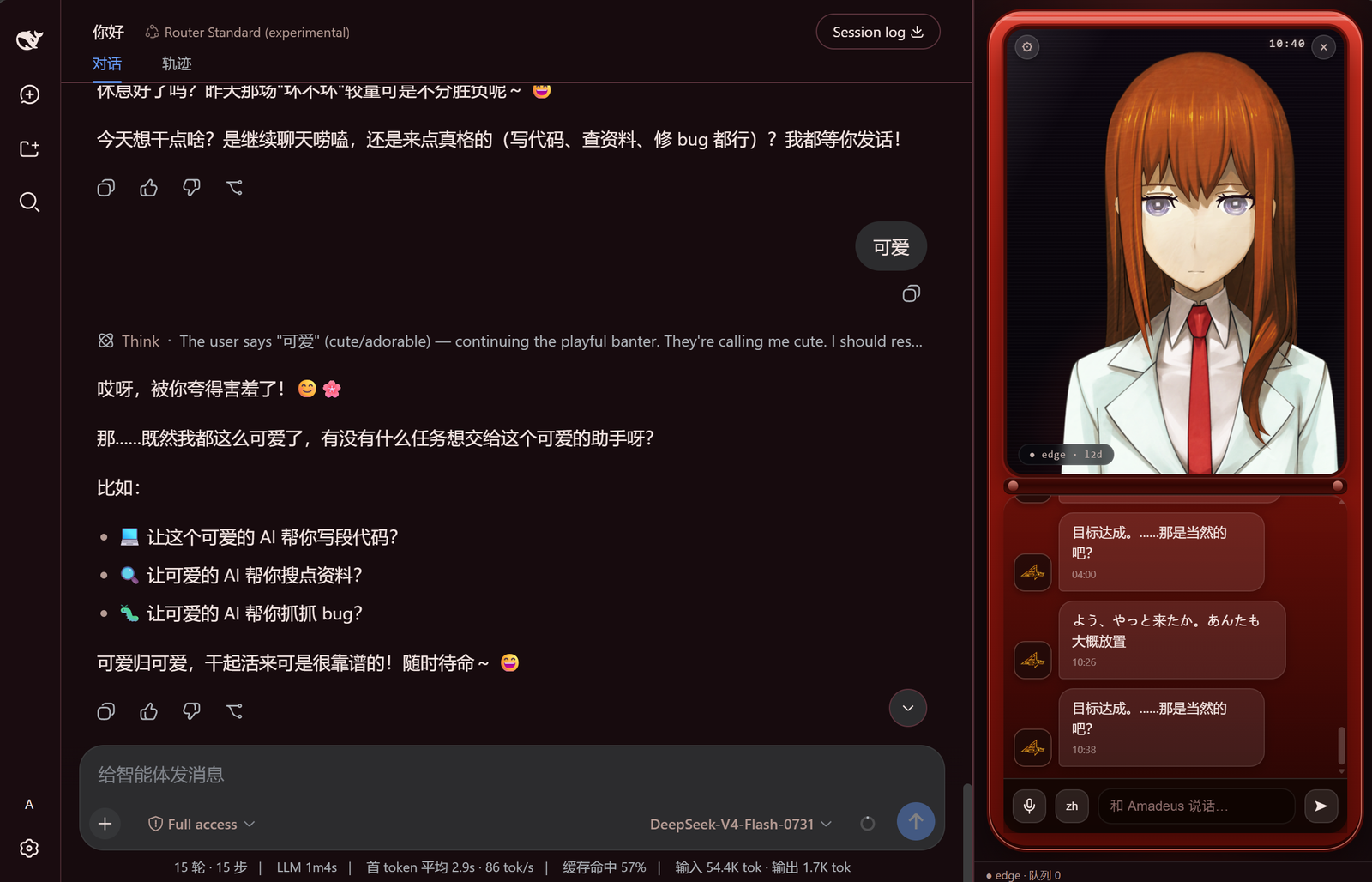
仓库根即 npm 包(amadeus-for-dsh,声明了 dsh.bundle.patch),因此安装方式和其他
GitHub 插件完全相同:
# 安装到 desktop profile(DSH Desktop 自带 CLI 的默认 profile)
dsh plugin --profile desktop add github:yyxcnasd/amadeus-for-dsh

# 或安装到 web profile
dsh plugin --profile web add github:yyxcnasd/amadeus-for-dsh
dsh plugin add 会:
profiles\<profile>\package.json);dsh.bundle.patch,自动把它加入该 profile 的 dsh.profile.bundles;零命令替代:在你正在使用的 profile 上重启即可看到效果。更新:重跑同一条 add 命令即可(或 dsh plugin --profile <p> update github:…)。
install.ps1)迁移v2.0 的 install.ps1 会把插件复制到 profiles\node_modules\amadeus-for-dsh 并在
profiles\web\cordis.patch.yml 手写加载行。新安装方式会自动清理这些旧痕迹
(幂等,原文件备份 .bak-*),避免重复加载冲突。
在线一行命令(自动选 profile、初始化数据目录、可选 TTS 通道):
powershell -ExecutionPolicy Bypass -c "irm https://raw.githubusercontent.com/yyxcnasd/amadeus-for-dsh/main/install-online.ps1 | iex"本地发行包(zip)→ 解压 → 双击 Amadeus-OneClick.bat 或运行 .\install.ps1 [-Profile desktop|web] [-Channel edge|quest]
pnpm 依赖:
dsh plugin需要 pnpm 在 PATH(DSH Desktop 自带;普通安装npm i -g pnpm或corepack enable)。
插件本体是跨平台的(Node / 浏览器 / Python 均按平台解析可执行文件),
PowerShell / .bat / install.ps1 等辅助工具仅面向 Windows,Linux 下直接用 dsh plugin add 即可。
安装插件(DSH Web 模式):
dsh plugin --profile web add github:yyxcnasd/amadeus-for-dsh
dsh web   # 重启 / 启动后右侧栏出现翻盖手机面板
准备 curl(TTS 备用通道需要):
# Arch: sudo pacman -S curl Debian/Ubuntu: sudo apt install curl Fedora: sudo dnf install curl准备 Python 与 edge-tts(主 TTS 通道)。推荐使用 venv,避免污染系统 Python:
python -m venv ~/.local/share/amadeus/venv
~/.local/share/amadeus/venv/bin/python -m pip install edge-tts
export AMADEUS_PYTHON="$HOME/.local/share/amadeus/venv/bin/python"   # 可选:显式指定解释器
插件解析 Python 的顺序:AMADEUS_PYTHON 环境变量 → python → python3(非 Windows)。
若不想用 venv,也可以直接 pip install --user edge-tts。
数据目录:默认 ~/.dsh/amadeus(DSH_HOME 优先于家目录),不会随启动目录漂移。
配置 / 长期记忆 / 临时音频都在这里,重装不丢。
可选环境变量:
| 变量 | 作用 |
| --- | --- |
| DSH_HOME | 覆盖 DSH 与 Amadeus 数据根目录(默认 ~/.dsh) |
| AMADEUS_ROOT | 覆盖插件资源根(一般只在开发时用) |
| AMADEUS_PYTHON | 指定 Python 解释器路径(venv 等) |
其他说明:curl / python 名称按平台自动选择(Windows curl.exe / POSIX curl);
浏览器端行为与平台无关(Firefox / Chrome 均可)。
Edge TTS 通道需要 Python 3.9+(脚本自动
pip install edge-tts,失败可改用 VOICEVOX 公共 API 通道,无需 Python)。
| 路径 | 内容 |
|---|---|
%DSH_HOME%\profiles\<profile>\node_modules\amadeus-for-dsh\ |
插件本体(pnpm 管理,update 即升级) |
%DSH_HOME%\amadeus\{config,memory,tmp}\ |
配置 / 长期记忆 / 临时音频(升级不丢) |
%DSH_HOME%\profiles\<profile>\package.json |
dependencies + dsh.profile.bundles(dsh 自动维护) |
%DSH_HOME% 默认 C:\Users\<你>\.dsh,可用环境变量覆盖。
卸载:dsh plugin --profile <p> remove amadeus-for-dsh(保留数据目录)。
node tools/build_static.mjs   # plugin/src/* → 仓库根 host.mjs + client.mjs
node tools/build_client.mjs   # esbuild 打包 client.js(仅改 client 源码时需要)
powershell -ExecutionPolicy Bypass -File tools/make_dist.ps1   # 生成发行 zip
dsh plugin --profile desktop add link:. # 本地开发安装(不改远程)plugin/src/host.js、plugin/src/client.js、plugin/web/*。host.mjs 用 import.meta.url 定位包目录(即资源根);运行数据在 %DSH_HOME%\amadeus;开发可用 AMADEUS_ROOT 覆盖资源根。docs/;TTS / Live2D 调研见 research/。package.json / host.mjs / client.js # 仓库根即 npm 包(dsh plugin add 安装)
cordis.patch.yml # bundle 补丁层(dsh 自动纳入 profile.bundles)
install.ps1 / install-online.ps1 # 辅助安装器(内部即 dsh plugin add)
Amadeus-OneClick.bat # 发行包内的一键入口
plugin/src + plugin/web/ # 插件源码 + 翻盖手机面板
tools/ # TTS/STT python、构建脚本
assets/ # Live2D 模型、图标、铃声
config/ persona/ # 默认配置模板、人格提示词
docs/ research/ # 设计文档、调研笔记fs.writeText 签名、agent/error 事件移除等),web 与 desktop profile 均可安装。AMADEUS_PYTHON 指定(venv);数据目录默认 ~/.dsh/amadeus。
PowerShell / .bat 辅助工具仅面向 Windows,Linux 直接用 dsh plugin add(见上方 🐧 Linux)。角色形象/声音/台词归 MAGES./Nitroplus;Live2D 模型与语音素材为粉丝制作,仅供个人学习,禁止商用。
CLASSIFICATION EVIDENCE
系统优先读取 GitHub Topics,再与站内分类词典和词根规则比对。当前命中: 无有效分类标签。
deepseek-ai
DeepSeek Harness: Everything is a Plugin.

anywhere-labs
为 DeepSeek Harness (DSH) 插件生态打造的现代化桌面端解决方案。万物皆「插件」,桌面本身也是「插件」。

walkinglabs
Harness engineering beginner tutorial, from 0 to 1