

模型与 MCP
待识别

rea
morluto
Reverse engineer anything with agents, from app behavior down to native binaries.
PROJECT TOPICS
INSTALL REFERENCE
dsh plugin --profile web add github:yuxiaole-bili/dsh-apk-vm
该命令指向仓库当前默认分支;尚无绑定当前 commit 的完整验证结果。
PROJECT README





Run a real Android APK inside a local, rooted, open-source Android VM and preview it in the DeepSeek Harness sidebar — streamed as H.264/WebCodecs video at up to 60 fps.

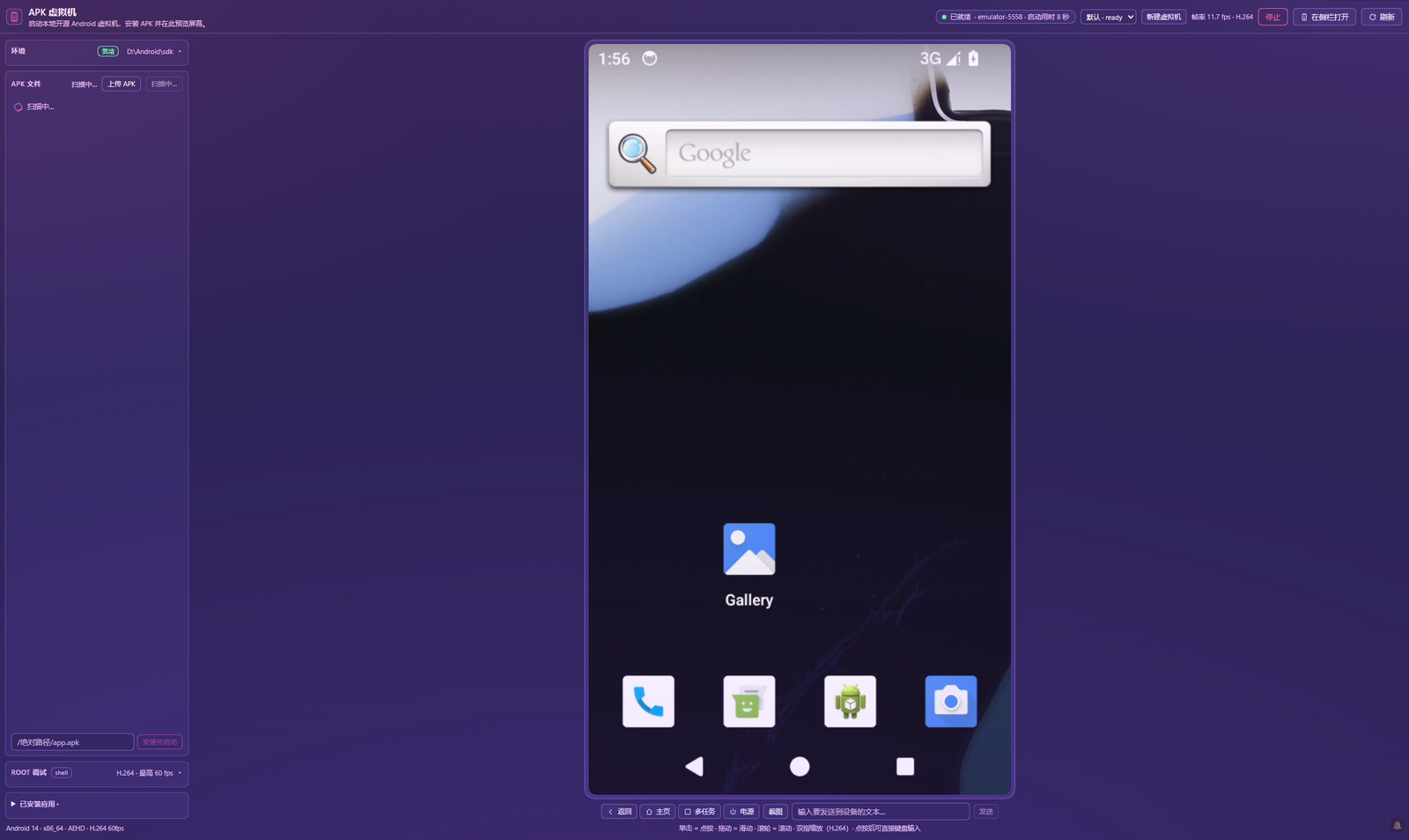
Real panel capture: rooted Android 14 guest, live H.264 stream, input controls and installed-app tools — no mockup.
dsh plugin --profile web add dsh-apk-vm
·
reproducible demo
Why it is useful
apk_vm tools, a live UI Inspector, copy-ready selectors and record/replay flows.This repository contains the static DSH plugin dsh-apk-vm. It adds a first-class sidebar
entry ("APK Virtual Machine" / "APK 虚拟机") whose main panel boots an AOSP Android Emulator,
installs an APK into the guest, streams the guest display into the panel, and forwards
tap / swipe / key / text input back into the VM. The guest is a userdebug image prepared for
root (adb root on every boot), and the plugin exposes that rooted device to DSH through a
same-origin, loopback-only debug HTTP API and an apk_vm Agent tool.
中文简介:在 DeepSeek Harness 的侧边栏里预览 Android APK。插件会启动本地开源 AOSP Android 虚拟机(Android 14 / API 34,
system-images;android-34;default;x86_64), 安装 APK,并通过 scrcpy H.264 + WebCodecs 把画面串流到侧边栏(最高 60 fps),同时把 点击、滑动、按键、文本输入送回虚拟机。支持拖拽 APK 上传、环境自检卡片、root 调试 API 与apk_vmAgent 工具;多个 Agent 可各自使用独立的隔离虚拟机实例(多开)。 参考机上冷启动约 29.5 s、快照快速启动约 8.4–10.5 s。 当前 Windows x64 与 Linux x86_64(headless)为端到端已验证平台;macOS 仅做探测/CI 覆盖,详见docs/LINUX-E2E.md。
Status: 0.12.5 · Apache-2.0 · no npm runtime dependencies · no build step.
This is an open-source DSH plugin published on npm as dsh-apk-vm. Repository:
github.com/yuxiaole-bili/dsh-apk-vm.
Maintainer: yuxiaole-bili.
Please read CONTRIBUTING.md, CODE_OF_CONDUCT.md,
SECURITY.md, docs/PRIVACY.md and docs/RELEASING.md before opening issues or
releasing.
Turn DeepSeek Harness into a local Android APK workbench: boot a rooted AOSP VM, preview it at up to 60 fps in the sidebar, and let Agents install, tap, inspect and debug APKs without leaving the session.
Install the published npm package (the command used by the DSH plugin center and the community market):
dsh plugin --profile web add dsh-apk-vmFor the Electron-managed Desktop profile, use Plugins → add/install local bundle with this directory, or install the package through the app's plugin manager.
Source fallback without npm:
dsh plugin --profile web add github:yuxiaole-bili/dsh-apk-vm
# local clone / non-Electron profile:
dsh plugin --profile desktop add <path-to-this-clone>开发与运维 / Developer Tools — Android VM lifecycle, APK install/preview, rooted debugging and Agent-facing UI automation for development workflows.
Requirements
adb, emulator, sdkmanager/avdmanager, a matching system image and an AVD
(the Environment card checks all of this; on a cold machine the default autoSetup provisions
it — JDK 17, SDK, system image and AVD — on first use, downloading roughly 2.5 GB; set
autoSetup: false to keep setup manual).hw.ramSize 1.5 GB default plus
emulator/GPU overhead); maxInstances defaults to 3 extra VMs. The memoryGuard (default on)
caps the effective count from total host RAM and the vmPreset: lite preset shrinks the guest
to 1 GB / 2 vCPU for 8–16 GB machines.Permissions / risk
userdebug and rooted (adb root on boot); do not put secrets or
personal data in the AVD.apk_vm is registered for every Agent in the profile and exposes guest root shell, app
install/uninstall, UIAutomator and input injection. Grant it the same trust as a terminal on a
rooted Android device./apk-vm/* HTTP routes and WebSocket upgrades are same-origin and loopback-only by
default; allowRemote: true is an explicit opt-in for use behind a trusted authenticated
proxy.autoSetup provisioning (a SHA-256-verified
Temurin JDK 17 from api.adoptium.net, then the user's own sdkmanager for SDK packages and
the system image — roughly 2.5 GB on a cold machine), for manual downloads you trigger, or
when you configure a remote adb device.Supported DSH versions
The package declares its DSH compatibility in package.json so the plugin manager and market can
check it before install and activation:
engines.dsh: >=0.2.1-rc.3 || >=0.2.2-rc.1 — tested against DSH Desktop 0.2.1-rc.3
(static bundle/plugin APIs) and DSH Desktop 0.2.2-rc.3 (current reference host: release
0.2.2-rc.3, Node 24.21.0, host protocol v4). Older DSH releases are rejected by the plugin
manager as incompatible-version; a version exemption can still be granted manually.dsh.compatibility.dshReleases: 0.2.1-rc.3+, 0.2.2-rc.1+ → compatible (market metadata).Compatibility
dsh-better-sidebar; the plugin falls back
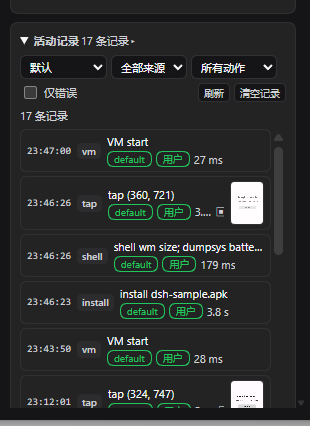
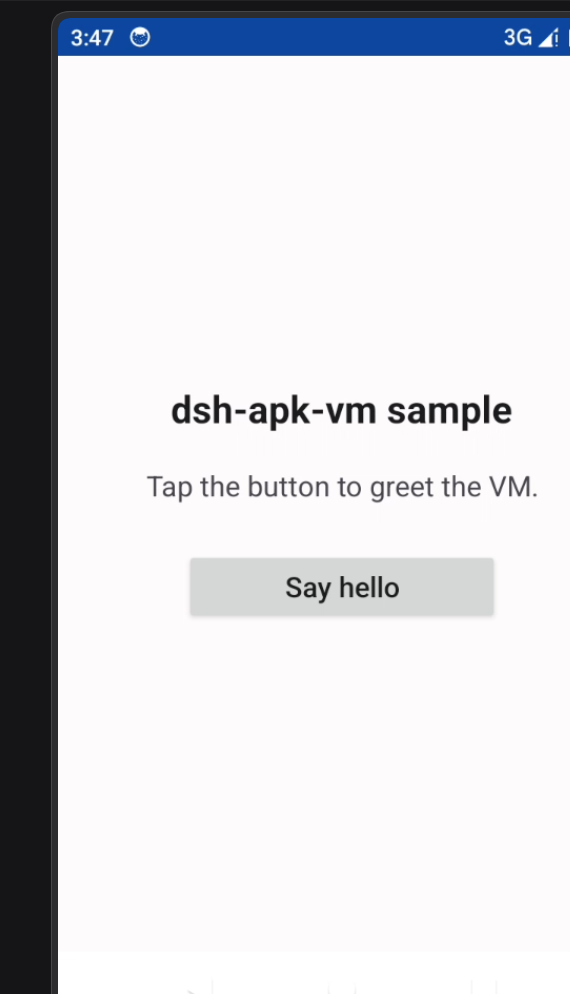
cleanly when that service is absent.Real screenshots from the reference host (0.12.0 UI; the Windows user name, real APK names/paths and the assistant avatar are Gaussian-blurred):
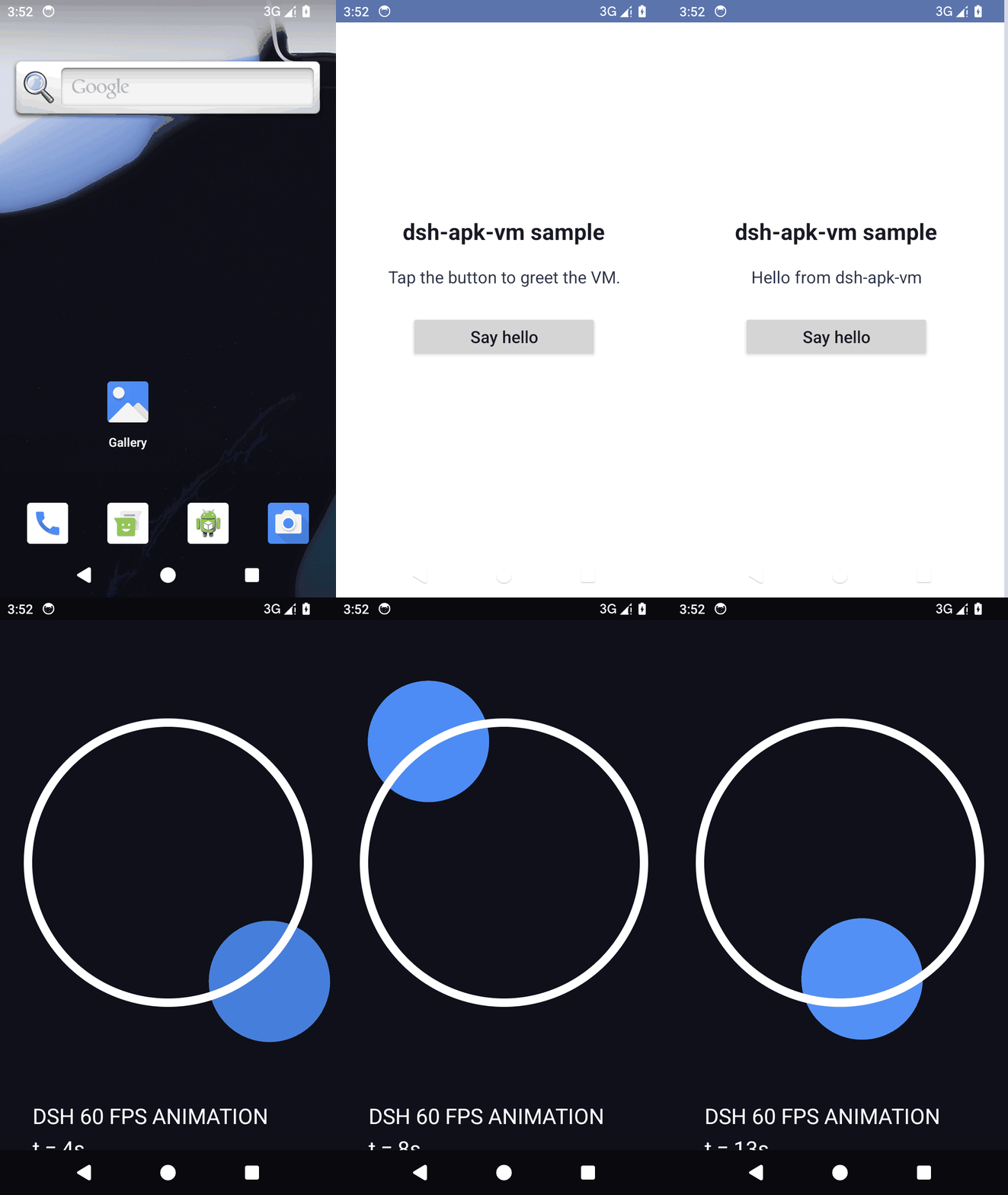
28-second capture of the loop: home screen → sample APK installed and driven by the API → 60 fps animation in the guest (720×1280, 3.2 MiB):
| Asset | Status |
|---|---|
docs/screenshot-panel.png |
✅ main panel: Environment, APK files, ownership, Activity, rooted debug, guest H.264 |
docs/screenshot-activity.png |
✅ Activity card: agent + user operations with screenshot thumbnails |
docs/screenshot-device.png |
✅ guest running the sample APK on the H.264 canvas |
docs/screenshot-environment.png |
✅ Environment self-check card |
docs/screenshot-apk-files.png |
✅ APK files / remembered installs card |
docs/screenshot-debug.png |
✅ Rooted debug toolbox card |
docs/demo.gif |
✅ 28 s loop (720×1280, 3.2 MiB); reproducible from the guest-side screencap loop in DEMO.md |
The Performance and Verification sections list exactly what was
measured, on which host, and how. Real apk_vm output from the reference run:
find_ui {"text":"Phone"}  -> Phone @ 102,1121
assert_text {"text":"Phone"} -> found 1 matching UI node(s)
tap_text {"text":"Phone"} -> tapped Phone at 102,1121
key {"text":"HOME"} -> returned to launchersidebar.panellist,
id apk-vm, order 30) with a phone glyph (icon.svg), plus a full center-column
panel (main, key apk-vm). Both are live-verified in the reference profile.adb,
emulator, command-line tools (sdkmanager/avdmanager), the configured system image, the
AVD, and CPU acceleration — with the missing pieces and the available repair actions
(GET/POST /apk-vm/setup). The card can create the AVD when the system image is already
installed, and — when allowSetupDownloads: true — install missing SDK components, or
bootstrap a completely empty host (download Google command-line tools, extract, accept
licenses, install platform-tools/emulator/build-tools/platform).autoSetup: true (default) provisions a completely cold
host on first use: it downloads a SHA-256-verified Temurin JDK 17 from Adoptium, bootstraps the
SDK command-line tools, installs platform-tools/emulator/build-tools/platforms, the
configured system image and the AVD, with live progress plus cancel/retry in the Environment
card (autoSetup on GET/POST /apk-vm/setup). The normal autoStart flow then boots the VM;
set autoSetup: false to keep setup manual.setupRetries: 3, retryDelayMs: 2000)
and no-data stalls are detected by a 45 s no-progress watchdog, so a link that dies at 10 %
resumes instead of hanging. The JDK archive resumes from a .partial file with HTTP Range and
is re-verified against the SHA-256 checksum on each attempt; a configurable mirror
(jdkMirror) bypasses unreachable GitHub assets. The command-line-tools archive can point at
a mirror or proxy (commandLineToolsUrl, commandLineToolsSha256, sdkManagerArgs,
sdkManagerEnv, networkProxy), and the cumulative free-disk budget
(minFreeDiskBytes, default 6 GB) is checked before provisioning starts.memoryGuard on (default) the effective maxInstances is derived from total
host RAM (8 GB → 1; 16 GB → 3 with the default requested cap; clamped to 1–8), free host RAM
is checked at start, and a low-memory machine refuses to start another VM with a clear error
instead of swapping itself to death. On a 16 GB desktop that also runs an IDE and a browser,
keep maxInstances at 2 or switch to vmPreset: lite, which
shrinks the AVD to 1 GB RAM / 2 vCPU / SwiftShader with a 720p30 H.264 stream, and
memoryPressureReap (default on) stops the least-recently-used idle local VM when memory is
tight (extra VMs are stopped, never destroyed). The VM instances card shows host RAM, the
effective cap, the preset and the per-VM RAM/vCPU profile; GET /apk-vm/state and
GET /apk-vm/emulators expose the same memory object.maxInstances, default 3 extra; extra VMs use a 720×1280 preview display).
Extra instances expose owner / lastUsedAt / idleMs, and are stopped automatically
after instanceIdleMs without panel frames, stream clients or Agent commands (AVD kept for
quick reuse). The panel selector and VM instances card show owner/idle state and offer
Stop/Destroy. The apk_vm tool accepts
instance, ownerScope (shared / conversation / project), ownerLabel and exposes
list_instances / create_instance / destroy_instance / owner_status / claim_vm /
release_vm.GET /apk-vm/avds, POST /apk-vm/avd); the current AVD is stopped, switched and
restarted automatically./apk-vm/upload
(raw APK bytes, ≤ 500 MiB, .apk/ZIP magic checked), installed into the running VM and
launched. Uploaded files live in the OS temp dir and are cleaned up when the plugin is
disposed. Installing by absolute local path is still available (/apk-vm/install)..apk, .apks
(bundletool output) and .xapk files; split APKs are extracted to a temp directory and
installed with adb install-multiple. Plain .apk still uses adb install -r.
.aab is rejected with a clear "build APKs with bundletool first" message.tap_text / assert_text commands for the apk_vm
tool. Also available to Agents as the inspect_ui action.flow_start, flow_stop, flow_list and flow_replay./etc/hosts via a root bind mount,
HTTP proxy + CA installation, isolated/shared instance modes, and a guest-side connectivity
test. Optional pcap capture can be downloaded from the panel. See
Network controls.dsh_apk_* AVDs. Destructive actions need a second
click and never touch the active VM.skill_* and control_* actions;
the panel has a small Skills card for recording, running and deleting them.debug/packages + debug/action API as the Agent tool.<profile>/.apk-vm/installed-apps.json (path, package, label, launch activity,
instance). When a quick-boot snapshot reset, a recreated AVD or a plugin/emulator upgrade leaves
the guest without one of those packages, the plugin reinstalls it automatically on the next boot
(autoReinstall: true, default) and records the pass in the activity journal. Uploaded APKs are
archived under <profile>/.apk-vm/apks (newest 10) so the reinstall does not depend on the
original temp file.apk_vm tool call is journaled locally — action,
bounded argument preview, result, error, duration, instance, and an optional screenshot for
mutating actions. The sidebar Agent activity card renders it as a filterable timeline with
thumbnails, a full-screen overlay and 3 s auto-refresh, so you can see exactly what an Agent did
to the VM. See Agent activity log.DEVICE_UNRESPONSIVE-style error with an actionable message instead of a bare 180 s timeout;
ui_dump/inspect_ui supplement WebView content with a guest-side uiautomator dump text
fallback; shell gains an explicit root: true path (su 0); tap/text can verify and
retry; network mode switches repair the guest default route; watchdog/ANR crashes are detected
with a recovery hint; reinstall re-grants the install/unknown-sources appop on debug VMs.
See Troubleshooting for each case.dsh-better-sidebar tab.
When that community plugin is installed, this plugin registers a real tab type
(apk-vm:preview) through its service — no fork, no DOM hacks, and it degrades cleanly when
the service is absent (see compatibility).<profile>/.apk-vm/remote-profiles.json (host/user/ports/AVD, never the key contents),
forwards a loopback port to the remote emulator's adb port, runs adb connect and attaches the
device, so the same panel/H.264/input/debug surface drives the remote guest. Up to
remoteMaxSessions sessions can run at once, each with its own AVD; launch: true starts a
fixed headless emulator on the remote host over the same SSH connection and disconnect stops
it again. The panel lists saved profiles and live sessions with per-session connect/disconnect.
See Multiple instances, physical devices and snapshots.GET /apk-vm/emulators returns one merged table of local AVDs
(name, target, ABI, RAM, LCD, snapshot count, running state, size) plus the AVDs and adb devices
of every saved remote host, so you can see what can be started before spawning anything.-camera-back / -camera-front: emulated,
virtualscene, webcam, none) and feed the virtual scene with PNG/JPEG posters
(-virtualscene-poster). The panel's Media card manages the modes and poster list; settings
apply to newly spawned instances and to the default VM after a restart.off, host (pass a host input device through to the
guest; Windows/Linux/macOS) and file (loop an audio file into a virtual PulseAudio source;
Linux hosts and remote SSH hosts). Configure it in the panel Media card, through
/apk-vm/mic, or with cfg.mic; remote sessions upload posters/audio to
/tmp/apk-vm-media/<id> over the same SSH connection.*.apk under the configured roots,
reads package name / label / launcher activity with aapt2 dump badging, then runs
adb install -r and launches the app with am start.GET /apk-vm/apk-info?path=… reports version, min/target SDK,
permissions, native ABIs, features and launcher activity without starting the VM;
GET /apk-vm/apk-icon?path=… extracts the raster launcher icon directly from the APK ZIP.
The APK list shows icons when a raster icon is present./apk-vm/ws, decoded with WebCodecs VideoDecoder onto a <canvas>
(configured for 60 fps, 540×960, 6 Mbps). Late clients get a RESET_VIDEO keyframe request.
If WebCodecs / WebSocket is unavailable, the panel falls back to adb exec-out screencap -p
PNG polling (target 1–10 fps).SET_CLIPBOARD) or read back (GET_CLIPBOARD). Coordinates are converted
from the rendered phone frame to the device resolution.adb root after every boot, an on-device
toolkit at /data/local/tmp/dsh/debug.sh, a same-origin debug HTTP API, and an apk_vm
Agent tool every DSH agent can call: root shell, logcat, props, packages, install, push/pull,
reboot, force-stop / clear-data / uninstall, screenshot, rotate, UIAutomator UI tree,
5-second screen recording (pulled to the host temp dir) and performance snapshot.lib/setup.js and lib/android.js discover Android SDK,
adb, the emulator and AVDs across Windows, macOS and Linux layouts (including .exe
suffixes and per-OS fallback locations). Windows x64 and Linux x86_64 headless are
verified end-to-end; see docs/LINUX-E2E.md./apk-vm/* HTTP route and the /apk-vm/ws upgrade rejects
cross-origin requests; request bodies and command output are bounded, and host processes are
spawned with argv arrays (never a shell string).--dsw-alias-* theme tokens; English and 简体中文
are bundled in locale/.GET /apk-vm/debug/inspect (and /apk-vm/instances/<id>/debug/inspect) returns the parsed
UIAutomator nodes with bounds, labels, and generated find_ui / assert_text / tap_text
commands. The panel's Inspect UI button renders the same data as an overlay.GET|POST /apk-vm/flows (and /apk-vm/instances/<id>/flows) lists, starts, stops, replays
and deletes recorded flows. The panel has a Flow recorder card with the same actions.apk_vm actions: inspect_ui, flow_start, flow_stop, flow_list, flow_replay.POST /apk-vm/debug/proxy sets the guest HTTP proxy; DELETE clears it.POST /apk-vm/debug/ca accepts a host .pem/.crt path and installs it under the guest's
user CA directory with the correct subject hash.H5 pages and hybrid Apps often expose nothing useful to UIAutomator. The plugin now speaks CDP
to the running WebView: it discovers webview_devtools_remote sockets, forwards each over
adb forward on loopback, and keeps the connection internal to the Host process.
apk_vm actions: webview (webviewAction=list|eval|click|wait_for|insert_text|info),
tap_selector, tap_css, type_text, wait_for.webviewAction=list returns sanitized target metadata (id, title, url, type), never a
DevTools WebSocket URL or token. Select a target with targetId or webviewTarget.webviewAction=eval evaluates a single JavaScript expression and returns result.value plus a
compact preview in summary. JSON values come back as-is; values that do not survive
JSON.stringify by value (DOMRect, MediaQueryList, other objects) come back as a JSON-safe
property snapshot, so document.querySelector("#x").getBoundingClientRect().width and
matchMedia("(pointer: coarse)").matches read correctly instead of returning null. Statement
blocks fall back to plain CDP evaluation (no property snapshot; the result is whatever the
runtime returns, often null); wrap a sequence in an expression instead: (() => { const r = document.querySelector("#x").getBoundingClientRect(); return { width: r.width, height: r.height }; })().click and wait_for accept
ordinary CSS and testid:VALUE (which maps to [data-testid="VALUE"]). Open shadow roots
are traversed; closed shadow roots and iframes are not.tap_selector uses the same deep query and clicks through CDP. tap_css is for canvas or
non-DOM UI: it converts CSS viewport coordinates with info.coordinateMap.type_text injects Unicode through the scrcpy control stream; it does not require ADBKeyboard.wait_for accepts a selector, an HTTP URL, a UI text condition, or a number of seconds. It
polls and returns the elapsed time instead of forcing fixed sleeps.Example Agent sequence for a hybrid App:
apk_vm { action: "webview", webviewAction: "list" }
apk_vm { action: "webview", webviewAction: "eval", script: "matchMedia('(pointer: coarse)').matches" }
apk_vm { action: "webview", webviewAction: "eval", script: "document.querySelector('#file-card').getBoundingClientRect()" }
apk_vm { action: "webview", webviewAction: "click", selector: "testid:login" }
apk_vm { action: "type_text", text: "中文角色名" }
apk_vm { action: "wait_for", selector: "[data-testid=home]" }
App-operation Skills are short, replayable navigation recipes for tests. Instead of recording raw coordinates, the Agent works through a Control Codebook: a small table that gives stable codes to controls it has identified. A Skill embeds a copy of that codebook, so it can be replayed later even if the live UI tree changes its node order.
skill_start (optionally pass a codebook), then use
control_ui / control_features to inspect controls.control_codebook, then act with control_tap,
control_input, control_long_press, control_swipe, control_assert or control_wait.
Each semantic action is appended to the recording.skill_stop. The Skill stores its embedded codebook and steps under the workspace
.apk-vm/skills/ directory (gitignored).skill_run, optionally using untilCode to stop at a page and speed to scale
optional waits. Steps use waitFor polling, not only fixed sleeps.A codebook entry looks like this:
{
  "codebook": {
    "version": 1,
    "entries": [
      { "code": "A01", "name": "USERNAME", "features": { "resourceId": "com.example:id/user" } },
      { "code": "LOGIN_BTN", "aliases": ["A02"], "features": { "text": "Sign in", "clickable": true } },
      { "code": "STAR", "features": { "image": { "name": "star-icon", "hash": "…", "maxDistance": 10 } } }
    ]
  }
}A01) or semantic (LOGIN_BTN); aliases are accepted too.resourceId, text, textAny, contentDesc,
className, clickable, enabled, bounds ratio). Multiple matches are an explicit error with
candidates, never a silent first match.control_features can capture optional image features (PNG dHash + average/dominant colour)
for a control; give the image a name and merge the suggested entry into the codebook.
Image matching is only used when the entry declares features.image.skill_run accepts variables for {{placeholder}} interpolation, dryRun to resolve
controls without touching the device, and timeoutMs. A failed step returns a screenshot path,
UI XML, candidates and the step index.flow_*) is still available for compatibility; Skills are the
semantic, code-based option.HTTP routes: GET|POST /apk-vm/skills and POST /apk-vm/controls (with the same
/apk-vm/instances/<id>/... variants). apk_vm actions: skill_list, skill_get,
skill_save, skill_delete, skill_start, skill_stop, skill_cancel, skill_run,
skill_codebook, control_ui, control_features, control_codebook, control_tap, control_input,
control_long_press, control_swipe, control_assert, control_wait, control_launch.
This feature deliberately does not call arbitrary functions inside the target app. It drives the app only through its UI, so it keeps working for third-party APKs and does not require app instrumentation.
Every running VM has a renewable owner lease, so two DSH conversations cannot silently drive
the same emulator. A lease records the owner key, display label, scope (shared, conversation
or project), session id, workspace, and since / lastSeenAt timestamps; leases expire after
30 minutes (leaseTtlMs) and are renewed by apk_vm calls that route to that VM.
ownerScope=conversation gives the current DSH session a VM that follows it across turns;
ownerScope=project does the same for the current workspace. ownerScope=shared keeps the
first-come default behaviour.instance is explicitly requested and owned by another conversation, the call fails with
vm-busy and the owner details. ownerForce=true is an explicit takeover and should be used
only after checking owner_status.shared /
conversation / project scope control for the human user.409 vm-busy. The panel
sends x-apk-vm-role: admin; the Host accepts that role only from loopback requests and
downgrades non-local callers to user.owner_status lists default/extra VM leases; claim_vm and release_vm manage them.
HTTP: GET|POST /apk-vm/ownership (status, claim, release, touch), while
GET /apk-vm/state and GET /apk-vm/instances include owner metadata.x-apk-vm-owner, x-apk-vm-scope, x-apk-vm-session, x-apk-vm-workspace and
x-apk-vm-label. Header values may be percent-encoded (UTF-8); the Host decodes them, so
non-ASCII labels and workspace paths remain valid for browser fetch. A request that
supplies an owner header auto-claims a free VM; on a leased VM
it must match the current owner key. POST /apk-vm/* control routes return 409 vm-busy with
the current owner when the header is missing or does not match. Read-only GET routes are
never blocked.session/disposed event) automatically releases its leases,
with the 30-minute TTL as a fallback if that event is unavailable.POST /apk-vm/instances {"name":"agent-a","start":true} creates a
dedicated AVD + emulator (+ its own H.264 stream) for another Agent conversation; lease rules
are in VM ownership. Extra instances are
idle-stopped after instanceIdleMs; the AVD is kept for quick reuse.GET /apk-vm/devices lists adb devices;
POST /apk-vm/device {"serial":"…"} attaches an online USB/physical/network device and
detaches back to the managed AVD with {"serial":""}. The Environment card offers the same
attach/detach actions.GET/POST /apk-vm/remote runs the guest behind an SSH host:
an ssh -N -L loopback tunnel forwards the remote emulator's adb port, adb connect 127.0.0.1:<localPort> registers it and the normal attach/boot-wait path runs, so the panel
streams the remote guest over the same H.264 channel. POST {"action":"connect","host","user", "keyPath"?,"remotePort":5558,"avdName"?,"launch":true} optionally starts a fixed headless
emulator on the remote host (-no-window -no-audio -no-boot-anim -gpu swiftshader_indirect) over the same SSH connection; {"action":"disconnect", "stopEmulator":true} also kills an emulator the plugin launched. The validated profile has no
secrets (the SSH key path stays on this host) and is persisted under
<profile>/.apk-vm/remote-profile.json, so the panel card prefills after a restart. Only the
fixed command shape is executed; every value is validated and single-quote escaped.default and remote
sessions) a display name with apk_vm {"action":"rename_instance","instance":"default","name":"QA phone"} or POST /apk-vm/instances {"action":"rename","instance":"…","name":"…"}; the panel
has a Rename button in the Instances card. Names persist under
<profile>/.apk-vm/instance-names.json, and list_instances / GET /apk-vm/instances
include name. The panel auto-selects the VM owned by the current conversation (falling
back to default), so a multi-agent setup no longer always shows one fixed VM.GET /apk-vm/snapshots lists snapshots;
POST /apk-vm/snapshots {"action":"save|load|delete","name":"…"} manages them. The quick-boot
snapshot (snapshotName, default default_boot) is handled automatically. The panel's
Snapshot card stores, restores and deletes snapshots and shows their footprint; they live under
~/.android/avd/<avd>.avd/snapshots/.Every apk_vm tool call and every mutating panel/HTTP action (tap, swipe, typed text, install,
snapshot save/load, debug shell, ...) is journaled locally, so you can see what an Agent — or a
person clicking in the panel — actually did to the VM, when, and with what result. The panel adds
a sidebar Activity card that renders the journal as a timeline.
<profile>/.apk-vm/activity/activity.jsonl plus screenshots/<id>.png; ring-pruned
(1000 entries / 250 MB by default). activityDir overrides the location.source (tool for the agent tool, http for panel/API operations,
system), tool (apk_vm, panel or a client label), action, summary, ok / error,
durationMs, instanceId, a bounded argsPreview, and an optional screenshot for mutating
actions (tap/swipe/key/text/install/type_text/…).GET /apk-vm/activity?limit=&beforeId=&action=&instanceId=&source=&ok= (newest first + stats),
GET /apk-vm/activity/<id> (one entry), GET /apk-vm/activity/<id>/shot (PNG),
POST /apk-vm/activity/clear.A worked, dependency-free example is in examples/agent-workflow.mjs: it drives state → install → UI tree → tap → assertion → screenshot and then prints the activity timeline the call just produced.
GET /apk-vm/storage reports the logical size of every AVD, its quick-boot snapshots, the
Android SDK, plugin temp files and the free space on the AVD volume. The panel's Storage
card uses the same endpoint.
POST /apk-vm/storage accepts:
{ "action": "temp" }
{ "action": "snapshots", "avdName": "dsh_apk", "confirm": true }
{ "action": "orphan-avds", "confirm": true }
temp removes only screenshots, MP4 recordings, uploaded APKs and flow JSON created by this
plugin.snapshots deletes the quick-boot snapshots of a stopped plugin-managed AVD; the next
boot is a cold boot.orphan-avds removes only dsh_apk_* AVDs that are not registered to any instance and are
not active.apk_vm tool actions: storage, clean_storage (storageAction, avdName, confirm).GET /apk-vm/network returns the guest addresses, current proxy, DNS, hosts count, mode,
port forwards and pcap status. POST /apk-vm/network accepts action:
{ "action": "mode", "mode": "isolated|shared" }
{ "action": "forward-add", "localPort": 18080, "remotePort": 8080, "shared": false }
{ "action": "forward-remove", "localPort": 18080 }
{ "action": "dns", "servers": ["1.1.1.1"] }
{ "action": "hosts", "entries": ["198.51.100.10 api.example.test"] }
{ "action": "test", "host": "198.51.100.10", "port": 8080 }
{ "action": "reverse-add", "localPort": 8080, "hostPort": 3000 }
{ "action": "reverse-remove", "localPort": 8080 }
{ "action": "validate" }
{ "action": "pcap", "path": "D:\\apk-vm-capture.pcap" }adb forward tcp:<hostPort> tcp:<guestPort>. The panel offers one-click
presets for Metro 8081, HTTP 8080, Frida 27042 and DevTools 9222, plus the
manual host/guest fields.-dns-server flag on the next start./etc/hosts (root required) and reapplied
after a plugin-managed boot.shared forwards are reachable from other VMs through the emulator's host alias; the
QEMU NAT itself remains isolated.-tcpdump and starts on the next emulator start;
download via GET /apk-vm/network/pcap.reverse-add maps guest 127.0.0.1:<localPort> to host 127.0.0.1:<hostPort> with
adb reverse; reboot re-adds it during environment restore.validate reports Android's VALIDATED/INTERNET state. An isolated QEMU NAT cannot pass
the captive-portal probe, so WebView may reject non-loopback HTTP even when nc/curl
succeed; the action returns an explicit hint instead of pretending the network is validated.A public, dependency-free demo lives in examples:
node examples/demo.mjsIt installs the committed MIT-licensed 12 KB sample APK (dev.dsh.sample), reads the
UIAutomator tree, taps Say hello, asserts that the screen now says
Hello from dsh-apk-vm, and saves a 720×1280 screenshot to examples/demo-out/. No personal
APK, private key or host-specific path is required.
| Requirement | Notes |
|---|---|
| DeepSeek Harness | A profile that can install local plugin bundles (the desktop Web UI or any agent with the plugin_manager tool). |
| Android SDK | platform-tools (adb), emulator, build-tools (for aapt2), command-line tools (sdkmanager/avdmanager) and an AOSP system image. The SDK command-line tools need a JDK (17 works); on a cold machine the default autoSetup downloads a portable Temurin JDK 17 and bootstraps the SDK itself. |
| AOSP system image | system-images;android-34;default;x86_64 (Android 14, API 34) — the image used for all measurements below. Configurable with systemImage. |
| Hardware virtualization | Required for the x86_64 image: AEHD or WHPX on Windows, KVM on Linux, HVF on macOS. See acceleration matrix. |
| Disk / RAM | A few GB for the SDK + system image and the AVD (first-run provisioning downloads roughly 2.5 GB: JDK ≈190 MB + command-line tools + SDK packages + system image); an emulator with a modern desktop GPU is recommended. |
| Node.js 24+ (optional) | Only for running this repository's checks (Verification). The plugin itself has no npm dependencies. |
The plugin's Environment card performs this check for you (see First run); the commands below are the manual equivalent.
| Host OS | Backend | How to enable |
|---|---|---|
| Windows | AEHD (Android Emulator Hypervisor Driver) | Install via SDK Manager package extras;google;Android_Emulator_Hypervisor_Driver, or the standalone installer; requires administrator rights and a reboot. Recommended when Hyper-V/WHPX is not active. |
| Windows | WHPX | Enable the Windows Hypervisor Platform optional feature (and Hyper-V if desired), reboot. Alternative when Hyper-V is already in use. |
| Linux | KVM | Load kvm_intel/kvm_amd, ensure /dev/kvm exists and your user can access it (e.g. kvm group), then reboot/login again. |
| macOS | HVF (Hypervisor.framework) | Built into macOS; the emulator uses it automatically on Intel and Apple Silicon hosts. |
Check the host before starting the plugin:
"$ANDROID_HOME/emulator/emulator" -accel-checkThe plugin also runs the SDK's emulator-check accel itself and reports the result in
/apk-vm/state (vm.accel), /apk-vm/setup (accel) and the panel log. If no hypervisor is
usable, it fails fast with an explicit error instead of hanging for 20 minutes (the x86_64
image cannot boot under pure TCG).
Copy or clone this repository anywhere local:
git clone https://github.com/yuxiaole-bili/dsh-apk-vm.git
cd dsh-apk-vm
Then pick one:
desktop profile):dsh plugin --profile web add dsh-apk-vmSource fallback: dsh plugin --profile web add github:yuxiaole-bili/dsh-apk-vm.
dsh.client declaration in package.json loads client.js into the Web UI.plugin_manager with action install_bundle and the
target set to this folder path.dsh plugin --profile <profile> add <path-to-this-folder>. The Electron-managed desktop
profile must be managed from the app UI instead.After installing or upgrading the plugin, reload the DSH Web page so the new client bundle is loaded.
With the shipped autoSetup: true this step is automatic: the first /apk-vm/state or
/apk-vm/setup request — opening the panel, or an Agent's first apk_vm call — detects what is
missing and provisions it in the background while the Environment card shows the current
step. The chain is:
JAVA_HOME is found, a portable Temurin build is downloaded
from Adoptium (api.adoptium.net, SHA-256 verified) into ~/.dsh/apk-vm/jdk (override with
jdkRoot). Adoptium's archive is hosted on GitHub; when that is unreachable (for example on
mainland-China networks) a built-in Tsinghua mirror is tried next with the same checksum.commandlinetools are unpacked and SDK licenses accepted.platform-tools, emulator, build-tools and platforms.systemImage (default system-images;android-34;default;x86_64).avdName (default dsh_apk) is created.Cancel / Retry are available in the card, and the same state is exposed as autoSetup
in GET /apk-vm/setup. Set autoSetup: false to provision manually instead:
The plugin auto-discovers the SDK (sdkRoot, ANDROID_HOME, ANDROID_SDK_ROOT, then common
per-OS locations) and adb/emulator; the Environment card's one-click actions remain available as
a fallback (including Create AVD and, with allowSetupDownloads: true, an
sdkmanager --install for the image). The manual commands are:
sdkmanager --install "platform-tools" "emulator" "build-tools;34.0.0" \
  "system-images;android-34;default;x86_64"
avdmanager create avd -n dsh_apk -k "system-images;android-34;default;x86_64"
The plugin can also attach to an already-running adb device instead of spawning the AVD; set
serial (for example emulator-5558 or <device-ip>:5555) and leave emulatorPath/avdName
unset.
The bundle ships with portable defaults (SDK auto-detection, avdName: dsh_apk). Review the
config for your machine — at minimum roots if you want extra APK scan directories. The full
list of keys is in the configuration reference.
config:
  # sdkRoot: 'C:/Android/sdk'       # optional; otherwise auto-detected
  # emulatorPath: 'C:/Android/sdk/emulator/emulator.exe'  # optional; auto-detected
  # serial: 'emulator-5558'        # ...or attach an existing adb serial instead of spawning
  systemImage: 'system-images;android-34;default;x86_64'
  avdName: dsh_apk
  port: 5558
  roots: ['C:/projects']           # extra APK discovery roots (workspace is automatic)
  gpuMode: host
  accel: auto
  requireAccel: true
  quickBoot: true
  snapshotName: default_boot
  saveSnapshotAfterBoot: true
  prewarm: false                   # opt-in warm boot on plugin activation
  prewarmDelayMs: 3000
  autoStart: true
  multiInstance: true              # isolated VMs for concurrent agents
  maxInstances: 3                  # extra VMs (default VM is always available)
  instanceIdleMs: 900000           # stop idle extra VMs after 15 min (AVD kept)
  instanceReapIntervalMs: 60000
  memoryGuard: true                # cap instances from host RAM; refuse low-memory starts
  # hostReserveMb: 4096            # RAM kept for the host/other apps
  # estimatedVmMb: 3072            # estimated cost of one local emulator
  vmPreset: standard               # standard | lite (1 GB / 2 vCPU / SwiftShader / 720p30)
  memoryPressureReap: true         # stop LRU idle VMs before creating another one
  leaseTtlMs: 1800000              # VM owner lease lifetime; renewed by apk_vm calls
  allowRemote: false               # reject non-loopback VM API clients
  autoSetup: true                  # zero-config first run: auto-provision JDK 17 + SDK + image + AVD
  setupRetries: 3                  # retries per provisioning step (exponential backoff)
  retryDelayMs: 2000
  # minFreeDiskBytes: 6442450944   # cumulative free-disk budget before provisioning
  # jdkRoot: 'C:/tools/dsh-jdk'   # where the auto-downloaded JDK 17 lives
  # jdkVersion: 17                 # Temurin major version to provision (known-good table covers 17.0.21+9)
  # jdkMirror: 'https://mirrors.tuna.tsinghua.edu.cn/Adoptium'  # override the JDK mirror fallback
  # activityDir: 'C:/tools/apk-vm-activity'  # journal + screenshot storage (default <profile>/.apk-vm/activity)
  allowSetupDownloads: false       # gate the optional manual system-image download action
  # commandLineToolsUrl: 'https://example.com/commandlinetools-win-latest.zip'  # mirror for the tools archive
  # commandLineToolsSha256: '...'  # checksum for the custom archive
  # sdkManagerArgs: ['--no_https'] # passed verbatim to sdkmanager (mirrors / flags)
  # sdkManagerEnv: { SDK_TEST_BASE_URL: 'https://mirror.example.com/android/repository/' }
  # networkProxy: { host: 127.0.0.1, port: 7890 }  # --proxy_* flags for sdkmanager only
  scrcpy: true
  scrcpyMaxSize: 960
  scrcpyMaxFps: 60
  scrcpyBitrate: 6000000
  frameFps: 2                      # only the PNG fallback target (1-10)
If emulatorPath / adbPath are omitted, the plugin auto-discovers the Android SDK from
sdkRoot, then ANDROID_HOME / ANDROID_SDK_ROOT, then common per-user/system install
locations, and finally falls back to PATH. Spawning an AVD still needs avdName; use serial
to attach an existing device instead.
prewarm/autoStart boot it). The first start is a cold boot
(measured 29.5 s on the reference host); the plugin then saves the quick-boot snapshot
default_boot, and later starts restore it (measured 8.4–10.5 s)..apk file onto the panel, or pick one from the
discovered list / install by absolute path. The app is installed and launched automatically.
Use the phone frame for input and the Rooted debug card for root shell, logcat, props,
UI tree, rotation, recording, perf and screenshot.apk_vm tool to install
C:/work/app.apk and take a screenshot."All keys are optional; defaults are shown in the Default column.
| Key | Default | Purpose |
|---|---|---|
emulatorPath |
auto-detected | Path to the Android emulator executable. Auto-discovered from the SDK / PATH. |
avdName |
— | AVD name to spawn. Required to spawn an AVD. |
serial |
— | Attach this adb serial instead of spawning an emulator. |
port |
5558 |
Emulator console port used when spawning. |
sdkRoot |
ANDROID_HOME / ANDROID_SDK_ROOT |
Android SDK root for adb, aapt2, emulator-check, sdkmanager/avdmanager. |
adbPath |
<sdk>/platform-tools/adb |
Explicit adb executable. |
systemImage |
system-images;android-34;default;x86_64 (arm64-v8a on arm64 hosts) |
System image required by the Environment card and used for AVD creation. |
spawnEmulator |
true |
Set false to only attach (never spawn). |
emulatorArgs |
[] |
Extra argv appended to the emulator command line. |
roots |
[] |
Extra APK discovery roots. The DSH working directory, process.cwd() and the home directory are added automatically. |
bootTimeoutMs |
1200000 |
Max wait for the guest to report sys.boot_completed=1. |
gpuMode |
host |
host uses the real GPU; swiftshader_indirect is the software fallback for headless hosts. |
accel |
auto |
auto detects AEHD/WHPX/KVM/HAXM/HVF; on/off force the decision. |
requireAccel |
true |
Fail fast with an explicit error when no hypervisor is found, instead of booting forever under TCG. |
quickBoot |
true |
Restore the saved AVD snapshot when present; false adds -no-snapshot. |
snapshotName |
default_boot |
Snapshot name to load/save. |
saveSnapshotAfterBoot |
true |
Save a snapshot after the first successful cold boot. |
prewarm |
false |
Boot the VM in the background shortly after plugin activation. |
prewarmDelayMs |
3000 |
Delay before the prewarm start. |
autoStart |
true |
Start the VM on the first /apk-vm/state or /apk-vm/frame request. |
autoReinstall |
true |
Remember APKs installed through the plugin and reinstall missing ones on the next boot (registry in <profile>/.apk-vm/installed-apps.json, archived APKs in <profile>/.apk-vm/apks). Set false to opt out. |
remoteMaxSessions |
4 |
Maximum concurrent remote SSH VM sessions (1–16). |
camera |
{ back: "emulated", front: "none", posters: [] } |
Guest camera modes and virtual-scene poster list (posters entries: {name, path}). |
mic |
{ mode: "off" } |
Guest microphone: off / host (host input passthrough) / file (loop an audio file into a virtual source; Linux and remote hosts). Optional backend, filePath. |
multiInstance |
true |
Allow isolated extra VMs for concurrent Agents. |
maxInstances |
3 |
Maximum number of extra instances (in addition to the default VM). Each running instance costs guest RAM/CPU. |
memoryGuard |
true |
Cap the effective instance count from host RAM and refuse to start a local VM when free memory is below the reserve. Remote sessions are not counted. |
hostReserveMb |
4096 |
Host RAM kept free when computing the effective cap / deciding whether a new VM fits. |
estimatedVmMb |
3072 |
Estimated host RAM used by one local emulator (AVD RAM + qemu/GPU overhead) for the guard and the panel estimate. |
vmPreset |
standard |
standard or lite (1 GB guest RAM, 2 vCPU, SwiftShader GPU, 1 fps PNG / 720p30 H.264). Applies to the default AVD (rewritten on activation) and to extra instances. |
memoryPressureReap |
true |
When memory is tight, stop the least-recently-used idle local VM before creating another one. Extra VMs are stopped, never destroyed. |
instanceIdleMs |
900000 |
Stop an extra instance after this long without panel frames, a video client, or an Agent command (AVD is kept). |
instanceReapIntervalMs |
60000 |
How often the idle reaper checks extra instances. |
leaseTtlMs |
1800000 |
Lifetime of a VM owner lease. Every apk_vm call that routes to the VM renews it; set 0 to disable expiry. |
allowRemote |
false |
Allow non-loopback clients to reach /apk-vm/* and /apk-vm/ws (only behind your own authenticated proxy). |
allowSetupDownloads |
false |
Allow the Environment card's install-image action to run sdkmanager --install (large download). |
autoSetup |
true |
Provision a missing JDK 17 / SDK packages / system image / AVD automatically on first use (roughly 2.5 GB on a cold machine). Set false to keep setup manual. |
jdkRoot |
~/.dsh/apk-vm/jdk |
Where the auto-downloaded Temurin JDK 17 is installed. A system JDK / JAVA_HOME is preferred when present. |
jdkVersion |
17 |
Temurin major version to provision when autoSetup needs a JDK. |
jdkMirror |
built-in Tsinghua mirror | Mirror base URL (or array of bases) used for the Temurin JDK archive when the GitHub-hosted Adoptium download is unreachable, verified with the same SHA-256 checksum. Env: DSH_APK_VM_JDK_MIRROR; an empty value disables the fallback. |
setupRetries |
3 |
Automatic retries per provisioning step after a transient network/command failure (exponential backoff). |
retryDelayMs |
2000 |
Base delay between provisioning retries; doubled each attempt. |
minFreeDiskBytes |
6442450944 (6 GB) |
Cumulative free-disk budget checked before provisioning starts (JDK + tools + image + AVD). |
commandLineToolsUrl |
Google archive | Optional mirror URL for the command-line-tools archive (checksum option below). |
commandLineToolsSha256 |
— | Optional SHA-256 for commandLineToolsUrl; the download is verified like the JDK. |
sdkManagerArgs |
[] |
Extra arguments passed verbatim to sdkmanager (for example ["--no_https"] for a mirror). |
sdkManagerEnv |
{} |
Extra environment variables for sdkmanager (for example SDK_TEST_BASE_URL for an SDK mirror). |
networkProxy |
— | {host, port, user, password} translated into --proxy_* flags for sdkmanager only; the plugin itself never proxies its own requests. |
activityDir |
<profile>/.apk-vm/activity |
Where the Agent activity journal (activity.jsonl) and its screenshots are stored. |
frameFps |
2 |
PNG fallback target frame rate, 1–10 (the H.264 path is not affected). |
scrcpy |
true |
Enable the H.264/WebCodecs transport. |
scrcpyMaxSize |
960 |
Encoder max size; 960 yields 540×960 video. |
scrcpyMaxFps |
60 |
Encoder frame-rate cap, 1–60. |
scrcpyBitrate |
6000000 |
Video bitrate in bits/s. |
scrcpyPort |
27183 |
Local adb-forward port for the scrcpy server tunnel. |
scrcpyJarPath |
vendored JAR | Override the scrcpy server JAR path. |
The Environment report (GET /apk-vm/setup) returns ok, platform, sdkRoot, adbPath,
emulatorPath, avdmanagerPath, sdkmanagerPath, emulatorVersion, systemImage +
systemImagePresent, avdName + avdPresent + avdPath, javaHome + javaPresent,
accel { available, backend, detail }, hypervisorNotes, missing[] and actions[] with
per-action availability. It also carries the auto-setup state: autoSetupEnabled plus
autoSetup { state, step, totalSteps, stepId, message, error, warnings[], startedAt, finishedAt }; POST /apk-vm/setup with { action: "auto-setup" } starts/retries provisioning
and { action: "cancel-auto-setup" } cancels it.
GET /apk-vm/state, GET /apk-vm/emulators, GET /apk-vm/instances and the
apk_vm list_instances action also expose a memory object:
{ available, totalMb, freeMb, reserveMb, estimatedVmMb, guard, pressureReap, requestedMaxInstances, effectiveMaxInstances, preset: { name, ramSizeMb, cores, ... }, limited, reason }. It is the same object the panel uses for the host-memory line and the
instance cap. POST /apk-vm/instances (create) and create_instance honour it: when a local VM
does not fit, the request fails with an actionable error, or memoryPressureReap stops an idle
VM first.
┌────────────────────────────── DSH Web UI ────────────────────────────────┐
│ sidebar.panellist [apk-vm, order 30] ──click──▶ main[apk-vm] panel       │
│                         Client half: client.js                           │
│  Environment card · upload/drop · APK list · phone frame (WebCodecs      │
│  canvas or PNG fallback) · Rooted debug card                             │
└──────────────────────────────────┬───────────────────────────────────────┘
                                   │ same-origin HTTP + WebSocket
┌──────────────────────────────────▼───────────────────────────────────────┐
│ DSH Host: index.js  (/apk-vm/* routes, ws relay, debug API, agent tool)  │
│  ├─ lib/android.js  AndroidVm: AVD lifecycle, adb, aapt2, input, debug   │
│  ├─ lib/setup.js    Environment detection, createAvd, installSystemImage │
│  ├─ lib/scrcpy.js   ScrcpySession: push server, adb forward, H.264 demux │
│  │                  (Annex-B → AVCC), control messages (RESET_VIDEO, …)  │
│  └─ lib/ws.js       dependency-free RFC 6455 WebSocket server            │
└──────────────────────────────────┬───────────────────────────────────────┘
                                   │ adb
                    ┌──────────────▼──────────────┐
                    │ AOSP Android Emulator        │
                    │ Android 14 / API 34, x86_64  │
                    │ userdebug, adbd as root      │
└──────────────────────────────┘| Layer | Implementation | Role |
|---|---|---|
| VM | AOSP Android Emulator (emulator + system-images;android-34;default;x86_64) |
Boots the open-source Android system image; driven through adb. |
| Setup | lib/setup.js, lib/jdk.js, lib/autosetup.js | Dependency-free SDK / adb / emulator / AVD / acceleration detection plus one-click create-avd and optional install-image; lib/jdk.js provisions a managed Temurin JDK 17 and lib/autosetup.js runs the first-use auto-provisioning chain. |
| Journal | lib/activity-log.js | Records every apk_vm tool call and every mutating panel/HTTP request (source: tool|http|system; action, argument preview, result/error, duration, instance, screenshot for mutating actions) as local JSONL + PNGs; backs the panel timeline and the /apk-vm/activity routes. |
| Installed apps | lib/installed-apps.js | Persists APKs installed through the plugin (<profile>/.apk-vm/installed-apps.json, archived copies under <profile>/.apk-vm/apks) and re-installs missing packages on the next boot (autoReinstall). |
| Memory | lib/memory.js | Host RAM snapshot, effective instance cap derived from RAM, standard / lite preset resolution and the low-memory start checks used by lib/instances.js; exposed as memory on GET /apk-vm/state, /apk-vm/emulators and /apk-vm/instances. |
| Streaming | scrcpy 5.0.1 server (lib/vendor/scrcpy-server-v5.0.1.jar, pushed to /data/local/tmp/scrcpy-server.jar) + lib/scrcpy.js |
H.264 screen capture and the scrcpy control protocol, without the desktop scrcpy client. |
| Device bridge | adb from Android SDK platform-tools |
install / launch / screencap / input / logcat / file push-pull. |
| Plugin runtime | DSH plugin APIs (slots, locale, webServer, tools, dsh.client) |
Sidebar entry, main panel, same-origin HTTP/WebSocket control plane, agent tool. |
No npm dependencies are used: the Host half imports only Node built-ins, client.js is a
pre-built browser bundle, and the plugin has no build step.
| Layer | What it does |
|---|---|
| Hardware CPU acceleration | Runs emulator-check accel; when AEHD / WHPX / KVM / HAXM / HVF is usable the emulator gets hardware virtualization. Pure TCG is never silently attempted for the x86_64 image (requireAccel: true fails fast with a clear error). |
| Host GPU | -gpu host renders the VM with the real GPU instead of SwiftShader; switch gpuMode on headless/no-GPU hosts. |
| Quick-boot snapshot | The first successful cold boot saves adb emu avd snapshot save default_boot; later starts pass -snapshot default_boot. A leftover ram.img without snapshot.pb is not treated as a valid snapshot. |
| Warm start | prewarm: true boots the VM ~3 s after plugin activation; autoStart: true boots it on the first /apk-vm/state//apk-vm/frame request. |
/apk-vm/state exposes vm.bootKind (cold / snapshot / attach), vm.bootMs,
vm.accel, vm.gpuMode and vm.snapshotAvailable; the panel shows cold Ns / quick Ns.
The default transport (when scrcpy: true) is:
scrcpy-server (guest H.264) → adb forward → ScrcpyVideoDemuxer → Annex-B→AVCC
→ /apk-vm/ws WebSocket → browser VideoDecoder → <canvas>init: { codec:"h264", codecString, description (avcC, base64), width, height, maxFps, bitrate }.[0]=1][1=keyframe flag][2..9]=pts (int64 LE)][10..]=AVCC NAL units].RESET_VIDEO (type 17) so it receives a fresh keyframe; clients drop delta frames until the
first keyframe so the canvas never decodes garbage./apk-vm/input remains the only input channel
(the panel does not bypass it), so input keeps working with the PNG fallback.The protocol notes collected while implementing this against scrcpy 5.0.1 are in spike/scrcpy/PROTOCOL.md.
Every route rejects cross-origin requests; the WebSocket upgrade is checked the same way. JSON bodies are bounded to 64 KiB; the raw APK upload is bounded to 500 MiB.
| Method | Path | Purpose |
|---|---|---|
| GET | /apk-vm/state |
VM state, serial, boot time/kind, accel/GPU, root/debug status, display size, current APK, stream counters, log tail. |
| GET | /apk-vm/setup?force=1 |
Environment report (SDK/adb/emulator/tools/image/AVD/acceleration, missing items, available actions). Cached ~15 s. |
| POST | /apk-vm/setup |
{"action":"refresh"\|"create-avd"\|"install-image"\|"install-tools"\|"bootstrap-sdk"} plus "auto-setup" / "cancel-auto-setup" for first-use provisioning. install-tools/bootstrap-sdk accept optional packages; manual download actions require allowSetupDownloads: true or confirmDownload: true (otherwise 403). |
| GET | /apk-vm/apks |
Discover *.apk files under the configured roots. |
| GET | /apk-vm/apk-info?path=… |
Static APK metadata (package/version/targetSdk/permissions/features/native code/launch activity/icon path) via aapt2. |
| GET/HEAD | /apk-vm/apk-icon?path=… |
Extract the raster launcher icon from the APK ZIP (PNG/WebP/JPEG). |
| GET | /apk-vm/devices |
List adb devices (serial, state, kind, model, product, transport) plus current/managed-device metadata. |
| POST | /apk-vm/device |
{"serial":"<adb-serial>"} attach an online physical/network device; {"serial":""} detach and restore the managed AVD. |
| GET/POST | /apk-vm/remote |
Multi-session SSH-proxied VMs: POST {"action":"connect","profile":{host,user,keyPath?,sshPort?,remotePort?,avdName?,launch?},"connectTimeoutMs"?}, {"action":"disconnect","id"?,"stopEmulator"?,"detachDevice"?}, {"action":"remove-session","id"?}, {"action":"status"}, {"action":"save-profile"}, {"action":"forget-profile","id"?}; GET returns {sessions,profiles,counts,…}. |
| GET | /apk-vm/emulators |
Merged local + remote emulator inventory (local, remotes[], updatedAt). |
| GET | /apk-vm/guide |
Agent playbook (docs/AGENTS.md) as Markdown; same content as apk_vm action guide. |
| GET/POST | /apk-vm/camera |
Virtual camera settings: POST {"action":"save"|"apply","camera":{back,front,posters[]},"restart"?}. |
| GET/POST | /apk-vm/mic |
Virtual microphone settings: POST {"action":"save"|"apply","mic":{mode,backend,filePath},"restart"?}. |
| POST | /apk-vm/vm |
{"action":"start"\|"stop"\|"restart"\|"snapshot"}. |
| POST | /apk-vm/install |
{"path":"C:/path/app.apk"} → install + launch. |
| POST | /apk-vm/upload |
Raw APK/APKS/XAPK/AAB bytes (≤ 500 MiB) with the file name in the x-apk-name header → validate ZIP/APK magic, write to the OS temp dir, install + launch. |
| GET | /apk-vm/frame?t=… |
Latest PNG frame (409 while the VM is not ready). |
| POST | /apk-vm/input |
tap / swipe / key / text payloads. |
| POST | /apk-vm/touch |
Multi-touch scrcpy control ({"action":"down\|move\|up\|cancel","pointerId":0,"x":…,"y":…} in video-frame coordinates) for pinch/zoom. |
| GET/POST | /apk-vm/clipboard |
Read the device clipboard (GET, scrcpy GET_CLIPBOARD) or write text (POST {"text":…}). Explicit calls only; no background clipboard sync. |
| GET/POST | /apk-vm/snapshots |
List named AVD snapshots; POST {"action":"save\|load\|delete","name":…}. |
| POST | /apk-vm/ui-test |
{"name":…,"assertions":[…],"updateBaseline":false} — UIAutomator assertions + exact-byte screenshot baseline; returns JSON and Markdown. |
| POST | /apk-vm/network/har |
{"path":"…har","method"?,"status"?,"domain"?,"search"?} — load an external proxy HAR, summarize/filter and include bounded entries + curl. |
| POST | /apk-vm/stream |
{"fps":1–10} — set the PNG fallback target frame rate. |
| POST | /apk-vm/stream/quality |
{"preset":"low\|balanced\|high"} — change H.264 resolution/bitrate/fps; the scrcpy session reconnects. |
| GET (upgrade) | /apk-vm/ws |
WebSocket H.264 stream (see above). |
| GET/POST | /apk-vm/ownership |
GET lists VM leases; POST {"action":"claim\|release\|touch","instanceId":"default","ownerScope":"shared\|conversation\|project","sessionId"?,"workspace"?,"force"?} manages the owner lease. |
| GET | /apk-vm/instances |
List default + extra VM instances, including name, owner, ownerInfo (key, label, scope, sessionId, workspace, since, lastSeenAt), lastUsedAt, idleMs, idleTimeoutMs, videoClients. |
| POST | /apk-vm/instances |
{"name":"agent-a","start":true} — create an isolated AVD/VM; every extra instance has its own H.264 stream. {"action":"rename","instance":"default","name":"QA phone"} sets a display name. |
| DELETE | /apk-vm/instances/:id |
Stop/dispose an extra instance (the default cannot be destroyed). |
| GET/POST | /apk-vm/instances/:id/... |
Per-instance mirror of state, frame, vm, input, install, upload, debug/*. |
| GET | /apk-vm/activity?limit=&beforeId=&action=&instanceId=&ok= |
Agent activity journal, newest first, with stats; enabled: true. |
| GET | /apk-vm/activity/<id>/shot |
PNG screenshot attached to one activity entry. |
| POST | /apk-vm/activity/clear |
Clear the activity journal and its screenshots. |
Uploaded APKs are written under <os temp>/dsh-apk-vm-uploads and that directory is removed
when the plugin is disposed (best-effort stale-file cleanup also runs before each upload).
The VM image is the AOSP android-34;default;x86_64 userdebug build. After every boot the
Host half prepares a rooted debug environment and captures it in the quick-boot snapshot:
_prepareDebugSystem() runs adb root, waits for adbd, and verifies
uid=0(root). The image has ro.debuggable=1 and ro.adb.secure=0, so there is no adb
authorization prompt. State reports root: true plus identity (debugBuild, adbSecure).persist.sys.usb.config=adb, root-access property set./data/local/tmp/dsh/debug.sh (+ README.txt, mode 755):
info | logs [lines] | prop <name> [value] | pkgs | install <apk> | help.adb emu avd snapshot save default_boot; a quick boot restores them and adb root is
re-applied idempotently.-prop qemu.* arguments, so root/debug state is applied right after
boot (not faked via a -prop ro.* flag) and then snapshotted.| Method | Path | Operation |
|---|---|---|
| GET | /apk-vm/debug/info |
serial, identity (Android/API/ABI/debug), root, toolkit, display, uptime. |
| POST | /apk-vm/debug/shell |
{"command":"id; getprop …"} → rooted shell (bounded stdout/stderr/code). |
| GET | /apk-vm/debug/logcat?lines=200&buffer=main&filter=… |
bounded logcat dump; buffer=crash for the crash buffer. |
| GET/POST | /apk-vm/debug/prop |
read (?name=) / write ({"name","value"}) system properties. |
| GET | /apk-vm/debug/packages |
third-party (or ?all=1 all) packages with APK paths. |
| POST | /apk-vm/debug/root |
ensure adbd is root. |
| POST | /apk-vm/debug/push |
{"localPath","remotePath"} (remote under /data/local/tmp, /sdcard, /storage/emulated/0). |
| POST | /apk-vm/debug/pull |
{"remotePath","localPath"} (local confined to APK roots + temp). |
| POST | /apk-vm/debug/reboot |
{"mode":"system"\|"recovery"\|"bootloader"}. |
| POST | /apk-vm/debug/action |
force-stop / clear-data / uninstall by package name. |
| POST | /apk-vm/debug/rotate |
{"orientation":"portrait"\|"landscape"\|"left"\|"right"\|"upside-down"} or rotation 0..3; locks the guest rotation. |
| GET | /apk-vm/debug/ui |
UIAutomator hierarchy XML (bounded to 500 000 chars) plus node count and guest remote path. |
| POST | /apk-vm/debug/record |
{"seconds":1–60} (default 5) → screenrecord MP4 pulled to the host temp dir; returns localPath and byte size; the panel auto-downloads it. |
| GET | /apk-vm/artifacts?name=… |
Download a screenshot/recording previously written by the plugin into the OS temp dir (basename whitelist, no arbitrary paths). |
| GET | /apk-vm/debug/perf |
load average, /proc/meminfo totals/free/available and the first lines of dumpsys cpuinfo. |
| GET/HEAD | /apk-vm/debug/screenshot |
PNG download (Content-Disposition: attachment). Add ?overlay=1 to draw the current UIAutomator interactive-node boxes on the image. |
| POST | /apk-vm/debug/env |
{"action":"capture"\|"restore","envSnapshot":{…}} — snapshot or re-apply network mode, proxy, DNS intent, hosts and port/reverse forwards. |
apk_vmRegistered globally through ctx.tools, so every DSH agent can operate the rooted VM directly:
info, shell, logcat, getprop, setprop, packages, install, push, pull,
reboot, root, force_stop, clear_data, uninstall, rotate, ui_dump, record, perf,
screenshot (add overlay:true for UIAutomator boxes), high-level input tap / swipe / long_press / key / text
(device coordinates), CSS-coordinate input tap_css / tap_selector, Unicode type_text,
WebView CDP webview (list|eval|click|wait_for|insert_text|info), conditional wait_for,
network reverse-add / reverse-remove / reverse-list / validate, environment
env_snapshot / env_restore and raw adb argv,
UI automation find_ui / assert_text / tap_text (UIAutomator text/resource-id/content-desc/class),
clipboard clipboard_get / clipboard_set,
static apk_info (metadata without booting a VM),
device management (devices, attach_device, detach_device),
plus start / stop and instance management (list_instances, create_instance,
destroy_instance). It calls the same Host methods as the HTTP routes and the panel (no
duplicated logic).
An agent-facing playbook ships in docs/AGENTS.md and is readable at runtime
with {"action":"guide"} (or GET /apk-vm/guide): the standard loop, action map,
device-pixel vs CSS-coordinate rules, WebView/CDP usage, instance and remote-session handling,
and error recovery.
The first apk_vm call in a new conversation returns that guide once
(result.guideRequired: true) and executes nothing: read it, then repeat the call. The default
instance is a shared, short-lived device; when a conversation needs a long-lived debugging VM,
claim a dedicated one with ownerScope=conversation/project (or create_instance) instead of
holding the shared VM. Entering the shared VM from a different conversation resets the guest to
its home screen.
For concurrent Agents, pass instance to target a specific VM; when omitted, the tool resolves
the calling Agent's lease and assigned instance (first conversation → default VM, later
conversations → isolated instances created on demand until maxInstances). Set
ownerScope=conversation or ownerScope=project to request a dedicated VM for the current DSH
session/workspace. owner_status lists leases, claim_vm / release_vm manage them, and
ownerForce=true is required for an explicit takeover. Each extra instance has its own H.264
WebSocket (/apk-vm/instances/<id>/ws) and falls back to PNG if WebCodecs is unavailable.
UI automation is live-verified against a multi-instance VM: find_ui {"text":"Phone"} returned
Phone @ 102,1121, assert_text {"text":"Phone"} found one node, tap_text {"text":"Phone"}
tapped that center and opened the app, and key HOME returned to the launcher.
The APK VM panel has an Environment card (readiness, missing items, Create AVD / Download
image / Re-check) and a Rooted debug card: root/shell badge, Android/API/ABI line, rooted
command input (equivalent to adb shell), Logcat / Live logcat / Crash log / Props / Root /
UI tree / Perf /
Record 5s / Rotate / Screenshot buttons, and a bounded output console.
dsh-better-sidebar is the community sidebar workbench (right-sidebar tabs, bottom workbench, file viewers). When it is active, this plugin registers a real tab type through its documented service — no forks, no DOM hacks, no hard dependency:
ctx.inject(['betterSidebar'], …), so the plugin keeps working
unchanged on a plain DSH and simply gains the tab when the service appears.ctx.betterSidebar.registerTab({ id: 'apk-vm:preview', title, description, icon, order: 60, single: true, component }) — the tab appears in the native right Sidebar's + menu and in
the bottom workbench, rendered with the same VM console adapted to a narrow pane (stacked APK
list, compact header, visible-gated frame polling).ctx.betterSidebar.openTab({ type: 'apk-vm:preview', target: 'right' }) for the active
session (with a clear message when no session is open).main panel or the left sidebar entry.Live-verified in the reference profile: the sidebar.right.pane.tab slot lists the occupant
dsh-better-sidebar:apk-vm:preview (active: true). The sandbox test
spike/ui-better-sidebar-smoke.cjs separately asserts
descriptor fields, localization, disposal, the "already present" path, and resilience when the
service disappears.
Measured on the reference host: Windows x64, AEHD 2.2 hardware acceleration, -gpu host
(NVIDIA RTX 5070 Ti), AOSP system-images;android-34;default;x86_64 (Android 14 / API 34).
These are observations from a single machine, not universal guarantees.
| Metric | Result |
|---|---|
| Cold boot (first boot; also after re-saving the snapshot for the current AVD config) | 29.5 s |
| Quick boot (snapshot restore) | 8.4 s measured (Boot completed in 8371 ms, bootKind: snapshot); 8.4–10.5 s across runs — inside the 30 s target |
Raw H.264 stream over /apk-vm/ws (60 Hz animation test app) |
~59.3 fps (425–474 packets in 8 s, zero protocol errors) |
| Headless browser software WebCodecs decode | 318 frames / 6.32 s = 50.3 fps (~57 fps excluding ~0.7 s startup) |
| Late second client (keyframe recovery) | 234 packets / 4 s (~58.5 fps) after RESET_VIDEO |
PNG screencap fallback |
~1.1 fps at 720×1280 (transport limit; not a regression) |
| Rooted guest | adb shell id = uid=0(root); ro.debuggable=1; ro.adb.secure=0; toolkit installed (755) |
FPS is content-driven: scrcpy only emits frames when the screen changes, so a static home
screen legitimately shows a low FPS. The 60 Hz animation test sustains ~59 fps over the wire.
The Target FPS selector applies only to the PNG fallback; the H.264 path is capped by
scrcpyMaxFps.
Host memory is the other cost driver: each local emulator costs roughly 2–3 GB (1.5 GB AVD RAM
plus qemu/GPU overhead). With memoryGuard: true the effective instance cap is derived from
total RAM minus hostReserveMb (4 GB) divided by estimatedVmMb (3 GB), then clamped by
maxInstances: 8 GB → 1 VM, 16 GB → 3 (the default requested cap), 32 GB+ → 3. A 16 GB desktop
that also runs an IDE and a browser is happier with maxInstances: 2; vmPreset: lite lowers
the guest to 1 GB / 2 vCPU / SwiftShader and a 720p30 stream when you need a third.
.github/workflows/ci.yml runs on ubuntu-latest with Node.js 24 on
every push and pull request (full headless suite), plus a cross-platform headless matrix
(ubuntu-latest, windows-latest, macos-latest) that runs syntax checks, setup detection,
instance lifecycle and the UI bundle smoke test:
node --check on index.js, client.js and every lib/*.js module;exec, no SDK needed);aapt2 APK metadata parsing;-no-snapshot).No Android emulator or AVD is required in CI. Emulator-dependent integration tests are Windows-local only and are not suitable for hosted CI runners (nested virtualization is not available on GitHub-hosted runners).
| Check | Result |
|---|---|
Bundle install via DSH plugin_manager install_bundle |
application: applied, no warnings |
Sidebar registration (sidebar.panellist, id apk-vm, order 30) |
active in the live slot tree |
Main panel registration (main, key apk-vm) |
active in the live slot tree |
GET /apk-vm/state / GET /apk-vm/apks |
200 {"ok":true,…}; discovered the workspace sample.apk and user APKs |
GET /apk-vm/frame while stopped |
409 with JSON error (as specified) |
| Client bundle | node --check OK; 136/136 sandbox checks pass |
| dsh-better-sidebar tab | live sidebar.right.pane.tab occupant dsh-better-sidebar:apk-vm:preview; smoke test passes |
| Host/backend modules | node --check OK; lib/android.js smoke tests 11/11; mock-device 24/24 |
| Environment detection | spike/setup-smoke.mjs 30/30 (hermetic, runs on CI) |
| scrcpy relay | 160 assertions incl. a fake-device end-to-end protocol test; real emulator measured ~59 fps |
| H.264 / WebCodecs | raw stream 59.3 fps; headless software decode 50.3 fps; late-client keyframe recovery works |
| Fast boot | cold 29.5 s; quick boot 8.4–10.5 s (bootKind: snapshot) |
| Rooted guest / debug API | root:true, debugPrepared:true; /debug/info, /debug/shell, /debug/logcat, /debug/prop, /debug/packages, snapshot save all returned ok |
Agent tool apk_vm |
registered through ctx.tools; DSH reported the updated tool schema |
The APK upload, environment card, and the added device actions (rotate / UI tree / record / perf / screenshot download) are implemented in this release and covered by the syntax and headless suites where applicable; the measured table above only lists values that were actually observed. No screenshots are published yet (see Demo).
Run the same headless suites locally (Windows or any OS) from the repository root:
node --check index.js
node --check client.js
for f in lib/*.js; do node --check "$f"; done
node spike/ui-smoke.cjs
node spike/ui-better-sidebar-smoke.cjs
node spike/setup-smoke.mjs
node spike/cdp-test.mjs
node spike/installed-apps-test.mjs
node spike/android/mock-device.mjs
node spike/android/launch-plan.mjs
spike/android/mock-device.mjs needs a real aapt2; install Android SDK build-tools or point
ANDROID_HOME / ANDROID_SDK_ROOT at an SDK that has them.
The report lists each missing item: SDK path, adb, emulator, sdkmanager/avdmanager, the
configured system image, the AVD, or CPU acceleration. With the default autoSetup: true the
card starts provisioning automatically; while it runs you see the current step plus Cancel /
Retry.
~/.dsh/apk-vm/jdk automatically; a
system JDK / JAVA_HOME is used instead when present.sdkRoot (or
ANDROID_HOME / ANDROID_SDK_ROOT) to an existing SDK.sdkmanager, or set
allowSetupDownloads: true and use Download image in the card.avdmanager create avd -n dsh_apk -k "system-images;android-34;default;x86_64".The card shows the last step and the error (autoSetup.error in GET /apk-vm/setup). Each
provisioning step is retried automatically (setupRetries, default 3, exponential backoff) and
downloads that stop transferring data are aborted by a 45 s no-progress watchdog, so a link that
dies mid-download recovers instead of hanging. Common causes: no network access to
api.adoptium.net / dl.google.com (or to github.com, where Adoptium hosts the JDK archive —
the built-in Tsinghua mirror is tried automatically), a proxy or firewall, an antivirus locking
freshly extracted files, or less than the required free disk space (minFreeDiskBytes, default
6 GB, is checked before provisioning). Press Retry: the JDK archive is reused when its
SHA-256 checksum matches and resumes from a .partial file with HTTP Range otherwise; a mirror
can be pinned with jdkMirror (or DSH_APK_VM_JDK_MIRROR). For proxies and mirrors behind the
SDK downloads set networkProxy (translated to sdkmanager --proxy_* flags), sdkManagerArgs,
sdkManagerEnv, or point commandLineToolsUrl / commandLineToolsSha256 at your own tools
archive. You can also set autoSetup: false and provision manually (see
step 3); parts that already
succeeded are skipped on the next attempt.
With memoryGuard: true (default) a local emulator is only started when the host has room for
it: total RAM minus hostReserveMb (4 GB) divided by estimatedVmMb (~3 GB) gives the
effective instance cap (GET /apk-vm/state → memory.effectiveMaxInstances; the panel shows it
on the VM instances card). Close other emulators/apps, raise hostReserveMb/estimatedVmMb only
after measuring, set vmPreset: lite to shrink new guests to 1 GB / 2 vCPU, enable
memoryPressureReap (default) so idle VMs are stopped first, or move work to a remote VM
(/apk-vm/remote, see Remote VM host over SSH). memoryGuard: false
disables the check.
The plugin fails fast (requireAccel: true by default) because an x86_64 system image cannot
boot under pure software TCG. Check with "$ANDROID_HOME/emulator/emulator" -accel-check, then:
extras;google;Android_Emulator_Hypervisor_Driver package or
the standalone AEHD installer, then reboot. Conflicts with Hyper-V/WHPX, WSL2, memory
integrity/VBS, or vendor emulator drivers (MuMu, BlueStacks, LDPlayer, Nox) can prevent AEHD
from loading or cause an installer error such as 1450 — stop/disable the competing
driver, reboot, and retry. Do not run two hypervisor stacks at the same time./dev/kvm.Setting requireAccel: false / accel: off is only useful for diagnostics — the x86_64 guest
is not expected to finish booting that way.
sc query aehd on Windows) and that virtualization is enabled
in the BIOS/UEFI.MuMuVMMDrv) can hold AMD-V/VT-x. Stop/disable it
and reboot. (Restore it later if you still use that emulator.)| Port | Used for | Fix |
|---|---|---|
5558 (port) |
Emulator console port | Change port, or close the stale emulator/adb process. |
27183 (scrcpyPort) |
Local adb forward for the scrcpy tunnel | Change scrcpyPort. |
5037 |
adb server | adb kill-server if a stale or foreign adb server owns it. |
-writable-system, …) delete the old snapshot and let
the plugin create a new one: remove
~/.android/avd/<avdName>.avd/snapshots/<snapshotName> (on Windows,
%USERPROFILE%\.android\avd\<avdName>.avd\snapshots\<snapshotName>), then start cold again.ram.img but no snapshot.pb is not a valid snapshot; the plugin
ignores it. Delete it or set quickBoot: false once to force a clean cold boot.emulator exited (code 3221225477…), Windows access violation 0xC0000005) or the
files look partially written (snapshot.pb much newer than ram.bin), the plugin quarantines
the directory as snapshots/<name>.corrupt-<timestamp>, retries once as a cold boot and
rebuilds a fresh snapshot. The quarantine path is reported in status().snapshotRecovery; the
old directory can be deleted.adb kill-server (or kill the leftover
emulator/qemu-system-* process) and retry.push reports "outside the allowed roots" or "local file not found"apk_vm push accepts only local files under the allowed roots: the DSH workspace,
process.cwd(), the home directory and the OS temp dir, plus anything you add to roots.
The two failures are distinct now — outside the allowed roots lists the roots and how to extend
them; local file not found means the path really does not exist (both used to share one
misleading message). On Windows the comparison is case- and separator-insensitive after
realpath normalization, so mixed separators in the same home directory match. If the file legitimately
lives elsewhere, add its directory to roots in the plugin config, or copy it under the
workspace / temp dir first.
adb or storage tool actions fail with a JavaScript errorFixed in 1.0.0: adb used to fail with Cannot access 'api' before initialization for every
call (an initialization-order bug) and storage failed with storageSdkRoot is not defined.
Both paths are covered by spike/tool-core-test.mjs; no configuration workaround is needed after
updating.
SurfaceFlinger/system_server
stopped producing frames). The tool now returns a structured error (DEVICE_UNRESPONSIVE /
SCREENSHOT_TIMEOUT) with a recovery hint instead of an opaque timeout, and the optional
auto-recovery path (adb reconnect, then at most one emulator reboot with a cooldown) is used
when enabled. A quick manual recovery is apk_vm reboot, or stop/start the VM in the panel.ui_dump / inspect_ui on a WebView can return very few nodes with no visible text. The tool
now supplements the tree with a guest-side uiautomator dump text pass, so card titles and
button labels inside WebViews still show up (the original UIAutomator JSON shape is
unchanged).tap inside a WebView that appears to do nothing may have been injected but ignored by the
page. tap can verify the frame changed and retry once with a small offset; when the screen is
byte-identical before and after, the result reports changed: false so you can distinguish a
lost injection from a page that is genuinely stuck.shell runs as the shell user (uid 2000) even though the VM is rooted. Use the explicit
root path (shell with root: true, i.e. su 0 sh -c …) for /data/data reads and
shared_prefs writes; writing app-private files also needs the app's SELinux category
(u:object_r:app_data_file:s0:c<…>) because toybox chcon has no --reference.text injection can succeed on the input channel but not reach a WebView field; the
text path now verifies the field and falls back to a clipboard/input text style delivery,
reporting which method worked.Driving the panel and a hybrid App from a phone surfaces a few coordinate and lifecycle pitfalls:
tap/swipe
take device pixels, while getBoundingClientRect() inside the WebView returns CSS pixels at
the page's device pixel ratio (2 on the default AVD). Convert with info.coordinateMap:
device = round(css * dpr) + offset. Prefer tap_css / tap_selector (both CDP-based) for
DOM UI instead of converting by hand; tap_css is for canvas / non-DOM UI.instance: "default" (or the id you
own) on every apk_vm call so a start or install never lands on a clean extra instance.webviewAction=eval now returns values, including non-JSON-by-value objects (DOMRect,
MediaQueryList) via a property snapshot — see
WebView and Chrome DevTools Protocol.tap can land on the previous field and concatenate account/password. Send BACK after
each field before tapping the next one, or use insert_text / type_text with a selector.screencap hangs and the state flips to
starting, stop/start the instance or apk_vm reboot. Installed APKs are remembered and
re-installed after a quick-boot reset (autoReinstall, default on), but Android-side login state
is app data: clear_data wipes it. The 180 s screenshot timeout and the adb action error are
fixed in 1.0.0 (see the earlier sections).Switching an instance to shared can leave the guest with a link-scope route but no default
gateway, and a reboot clears it again. The plugin now detects and repairs the default route
(ip route add default via <emulator host alias>) when the mode becomes shared, and the network
status reports ENETUNREACH explicitly. If a repair still fails, reboot the VM once — the route
is restored by the normal environment restore.
A system_server watchdog crash (DeadSystemException, WAITED_HALF) can kill the foreground
app, drop focus to FallbackHome and make screenshots fail. The plugin now probes a few cheap
health signals and reports a structured unresponsive status with the ANR trace location
(/data/anr) and a recovery action; stop/start (or apk_vm reboot) restores the VM.
Android clears the per-package REQUEST_INSTALL_PACKAGES appop when a package is reinstalled, so
an auto-update test can fail right after install. On debug/local VMs the plugin snapshots and
re-grants the previously allowed appops after install (configurable); otherwise re-open the
settings toggle for that package.
.apk/ZIP bytes up to 500 MiB; larger files return 413
and non-ZIP content returns 400. Use Install from path for unusual cases.409; wait for the current install to finish./apk-vm/state.client.js bundle is loaded; a long-lived tab may keep the
old bundle cached.401/403 after a DSH restart, sign in / refresh the session — the
DSH Web GUI requires its auth token, and the plugin routes live behind the same server./apk-vm/state → vm.logTail) and the DSH host log.RESET_VIDEO on connect. If the browser has no WebCodecs/WebSocket, the panel falls back
to PNG polling (~1 fps) automatically.Target FPS selector changes only the PNG fallback; use scrcpyMaxFps for H.264.aapt2 errorsroots; the DSH working directory, process.cwd() and the home
directory are searched automatically.build-tools (provides aapt2) and make sure ANDROID_HOME /
ANDROID_SDK_ROOT points at the SDK, or set the SDK root via config.aapt2 dump badging; the panel surfaces the error.SDK/adb/emulator/AVD discovery covers the standard per-OS layouts (including Homebrew and
/opt style installs), but end-to-end emulator + streaming behavior has only been verified on
Windows x64 so far. If you hit a platform issue, include /apk-vm/setup output in the bug
report — it lists exactly which paths were detected.
This plugin intentionally exposes powerful local control over an Android emulator. Read this before pointing the DSH Web UI at an untrusted network.
adb,
sdkmanager and avdmanager with child_process.spawn(exe, argv) — never through a shell —
so user-supplied strings are not shell-interpreted. Paths are validated (APK/bundle paths must
exist and end in .apk/.apks/.xapk; push/pull paths are restricted to /data/local/tmp,
/sdcard, /storage/emulated/0 and allowed local roots).stop() sends adb emu kill only when
this process owns the emulator; a pre-existing/attached device (physical, remote adb or a
manually started emulator) is detached and left running.adb root, ro.debuggable=1 and
ro.adb.secure=0 mean anything you install inside the VM is not sandboxed from root. Do not
put real secrets or personal data in the AVD./apk-vm/debug/shell runs
arbitrary commands inside the emulator (not on the host), and /apk-vm/debug/action can
uninstall packages. Requests are same-origin only and bounded, but any page/extension that can
make same-origin requests to your DSH Web server can exercise them.create-avd writes an AVD; and
install-image runs sdkmanager --install only when the user opted in with
allowSetupDownloads: true (default false). Automatic provisioning (autoSetup, default
true) also downloads the JDK 17 from api.adoptium.net (SHA-256 verified; when the
GitHub-hosted asset is unreachable the built-in mirror is used with the same checksum) and
runs the user's own sdkmanager/avdmanager for the SDK packages, image and AVD on first
use; set autoSetup: false to disable it. All of these are reachable only from the same origin and
loopback clients.apk_vm Agent tool is available to every agent in the DSH profile. Grant agent access
to this plugin with the same care as giving an agent a terminal on an Android device./apk-vm/* HTTP
route and the WebSocket upgrade reject non-loopback clients unless allowRemote: true is
explicitly set (for use behind your own authenticated reverse proxy). This means exposing the
DSH Web UI on the LAN does not automatically expose the root debug API.autoSetup provisioning (Temurin JDK from
api.adoptium.net or its mirror, then the SDK packages/image through the user's own
sdkmanager, which contacts Google's SDK repository) and the same-origin DSH Web server.networkProxy is translated
into sdkmanager --proxy_* flags only, and sdkManagerArgs / sdkManagerEnv are passed to the
child sdkmanager invocation only. The plugin never proxies its own requests, and none of these
values (including a proxy password) is written to the activity journal or exposed on HTTP
routes.<profile>/.apk-vm/activity on this host and are never sent anywhere. They can contain
screen content and command arguments, so clear the journal before sharing a recording of the
panel (the card has a confirmed Clear action, or POST /apk-vm/activity/clear).To report a vulnerability, follow SECURITY.md — please use private disclosure, not a public issue.
The features below are not shipped yet — they are tracked for future releases. Everything described above is implemented in this release.
/apk-vm/devices + /apk-vm/device and the SSH-proxied /apk-vm/remote path (loopback
tunnel, adb connect, attach/boot-wait, optional fixed headless emulator launch) are
implemented and covered hermetically by spike/remote-test.mjs; per-device/per-host quirks
(OEM adb authorization, screen size/orientation, root availability, a host without an
emulator binary) still need an environment-specific smoke test.QEMU + Android-x86 for hosts without hardware virtualization and -writable-system image
customization remain research notes in DESIGN.md §8.
Remote multi-session needs distinct AVDs. Android refuses to run a second emulator on the
same AVD unless every instance was started with -read-only; the plugin therefore expects a
separate AVD per remote session (clone the AVD on the remote host if needed).
The virtual camera is not a file-to-camera bridge. Supported inputs are the emulator's built-in virtual scene (with PNG/JPEG posters) and host webcams; arbitrary video files are not injected as camera frames.
The virtual microphone file mode needs a Linux/PulseAudio host. On Windows only host
passthrough is available, and camera/mic changes apply to a running default VM only after it is
restarted.
The memory guard is an estimate, not a hard limit. It reads host totals (os APIs), assumes
estimatedVmMb per local VM and refuses/clamps new local VMs, but it cannot stop an externally
started emulator and it counts remote sessions as zero host RAM. Set memoryGuard: false if the
estimate is too conservative for your machine.
vmPreset: lite resizes hardware profiles, not a running guest. The default AVD's
hw.ramSize/hw.cpu.ncore are rewritten on activation and extra instances get them at create
time; an already running VM must be restarted to pick them up.
Download resume is partial. The JDK archive resumes from .partial with HTTP Range and is
checksum-verified on every retry; the command-line-tools archive, SDK packages and system image
are retried per step (whole-file), and sdkmanager owns its own retry/proxy behaviour. The 45 s
no-progress watchdog applies to the JDK and command-line-tools downloads.
Windows x64 and Linux x86_64 are the end-to-end verified platforms. macOS SDK/adb/
emulator/AVD discovery is implemented and arm64 hosts automatically select the
arm64-v8a system image, but emulator + H.264 behavior on macOS/Apple Silicon is still
unverified end-to-end.
Hardware virtualization is mandatory for the x86_64 AOSP image; pure TCG fails by design.
Quick boot is snapshot-based. Changing AVD configuration invalidates the snapshot; recreate it as described in Troubleshooting.
H.264 FPS is content-driven. Static screens show low FPS; the PNG fallback is ~1 fps by transport limitation.
The rooted debug API is local-only by design. Do not expose the DSH Web port to untrusted networks.
The activity journal records apk_vm tool calls (the path Agents normally use). Direct HTTP
calls to /apk-vm/* from a script are not journaled; the journal is capped at 1000 entries /
250 MB by default (activityDir changes the location; the caps are not configurable yet).
No audio yet (see Roadmap).
Contributions are welcome. Start with CONTRIBUTING.md for the development workflow, repository layout, the checks to run before a PR, and the rules for the UI half (theme tokens, localization, no new npm dependencies). All participants are expected to follow CODE_OF_CONDUCT.md. Security issues should follow SECURITY.md. By contributing you agree that your contributions are licensed under the repository's Apache-2.0 terms. Release mechanics are in docs/RELEASING.md.
Quick reference for a change:
node --check index.js && node --check client.js
for f in lib/*.js; do node --check "$f"; done
node spike/ui-smoke.cjs
node spike/ui-better-sidebar-smoke.cjs
node spike/setup-smoke.mjs
node spike/cdp-test.mjs
node spike/installed-apps-test.mjs
node spike/android/mock-device.mjs
node spike/android/launch-plan.mjs
node spike/instances-smoke.mjs
node scripts/privacy-scan.mjs --untracked
Use .github/ISSUE_TEMPLATE/bug_report.yml for bugs and .github/ISSUE_TEMPLATE/feature_request.yml for features. Emulator integration testing is Windows-local only (see CONTRIBUTING.md); hosted CI runs the headless suites only.
Licensed under the Apache License, Version 2.0 — see LICENSE. Third-party components and attribution are listed in NOTICE.
lib/vendor/scrcpy-server-v5.0.1.jar is redistributed unmodified under that license and is
pushed to the guest at runtime; the desktop scrcpy client is not used.This project is not affiliated with or endorsed by Genymobile, the Android Open Source Project, or the DeepSeek Harness project. "Android" is a trademark of Google LLC.
CLASSIFICATION EVIDENCE
系统优先读取 GitHub Topics,再与站内分类词典和词根规则比对。当前命中: deepseek-harness。
morluto
Reverse engineer anything with agents, from app behavior down to native binaries.

deepseek-ai
DeepSeek Harness: Everything is a Plugin.

nexu-io
The 1st Collaborative AI Design Agent Workspace. Local-first and open source. Create motion, prototypes, websites, apps, dashboards, presentations, images, and videos with your team and AI agents. Share work, exchange feedback, and iterate together in one workspace.