

模型与 MCP
待识别

rea
morluto
Reverse engineer anything with agents, from app behavior down to native binaries.
PROJECT TOPICS
PROJECT README


DSH plugin that gives the agent — and the settings UI — control of a live
Simulink session. It registers the MathWorks MCP server plus 32 Simulink tools
(mcp__simulink__sl_*), ships its own runtime, installs four agent skills, and
adds a Simulink settings page.
dsh plugin --profile desktop add dsh-simulink-mcpor install it from the DSH plugin market. Either way, reload the window after installing so the settings page appears.
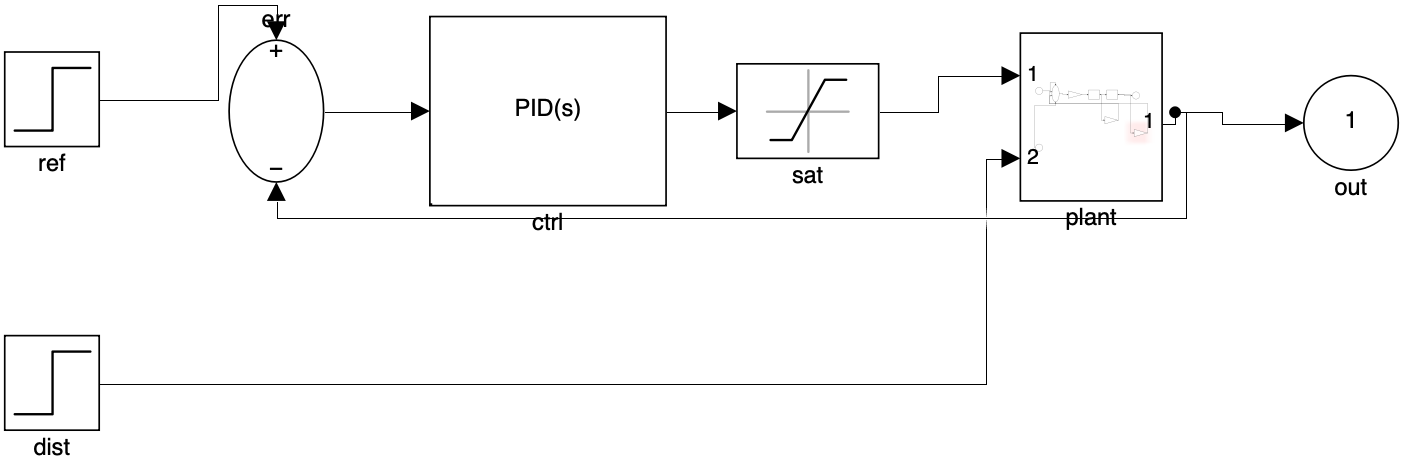 |
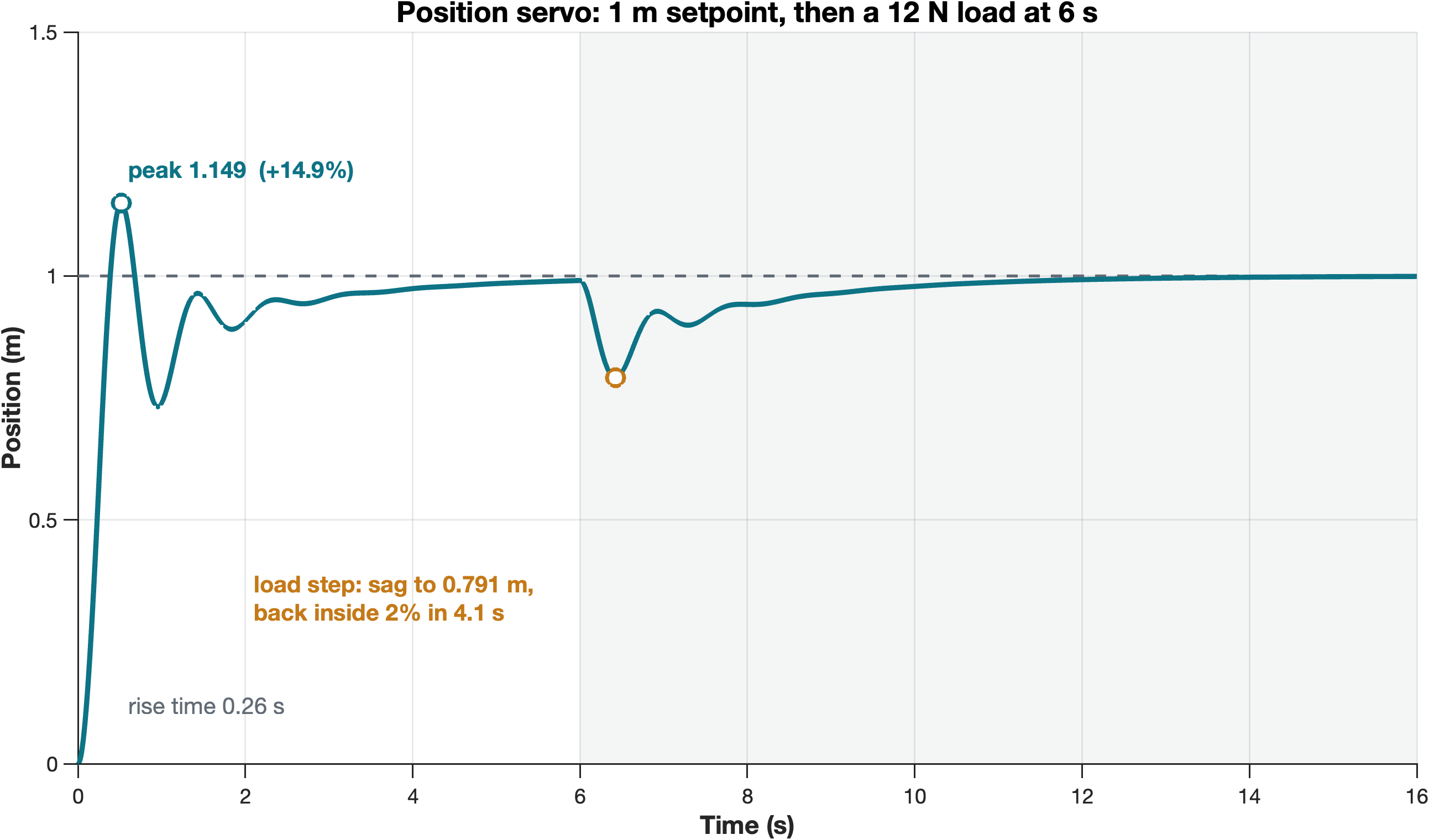 |
| Build — one JSON spec, wired and grouped | Measure — overshoot, rise, settling, steady state |
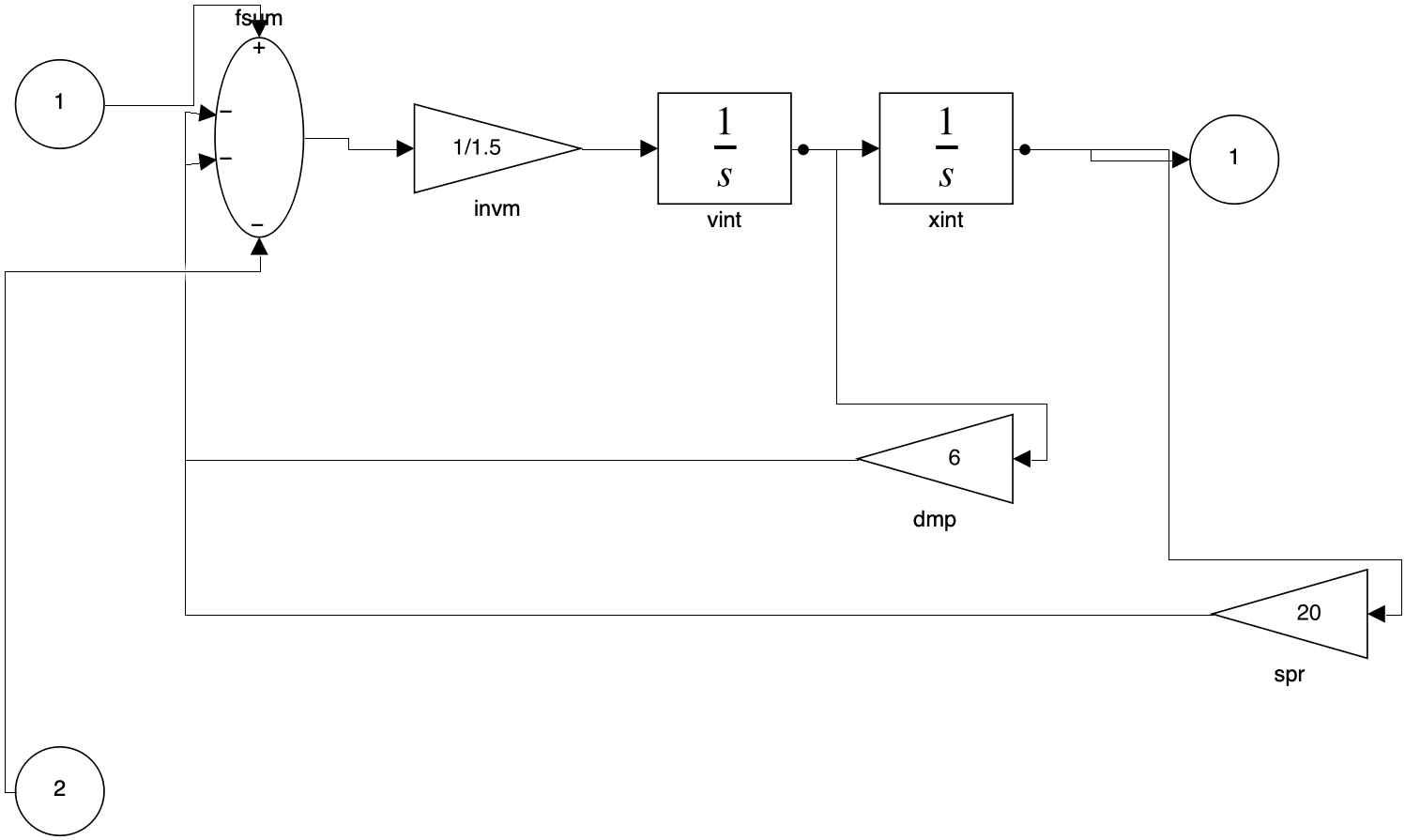 |
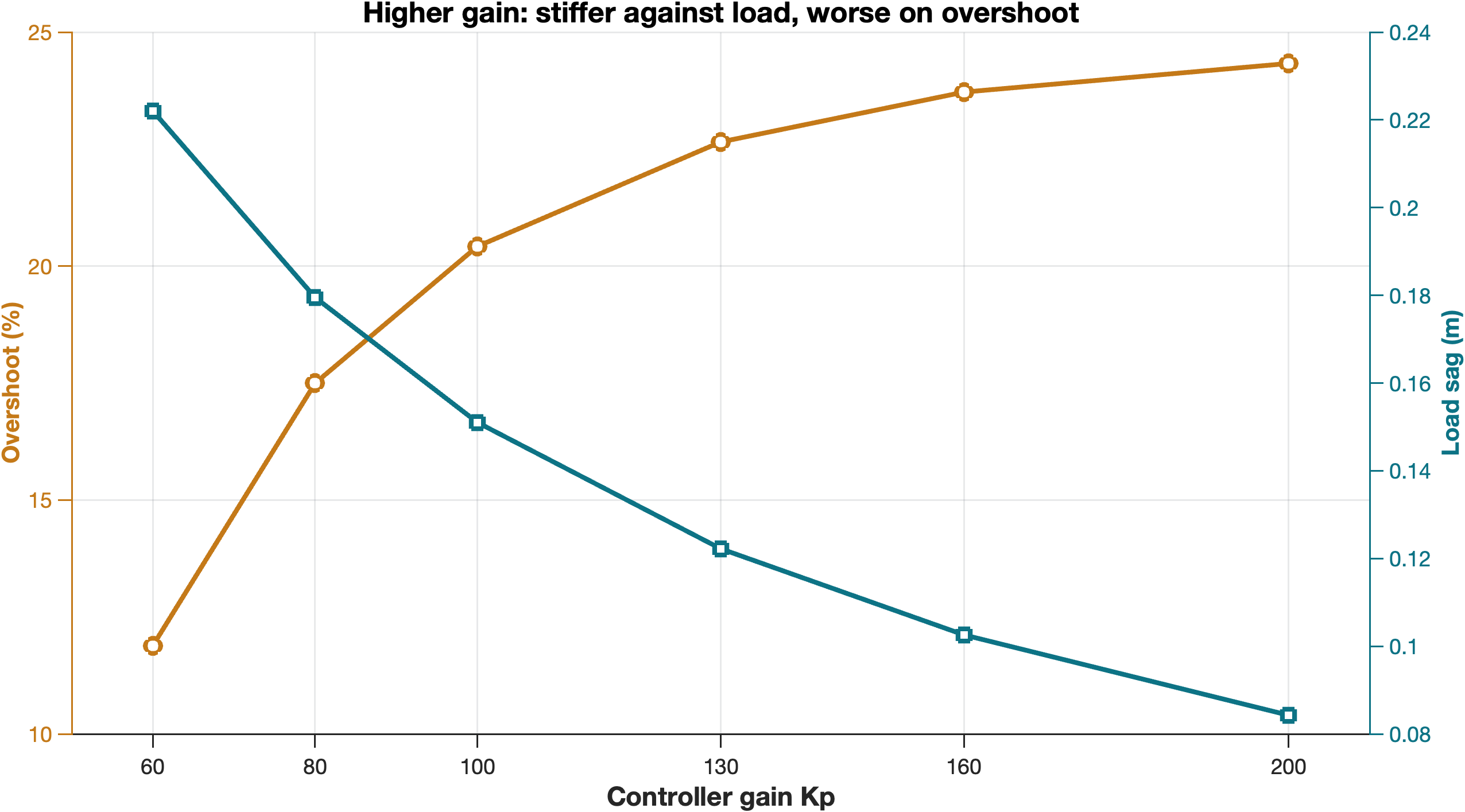 |
| Inspect — inside a subsystem, not just the top level | Sweep — gain against load rejection, one chart |
| Piece | Where | Purpose |
|---|---|---|
MCP server row (id: mcp-simulink) |
composition | stdio row that attaches to MATLAB |
| Runtime copy | $DSH_HOME/simulink-mcp/runtime/ |
bin/matlab-mcp-server, matlab/sl_*.m, tools/simulink-tools.json |
| Skills | $DSH_HOME/skills/simulink-{modeling,simulation,debugging,testing}/ |
build / simulate / debug / verify guidance |
startup.m line |
~/Documents/MATLAB/startup.m |
shareMATLABSession + addpath to the mirrored runtime |
| Settings page | DSH 设置 → Simulink 建模 | connection status, loaded models, diagram preview |
The package is self-contained: the only machine-specific value in
cordis.patch.yml is the $DSH_HOME prefix. Copy the folder to another Mac and
it resolves its own paths after install.
/Applications/MATLAB_R*.app; on Windows it checks
MATLAB_ROOT, the MathWorks registry keys, Program Files\MATLAB, and
every drive (portable installs like F:\matlab). What it searched is
written to runtime/.matlab-search.json.apply() rewrites the addpath line in
~/Documents/MATLAB/startup.m on install, so every new session is shared and
has the tool functions on its path.If MATLAB is closed, DSH still starts (failOnStartupError: false); the tools
and the panel report the failure instead of blocking the app.
| Stage | Tools |
|---|---|
| Session | sl_env, sl_set_folder, sl_last_error, sl_selftest |
| Build | sl_new, sl_open, sl_save, sl_close, sl_add_block, sl_add_line, sl_delete, sl_delete_line, sl_set_param, sl_cleanup, sl_layout |
| Read | sl_list_models, sl_blocks, sl_ports, sl_lines, sl_trace, sl_block_params, sl_lib_search |
| Look | sl_show, sl_snapshot, sl_highlight, sl_plot |
| Verify | sl_update, sl_sim, sl_sim_data, sl_metrics |
Two tools exist purely because guessing went wrong in practice: sl_trace
follows one signal path instead of dumping every line, and sl_metrics returns
overshoot / rise time / settling time / steady-state error instead of leaving
the agent to read a plot by eye.
设置 → 插件 → Simulink 建模,有三块内容:连接状态(版本、pid、工具箱数、工作目录、 运行时同步结果)、模型列表(点开某个模型会显示结构图快照)、最近一次 MATLAB 错误。
?probe=1)才会做实时探测。$DSH_HOME/simulink-mcp/settings.json,DSH 启动 5 秒后在后台
拉起会话;开启/关闭都会立即返回,启动过程由面板轮询显示(已开启 / 正在启动 / 启动失败)。
关闭只停止"以后自动启动",不会杀掉正在跑的 MATLAB。sl_selftest builds a throwaway model in the MATLAB temp folder, wires it,
compiles, simulates, reads data, snapshots, saves, checks error reporting and
cleans up — use it to prove an install works.
The host plugin serves four routes under /plugin-simulink (dispatch matches
the path suffix, so it works whether or not the host strips the prefix):
GET /status — {sync, env, models, error} from sl_env, sl_list_models
and sl_last_errorGET /snapshot?model=<name> — the model diagram as image/pngGET /debug?tool=<mcp tool name>&args=<json> — the raw settled tool batch,
for diagnosing a tool-payload change without guessingPOST /act — {action: "show" | "open" | "env", model?, path?}Every route asks the host's connection.requestRejection(req) first and answers
401/403 before touching MATLAB, so a page in another browser tab cannot drive
the session. On a host without that service the plugin falls back to its own
check (loopback Host, Origin must match) — narrower, but still closed.
model file not found for a real file — check which
sl_*.m MATLAB resolves: which sl_open must point at
$DSH_HOME/simulink-mcp/runtime/matlab/. An older copy earlier on the path
wins otherwise; rmpath it and addpath the runtime folder.包里带两个平台的服务器二进制(runtime/bin/darwin-arm64、runtime/bin/win32-x64)。
runtime/launcher.cjs 按当前平台选二进制、找 MATLAB、补参数,所以
cordis.patch.yml 里没有绝对路径,同一份包在 macOS 和 Windows 上都能装。
Program Files\MATLAB 和所有盘符(覆盖
F:\matlab 这类便携安装);扫过的路径记录在 runtime/.matlab-search.json。要显式指定,
设 MATLAB_ROOT(不要带 \bin)。SaveFormat='Array':Dataset 需要 Simulink signal observer,而 Windows 的
应用控制策略可能把那个 DLL 拦掉(见 INSTALL-WINDOWS.md 第 6 节)。examples/mkt_servo.slx 是本仓库所有截图用的模型:位置伺服,ref(1 m 阶跃) →
err → PID(Kp 60 / Ki 40) → sat(±40 N) → plant(子系统) → out,dist 在 6 s
加 12 N 负载。plant 内部是 1/m、速度/位置两个积分器和弹簧/阻尼反馈。
装好后可以让 agent 直接跑:
打开 examples/mkt_servo.slx,列出顶层块,编译并从 0 仿真到 16 秒,把 out 的位置曲线画出来本仓库的插件代码(Host/Client 插件、runtime/matlab/sl_*.m、技能、文档)是 MIT。
runtime/bin/ 下的 matlab-mcp-server 二进制来自 MathWorks 的
matlab-mcp-server,按其自身许可分发,
只可与 MathWorks 产品一起使用——它不含 MATLAB,也不代替 MATLAB 授权。
runtime/launcher.cjs 只做一件事:挑平台二进制、找 MATLAB、把参数接起来。
CLASSIFICATION EVIDENCE
系统优先读取 GitHub Topics,再与站内分类词典和词根规则比对。当前命中: mcp。
morluto
Reverse engineer anything with agents, from app behavior down to native binaries.

deepseek-ai
DeepSeek Harness: Everything is a Plugin.

nexu-io
The 1st Collaborative AI Design Agent Workspace. Local-first and open source. Create motion, prototypes, websites, apps, dashboards, presentations, images, and videos with your team and AI agents. Share work, exchange feedback, and iterate together in one workspace.