DeepSeek Palenight Theme
A theme for the dsh Harness Web UI, delivered in two forms:
- Persistent dsh bundle (recommended) —
package.json declares
dsh.bundle.patch + dsh.client, so installing the package into a dsh
profile makes the theme part of the host composition: it is served at
/plugins/dsh-palenight-theme/client.js, listed in window.__DSH_BOOT__,
and survives host restarts (same mechanism as @liustack/modlens).
- Dynamic Cordis plugin — the original form (
plugin/client.js +
plugin/host.js), activated per-session via cordis_define/cordis_run;
it dies with the process and is only kept for reference.
Both forms stack a token layer over the active theme — no rebuild of the
harness shell is needed.
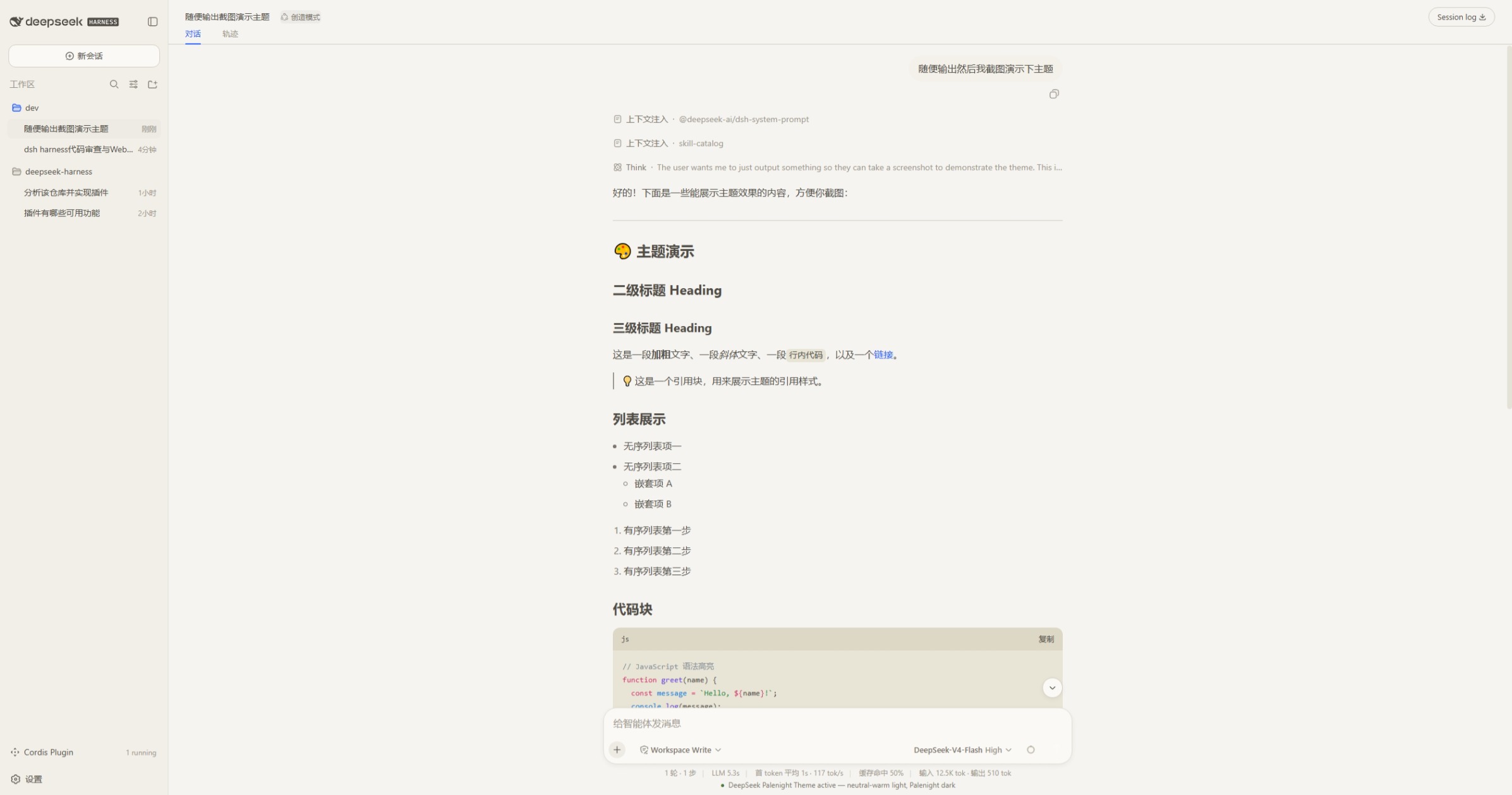
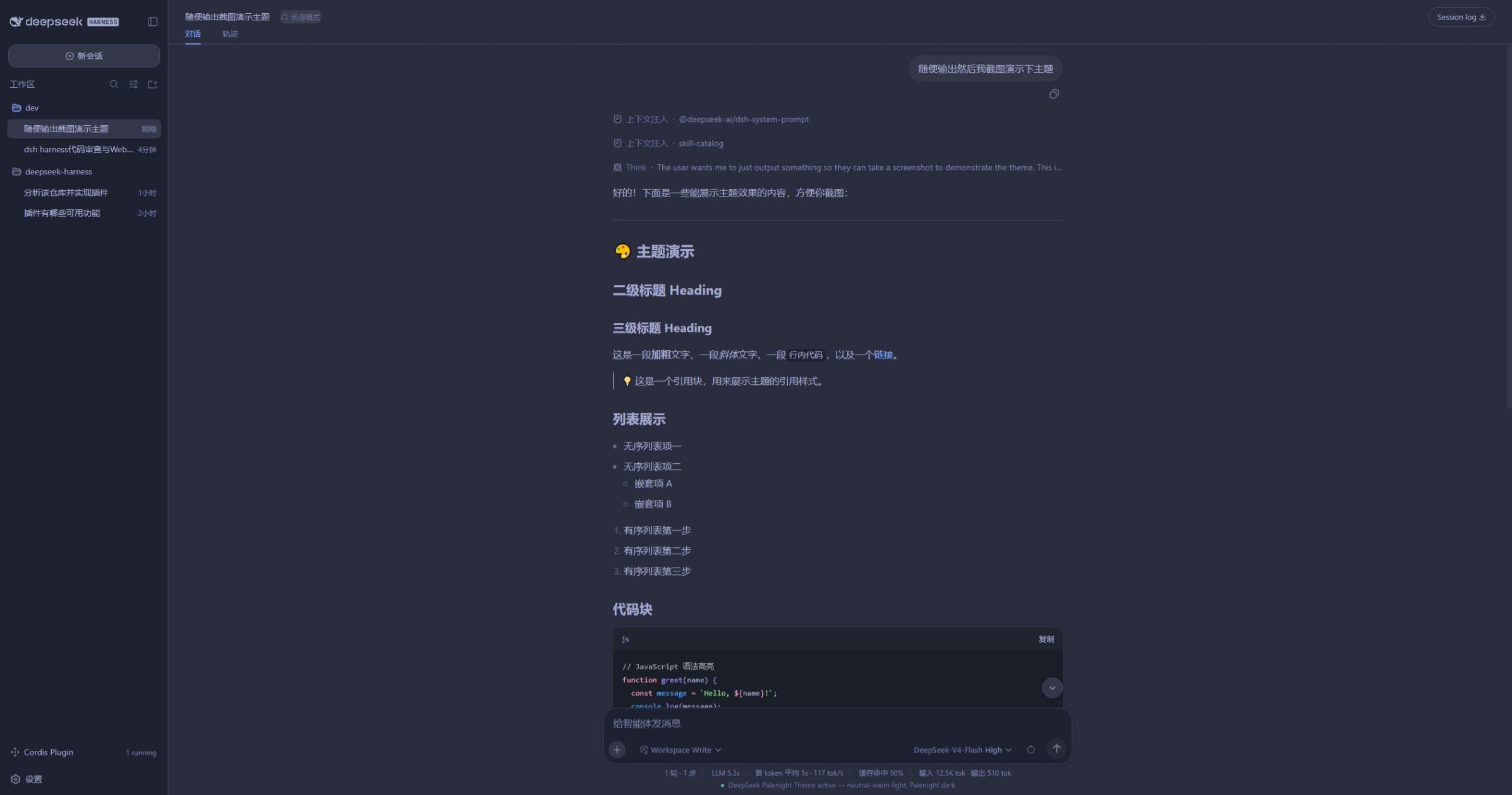
- Dark mode — Community Material Theme Palenight: indigo
#292D3E
surfaces, periwinkle text #A6ACCD, teal accent #80CBC4.
- Light mode — warm neutral: parchment
#F5F4F0, warm grey text #4F4B45,
teal accent #00897B.
- Code blocks get clear contrast in both modes.
- ~100 theme variables covered (surfaces, tabs/headers, inputs, menus,
text tiers, borders, buttons, interactive states, code, scrollbars).
Preview
| Light |
Dark |
 |
 |
How it works
The dsh web frontend exposes a theme client service. overrideTokens(source, tokens) stacks a per-token CSS-variable layer on top of the active theme:
theme.overrideTokens('deepseek-palenight-theme', {
  '--dsw-alias-bg-base': { light: '#F5F4F0', dark: '#292D3E' },
  '--dsw-alias-brand-primary': { light: '#00897B', dark: '#80CBC4' },
  // ... ~100 tokens total
})
The browser half (plugin/client.js) applies the layer and registers small UI
(run-card panel, composer status line). The host half (plugin/host.js)
registers two package-private RPC handlers (demo/ping, demo/hello) and a
model-visible demo tool (demo_greet) to prove both halves are live.
Activation (persistent bundle form — survives restarts)
The package is a dsh bundle: package.json declares dsh.bundle.patch
(its cordis.patch.yml row) and dsh.client (the web client bundle). Install
it so the dsh profile can resolve it:
- Resolve the package from the profile. Either install it with pnpm in
the profile directory (
dsh plugin --profile web add dsh-palenight-theme,
once published), or — for a local checkout — copy the package directory
into the profile's dependency store and register it:
- copy to
~/.dsh/profiles/node_modules/dsh-palenight-theme/
- add
"dsh-palenight-theme": "1.0.0" to dependencies in
~/.dsh/profiles/web/package.json
- append
dsh-palenight-theme to dsh.profile.bundles in the same file
- Restart dsh. The row
- id: dsh-palenight-theme composes into the host
tree, and the client-modules registry adds
/plugins/dsh-palenight-theme/client.js to the boot manifest
(dsh.client.platform: web, immediately: true).
- The theme applies at every boot. Switch dsh Appearance to
Light/Dark/System — both palettes are themed.
To remove: drop the dependency and bundle entry, then restart.
Activation gate. The client bundle declares inject: ['theme'], so the
plugin activates only after the theme service (provided by
@deepseek-ai/dsh-client-ui-theme) is available. Do not remove it: with
inject: [] the immediately: true bundle runs before ui-theme provides
the service, ctx.get('theme') is undefined, and the token layer silently
never applies.
Hot updates. dsh-client-hmr watches served bundle files, so replacing
plugin/client-module.js (same package, new content hash) reaches the graph
without a host restart.
Activation (dynamic form, deprecated — dies on restart)
cordis_define a new Plugin (kind: new, any idPrefix), pasting
plugin/host.js as code.host and plugin/client.js as code.client.cordis_run the returned pluginId/packageId (mode: run).- Approve the browser-side
cordis/request-run prompt (client code only runs
after you approve it).
- The theme applies immediately. Switch dsh Appearance to Light/Dark/System —
both palettes are themed.
To revert: cordis_stop <pluginId> restores the default theme and removes all
effects (badge, cards, tools). cordis_undefine removes it permanently.
Repository layout
dsh-palenight-theme/
├── README.md            This file
├── README.zh-CN.md      中文说明
├── LICENSE              MIT
├── package.json         Bundle manifest: dsh.bundle.patch + dsh.client
├── cordis.patch.yml     Host row insert (- id: dsh-palenight-theme)
└── plugin/
    ├── client-module.js Persistent bundle: browser half (token layer only,
    │                    module protocol, inject: ['theme'])
    ├── host-module.js   Persistent bundle: minimal host row (no-op)
    ├── client.js        Dynamic form: browser half (theme + demo UI)
    └── host.js          Dynamic form: host half (RPC handlers + demo tool)
Notes
- Both halves are plain JavaScript (no TS/JSX/import). The client uses
React.createElement only.
Theme.listTokens exposes only 13 tokens; the frontend actually consumes
~100. overrideTokens accepts any token name (only the { light, dark }
pair shape is validated), so the full set is overridable.- Dark palette values are taken from the Community Material Theme Palenight
VS Code extension (
equinusocio.vsc-community-material-theme-1.4.7), whose
license governs those colors; the code here is MIT.
License
MIT — see LICENSE.


