
学习研究
插件

Study-Mate
Miaotofu01
你的AI学习搭档:定路线、讲知识、做项目,边学边做,学透一门科目
PROJECT TOPICS
INSTALL REFERENCE
dsh plugin --profile web add github:ymwang92/dsh-refkeeper
该命令指向仓库当前默认分支;尚无绑定当前 commit 的完整验证结果。
PROJECT README
English · 简体中文



Long research conversations scatter citations across turns, tool results and summaries. dsh-refkeeper extracts references from the conversation you choose, checks their metadata against five scholarly registries, and turns them into traceable entries with annotations and BibTeX/RIS export. A registry disagreement is kept in quarantine instead of being treated as verified.
If this plugin saves you time, a star on GitHub helps other people find it. If you hit a bug or want a feature, open an issue — Chinese or English, either is fine. I read all of them and add the useful ones to the roadmap.
Features · Supported identifiers · Supported reference formats · Why this matters · Install · Use · Output · Verification · Privacy · Development · Changelog · License
math.GT/0309136 and cs/0112017 — are recognised too.refs/refs.json. The folder below is where the .bib and .ris files are written, not where the library is.| Identifier | Accepted examples |
|---|---|
| DOI | 10.1002/joc.1688; https://doi.org/10.1002/joc.1688 |
| arXiv | 2401.01234, arXiv:2401.01234v2, https://arxiv.org/abs/2401.01234v2; legacy math.GT/0309136, arXiv:math.GT/0309136v2 |
| Link carrying an identifier | https://arxiv.org/format/2401.01234, https://doi.org/10.1002/joc.1688, https://www.biorxiv.org/content/10.1101/2020.01.01.123456 |
| PubMed | PMID: 12345678; PMCID: PMC1234567 |
| ISBN | ISBN-10 0-306-40615-2; ISBN-13 978-0-306-40615-7 |
| Report number | NUREG-1234; PB123456; NACA 1234; NTRS 123456; AD-A123456; DOE/BR-123456; NASA/TM-2020-12345; EPA-600/R-14/001; RFC-9110 |
PMID and PMCID must include their labels. An unlabeled 6–8 digit number such as 20240101 is ignored, so dates and sample IDs are not mistaken for papers. A PMCID is resolved through PMC before the PubMed lookup.
A reference pasted as a line rather than as an identifier is parsed too.
| Format | Example |
|---|---|
| APA | Smith, J. (2020). A study of something. Journal of Testing, 12(3), 45-67. |
| GB/T 7714 | 张三, 李四. 一种标题很长的中文文献标题测试用例[J]. 某某学报, 2020, 12(3): 45-67. |
| IEEE | [1] A. Smith, "A titled paper," Journal of Testing, vol. 12, no. 3, pp. 45-67, 2020. |
| BibTeX | @article{key, title = {A Study}, author = {Smith, John}, year = {2020}, doi = {10.1000/x}} |
| Vancouver | 1. Smith J, Doe A. A study of something. Journal of Testing. 2020;12(3):45-67. |
A BibTeX entry can be pasted in bulk: several blocks in one message are read as
several references. @string macros are expanded and nested braces are
balanced, so title = {A {DNA}-based method} arrives as one title, and an
entry without a title is skipped rather than stored empty.
A standard number is not a reference. ISO 9001, GB/T 12345 and RFC 1918
are read as text but never become entries, because a research conversation
mentions them far more often than it cites them. A report number that really
is a report — NACA 1234, NTRS 123456, DOE/BR-123456, NASA/TM-2020-12345,
RFC-9110 — does become one.
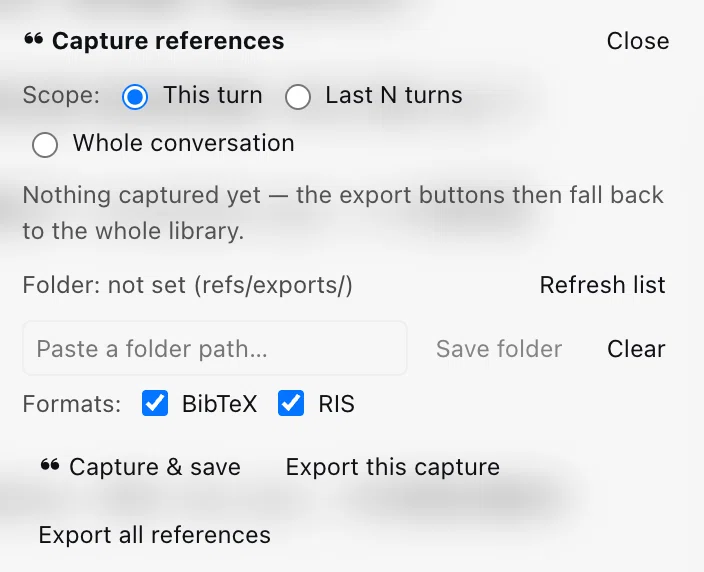
The interface gains exactly one thing: an item in the composer's tool row, standing next to the work-mode and model pickers. It reads ❝ Refs (Chinese UI: ❝ 引用). There is no sidebar, no toolbar and no floating widget — press it and the capture panel opens in the top-right corner of the window, close it and the row is back to what it was.

For three papers, copy by hand. Past that it is slow and easy to get wrong: one DOI sits in a tool result, an APA line sits in a summary, another paper is only mentioned by name two turns earlier.
Asking the model for a .bib file is faster, but models make up page ranges, DOIs and author order, and the mistake is usually found at submission time.
| Copy by hand | Ask a model for a .bib |
This plugin | |
|---|---|---|---|
| Source of the list | your reading | the model's memory | parsed from the conversation you select |
| Metadata checked | no | no | Crossref, OpenAlex, arXiv, DataCite, PubMed |
| What happens to a paper that cannot be confirmed | n/a | kept | moved to refs/quarantine.json, excluded from export |
| Invented pages, DOIs, authors | n/a | possible | fields come from registry records; unsupported fields stay empty |
| Why the paper is there | lost | lost | annotation plus a verbatim quote |
| Same export twice | n/a | unlikely | identical bytes; entries sorted, citekeys stable |
| Citations you never used | not included | included | excluded by default: tool output is not treated as a citation |
In DSH open Settings → Plugins → Add plugin and enter dsh-refkeeper. The package is published on npm, so this is one step and runs no build: the tarball ships the built lib/. Enable it for the current profile, then reload.
To track the repository instead of the published version, paste the Git address https://github.com/ymwang92/dsh-refkeeper into the same dialog. The repository commits lib/ too, so that route needs no build either.
No plugin-specific API key or registry configuration is required. Annotations use the model selected for the current session. The panel's Export to path is stored in refs/settings.json and must stay inside the session workspace; the library remains at refs/refs.json.
The same steps as commands:
/refs capture --scope=all --save
/refs export --format=both
Files are written to refs/ inside the session's workspace. To export into a specific folder, paste its path in the panel once; it is remembered in refs/settings.json. Folders outside the session workspace are refused, because the host only allows writes inside it.
refs/annotated.md is the reading copy:
### Physiographically sensitive mapping of temperature and precipitation across the conterminous United States

- Daly, C.; Halbleib, M.; Smith, J. I. et al. · 2008 · International Journal of Climatology 28 15 2031-2064 · DOI [10.1002/joc.1688](https://doi.org/10.1002/joc.1688)
- verification: **verified** 3/3 · crossref, openalex

> **Summary** — PRISM interpolation: temperature and precipitation grids for the conterminous US, built from station data with a physiographic adjustment.
> **Why it matters** — the dataset behind the 800 m climatology in section 3.
> **Evidence** — "we use the PRISM 800 m normals (Daly et al., 2008) as the baseline for the downscaling."
and the matching BibTeX entry:
@article{daly2008physiographically,
  author = {Daly, C. and Halbleib, M. and Smith, J. I. and Gibson, W. P. and Doggett, M. K.},
  title = {Physiographically sensitive mapping of temperature and precipitation across the conterminous United States},
  journal = {International Journal of Climatology},
  year = {2008},
  volume = {28},
  number = {15},
  pages = {2031--2064},
  publisher = {Wiley},
  doi = {10.1002/joc.1688},
  url = {https://doi.org/10.1002/joc.1688},
  abstract = {PRISM interpolation: temperature and precipitation grids ...}
}
If the citation in the conversation lacked volume, issue, pages, publisher or language, those come from the registry record. Fields that neither the conversation nor a registry supports are left out of the file entirely.
conversation text
   │  identifiers: DOI, arXiv id, labeled PMID/PMCID, ISBN, report number
   │  reference lines: APA, GB/T 7714, IEEE, BibTeX, Vancouver
   ▼
candidates ──► Crossref, OpenAlex, arXiv, DataCite, PubMed
                 (concurrent where possible; PMCID uses a PMC crosswalk)
   │
   ├─ accepted when: title matches · year within ±1 · first author matches
   │                 and at least one registry returned a record
   ├─ accepted ──► refs/refs.json        (verified)
   └─ rejected ──► refs/quarantine.json  (⚠, kept and visible, not exported by default)
unverified is a third status, used when the registries could not be reached. The entry stays in the library and can be retried later; a network failure is not evidence that a citation is wrong. quarantined means the registries answered and disagreed.
Four fields: summary, relevance, evidence, caveats. They are written after a capture by the profile's default model, from the conversation lines that mention the paper. A prompt rule and a parser filter both reject sentences that describe the absence of information ("the excerpt does not mention this work"); such a field is stored as empty and omitted from the export, so BibTeX gets no empty note and RIS gets no empty N1.
The model call happens once per capture, with a 60 second cap, and covers at most 12 entries. Entries beyond that budget, or captures without a reachable model, keep their bibliographic fields and the capture result says why annotations were skipped. The ref_save tool still accepts annotations you write yourself, and existing user annotations are never overwritten.
GB/T 7714 reference lines are parsed along with APA, IEEE, BibTeX and Vancouver. Chinese titles are matched against registry records by character bigrams (Dice ≥ 0.90) rather than word tokens, because romanised records otherwise never match. language is carried into both export formats.
Registry coverage for Chinese journals is thin: CNKI, Wanfang and CQVIP links are only used to extract identifiers, not queried as registries. Expect more manual correction there than for a paper with an English DOI.
| Control | What it does |
|---|---|
| Scope | this turn, the last N turns, or the whole session |
| Capture references | captures, verifies, annotates and stores; the result lists what was saved and what went to the quarantine |
| Where it is stored | the line above the list says how many references this capture stored and that they live in the workspace's refs/refs.json |
| Row checkbox | which entries the next export includes; saved rows are ticked, ⚠ rows are not |
| Badge | the state of the row at a glance: saved, ⚠ quarantined, skipped, failed |
| Sub-line | first author · year · venue, plus the reason when the check failed |
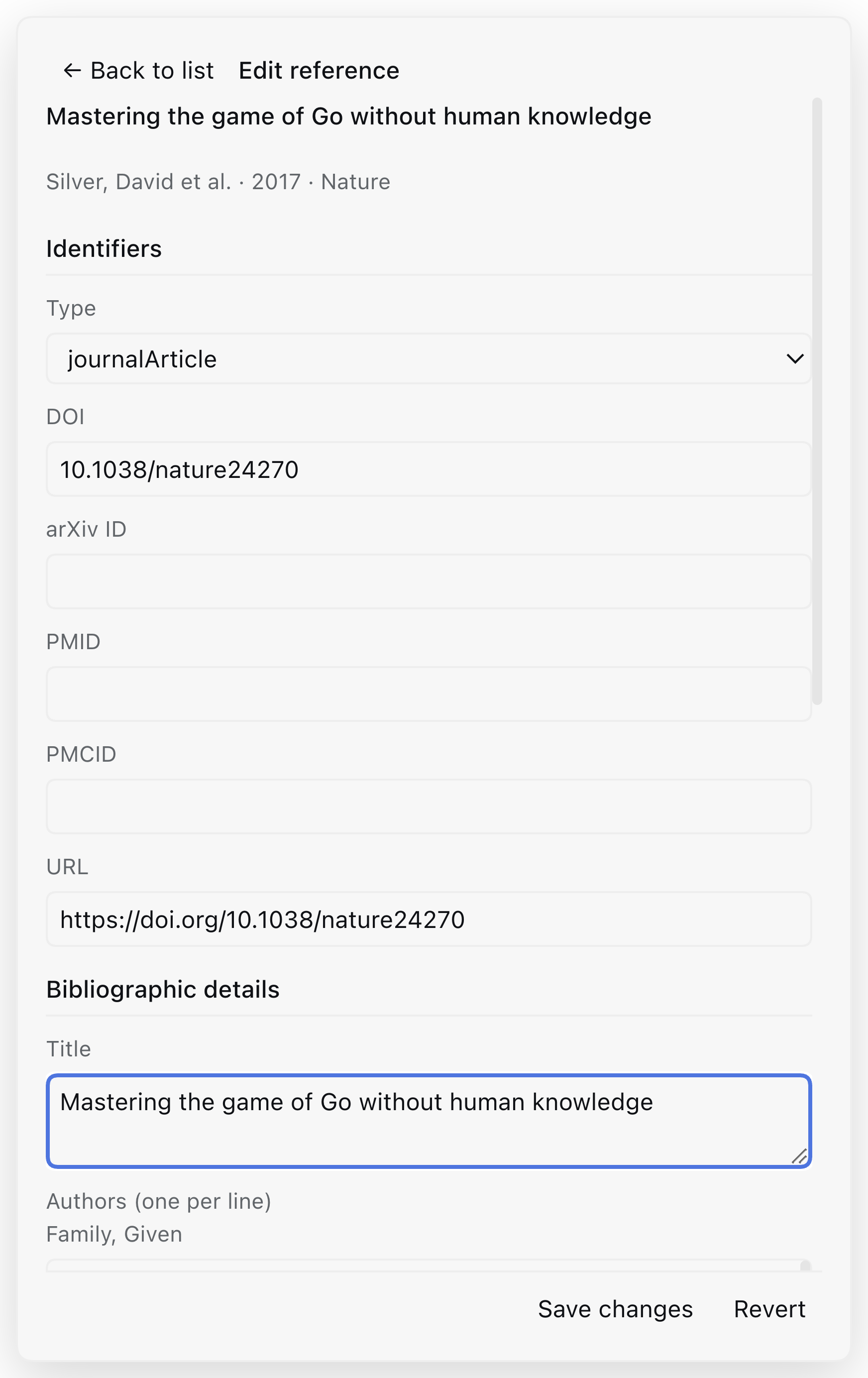
| Click a row | opens an independent edit page instead of expanding inside the list |
| Three field groups | identifiers (type, DOI, arXiv id, PMID, PMCID, URL), bibliography, publication |
| Entry type | a dropdown of the seven types; free text fails silently at export time |
| Manual entry | a skipped row can be completed here and stored |
| Format | BibTeX, RIS, or both |
| Export to | where the .bib and .ris files are written; empty means refs/exports/ |
| Export this capture | writes the ticked entries |
| Export all references | writes the whole library |
The list scrolls on its own: the panel is a fixed header and footer around a scrolling middle, so the export buttons stay reachable however many references the capture brought in.
Opening a row gives you an independent edit page, with the fields grouped into identifiers, bibliography and publication:
| Task | Command |
|---|---|
| Preview what the conversation cites | /refs capture --scope=all --dry-run |
| Capture and store | /refs capture --scope=lastN --turns=5 --save |
| Check one reference | /refs verify --doi=10.1002/joc.1688 |
| Read the library | /refs list [--quarantine] |
| Fill in missing volume, pages, publisher | /refs enrich [--quarantine] |
| Promote verified quarantine entries | /refs promote [--ids=<payload>] or /refs promote --manual --reason=<text> |
| Edit one field | /refs edit --id=<id> --payload=<base64url(json)> |
| Remove entries | /refs remove <id\|doi\|arxiv>... or /refs remove --all --yes |
| Export | /refs export [--format=bibtex\|ris\|both] [--all] [--ids=...] [--out=path] |
| Set the export folder | /refs dir --set=<base64url(path)> or /refs dir --clear |
/refs                                                     capture readiness
/refs capture [--scope=turn|lastN|all] [--turns=N] [--save] [--dry-run] [--include-tools]
/refs verify --doi=... | --arxiv=... | --title=... [--json]
/refs save --json='{...}'
/refs list [--limit=N] [--quarantine]
/refs edit --id=<id> --payload=<base64url(json)>
/refs enrich [--quarantine]
/refs promote [--ids=<payload>] [--manual --reason=<text>]
/refs remove <id|doi|arxiv>... [--quarantine]
/refs remove --all --yes [--quarantine]
/refs export [--format=bibtex|ris|both] [--out=path] [--include-quarantine]
/refs export [--ids=id,id] [--choose-dir] [--all]
/refs dir [--set=<base64url(path)>|--clear]
/refs promote re-verifies quarantine entries against live registries and moves only verified results. --ids narrows it to the rows you ticked in the panel, which is what the two buttons on a quarantined row send: "Re-verify" runs the checks, "Store as manual" moves the row with a recorded manual status and a reason. A promoted entry that already exists in the library replaces that row instead of leaving the old record behind.
Without --save, /refs capture only previews candidates. Export defaults to the
last saved capture; --all exports the library instead. Long identifiers are
passed base64url-encoded because real ids contain spaces, <>, ; and parentheses.
The same work is stored once even if both tables knew about it: a reference that
quarantined first and was captured successfully later is merged by identity
(DOI, arXiv id, ISBN or title + year), and remove / edit apply to both
tables so the leftover copy cannot resurface in an --include-quarantine
export.
| Tool | Purpose |
|---|---|
ref_capture |
collect candidate references from the conversation |
ref_verify |
check one identifier or title against the registries |
ref_save |
store a reference with annotations you supply |
ref_export |
write BibTeX/RIS for a batch, a selection, or the library |
ref_ping |
report which host services and registries are reachable |
refs/refs.json          accepted references, with their annotations
refs/quarantine.json    ⚠ entries that failed the check
refs/last-capture.json  result of the last capture; default export scope
refs/settings.json      remembered export folder
refs/annotated.md       reading copy: record, verdict, annotations
refs/exports/           default export destination
All plain JSON and Markdown, so they can be committed with the manuscript and diffed.
npm ci
npm test          # vitest
npm run typecheck
npm run build     # tsdown for the host bundle, then the client bundle
tsdown clears lib/, so run the client bundle afterwards. Node 22 or newer.
What changed in each release, and why, is in CHANGELOG.md.
MIT. See LICENSE.
CLASSIFICATION EVIDENCE
系统优先读取 GitHub Topics,再与站内分类词典和词根规则比对。当前命中: research。
Miaotofu01
你的AI学习搭档:定路线、讲知识、做项目,边学边做,学透一门科目

1692775560
Mimir — 一站式科研工作台插件:LaTeX 论文边写边编译、arXiv 文献管理、实验追踪、指标图表、GPU 服务器 SSH 任务编排,管理科研全周期。An open-source research workbench plugin for the whole research cycle.

Li-Evan
Open-source AI tutor for personalized learning: Socratic, adaptive lessons to learn anything. Claude Code skill + self-hosted web app. Bloom 2 Sigma · 开源 AI 家教