
模型与 MCP
待识别

rea
morluto
Reverse engineer anything with agents, from app behavior down to native binaries.
PROJECT TOPICS
INSTALL REFERENCE
dsh plugin --profile web add github:yishuiliufang/dsh-relaunch
该命令指向仓库当前默认分支;尚无绑定当前 commit 的完整验证结果。
PROJECT README
English | 中文
Restart DeepSeek Harness from its own sidebar.
🎯 The app has no restart command. This adds one — and unlike editing the application's own files, it survives application updates.
Windows only. The relaunch is implemented with Windows facilities (
wscript.exefor a windowless launch,taskkillto terminate). On macOS and Linux the rail entry still appears, but pressing it fails cleanly rather than doing something unexpected.
DeepSeek Harness ships no UI for restarting itself. The top bar has an
Applications menu, and a restart item exists in the source — but it sits
behind a development flag that production builds never satisfy, so it is not
reachable.
The obvious workaround is to patch the application's app.asar. That works
until the first update: the updater replaces the archive wholesale, your patch
disappears, and the button is gone again. Editing another program's installed
files is also the kind of thing you have to redo forever.
So this does it from the outside. A plugin lives in your DSH profile, which updates do not touch. It adds a rail entry to the sidebar; pressing the button in the panel behind it closes Harness and starts it again.
| ⚡ One click | A rail entry beside the shipped panels |
| 🚫 No console flash | The worker is launched windowless, so nothing blinks on screen |
| 🚫 No confirmation dialog | Restart asks nothing; the panel's button is the confirmation |
| 🔁 Survives updates | Installed as a profile plugin, not carved into the app |
| 🔒 Explicit | The restart never fires on its own — it needs the button |
| 🌐 Localized | English and Chinese, following the app's language setting |
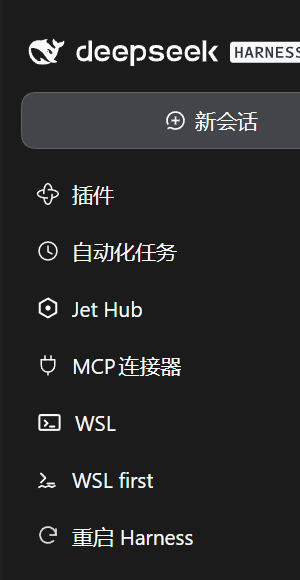
The rail entry sits with the shipped panels:
Selecting it opens the panel, whose single button performs the restart:
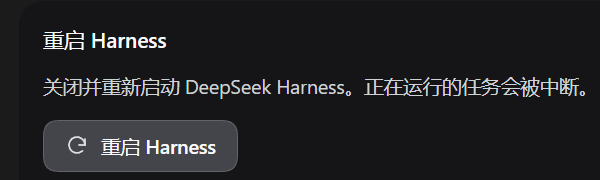
Both images are captures of the running application, not mock-ups.
npm install @yishuiliufang/dsh-relaunchThen add it to your profile's package.json:
{
  "dsh": {
    "profile": {
      "bundles": ["...", "@yishuiliufang/dsh-relaunch"]
    }
  }
}
The bundle ships its own cordis.patch.yml, which inserts the plugin row
process-wide. A profile restart is required — the loader reads its
composition at startup, and the sidebar does not gain the entry until then.
Click the circular-arrow icon in the left rail. The panel has one button.
Pressing it:
Everything running is interrupted. That is what a restart is — DSH checkpoints sessions as it goes, so your conversation history survives, but a task executing at that moment does not.
The restart cannot be done from inside the plugin, because the plugin runs inside the process being restarted. Leaving it to an in-process call would mean the process kills itself mid-response, and any child it started would die with it. So the work goes to a detached worker:
rail button
  └─ POST /dsh-relaunch/restart          (Host half, authenticated route)
       └─ wscript.exe launch-hidden.vbs  (GUI subsystem: no console allocated)
            └─ DeepSeek Harness.exe      (ELECTRON_RUN_AS_NODE=1: Node, windowless)
                 └─ restart-harness.mjs  (terminate → wait → start → verify)
Two details are load-bearing:
wscript.exe, not powershell.exe. PowerShell is a
console-subsystem program: starting it allocates a console window that
flashes on screen, and the WMI route used to detach it cannot ask for
CREATE_NO_WINDOW. The Harness executable is a GUI-subsystem binary, so
running it in Node mode produces no window at all.ELECTRON_RUN_AS_NODE before restarting the app. That
variable is what makes the worker run as Node instead of as the desktop app.
It is process-scoped, so it is inherited — and an Electron binary that inherits
it starts as a bare Node runtime with no application logic and exits within a
second, leaving nothing running. test/host.mjs pins this.>= 0.1.7-rc.2 (engines.dsh).The plugin declares *no `@deepseek-ai/peer dependency** and imports none of their values. That is deliberate: at startup DSH runs a compatibility check over every profile bundle, and if even one peer range fails to cover the running version, the whole bundle is skipped —cordis.patch.yml` never takes effect and
it looks like "installed but nothing happens". With no peer range to check, that
failure cannot occur here.
None. The plugin has no options; the route and the delay are fixed.
dsh-relaunch
├── index.js            # Host half: registers the restart route
├── client.js           # Client half: the rail entry and its panel
├── restart-harness.mjs # The detached worker: terminate, wait, relaunch, verify
├── launch-hidden.vbs   # Windowless launcher (wscript → Node mode)
├── restart-harness.ps1 # Transition shim; see CHANGELOG for why it remains
├── locale/             # Plugin-list metadata (en, zh)
├── icon.svg            # Plugin-list icon
├── test/
│   ├── manifest.mjs    # Package/manifest wiring (16 checks)
│   ├── host.mjs        # Route contract and the relaunch environment (11 checks)
│   └── client.mjs      # Client mount, localization, panel states (17 checks)
├── cordis.patch.yml    # Bundle layer: inserts the plugin row
├── dsh-plugin.json     # Plugin manifest
├── CHANGELOG.md        # Release notes
└── package.jsonnpm testNo DSH host and no dependencies are needed — the suites import only Node
builtins. host.mjs covers the environment leak described above, which is the
one bug in this project that produced a worse outcome than having no plugin at
all.
See CHANGELOG.md for what changed in each release.
MIT
CLASSIFICATION EVIDENCE
系统优先读取 GitHub Topics,再与站内分类词典和词根规则比对。当前命中: deepseek-harness。
morluto
Reverse engineer anything with agents, from app behavior down to native binaries.

deepseek-ai
DeepSeek Harness: Everything is a Plugin.

nexu-io
The 1st Collaborative AI Design Agent Workspace. Local-first and open source. Create motion, prototypes, websites, apps, dashboards, presentations, images, and videos with your team and AI agents. Share work, exchange feedback, and iterate together in one workspace.