
模型与 MCP
待识别

rea
morluto
Reverse engineer anything with agents, from app behavior down to native binaries.

yingyu4451/dsh-whale-leap
Play the whale-wallpaper animation added in DSH 0.2.2-rc.2 inside ongoing conversations, and replace the small mark to the left of the “Deep diving” status with an animated DeepSeek logo. · 让 DSH 0.2.2-rc.2 新增的鲸跃壁纸动画在已经进行的对话里也能出现,将运行状态行「深度求索」左侧的小尾巴替换成DeepSeek Logo 动画。
PROJECT TOPICS
INSTALL REFERENCE
dsh plugin --profile web add github:yingyu4451/dsh-whale-leap
该命令指向仓库当前默认分支;尚无绑定当前 commit 的完整验证结果。
PROJECT README

The whale-wallpaper animation added in DSH 0.2.2-rc.2 now also appears inside ongoing conversations, and the small mark to the left of the “Deep diving” status can be replaced with an animated DeepSeek logo.
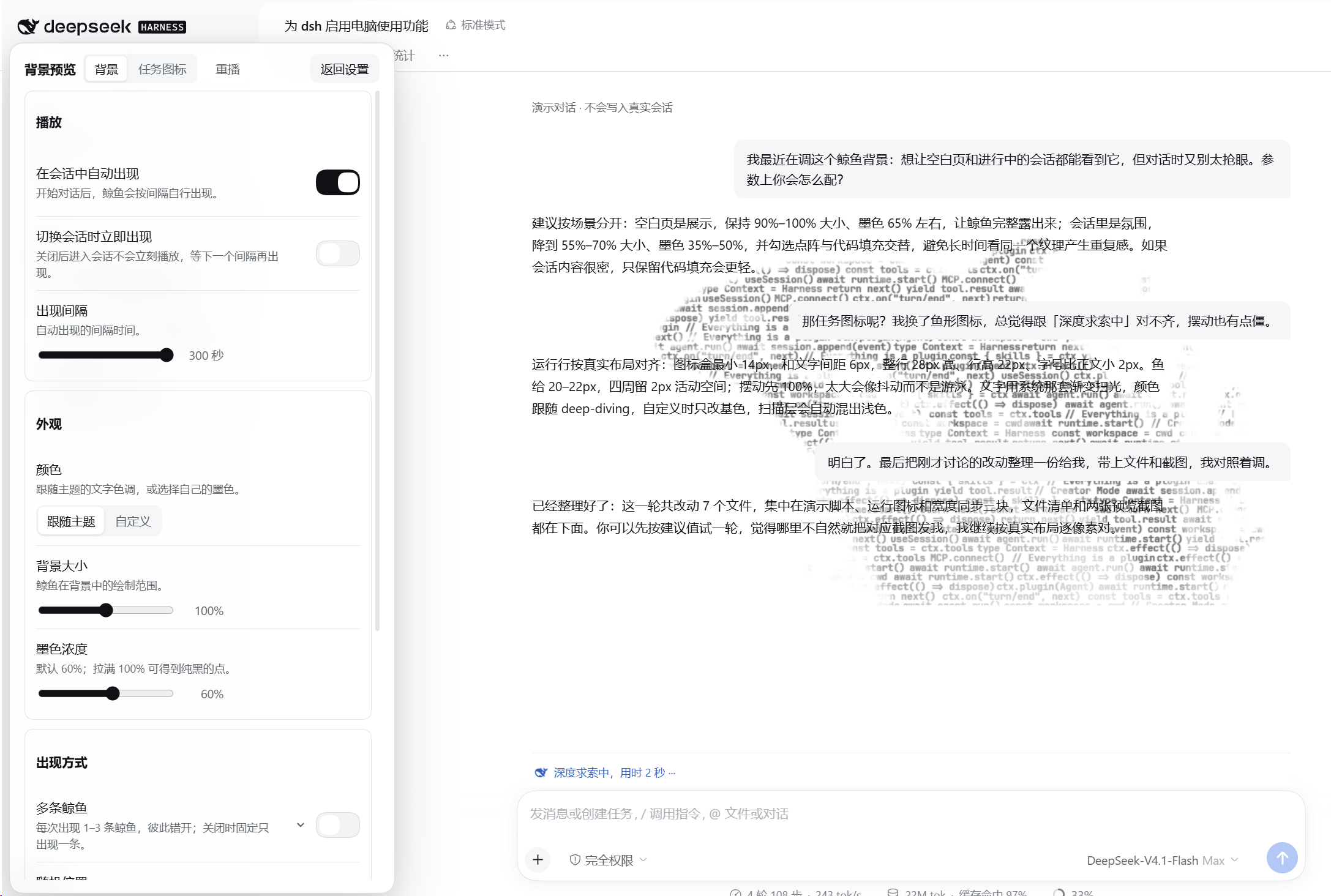
Live preview hides the settings dialog and replays the whale in the real conversation while a floating panel stays open for tuning. On the blank home — where there is no conversation yet — it stages a demo transcript and a running row, so the animation can still be judged against a realistic layout.
Esc or Back to settings restores the settings dialog.dsh web in a browser, restart the DSH app on desktop.From GitHub:
github:yingyu4451/dsh-whale-leap.dsh web once, then refresh the page.From a local checkout (development):
dsh plugin --profile <profile> add /path/to/dsh-whale-leapAfter rebuilding, copy the new build over $DSH_HOME/profiles/<profile>/node_modules/dsh-whale-leap and restart dsh web; alternatively remove and re-add the plugin in Plugins.
The settings header shows the current version and a Check for updates button. When a newer version is found, an Upgrade button appears: it resolves the release tag to its commit and reinstalls that exact revision through the DSH plugin manager (a failed install rolls back automatically). Restart dsh web afterwards to load the new build. If the plugin manager is unavailable or the check fails, the row keeps a link to the release page and distinguishes rate limiting, network errors and timeouts.
The settings page keeps only playback controls, a preview canvas per tab, and the Live preview entry; every appearance control lives in the floating panel.
| Option | Meaning |
|---|---|
| Appear automatically in conversations | Whether the whale appears on its own once a conversation starts. |
| Play immediately on conversation switch | When off, entering a conversation waits for the next interval instead of replaying at once. Available only while auto-appear is on. |
| Appearance interval | Minutes and seconds pickers, 5 s–59 min 59 s. Available only while auto-appear is on. |
| Random interval | When on, each wait is a fresh random 5 s–60 min instead of the fixed interval; the interval pickers are disabled. Off by default. |
| Option | Meaning |
|---|---|
| Colour | Follow the theme, or a custom ink colour. |
| Background size | Scene scale, 50%–150%. |
| Ink strength | 10%–100%; 100% is solid black dots. |
| Fill styles | Dot matrix, code, glyphs, binary and lines. Any number can be enabled; enabled styles rotate in order, at least one is required. |
| Option | Meaning |
|---|---|
| Multiple whales | 1–3 whales per appearance; off means a single whale. |
| Entrance timing | Together (all breach at once) or Independent (each picks its own moment). Only with multiple whales. |
| Size range | Farthest-to-nearest pod whale sizes, 20%–100%. Only with multiple whales. |
| Distance ink | Farther whales use lighter ink so the pod reads with depth. Only with multiple whales. |
| Random position | On: every whale gets a new spot, with the whole breach kept on screen. Off: a fixed formation, centred by default. |
| Horizontal / vertical position | Group offset while random position is off, −200 to +200 px each. |
The Task icon tab in the floating panel adjusts: replace the running icon (switch), icon colour, text colour, icon size (8–28 px), text size (11–20 px), horizontal/vertical offsets (−12 to +12 px each), motion style and swing amplitude (50%–200%). Text size only changes the font size; it does not alter the row height or padding.
Esc or Back to settings: leave live preview and restore the settings dialog.conversation.hero.frame, conversation.chat.running.mark and settings.section, so it needs ui-conversation, ui-chat and ui-settings.conversation.chat.running.mark slot; when the official build lacks that slot it falls back to a DOM adapter that hides the original icon (and restores it when the switch is off).whale-leap partition namespace.pnpm install # esbuild, react and a Host-side schemastery dev copy
pnpm run build # produce the ModuleLoader bundle lib/client.js
pnpm run check # build + smoke + render + Host routing checkslib/client.js embeds the frame atlas (webp → data URL) and the version; the Host half index.js only pulls @deepseek-ai/schemastery from the running profile and registers the settings page.
GitHub is the single source of releases and updates: the settings page compares against the repository's latest release (falling back to tags when no release exists).
pnpm run release:patch (or release:minor / release:major) bumps the version, commits and creates the vX.Y.Z tag.git push --follow-tags.gh release create vX.Y.Z --title "vX.Y.Z" --notes "…".index.js Host: Config schema, settings.configure and atlas route
shared/settings.js Field names, ranges and defaults shared by both halves
src/client/index.tsx Client entry: registers the three slots
src/client/atlas.ts Inlined frame atlas data URL
src/client/store.ts Settings runtime (mirror + debounced writes)
src/client/i18n.ts Eight locale dictionaries
src/client/platform.ts Web vs desktop shell detection
src/client/settings/ Settings page and CSS modules
src/client/whale/ Canvas, renderer, code fill, running icon artwork and paths
src/client/update.ts GitHub release check
src/client/upgrade.ts One-click upgrade (tag → commit, via the plugin manager)
docs/images/ README screenshot
locale/*.json Plugin manager title/description/detail metadataThe whale renderer, code fill, fish paths and running-icon animation are adapted from DeepSeek Harness (MIT License, Copyright (c) 2026 DeepSeek); the frame atlas comes from the same repository and ships with this package. Full licence and adaptation notes are in THIRD-PARTY-NOTICES.md.
This is an unofficial project — not affiliated with or endorsed by DeepSeek. The MIT licence grants copyright permissions only; it does not grant trademark rights in the DeepSeek name, logo or artwork.
CLASSIFICATION EVIDENCE
系统优先读取 GitHub Topics,再与站内分类词典和词根规则比对。当前命中: deepseek-harness。
morluto
Reverse engineer anything with agents, from app behavior down to native binaries.

deepseek-ai
DeepSeek Harness: Everything is a Plugin.

nexu-io
The 1st Collaborative AI Design Agent Workspace. Local-first and open source. Create motion, prototypes, websites, apps, dashboards, presentations, images, and videos with your team and AI agents. Share work, exchange feedback, and iterate together in one workspace.