
模型与 MCP
待识别

rea
morluto
Reverse engineer anything with agents, from app behavior down to native binaries.
PROJECT TOPICS
INSTALL REFERENCE
dsh plugin --profile web add github:yingqi-studio/dsh-panel-compact
该命令指向仓库当前默认分支;尚无绑定当前 commit 的完整验证结果。
PROJECT README
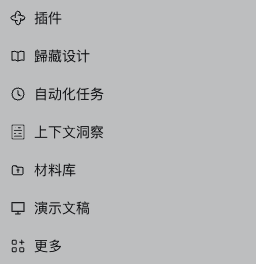
DeepSeek Harness puts every plugin panel entry in the sidebar. When you install a handful of plugins, that list eats the top of the sidebar and squeezes the workspace below it. This plugin folds it down:
localStorage, so the next launch looks the same.| Before — every panel in the sidebar | After — three of them, plus More |
|---|---|
 |
 |
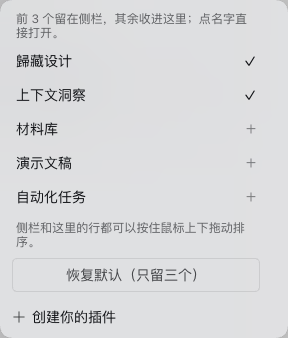
display: none — no plugin is unloaded, nothing inside a panel changes.sidebar.panellist.actions slot, which is what makes the shell render its "More" row in the first place. Every panel appears there, in your order, with a ✓ (in the sidebar) or + (in More) toggle. Rows in the menu can be dragged too.dsh plugin --profile <your-profile> add github:yingqi-studio/dsh-panel-compactAlso staged on npm as dsh-panel-compact — the first release is in npm's staged review, so until it is approved the npm entry only carries the 0.0.0-stage placeholder. Use the GitHub install above in the meantime; then dsh plugin --profile <your-profile> add dsh-panel-compact works too.
In DSH Desktop, open Plugins, search the name and install it there. Restart the app — a new bundle is composed into the profile tree at boot — and the sidebar comes back compact.
Requires the sidebar panel slots (dsh.web 0.2.x, verified against @deepseek-ai/dsh-client-ui-sidebar 0.2.1-rc.5). engines.dsh is declared as >=0.2.0.
The shell sorts panel rows by the order each plugin passed at registration, and exposes no API to reorder them; setPinned only reaches a plugin through the props of the sidebar.panellist.actions slot. So everything here happens in the page, on the row elements themselves:
style.display = 'none';style.order on nav children (nav is a flex column);data-dshsc-id so a row can be mapped back to a panel id;Two safety valves: if no "More" entry can be found, the plugin hides nothing (so panels can never be folded away with no way back); and the whole activation is wrapped in a try/catch, so a shell change degrades to "no compaction" instead of a broken sidebar.
The menu also hides the shell's own "Browse other plugins" row, since the full panel list is already there and the plugin browser is one click away in the sidebar.
localStorage['dsh-panel-compact.v1']:
{ "initialized": true,
  "order": ["plugins", "guizang-design", "schedules", "dsh-context", "materials", "dsh-ppt.workbench"],
  "pinned": ["guizang-design", "schedules"] }
Clear that key to go back to first-run behaviour. Note that this is per browser profile, not per DSH profile: two browsers see two layouts.
order on the DOM, so other plugins still see the registration order — nothing global is rewritten.nav with class suffix _panelList, panel rows as button[aria-label], and the More anchor as button[aria-haspopup="menu"]. That is why it is a plugin and not a core patch — if DSH changes the shell, this needs a matching change.The plugin was verified against a real page, not a mock: copy the desktop profile to a scratch DSH_HOME, boot it with dsh --profile test --no-open --port <port>, then drive a Chromium instance over CDP and check the DOM (display, order, data-dshsc-id, localStorage) after pinning, dragging and resetting. dsh --profile desktop --dump-config confirms the bundle is composed into the profile tree as - id: panel-compact / name: dsh-panel-compact.
DSH 左侧栏顶部的插件面板入口太多时,会把下面的工作区挤小。这个插件把这一排收起来:
localStorage,下次打开还是这样;安装:dsh plugin --profile <你的profile> add dsh-panel-compact,或在 DSH Desktop 的「插件」里搜名字安装,然后重启应用(新的 bundle 在启动时才会被合成进去)。
为什么是插件而不是改核心:外壳的面板行按注册时的 order 排序、没有对外排序 API,setPinned 也只在「更多」槽位的 props 里给到插件,所以显隐与顺序只能在浏览器里对行元素做(display / order / data-dshsc-id)。找不到「更多」入口时它什么也不藏,保证面板不会被藏了又打不开。
状态键:localStorage['dsh-panel-compact.v1'],清掉即恢复首次运行的状态。
MIT License.
CLASSIFICATION EVIDENCE
系统优先读取 GitHub Topics,再与站内分类词典和词根规则比对。当前命中: deepseek-harness。
morluto
Reverse engineer anything with agents, from app behavior down to native binaries.

deepseek-ai
DeepSeek Harness: Everything is a Plugin.

nexu-io
The 1st Collaborative AI Design Agent Workspace. Local-first and open source. Create motion, prototypes, websites, apps, dashboards, presentations, images, and videos with your team and AI agents. Share work, exchange feedback, and iterate together in one workspace.