
模型与 MCP
待识别

rea
morluto
Reverse engineer anything with agents, from app behavior down to native binaries.
PROJECT TOPICS
INSTALL REFERENCE
dsh plugin --profile web add github:yingqi-studio/dsh-material-library
该命令指向仓库当前默认分支;尚无绑定当前 commit 的完整验证结果。
PROJECT README
A material library for DeepSeek Harness (dsh): collect what a conversation produced — a folder, a file, a note — keep it in real folders with tags, and jump back to the chat it came from in one click.
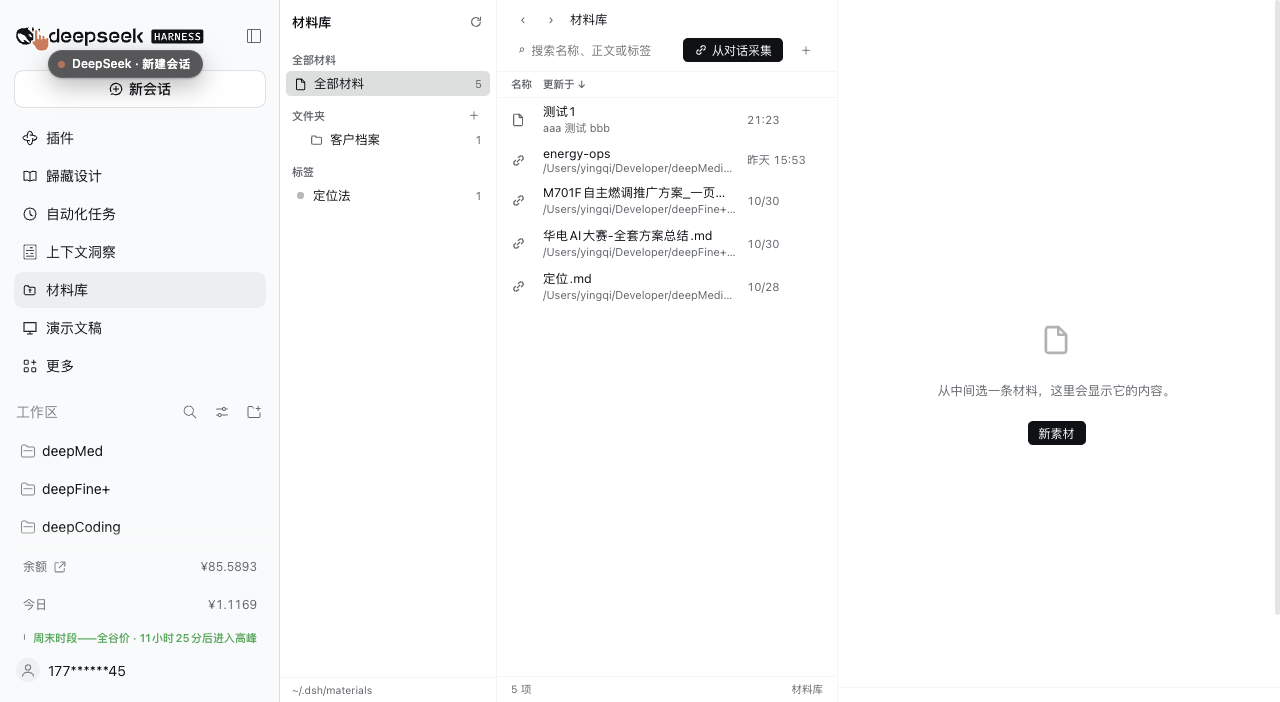
从对话采集 / Collect from chat button in the library open a picker: choose a conversation, browse its working directory, pick a folder or a file, name the entry, choose the library folder and tags. Entries point at the original path; nothing is copied..md file on disk; the folder tree is the directory tree under the library root (default ~/.dsh/materials). Tags live in .index.json beside it. You can edit either from outside the app.open command: the default app, or another installed application picked from a menu, or reveal in Finder. Images preview inline; text and Markdown render in the detail pane.Open in original session switches to that conversation and opens the folder in its right sidebar..history/ (up to 30 per file). Open Versions in the detail header, read any version in the pane, and restore it — restoring snapshots the current body first, so a restore is undoable. Notes kept: refs and folders have no versions.收进库 / Copy into library); the original is untouched./import copies a file or a directory from anywhere inside your home directory into the library (up to 2000 files per call), reusing the same collision-safe naming.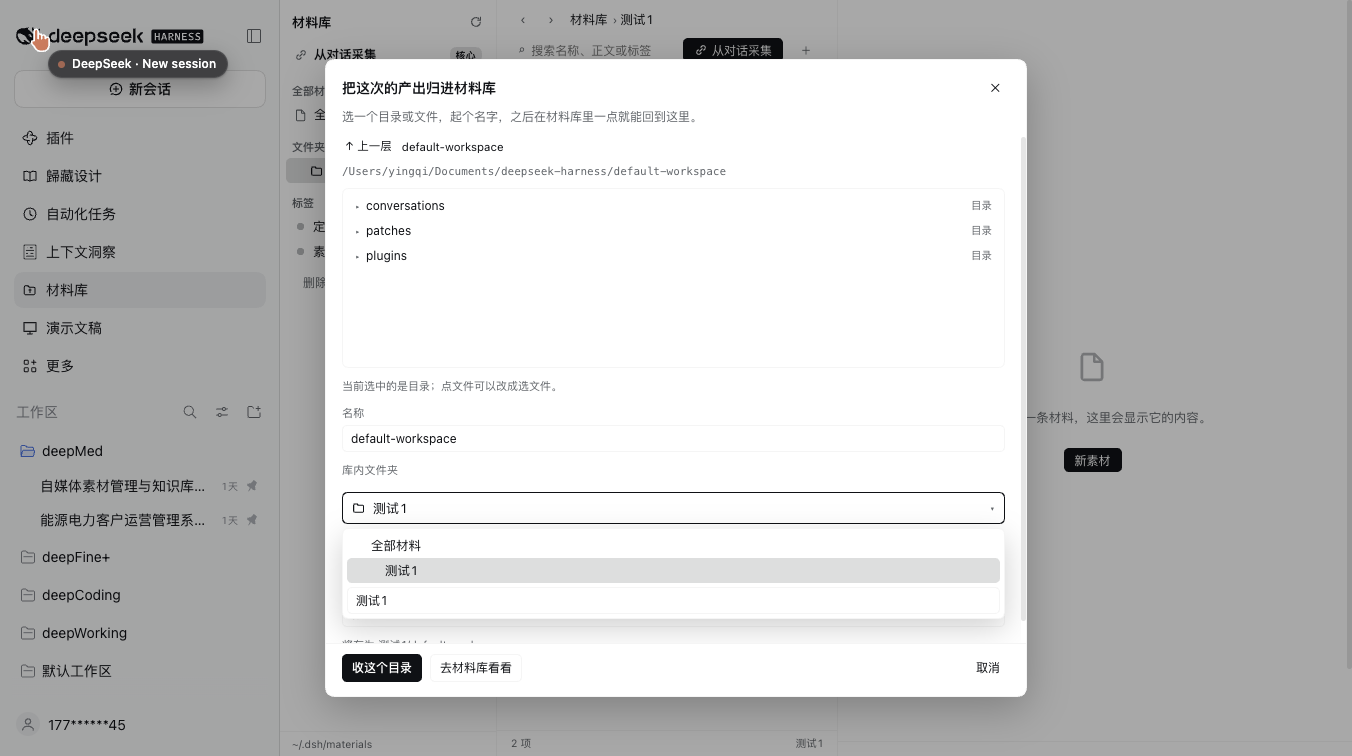
dsh plugin --profile <your-profile> add dsh-material-libraryPublished on npm as dsh-material-library; installing straight from GitHub also works: dsh plugin --profile <your-profile> add github:yingqi-studio/dsh-material-library.
In DSH Desktop, open Plugins, search the name, and install it there. Restart dsh web (or refresh the page) and the library appears as an icon in the sidebar.
Requires a host with the sidebar-entry and right-sidebar slots (dsh.web 0.2.x). engines.dsh is declared as >=0.2.0.
~/.dsh/materials/            # library root (override with the plugin config `root`)
├── .index.json              # tags for notes, plus the references you collected
├── .rules.json              # auto-filing rules (see below)
├── 使用说明.md               # a note = a real markdown file
└── 客户项目/                 # a folder = a real folder
    └── 需求.md
Set root in the plugin config to move the library elsewhere. Writes are serialized and atomic (.tmp + rename); paths are confined to the library root, and collected targets must stay inside your home directory.
The UI talks to the host over same-origin JSON routes under /api/dsh-materials (no generated remotes, so it stays dependency-free):
| Method | Route | Purpose |
|---|---|---|
| GET | /health |
library root, readiness |
| GET | /home |
home directory (fallback start for the picker) |
| GET | /state |
folders, notes, references, tag counts |
| GET | /list?path= |
list a directory outside the library (for the picker) |
| GET | /file?path= |
read a note |
| GET | /ref/preview?id= |
read a referenced text file for the detail pane |
| GET | /ref/raw?id= |
raw bytes of a referenced file (images) |
| GET | /openers?path= |
installed apps that can open a target, with icons |
| GET | /search?q=&tag= |
search names, bodies and tags |
| GET | /session-times |
last-modified time per session (picker ordering) |
| POST | /create /update /delete |
notes |
| POST | /folder /folder/rename /folder/delete |
folders |
| POST | /tag/rename /tag/delete |
tags |
| POST | /ref/add /ref/update /ref/delete |
collected references |
| POST | /open |
open / reveal a target with the OS |
| GET | /versions?path= |
saved versions of a note (id, time, size) |
| GET | /version?path=&id= |
read one saved version |
| POST | /restore |
restore a version (snapshots the current body first) |
| POST | /ref/copy |
copy a collected reference into the library as a real file |
| POST | /import |
copy a file or directory from inside the home directory into the library |
| POST | /archive |
file files or a folder into the library as references (idempotent; merges tags on a path already filed) |
| GET | /rules |
auto-filing rules (root, folder, tags, last run) |
| POST | /rules/run |
run the rules of one session now |
| POST | /rules/delete |
forget one rule |
Everything that mutates goes through one serialized store; conflicts (duplicate name, non-empty folder, unknown application) come back as readable 4xx errors.
A scheduled task can file its own output. The host registers one tool, materials_archive, available in every session:
materials_archive(path="out/", folder="日报/2026-11", tags=["日报"], include=".html,.md")path — file or folder (supports ~; a relative path resolves against the session's working directory). Omitted: the working directory.folder — library folder; empty/omitted files at the root. Created on demand.tags — merged with whatever the entry already carries.depth — 1 (default) files the files directly inside a folder, 0 files the folder itself as one entry, up to 12.include — comma separated suffix/glob filter, e.g. .html,.jpg or *.png.limit — stop after N entries (default 50, max 200).It is idempotent per path: filing the same path again refreshes its tags and folder instead of adding a second entry, so a task that runs every day can just call it again. The files are never moved or copied — the entry is a reference.
For a scheduled task, end the task prompt with a line like:
跑完把 out/ 收进材料库,folder 用「日报/当月」,tags 用 ["日报"]。
Filing a deliverable once is also a decision: "this keeps being produced". The library remembers it, and at the end of every later scheduled run that works in that folder it re-files the new documents by itself — no prompt instruction, no extra tool call.
The first filing is normally yours: you file the first 日报 the task produced. Nothing is remembered unless a filing actually happened, so a task nobody ever filed leaves no trace in the library.
materials_archive(path="out/", folder="日报", tags=["日报"])   # first run, by hand
# ... the task writes out/2026-11-03.html on its next run ...
# ... end of that run: out/2026-11-03.html is already in 日报 ....json, .log, .tmp, screenshots and dotfiles stay on disk). A folder with no document at all falls back to filing everything, so a task whose product really is a .json is not silently emptied. Pass include to override.out/2026-11-02.html and the rule watches out/ for .html only. Filing a single file remembers its folder plus its type..rules.json at the library root; a target that disappeared is skipped, not fatal.materials_archive files references, so a re-run of a task that overwrites its output still points at the same (new) file; a task that writes a new timestamped file every run adds one entry per run.把对话里产出的目录、文件和笔记收进一个材料库:真实文件夹 + 标签,Finder 的观感,点开像对话消息一样阅读,一键跳回原始会话。
.md,文件夹就是目录树(默认 ~/.dsh/materials),标签存在 .index.json。.history/(每个文件最多 30 份);右栏头部「历史版本」→ 选中看正文 → 「恢复这个版本」。恢复前会先给当前内容拍一份快照,所以恢复本身也能撤回。/import 把 home 目录里的一个文件或一整个目录复制进库(单次上限 2000 个文件)。.json/.log/.tmp/截图/. 开头)留在原处;目录里一个文档都没有时退回全收(产物本来就是 .json 的任务不会被清空)。显式给 include 可覆盖。日报.html,就只盯 .html)。没有人手动收过,就什么都不记。规则只在该目录所属的定时任务跑完时触发,把新出的同类成品自动收进来;普通对话轮次结束不会自动收录。规则跟着目录走,所以第一次在哪个对话里收的都无所谓。左栏「自动归档」可看到规则,悬停点 × 即停。materials_archive:定时任务可以把最终成品收进库。任务 prompt 末尾加一句「跑完把 out/ 里最终成品收进材料库,folder 用日报/当月,tags 用 ["日报"]」即可;收过一次后同类文件以后自动进来,不必每次写。同一条路径重复归档只更新标签与文件夹,不会重复入库,原件不动。安装:dsh plugin --profile <profile> add dsh-material-library(已发布在 npm;也可以 github:yingqi-studio/dsh-material-library 从仓库装)。
materials_archive agent tool.materials_archive。MIT
CLASSIFICATION EVIDENCE
系统优先读取 GitHub Topics,再与站内分类词典和词根规则比对。当前命中: deepseek-harness。
morluto
Reverse engineer anything with agents, from app behavior down to native binaries.

deepseek-ai
DeepSeek Harness: Everything is a Plugin.

nexu-io
The 1st Collaborative AI Design Agent Workspace. Local-first and open source. Create motion, prototypes, websites, apps, dashboards, presentations, images, and videos with your team and AI agents. Share work, exchange feedback, and iterate together in one workspace.