
其他
插件

dsh-bili-scroll
c1overzz
DSH 插件:每天替你刷一轮 B站,读字幕挑出值得的、写一份日报,值得的 @ 你
PROJECT TOPICS
INSTALL REFERENCE
dsh plugin --profile web add github:yhuan416/dsh-remote-hub
该命令指向仓库当前默认分支;尚无绑定当前 commit 的完整验证结果。
PROJECT README





English | 中文
Deployment guide (Chinese): docs/DEPLOY.zh.md Robustness notes (Chinese): docs/ROBUSTNESS.zh.md Architecture: ARCHITECTURE.md · 中文架构总览: docs/ARCHITECTURE.zh.md Compatibility: COMPATIBILITY.md Changelog: CHANGELOG.md · Roadmap: ROADMAP.md (中文: docs/ROADMAP.zh.md) Sibling projects: dsh-remote-agent · dsh-opencode-client
One browser tab, every dsh backend. The hub is a single dsh web that reverse-proxies each
registered remote backend under /remotes/<id>/, so the browser only ever talks to the hub origin —
which is what DSH's same-origin fences require (Host/Origin equality, SameSite=Strict cookies, no
CORS). A remote is just an HTTP base URL the hub can reach: a manual ssh -L, a plugin-managed
tunnel, or a future agent channel. The proxy code does not change.
# 1. install the plugin into a dsh profile (hub side)
git clone https://github.com/yhuan416/dsh-remote-hub ~/.dsh/plugins/dsh-remote-hub
cd ~/.dsh/plugins/dsh-remote-hub && ./scripts/install.sh web

# 2. make sure the backend publishes its token: install dsh-remote-agent there
#    https://github.com/yhuan416/dsh-remote-agent  →  ./scripts/install.sh web

# 3. restart the hub, then open 设置 → 插件 → dsh-remote-hub and add the remote
dsh web
The top bar then lists 本机 plus every remote; picking one shows that backend in a pane, and
+ 在 npm run check.
M1 (v0.2.0) — multi-backend remote control is usable: proxy, managed tunnels, token exchange, top-bar switching, remote session create/prompt and cwd chooser. See ROADMAP.md for what comes next (native integration depends on an upstream dsh workspace/session seam).
Validated end-to-end against a real remote over ssh -L:
| Check | Result |
|---|---|
/remotes/ without the hub cookie |
401 |
/remotes/ fallback entry page |
200 |
/remotes/<id>/ remote index |
200, own <base href="./"> |
/remotes/<id>/assets/* |
200 |
/remotes/<id>/plugins/** |
200 |
POST /remotes/<id>/api/<ns>/<method> |
200 (real gateway envelope) |
GET /remotes/<id>/plugins/events (SSE) |
200 |
Upgrade /remotes/<id>/api/remote.mux |
101 |
cross-origin Origin |
403 |
| unknown remote | 404 |
| two remotes at once | both 200/101, independent boot graphs |
Every health probe also parses the backend's __DSH_BOOT__.release.version; a mismatch with the
hub's own dsh version is logged, exposed as remoteVersion / hubVersion / versionWarning by
GET /api/remote-hosts/list and POST /api/remote-hosts/probe, and shown in the switcher's status
tooltip.
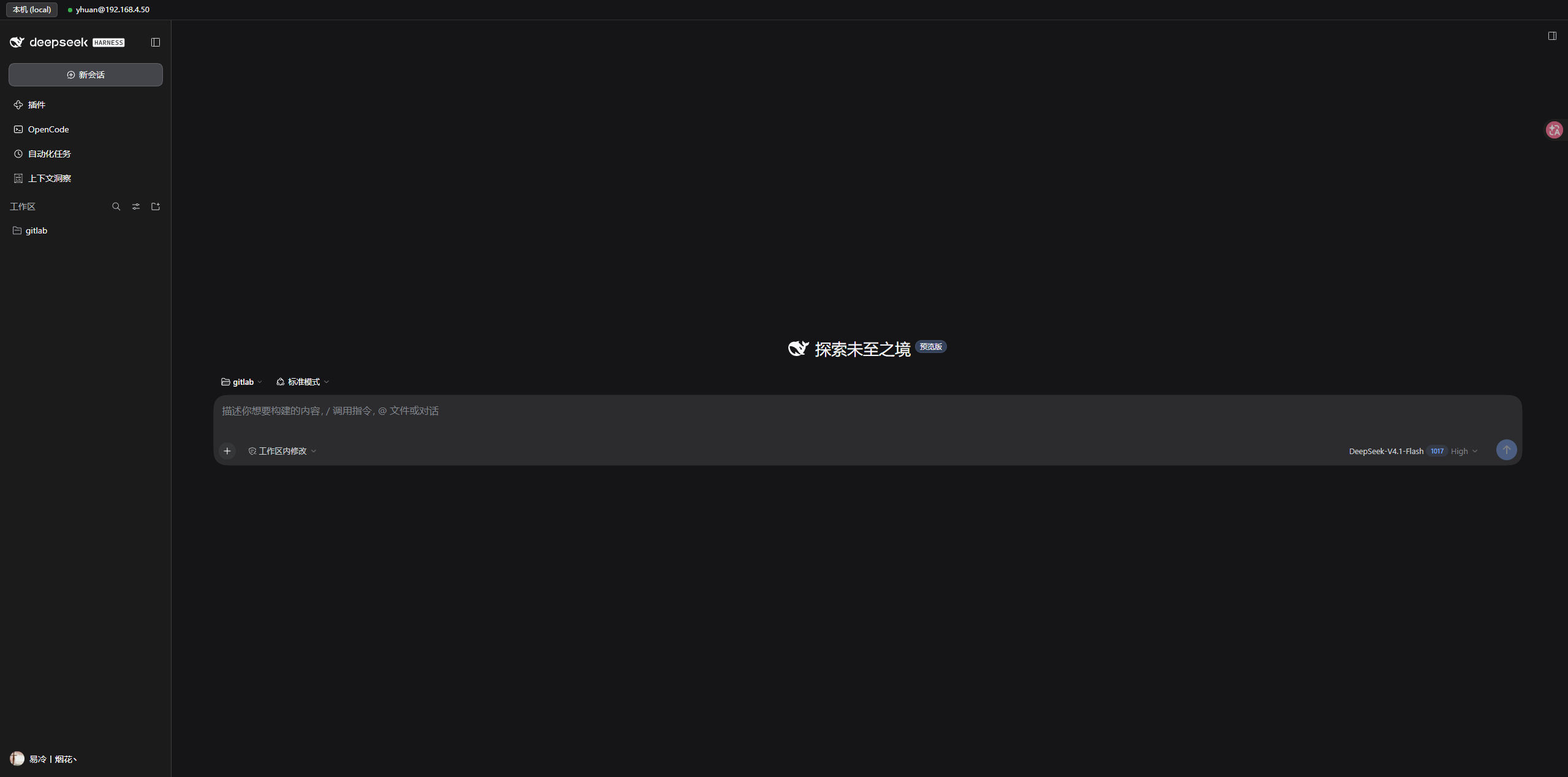
Hub with the top-bar environment switcher — 本机 (local) plus every registered remote; picking a
remote shows that backend in a pane without reloading the hub page:
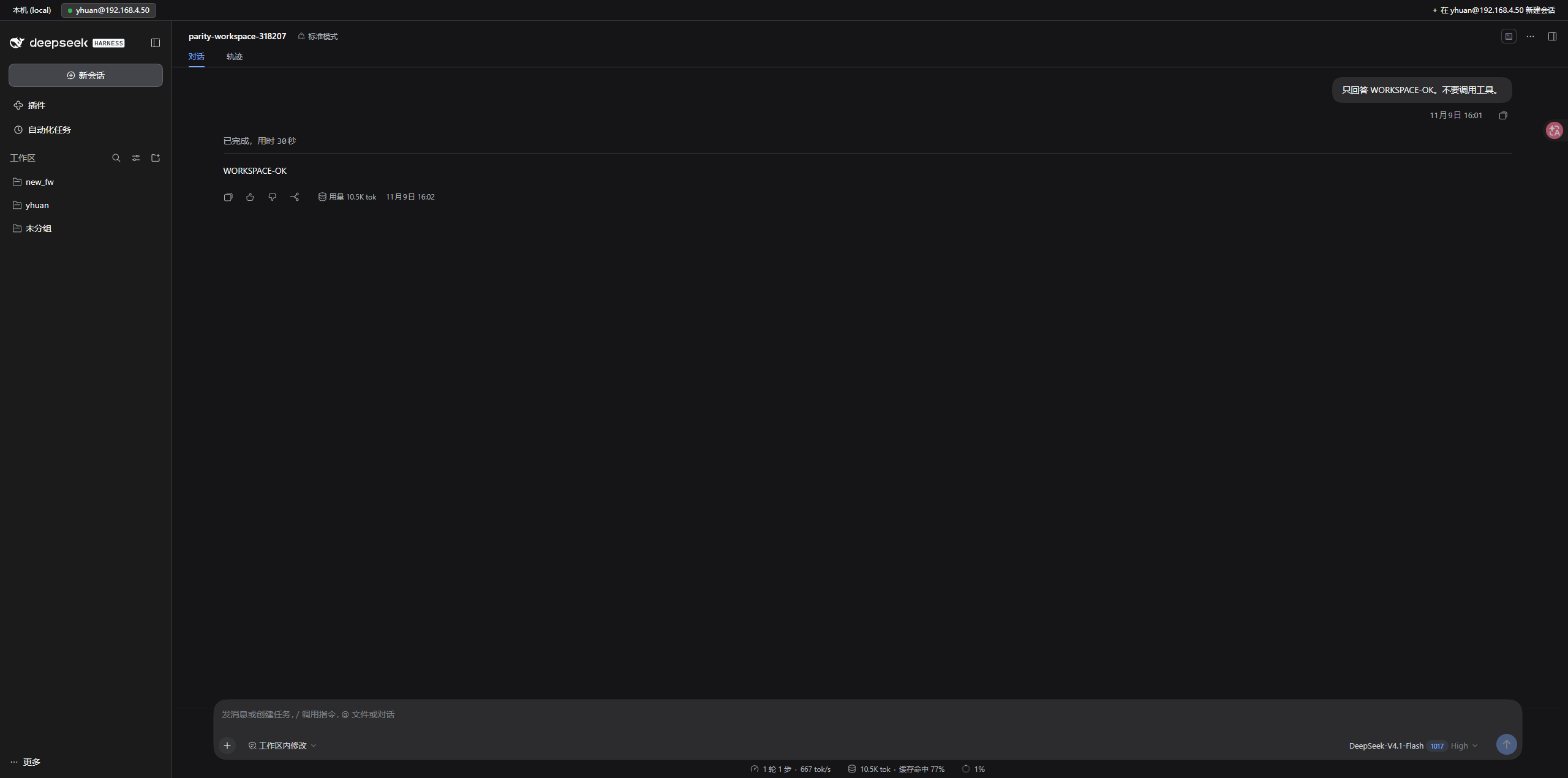
A remote backend rendered inside the hub pane: this session was created with the workspace
option, so it belongs to the remote's new_fw workspace (left sidebar) instead of a bare cwd:
Remote management lives in the unified Plugins page: Settings → Plugins → dsh-remote-hub (the plugin's detail page). The plugin contributes two pieces there:
Config): upstreamTimeoutMs,
probeIntervalMs, switcher.mode, switcher.dropdown;plugins.detail.section, registered by the hand-written client bundle
lib/client.js): table of remotes with state dot / label / transport / token source / latency
/ last error, per-row 打开 / 测试 / 删除, an add form (label, ssh host, user, remote port),
and a 远端工作区 list: every backend's workspaces and sessions aggregated by the Hub
(workspace store over ssh + session/list RPC; cwd grouping when the store is unreadable).
Clicking a session opens that backend in the top-bar pane and sends
{type:'dsh-hub-open-session', sessionId} to the framed page, whose client half calls
uiWorkspace.openSession() (retried until acked; falls back to the backend's home page)./remotes/ is now only a fallback entry page (plain links, no admin console). /api/remote-hosts/*
remains the API behind the Plugins section.
The supported multi-backend UX is the top-bar environment switcher (本机 + every remote).
Selecting a remote shows + 在 workspace, so it lands in
that workspace), then the known cwd paths, a custom path, or the remote default; the last used
directory is remembered per remote. It calls POST /api/remote-hosts/session/create, and opens the
new session in that backend's pane.
Remote sessions stay inside the backend's own proxied UI; they are not native local sessions. Earlier embedded overviews (sidebar mirror, iframe page, hero row) were removed deliberately — they layered UI without a native data seam. See ARCHITECTURE.md.
A remote dsh backend can run work for the current session in its own environment (files, tools, model) and return only the final answer:
remote_subagent tool — available whenever at least one remote is registered:
{ host?, task, workspace?, cwd?, session?, timeoutMs? } creates (or continues) a remote
session, sends the task, waits for the remote turn to settle and returns the full final
assistant text (read from the durable transcript) plus the remote session id. It does not depend
on OpenCode being configured. workspace (an id or its absolute path) makes the new session
join that remote workspace instead of owning a bare cwd, and is exclusive with cwd; a path is
resolved against the backend's workspace store over ssh, so an upstream-only remote needs the id.
A cwd session keeps the directory but is not recorded in the workspace store (it shows up as an
orphan in the hub's workspace list).remote-dsh-<id>. Add a tool row to
the profile to expose it to the agent (restart after adding a new host):- insert:
- id: tool-remote-n100
name: "@deepseek-ai/dsh-tool-subagent"
config:
provider: remote-dsh-n100
maxDepth: provider-managed
toolName: remote_subagent_n100Parity with local subagents (as far as the external-provider seam allows):
agentPreset is forwarded to session/create;agentOptions.provider/model/reasoningEffort is applied with session/selectModel (the model
must exist on the remote; maxTokens is rejected because the remote selection API cannot set it);outputSchema is prompt-enforced and validated locally, returning structured;label renames the remote session to dsh subagent: <label>;Not possible through this seam: continuable children, live tool/event streaming into the parent,
shared parent context, depth-limit inheritance, and native subagent catalog cards — those need a
local Agent or an upstream remote-session provider. Without the native row, use the
remote_subagent tool with an explicit host/cwd.
/api/remote-hosts/session/create and /api/remote-hosts/session/prompt forward
session/create / session/prompt through the managed tunnel and remote cookie, so the hub
can create a session on a chosen remote and send it a prompt without leaving the hub origin.
session/create takes either cwd or workspace (a workspace id or its absolute path; the two
are exclusive) — workspace joins an existing remote workspace, cwd owns a bare directory.
Independent of dsh remotes, the plugin can treat opencode servers as another kind of remote: declare them in config and the Plugins section lists their projects/sessions, can create a session, and embeds the session's own opencode UI:
config:
  opencode:
    - id: local-oc
      label: 本地 opencode
      url: http://127.0.0.1:4096   # opencode serve --port 4096
      # password: ...             # optional, OPENCODE_SERVER_PASSWORD (Basic auth)
Endpoints: GET /api/opencode/list, POST /api/opencode/session. Deep links use
<url>/session/<id>. The browser must be able to reach the server URL (same machine as the Hub, or
a local ssh tunnel); a remote opencode server needs ssh -L for now.
Runtime configuration lives in $DSH_HOME/remote-hosts.json (0600, atomic write):
{
  "version": 1,
  "removed": ["old-id"],     // tombstones: a seed in cordis.patch.yml stays deleted
  "hosts": [ { "id": "...", "label": "...", "ssh": {...}, "tokenFile": {...} } ]
}remotes array from cordis.patch.yml is imported into the store.| Route | Method | Body | Result |
|---|---|---|---|
| /api/remote-hosts/list | GET | — | sanitized remotes + state/health/latency/tunnel/token/stats |
| /api/remote-hosts/save | POST | label, transport, ssh{host,user,port}, remotePort, localPort, upstream, tokenMode, token, tokenPath | { ok, id } |
| /api/remote-hosts/remove | POST | { id } | { ok } |
| /api/remote-hosts/probe | POST | { id } | { ok, result: { status, latencyMs, tokenResolved, hasCookie } } |
| /api/remote-hosts/workspaces | GET | — | per remote: workspaces[{id,title,path,sessions[]}] + orphans; ssh reads the backend workspace store, direct groups by cwd |
These routes are registered through ctx.connection.fetch.register, so the framework enforces
the owner Peer and the browser trust fence for them.
The plugin injects one floating pill into the hub's own index page via the official
webserver/index-inject hook (kind: "html", body placement):
default mode bar: a persistent top bar lists 本机 + every remote. Picking a remote shows
that backend in an iframe below the bar (mounted once, kept alive); 本机 hides the pane again
and reveals the same local page — never a reload. The bar reserves 34px through
body{padding-top} so the app layout does not shift.
colors come from the app's own theme tokens (--dsw-alias-bg-base, --dsw-alias-label-primary,
--dsw-alias-border-l2, --dsw-alias-interactive-bg-*), so the bar follows light/dark mode.
every remote tab carries a status dot polled from /api/remote-hosts/list every 5s:
green online, amber pending/starting, red offline, grey unknown; hovering shows
state / tunnel state / last error.
the sidebar dropdown below the "new session" control is off by default now that the bar is
always visible; set switcher.dropdown: true to re-enable it (it uses the same theme tokens).
config:
config:
  switcher:
    mode: sidebar        # sidebar (default) | floating
    corner: bottom-right # floating mode only
    offsetX: 14
    offsetY: 14
content: a dropdown listing 本机 + every remote (current one highlighted), a "管理远端…" link;
the top bar and the dropdown offer "+ 在 POST /api/remote-hosts/session/create with it, and opens the new session in that backend's
pane (environment selection and new-session creation in one place, no page reload);
picking a remote opens a fullscreen overlay with that backend in an iframe, so switching never reloads the page you are on; iframes stay mounted once opened and switching between backends is instant. 本机 / 关闭 / Escape hide the overlay; a remote page rendered inside the overlay posts a message to the parent instead of navigating the top window;
it only ever appears on the hub's authenticated index response — the 401 page and proxied remote pages never contain it, and no token is embedded in the link (the hub cookie already authorizes it);
the launcher page carries a "← 本机" link back to the local UI.
The top bar is plain HTML injected by the host plugin. Remote management uses a hand-written
client bundle (lib/client.js, declared through dsh.client) that only registers a Plugins-page
section — no build step for either half.
/remotes/?token=<hub launch token> — one-shot entry: the plugin relays the token to the
hub's own /?token= exchange, sets the hub cookie, then 303s to the clean /remotes/.
Use the same hostname you used in the token URL (127.0.0.1 vs localhost are different cookie hosts)./remotes/ — fallback entry page (plain links); management moved to the Plugins page./remotes/<id>/ — a remote's own SPA, proxied./remotes/_status — JSON diagnostics: per remote hasToken / hasCookie / lastError.flowchart LR
browser["browser<br/>(hub origin only)"]
hub["dsh web — hub<br/>dsh-remote-hub"]
sub["dsh web — remote A<br/>+ dsh-remote-agent"]
sub2["dsh web — remote B<br/>+ dsh-remote-agent"]
browser -->|"same-origin HTTP / SSE / WS"| hub
hub -->|"/remotes/a/* → 127.0.0.1:3182"| sub
hub -->|"/remotes/b/* → 127.0.0.1:3183"| sub2
sub -.->|"writes remote-agent.json<br/>(token + port)"| hub
sub2 -.->|"writes remote-agent.json"| hubGET /?token=<token> exchange itself and caches the pair. The browser never sees
the remote token or the remote cookie./remotes/n100/api/x -> /api/x),Host and Origin rewritten to the upstream authority (127.0.0.1:3182),
which the remote's Host/Origin fence accepts as loopback,- insert:
- id: remote-hub
name: dsh-remote-hub
config:
remotes:
- id: n100 # [A-Za-z0-9_-]+, unique, stable
label: yhuan@192.168.4.50
upstream: http://127.0.0.1:3182 # whatever the hub can reach
token: <remote dsh launch token> # option A: inline (rotates on every remote restart)
- id: n100
upstream: http://127.0.0.1:3182
tokenFile: # option B: read the token automatically
kind: ssh # ssh | file
host: 192.168.4.50
user: yhuan
path: ~/.dsh/remote-agent.json # written by dsh-remote-agent on the backend
- id: local2
upstream: http://127.0.0.1:3183
tokenFile: /home/yhuan/.dsh/remote-agent.json # option B, same hostThe token is a credential: keep the profile file at 0600 and never log it.
Tuning keys live in the same config block:
config:
  upstreamTimeoutMs: 30000   # response-header timeout; expired requests answer 504
probeIntervalMs: 30000 # periodic health probe (GET /); 0 disables itTwo forms, per remote:
# A. the hub can already reach it (manual ssh -L, LAN, wg, ...)
- id: local2
  upstream: http://127.0.0.1:3183

# B. the plugin manages the tunnel itself
- id: n100
  ssh: { host: 192.168.4.50, user: yhuan }   # optional: port, identityFile, proxyJump
  remotePort: 3080                            # remote dsh port, default 3080
  # localPort: 32000                          # optional; default = 32000 + index (stable),
                                              # falls back to a free port when taken
Managed tunnel behaviour:
ssh -N -L 127.0.0.1:<local>:127.0.0.1:<remotePort> with
BatchMode=yes ConnectTimeout=8 ExitOnForwardFailure=yes ServerAliveInterval=15 StrictHostKeyChecking=accept-new;tunnel.state=up;localPort was configured explicitly);ssh and no leaked listening port;/remotes/<id>/... answers 502 with the last ssh error.# on the remote
dsh web --no-open --port 3080 # prints http://127.0.0.1:3080/?token=...
# on the hub
ssh -N -L 3182:127.0.0.1:3080 yhuan@192.168.4.50
# then put the remote token into config.remotes[].tokengit clone https://github.com/yhuan416/dsh-remote-hub ~/.dsh/plugins/dsh-remote-hub
cd ~/.dsh/plugins/dsh-remote-hub
./scripts/install.sh webThe script symlinks the package, records it as a profile dependency and selects it as a
bundle (the Plugins page only lists packages that are dependencies; a bare patch row stays
invisible there), drops the legacy manual patch row when present, and backs up both files first.
Restart dsh web afterwards: the bundle selection is composed at startup.
Offline checks after editing: npm run check (module exports + generated markup). End-to-end
setup: docs/DEPLOY.zh.md.
Management lives in Settings → Plugins → Installed plugins → dsh-remote-hub.
| Symptom | Check |
|---|---|
| Remote tab stays grey / red | GET /api/remote-hosts/list: state, tunnel.state, lastError. A dead ssh -L shows as offline; the supervisor retries with backoff and reallocates the port after 3 failed attempts unless the port was pinned. |
401 on /remotes/<id>/ |
The hub cookie exchange failed. Verify the backend wrote ~/.dsh/remote-agent.json (dsh-remote-agent installed + restarted) and that the ssh target can read it. |
403 from a remote |
Host/Origin fence. Only request through the hub origin; a direct Origin header from another site is rejected on purpose. |
new session fails with workspace path not found |
The path is not a workspace on that backend; the error lists the known paths. Pass a workspace id (uuid) when the remote has no ssh endpoint to read its store. |
versionWarning on a remote |
Hub and remote run different dsh versions. Not fatal — see COMPATIBILITY.md. |
npm run check fails after editing |
The two inline browser scripts are string-concatenated; check.mjs / check-launcher.mjs parse them, which catches a broken escape that would otherwise render a blank bar. |
| Project | Role |
|---|---|
| dsh-remote-hub (this repo) | Hub side: reverse proxy, tunnels, token exchange, top-bar switching, remote subagent providers. |
| dsh-remote-agent | Remote side: runs in every backend dsh web and publishes its launch token + identity so the hub needs no manual token copy. |
| dsh-opencode-client | Separate plugin that makes OpenCode a dsh client/subagent backend (sessions, delegation, catalogs). |
ssh -L supervisor (port allocation, backoff, cleanup)~/.dsh/remote-agent.json; the hub reads the token over sshssh-reverse / WebSocket dial when the hub is reachableTODO.md)The OpenCode client (server config, session listing/messages, opencode_delegate,
opencode_sessions, native opencode-<id> subagent provider and the "OpenCode Client" plugin
page) now lives in the separate dsh-opencode-client project.
This plugin keeps only dsh-backend concerns: reverse proxy, SSH tunnels, the top-bar switcher, and
remote_sessions for dsh remote hosts.
CLASSIFICATION EVIDENCE
系统优先读取 GitHub Topics,再与站内分类词典和词根规则比对。当前命中: 无有效分类标签。
c1overzz
DSH 插件:每天替你刷一轮 B站,读字幕挑出值得的、写一份日报,值得的 @ 你

hellowind777
一个自主的高级智能伙伴,不仅分析问题,更持续工作直到完成实现和验证。

xing-shuyin
Just open your browser — get all your work done.