

模型与 MCP
待识别

rea
morluto
Reverse engineer anything with agents, from app behavior down to native binaries.
PROJECT TOPICS
INSTALL REFERENCE
dsh plugin --profile web add github:ybniaobu/dsh-3d-viewer
该命令指向仓库当前默认分支;尚无绑定当前 commit 的完整验证结果。
PROJECT README

English | 中文

Preview 3D models and textures from the session workspace in DSH's right sidebar. Supported formats include FBX, OBJ, glTF, GLB, DAE, and STL models, plus PNG, JPEG, TGA, EXR, and HDR textures. Orbit, zoom, switch camera views, materials and environments, and play embedded animations.
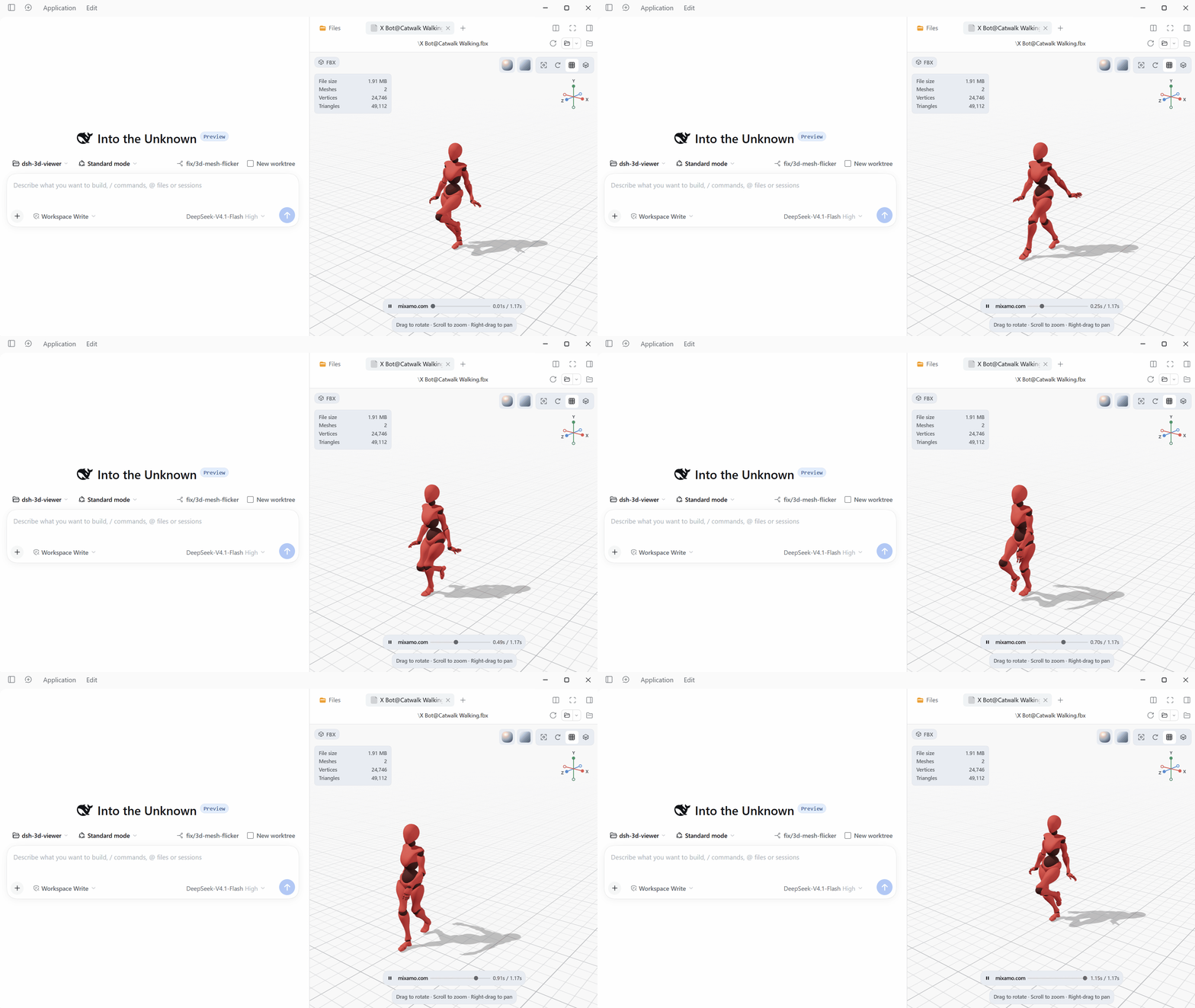
The plugin is distributed as the npm package dsh-3d-viewer. The Three.js runtime and format decoders load only when a preview is opened.
dsh-3d-viewer (or dsh-3d-viewer@0.3.0 to pin a version).F:\plugins\dsh-3d-viewer) and click Install.Plugins run inside the DSH process; install only trusted sources.
Open the right sidebar, choose Files (Mod+P), and click a supported file.
Model previews: drag to orbit, scroll to zoom, and right-drag to pan. The toolbar resets the view, starts auto-rotation, and toggles the grid and wireframe. Click or drag the orientation axes to change the camera view. Material and environment pickers are in the top-right controls. When the model has animation clips, the animation bar appears above the bottom hint: use play/pause, pick a clip by name, drag the progress slider to seek, and choose a playback speed from 0.5× to 2×. Switching clips resets to that clip's first frame while preserving the current play/pause state.
Texture previews: scroll to zoom, drag to pan when zoomed, and use Fit or double-click to reset. Flip Y handles bottom-up sources. The badge shows dimensions, bit depth, and zoom.
Large files and the first environment switch may take a few seconds. If no preview appears, refresh the page and then restart DSH.
| Format | Support |
|---|---|
| FBX | Meshes, hierarchy, materials, embedded textures, animations, node data |
| OBJ | Polygons, groups, normals, UVs, vertex colors, lines/points, MTL, common textures |
| glTF / GLB | Animations, skinning, embedded resources, external .bin files and textures |
| DAE | COLLADA meshes, materials, external textures, and animations |
| STL | ASCII and binary, neutral PBR material, binary vertex colors |
Notes:
.bin files and textures must exist in the workspace; missing resources can prevent loading.map_Ks / map_Ns are not fully mapped to PBR.| Format | Decoded data | Preview |
|---|---|---|
| PNG | 8-bit RGBA | Direct pixels, alpha preserved |
| JPG / JPEG | 8-bit RGBA | Direct pixels, alpha preserved |
| TGA | 8-bit RGBA | Direct pixels, alpha preserved |
| EXR | 16-bit half or 32-bit float, 1–4 channels | Tone-mapped to SDR |
| HDR | Radiance RGBE, 16-bit half by default | Tone-mapped to SDR |
| Area | Main files |
|---|---|
| Host and package | index.js, cordis.patch.yml, package.json |
| Core | src/core/: byte helpers, formats, model statistics |
| Client registration | src/client.js, src/core/formats.js, src/core/texture-formats.js |
| Lazy runtime | src/runtime.js, src/ui/viewer-runtime.js, src/loaders/address.js |
| Lazy UI chunks | client.ui.styles.js, client.ui.texture.js, client.locales.*.js |
| UI | src/ui/: chrome, controls, preferences; ui/model/ and ui/texture/ for the two viewers |
| Scene | src/scene/: renderer, camera, materials, environment, grid, post-processing |
| Loaders | src/loaders/: dispatch, workspace reads, texture workers, formats/ loaders |
| Vendored code | src/vendor/: modified FBX loader |
| Build and tests | build.mjs, tests/run.mjs, tests/**/*.mjs |
src/client.js only registers previews; src/runtime.js owns Three.js, scene setup, and lazy format dispatch. The UI shell does not import Three.js directly; scene code and the texture WebGL preview load with the lazy runtime. Styles, non-baseline locale dictionaries, and the texture viewer are also package-local UI chunks; English and Chinese dictionaries stay in the entry bundle as the DSH fallbacks.
npm ci
npm test
npm run build
CI uses Node.js 24. npm test runs each tests/**/*.mjs file in its own process.
npm run build writes the UI entry, lazy runtime, format/texture chunks, UI style/locale/texture chunks, and the EXR/HDR worker to dist/. Commit the rebuilt dist/ files when source changes.
MIT; see LICENSE. Third-party notices are in THIRD_PARTY_NOTICES.md, including Three.js (MIT) and Poly Haven HDRIs (CC0). React is provided by DSH.
CLASSIFICATION EVIDENCE
系统优先读取 GitHub Topics,再与站内分类词典和词根规则比对。当前命中: deepseek-harness、deepseek-harness-plugin。
morluto
Reverse engineer anything with agents, from app behavior down to native binaries.

deepseek-ai
DeepSeek Harness: Everything is a Plugin.

nexu-io
The 1st Collaborative AI Design Agent Workspace. Local-first and open source. Create motion, prototypes, websites, apps, dashboards, presentations, images, and videos with your team and AI agents. Share work, exchange feedback, and iterate together in one workspace.