
模型与 MCP
待识别

rea
morluto
Reverse engineer anything with agents, from app behavior down to native binaries.
PROJECT TOPICS
INSTALL REFERENCE
dsh plugin --profile web add github:yanxijian/dsh-model-provider-info
该命令指向仓库当前默认分支;尚无绑定当前 commit 的完整验证结果。
PROJECT README
Shows the provider name before the model name in the DeepSeek Harness composer's model seat, and gives third-party routes a visual weight of their own.
The composer names the current model in three places — the trigger caption, the root menu's
current value, and each selectable row — and by itself renders only the catalog model name. That
is ambiguous as soon as two providers offer a model with the same name. This bundle contributes
the conversation.input.model.label inline slot, so the same label reads
DeepSeek Account · DeepSeek-V4.1-Flash instead of DeepSeek-V4.1-Flash, and the reasoning
effort stays a separate caption beside it.
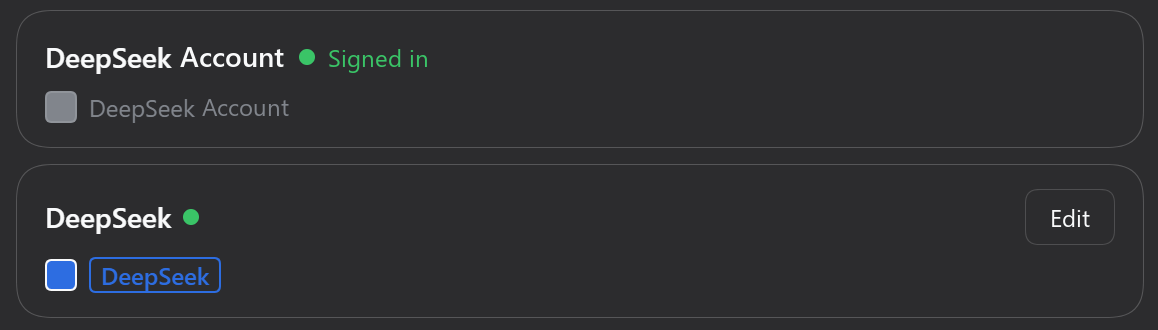
Every provider card in Settings → Models carries a single colour swatch and a preview of the name the composer will draw for it: the DeepSeek account row keeps the default grey text, while the DeepSeek API route shows the blue chip picked for it.
deepseek-account and deepseek-official count as first-party; every other provider id is
third-party. The split follows the product's own ordering (provider-order.ts in
ui-model-selection, store.ts in ui-settings-models both special-case exactly these two
ids).
Emphasis is graded by surface, so the list does not become a wall of warnings:
| Surface | First-party | Third-party |
|---|---|---|
| Model trigger | plain caption text | #F61A43 outlined chip: 12px, weight 600, 1px border, --dsw-radius-xs, transparent fill |
| Menu "Model" value | same as above | same chip (this is also the current selection) |
| Expanded list rows | plain caption text | --dsw-alias-label-secondary + weight 500, no colour, no border |
The list rows are deliberately quieter: every group already carries its provider as a heading, so a chip per row would say the provider twice and paint the column red.
The catalog badge a provider attaches to a model (model.badge, the same Tag the built-in
label draws) is reproduced here: before the name in the trigger, after it in menus and rows.
Settings → Models. Two places, stored per browser:
Every provider card ends with one colour icon: click it to pick that provider's colour, and it shows the colour in use (a heavier ring means the provider has its own colour rather than the default). Double-click it to go back to the default.
The bottom card sets the defaults:
| Option | Default | Effect |
|---|---|---|
| Default colour | #F61A43 |
The icon picks it; used by every provider without a colour of its own |
| Colour the list rows too | off | Off: expanded rows differ by tone and weight only. On: they get the outlined chip as well |
| Show the provider on DeepSeek routes | on | Off: deepseek-account / deepseek-official show the model name alone |
Choosing a colour for one of DeepSeek's own routes also switches that route to the chip, since an explicit colour is a request to see it. Both surfaces share one live record, so changes show up in the composer immediately.
dsh plugin --profile <profile> add dsh-model-provider-infoDesktop users install through Plugins → Add plugin instead; on a machine running DSH Desktop
the CLI command above targets profiles/web, not the profile the app uses.
From a checkout: dsh plugin --profile <profile> add link:/path/to/dsh-model-provider-info.
No build step, no runtime dependencies, no network access. Upgrading DSH does not remove it: it registers an official slot instead of patching a compiled bundle.
#F61A43 is the default accent — a literal colour rather than a theme token, because the
user picks it. Everything else stays on tokens.Custom tag's 11px / 400: the accent is a mid-tone at roughly
4.07:1 against the light card and 3.4:1 against the dark composer surface, which an 11px
regular weight cannot carry.priority: hosts from 0.2.1 onward have no built-in occupant on this single slot./model command popup and the
trigger's accessible name stay owned by the model selector.localStorage under dsh-model-provider-info/settings/v1, so they are
per browser rather than per profile.Before npm publish, replace the REPLACE-ME placeholder in repository, homepage and
bugs with the real GitHub owner, then:
npm publish --registry https://registry.npmjs.org --access publicThe package is unscoped, so --access public is implied; it is spelled out to make the intent
explicit. Keep the npm repository field pointing at the repository listed in the plugin
catalog, or the two will not be linked.
CLASSIFICATION EVIDENCE
系统优先读取 GitHub Topics,再与站内分类词典和词根规则比对。当前命中: deepseek-harness。
morluto
Reverse engineer anything with agents, from app behavior down to native binaries.

deepseek-ai
DeepSeek Harness: Everything is a Plugin.

nexu-io
The 1st Collaborative AI Design Agent Workspace. Local-first and open source. Create motion, prototypes, websites, apps, dashboards, presentations, images, and videos with your team and AI agents. Share work, exchange feedback, and iterate together in one workspace.