

其他
完整应用

deepseek-harness
deepseek-ai
DeepSeek Harness: Everything is a Plugin.
PROJECT TOPICS
INSTALL REFERENCE
dsh plugin --profile web add github:yangbobo2021/relay-dsh-plugin-codex
该命令指向仓库当前默认分支;尚无绑定当前 commit 的完整验证结果。
PROJECT README
Stable
0.2.4is verified on official DSH0.1.5-rc.2and0.1.6-alpha.1. It refreshes Codex models after runtime changes and keeps enhanced mode usable when DSH contributesmcp__-prefixed tools, while preserving the compatibility guarantees from0.2.3. Install it from npm · Compatibility evidence.
Release channels:
latest→0.2.4;next→0.2.5-rc.1.
npx @deepseek-ai/dsh@0.1.6-alpha.1 plugin --profile web add relay-dsh-plugin-codex@latest
npx @deepseek-ai/dsh@0.1.6-alpha.1 web





English | 中文
npm package: relay-dsh-plugin-codex
· All Relay DSH plugins
Run Codex inside official DeepSeek Harness without switching interfaces or maintaining a DSH fork.
relay-dsh-plugin-codex adds Codex as a native conversation backend to the
official DeepSeek Harness
(DSH) Web UI. You keep DSH's workspace, conversation history, composer,
approvals, and tools while each DSH Session continues one Codex App Server
Thread. The plugin installs independently; no Relay checkout is required.
Authenticate with an official Codex client before the first Session. Codex CLI users can run:
codex loginThe install requires Node.js 22.13 or newer and pnpm on PATH. Stop DSH Web,
install the stable plugin, and restart DSH:
npx @deepseek-ai/dsh@0.1.2-rc.1 plugin --profile web add relay-dsh-plugin-codex@latest
npx @deepseek-ai/dsh@0.1.2-rc.1 web
Open New Session, select a workspace, choose Codex from the mode menu, and send a message.
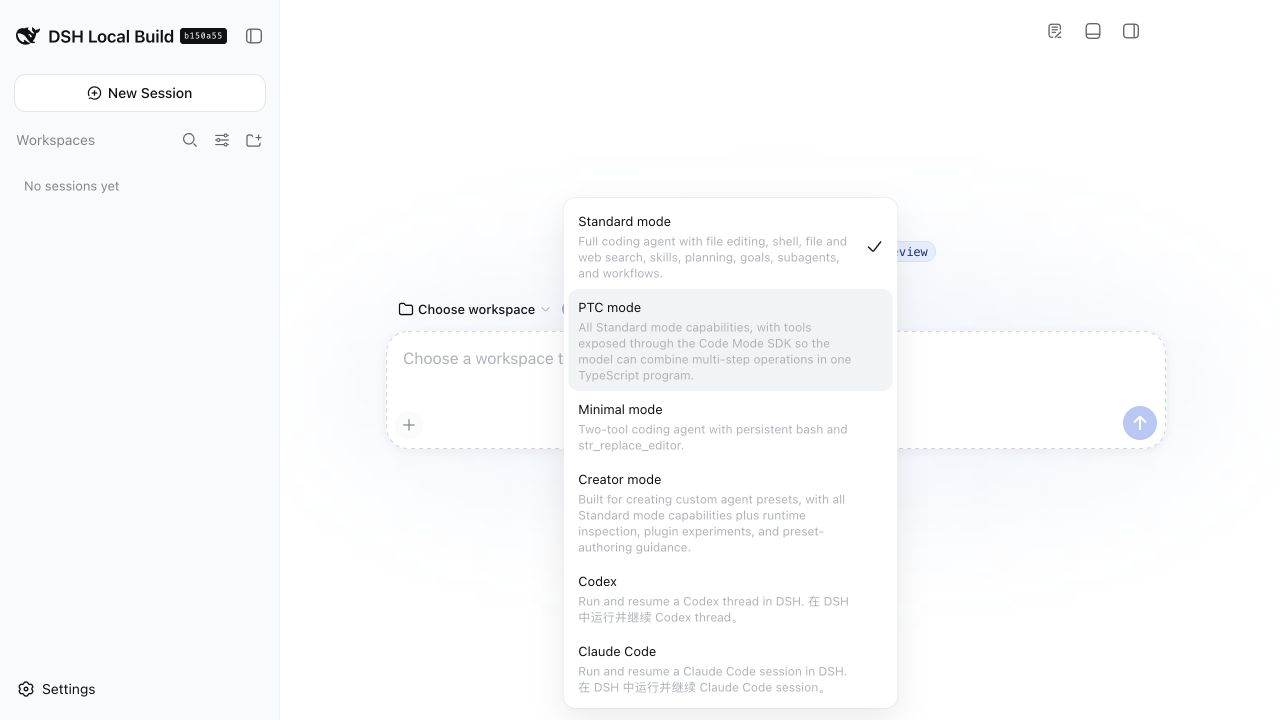
The screenshot was captured from official DSH 0.1.1-rc.2 with the Codex and
Claude plugins installed. If you install only this plugin, only Codex is
added.
Watch Plugin Manager find and install this package in 40 seconds · review all Relay DSH plugins
If this removes an interface switch from your DSH workflow, star this plugin and share your DSH version or install feedback. That signal helps other DSH users find a tested Codex backend.
Install it when you want to:
You do not need it to use DSH's standard agents. It also does not add Relay Events, file browsing, or a terminal panel. Those are separate optional plugins.
The steps below were validated with:
0.1.1-rc.2, commit
b150a551pnpm available on PATHDSH is currently a developer preview and may introduce compatibility-breaking changes. This repository tracks official releases and records its tested version here.
The plugin installs a pinned official @openai/codex runtime and launches it in
App Server mode. By default, DSH first probes the local ChatGPT/Codex App
executable and PATH candidates, then falls back to the bundled official
@openai/codex runtime. The bundled runtime contains native binaries for
macOS, Windows, and Linux on x64 and arm64, so DSH does not require a global
codex command.
Codex authentication is still required. Install or open an official Codex client and authenticate it before starting your first DSH Codex session. When using the CLI, verify the shared local credentials with:
codex --version
codex login
See the official Codex CLI guide and
authentication documentation for
installation and sign-in options. Credentials stay under Codex's normal local
authentication mechanism; this plugin does not collect them. Installing this
plugin supplies its App Server runtime, but does not add a global codex shell
command.
Stop a running DSH Web process before changing Profile bundles. Choose one of the following sources.
The published npm package name is
relay-dsh-plugin-codex.
Use @latest to install the current stable release:
npx @deepseek-ai/dsh@0.1.2-rc.1 plugin --profile web add relay-dsh-plugin-codex@latestAt the time of writing, latest resolves to stable version 0.2.4. The linked
npm page is the source of truth for the current version.
Use @next to try the newest release candidate that has passed the repository's
CI publishing and official DSH compatibility checks. The current candidate also
contains the bundled cross-platform App Server runtime, so DSH does not depend
on a global codex executable:
npx @deepseek-ai/dsh@0.1.6-alpha.1 plugin --profile web add relay-dsh-plugin-codex@nextThe next tag points to 0.2.5-rc.1; latest points to 0.2.4.
Check the npm registry for the currently published dist-tag before installing.
This prerelease preserves native service-tier and resumed-thread settings, stops
late commands belonging to canceled turns, rejects stale interaction replies, and
retains dynamic-tool errors. New conversations receive bounded execution guidance;
set codexExecutionGuidance: false to disable it, or codexExecutionMode: native
to compare without DSH dynamic tools and guidance. The default mode is enhanced.
The host identifies itself as DSH and does not advertise unimplemented Desktop
attestation or MCP App HTML rendering. Dependency discovery reports existing paths.
The bundled runtime is @openai/codex@0.155.1; Desktop's experimental binary
is not redistributed or required. This is not complete Desktop parity. Known
limitations include occasional empty native command-event output even when the
model received the error, and a macOS locale issue affecting tools such as
shasum. These have not been declared fixed. To roll back, stop DSH, reinstall
relay-dsh-plugin-codex@0.2.0, restore any changed profile configuration, and restart.
Install the current main branch when testing an unreleased change:
npx @deepseek-ai/dsh@0.1.6-alpha.1 plugin --profile web add github:yangbobo2021/relay-dsh-plugin-codex#mainmain can change at any time. For a reproducible GitHub install, pin a Tag or
full Commit SHA instead. For example:
npx @deepseek-ai/dsh@0.1.6-alpha.1 plugin --profile web add github:yangbobo2021/relay-dsh-plugin-codex#v0.2.5-rc.1The official DSH CLI initializes the web Profile if it does not exist, asks
pnpm to install the selected package, and adds the plugin's bundle layer. No
Relay checkout is required. If you already installed the dsh command, replace
the npx @deepseek-ai/dsh@0.1.6-alpha.1 prefix with dsh in any preview command above.
npx @deepseek-ai/dsh@0.1.2-rc.1 webIf you use an installed command, run dsh web instead. Bundle membership is read
at startup, so restarting after installation, update, or removal is required.
http://127.0.0.1:3080.There is no separate activation command. A successful install plus a DSH restart activates the bundle and registers the managed Codex mode automatically.
Only eligible Threads from the explicitly selected Workspace are shown. Already-bound
Threads and Threads from another Workspace cannot be selected. Titles and recency
are available before a Session is opened; batch execution time does not replace
the Codex inventory thread/list.updatedAt order.
Codex App Server remains authoritative for model context, tool state, and
compaction. DSH stores native user/assistant presentation history and the durable
one-to-one binding; it does not copy private Codex runtime records. Each time an
imported Session is opened, the plugin reads that Codex Thread once and appends
any missing terminal user/assistant Turns to DSH's presentation history, including
interrupted or failed Turns with visible messages. Only an inProgress Turn waits for
the next open. It does
not poll in the background, synchronize while the Session stays open, or add a
manual refresh action.
dsh namespaceTools execute through the owning Agent's DSH tool runtime and remain subject to DSH permissions and Codex approval behavior.
DSH MCP tools whose names begin with Codex's reserved mcp__ prefix receive a
stable relay_mcp__ wire alias during enhanced-mode registration. Calls are
mapped back to the original DSH name, so the MCP capability remains available.
Ordinary DSH tool names are unchanged; native mode continues to omit DSH tools.
The DSH Host plugin owns the Codex App Server process. It starts one child while
the plugin activates, performs initialize and model/list preflight before
model discovery, and stops it when DSH or the plugin shuts down. The default
selection is auto: valid local ChatGPT/Codex App paths are tried in order,
then the bundled official @openai/codex runtime is used. A local runtime that
fails preflight is stopped and retried once with bundled. A saved runtime
setting can replace the active runtime without restarting DSH; the replacement
must pass preflight before it is made active, and an active Turn is allowed to
finish first.
The runtime can be configured in Settings → Plugins → Plugin configuration →
Codex runtime. Choose Automatic discovery, Bundled @openai/codex, or
Custom executable, then save. The active runtime is replaced and the model
list refreshes without restarting DSH. The same setting is available
as the codexCommand bundle property for managed deployments.
The codexCommand setting has priority over RELAY_CODEX_COMMAND. Either may
be auto, bundled, or an absolute executable path. Empty values are ignored;
explicit paths are canonicalized and must be existing regular executable files.
An explicitly invalid path fails with a clear error and does not silently fall
back. A failed replacement leaves the previous runtime and model list active.
Settings diagnostics include the actual runtime source (local or bundled),
canonical path, and model count. The selected App Server's model/list result
is authoritative, so newly available model ids are retained without a plugin
allowlist.
Open Settings → Advanced to see whether Codex is Connected, Not
started, Starting, Connection failed, or Codex unavailable. A
forked Session that inherited Codex history without a safe one-to-one binding
shows Rebind required in its Session header. Installation and connection
errors include a stable error code and a next action; raw errors such as spawn codex ENOENT are not shown as the user instruction.
On a blank New Session, switching among Standard, Codex, and Claude selects the matching backend's model group and default reasoning effort. Delayed Codex model discovery is retried, and an older asynchronous result cannot overwrite a newer backend choice.
Forks use the Codex App Server thread/fork method. The child DSH Session sends
the inherited parent Thread id and completed lastTurnId; the returned child
Thread gets a new durable one-to-one binding. The operation fails closed if
provenance is incomplete, the source Thread has no owning DSH Session, or App
Server rejects the fork: Relay never falls back to thread/start. Existing
persisted bindings are also retained when resume fails. A pending approval is
answered only if its DSH Session, Codex Thread, Turn, Item, request, and binding
generation still match after reconnect; otherwise it is rejected with
diagnostic provenance.
See the reliability specification and executable acceptance matrix. Approval and structured-question composition is defined by the DSH interaction bridge specification.
This repository was designed and compatibility-tested in Relay, an open-source project for long-running agent work, external-event delivery, and multiple conversation backends.
The plugin is independently installable. Its only Relay package dependency is the provider-neutral session import hub, which the package manager installs automatically. It has no runtime dependency on the Relay application, Relay Events, or another feature plugin. It does not replace the official DSH layout or install workspace UI replacements. Workbench, Files, and Terminal are retired; current DSH provides those capabilities officially. This separation lets a user install only Codex while the broader Relay project composes Codex, Claude, events, waits, and monitors when those capabilities are needed.
Explore or star Relay to follow that broader work: https://github.com/yangbobo2021/Relay.
Stop DSH Web before changing the bundle, then restart it afterward.
# Show why the plugin is installed
dsh plugin --profile web why relay-dsh-plugin-codex

# Update the npm dependency
dsh plugin --profile web update relay-dsh-plugin-codex

# Remove it
dsh plugin --profile web remove relay-dsh-plugin-codex
Use the npx @deepseek-ai/dsh@0.1.2-rc.1 prefix instead of dsh when you do not
have a persistent DSH command.
Restart DSH Web. Then run dsh plugin --profile web why relay-dsh-plugin-codex. If pnpm cannot find the package, repeat the npm
installation command and read its final error.
Run codex login with an official Codex client under the same operating-system
user that starts DSH, then restart DSH. The plugin normally probes the local
ChatGPT/Codex App first and uses its bundled official @openai/codex runtime
when local discovery or preflight is unavailable.
If the error says the bundled runtime is missing, update or reinstall the plugin so the package manager restores the platform-specific optional dependency. A managed deployment can explicitly select another native Codex executable:
# macOS or Linux
RELAY_CODEX_COMMAND=/absolute/path/to/codex dsh web
# Windows PowerShell
$env:RELAY_CODEX_COMMAND = 'C:\absolute\path\to\codex.exe'
dsh webThe DSH bundle configuration property codexCommand has higher priority than
RELAY_CODEX_COMMAND. Use auto to request discovery, bundled to force the
plugin-tested runtime, or an absolute native executable path to select one
explicitly. Leaving both unset uses auto. A local discovery failure may fall
back to bundled; an explicitly invalid path does not.
If Settings shows CODEX_EXECUTABLE_NOT_FOUND, remove an invalid
codexCommand/RELAY_CODEX_COMMAND override or replace it with an absolute
path. CODEX_EXECUTABLE_INVALID means the configured path is not an absolute,
regular executable file. CODEX_RUNTIME_MISSING means the platform optional
dependency must be restored by reinstalling the plugin. CODEX_MODEL_LIST_EMPTY
or CODEX_MODEL_LIST_INVALID means the selected App Server did not expose a
usable model catalog. Connection failed instead means App Server
initialization or its process failed.
Normal forks call App Server thread/fork and bind the returned child Thread.
This status means the source Thread/Turn could not authorize or complete that
operation—for example, the Turn was still running, provenance was incomplete,
or the source binding no longer existed. Return to the original DSH Session,
fix the reported condition, and retry Fork. The plugin intentionally does not
fall back to a fresh replacement Thread.
DSH requires a workspace before starting a coding conversation. Select Add workspace, choose a directory, and return to New Session.
Codex permits only one App Server writer for a Thread. Switching to another Thread
in Codex Desktop may leave the writer held by that App Server process. Fully quit or
restart the owning Codex app, CLI, or App Server process, then retry the message in
DSH. The plugin keeps the original one-to-one binding and never creates a replacement
Thread. There is no safe force-takeover operation in the App Server protocol. Opening
the Session can still synchronize terminal presentation history through
thread/read; only continuation is blocked by writer ownership.
Install pnpm using its official installation guide
and confirm pnpm --version works in the same terminal.
DSH is a developer preview. Include the output of dsh --version, the plugin
source revision, and the startup error in a
GitHub issue.
git clone https://github.com/yangbobo2021/relay-dsh-plugin-codex.git
cd relay-dsh-plugin-codex
npm install
DSH_ROOT=/path/to/deepseek-harness npm run verify
npm pack
npm run verify runs type checking, tests, and the production build. Boundary
tests reject accidental runtime dependencies on Relay or another feature plugin.
Report bugs and feature requests in this repository's issue tracker.
Stable 0.2.4 supports official DSH 0.1.5-rc.2 and 0.1.6-alpha.1; install it from npm latest or Git tag v0.2.4.
npx @deepseek-ai/dsh@0.1.6-alpha.1 plugin --profile web add relay-dsh-plugin-codex@latest
# Git tag alternative, after publication:
npx @deepseek-ai/dsh@0.1.6-alpha.1 plugin --profile web add github:yangbobo2021/relay-dsh-plugin-codex#v0.2.4
CLASSIFICATION EVIDENCE
系统优先读取 GitHub Topics,再与站内分类词典和词根规则比对。当前命中: 无有效分类标签。
deepseek-ai
DeepSeek Harness: Everything is a Plugin.

anywhere-labs
为 DeepSeek Harness (DSH) 插件生态打造的现代化桌面端解决方案。万物皆「插件」,桌面本身也是「插件」。

awesome-dsh-plugin
A curated list of plugins for DeepSeek Harness (dsh) · DeepSeek Harness 插件精选列表