
模型与 MCP
待识别

rea
morluto
Reverse engineer anything with agents, from app behavior down to native binaries.
PROJECT TOPICS
INSTALL REFERENCE
dsh plugin --profile web add github:xx529/dsh-task-gantt
该命令指向仓库当前默认分支;尚无绑定当前 commit 的完整验证结果。
PROJECT README
An agent-team task Gantt chart for the DeepSeek Harness sidebar — one swimlane per teammate on the y-axis, real session time on the x-axis, and every shared task drawn with its title and summary.
English | 中文
Screenshot below is the real panel rendered from a synthetic fixture (5 lanes with 5 different agent colours, tasks of clearly different durations, one still running, message arrows in both directions), captured from a real browser at 2× and cropped to the panel itself:
docs/screenshots/panel-v4.png. It is labelled as such on purpose: the drawing is the shipped component, but the DATA is a fixture, so it is not a real-team capture. The footer in the image carries the build identity (v0.2.11 · label-in-box), which is how a reader can tell which build drew it. The remaining shots (board overview from real team data, task-card detail, degraded state) are still pending; seedocs/SCREENSHOTS.md. No mock-ups will be published.
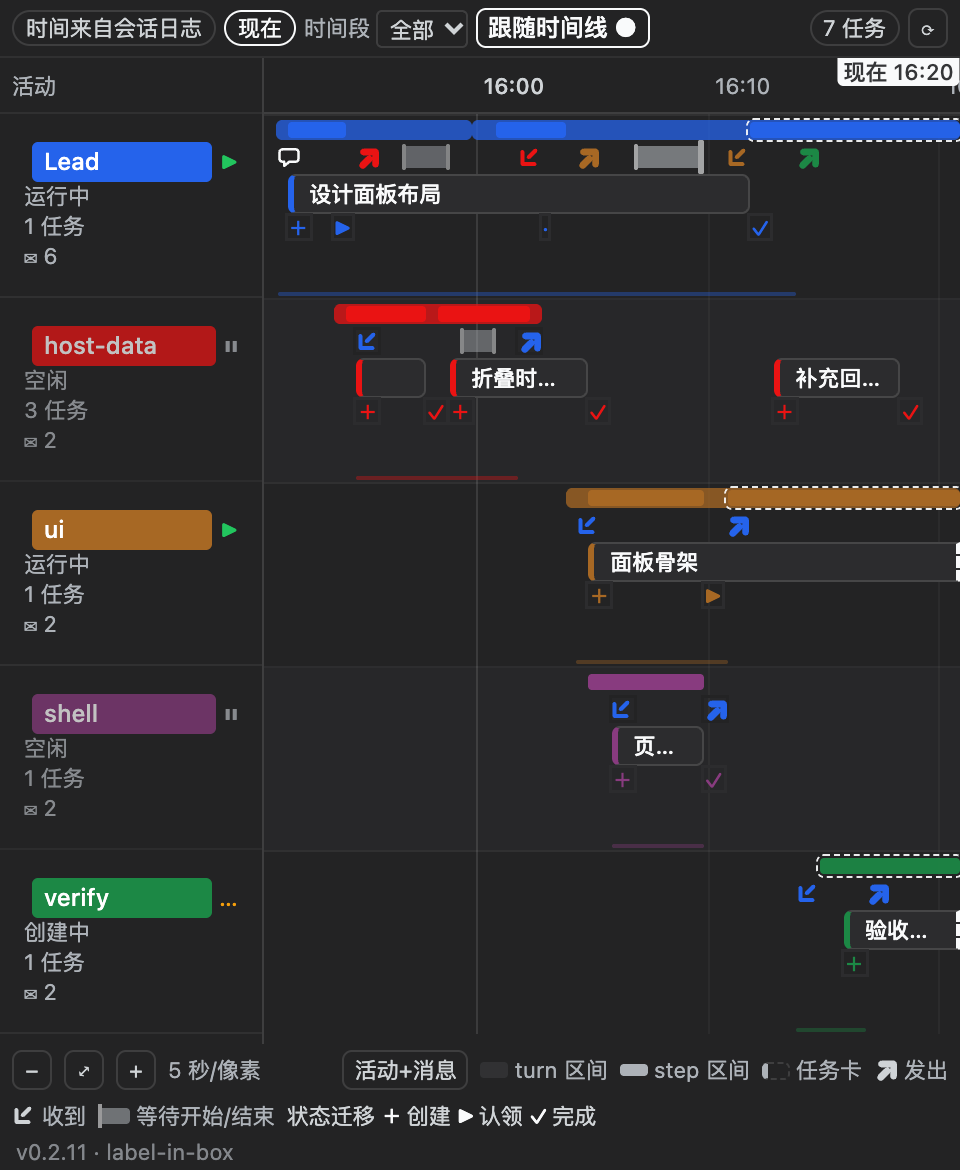
dsh-task-gantt is a plugin for dsh-better-sidebar: it registers one extra sidebar tab. It is read-only — it never creates, claims, or completes a task.
| Version | 0.3.3 |
Frozen contract (src/shared/contract.ts) |
done |
Host data layer (src/host/**) |
in progress |
Sidebar tab registration (src/client/index.ts) |
done |
Gantt rendering (src/client/ui/**) |
in progress |
| Real-machine mount smoke test | not run yet |
The chart is described below as specified by the frozen contract; for what has
actually been executed and observed, read
docs/VALIDATION.md (owned by the verification teammate) —
this README does not restate untested claims as results.
unassigned row for tasks the board has not handed to anyone.subject plus a one-line
description, with status, owner, blockedBy, writeScopes and readiness in
the detail view.--dsw-alias-* / --dsw-font-* / --ds-* tokens, so every skin works; the UI
is Chinese or English depending on the page language.| Requirement | Value |
|---|---|
| DSH | 0.2.2-rc.2 (validated on 0.2.2-rc.2, 0.2.2-rc.1 and 0.2.1; developed against 0.2.0-rc.2) |
| dsh-better-sidebar | >= 0.4.0 (the release that introduced the ctx.betterSidebar registry service) |
| Node | >= 20 for this plugin — DSH 0.2.2 itself requires Node >= 24.9 |
| Profile | any browser-backed DSH Web profile |
The plugin declares one peer, @deepseek-ai/cordis@^4.0.0, and marks it
optional. It declares no @deepseek-ai/dsh-* peer on purpose: the host's
startup compatibility preflight evaluates those ranges and silently disables the
whole profile row when one fails. See docs/DESIGN.md §8.
If dsh-better-sidebar is not installed, the plugin still loads and logs one
warning; it simply has no tab to register into.
The commands below are quoted verbatim from
docs/INSTALL.md (owner: packaging), which is the single
place they are written down and carries the full evidence for each one.
cd ~/.dsh && dsh plugin --profile web add "github:xx529/dsh-task-gantt"Then restart dsh web and hard-refresh the browser page (Cmd+Shift+R).
Status:
[not run].xx529/dsh-task-ganttdoes not exist on GitHub yet (gh repo view xx529/dsh-task-gantt→ "Could not resolve to a Repository"), so this exact command cannot be run end-to-end today. It is written from first-hand sources, not from memory:dsh pluginforwards its arguments verbatim topnpm(~/.nvm/versions/node/v22.22.2/lib/node_modules/@deepseek-ai/dsh/lib/bin.js:96), andgithub:owner/repois the form the official docs print for a bundle plugin (docs/INSTALL.md§1.1, with the same form verified against a real package).
⚠️ Do not install it under an alias
… add "dsh-task-gantt@github:xx529/dsh-task-gantt"also parses, but it lands the package atnode_modules/<alias>while its innerpackage.jsonstill says"name": "dsh-task-gantt". The profile'sdsh.profile.bundleslist and the Loader row are keyed by the package name, so the mismatch degrades to "warn, then skip". Use the unaliased form above (docs/INSTALL.md§1.1).
Optional prerequisite: the panel needs dsh-better-sidebar to have somewhere to register. It is deliberately not a dependency of this package.
cd ~/.dsh && dsh plugin --profile web add dsh-better-sidebarcd ~/.dsh && dsh plugin --profile web remove dsh-task-ganttRestart dsh web afterwards.
⚠️
removedoes not rewrite the patch layer. Uninstalling deletes the dependency but does not remove manually-addedinsertlines from acordis.patch.yml. This package's row comes from its own bundle patch (dsh.bundle.patch→cordis.patch.yml), which leaves with the package, so nothing should be left behind — but if you had also hand-added an- insert: - id: dsh-task-ganttline to~/.dsh/profiles/web/cordis.patch.yml, delete that line too (docs/INSTALL.md§5).
+.The tab is declared single: true — the documented single-instance sugar
(single: true ≡ dedupeKey: () => id): reopening it focuses the existing tab
instead of stacking a second one. If your sidebar shows no description next to
the entry, that is a host-side rule, not a plugin bug — the host only renders
descriptions while the new-tab list holds 4 or fewer entries.
| Element | Meaning |
|---|---|
| Lane header | one roster member: name, role, and a status dot |
| Faint band | a whole turn (turn/start … settlement) |
| Solid bar | one model step inside a turn (step/start … step/end) |
| Open-ended bar | the span has not closed yet — it extends toward "now" |
| Vertical "now" line | the current wall-clock time |
| Task chip | a shared task, positioned by its dated history |
| Task chip with a live marker | the task has no dated history; its position is its current state, not a recorded interval |
Hover or focus a task chip for the full subject, description, blockedBy,
writeScopes, and whether it is ready. The chart is built from real DOM
elements rather than a canvas, so it is selectable text and screen-reader
reachable.
The panel always tells you how its timeline was assembled. The response carries a
source field with exactly three values:
source |
What it means | What you see |
|---|---|---|
log |
spans came from readable durable session logs — authoritative | full timeline |
partial |
some lanes' logs were unreadable | the readable lanes are drawn; the others degrade, with a note |
live |
no log was readable — the board is projection-only | current state only, clearly labelled, with a note |
Two more states are worth knowing:
In no degraded state does the plugin invent a timestamp. A task with no recorded history is drawn at its current position and marked as live; that is deliberate.
The chart is assembled from two sources, because either one alone cannot draw it:
agentTeam session projection (browser side) is authoritative for
what exists and what state it is in — the roster, phases, and the shared
tasks with their status, owner, dependencies and write scopes. It contains no
timestamps at all: neither the member records nor the task records carry a
createdAt / startedAt / completedAt. It can tell you a task is
completed; it can never tell you when.time (epoch
ms) and seq. The host half reads the logs and folds them into activity spans
and dated task transitions.The host half exposes the folded result over a small read-only JSON API
(POST /dsh-task-gantt/api/timeline), and the browser half renders it. The
browser cannot read session logs itself, which is why the split exists.
Task transitions could in principle be invisible to the log, so the plugin tries three tiers in order and stops at the first that yields data:
team/task) → use its time verbatim;tool/call for the shared-task-board tool (team_task_create /
team_task_update) → use the call's time, and use its expected_revision
to attribute the change to the teammate that made it;history stays empty and the task is drawn as live.Tier 1 is the normal path, and this was measured. team/task events are
written into the Lead's own session log and flushed immediately, so a read
right after a board change already sees them; the six teammate logs contained
zero such events
(docs/FINDINGS-host.md §1, §4.1–4.2). Tier 2 remains
as a fallback and as the attribution channel, because team/task carries the
full task snapshot but no action field — the action has to be derived from
revision continuity plus status transitions
(docs/FINDINGS-host.md §4.4).
Tier 3 is a real outcome, not a bug. See docs/DESIGN.md §3.
None. The plugin registers one tab and one HTTP route prefix and has no settings surface, no config file, and no environment variables.
Does it modify my tasks?
No. The plugin is read-only; it never calls the task-create/update service. The
only HTTP routes it registers are POST …/timeline and POST …/ping, both
same-origin.
Why is a bar missing for a task that clearly ran? Because its transition was never recorded in a readable session log (tier 3 above). The task is still drawn at its current position and marked live rather than being placed at a guessed time.
Why does the tab not appear?
Either dsh-better-sidebar is not mounted in this profile, or the plugin row is
not active. Check that the plugin appears in the profile's
dsh.profile.bundles, then restart dsh web.
Does it work on a profile without an agent team?
Yes — it shows the empty state. The plugin probes every service it needs with
ctx.get(...) and never requires the agent-team layer to activate.
Will it work with my skin?
It should. The panel consumes only DSH theme tokens (--dsw-alias-*,
--dsw-font-*, --ds-*) and contains zero colour literals; that is enforced by a
test.
pnpm install
pnpm run typecheck     # tsc --noEmit, must be 0 errors
pnpm run test          # vitest
pnpm run build         # emits lib/index.js (host) + lib/client.js (browser)
lib/ is committed on purpose: the plugin installs from GitHub with no build
step, so the published bundle has to be in the repository — and CI checks that it
is current.
To try a local checkout against your profile without installing a copy (quoted
verbatim from docs/INSTALL.md §1.2):
cd ~/.dsh && dsh plugin --profile web add "link:/Users/lzx/Documents/GitHub/dsh-task-gantt"Design notes and data-source rationale: docs/DESIGN.md.
Market/submission material: docs/MARKET.md.
What has actually been verified: docs/VALIDATION.md.
MIT — see LICENSE.
CLASSIFICATION EVIDENCE
系统优先读取 GitHub Topics,再与站内分类词典和词根规则比对。当前命中: deepseek-harness。
morluto
Reverse engineer anything with agents, from app behavior down to native binaries.

deepseek-ai
DeepSeek Harness: Everything is a Plugin.

nexu-io
The 1st Collaborative AI Design Agent Workspace. Local-first and open source. Create motion, prototypes, websites, apps, dashboards, presentations, images, and videos with your team and AI agents. Share work, exchange feedback, and iterate together in one workspace.