
部署运维
基础设施

sandbase-harness
sandbaseai
Local-first, self-hosted AI agent runtime and MCP bridge with sandboxed sessions, memory, credentials, audit/replay, and a local Console.
PROJECT TOPICS
INSTALL REFERENCE
dsh plugin --profile web add github:xueayi/dsh-opencode-go-usage
该命令指向仓库当前默认分支;尚无绑定当前 commit 的完整验证结果。
PROJECT README
OpenCode Go plan usage monitor for DeepSeek Harness: a floating dock in the web GUI showing the 5h-rolling / weekly / monthly quota windows with live reset countdowns.
Data comes from the official quota API
(GET https://opencode.ai/zen/go/v1/usage, Bearer API key; no workspace id,
no cookie).
# From npm (the Web GUI runs on the `web` profile):
dsh plugin --profile web add @xueayi/dsh-opencode-go-usage
# Or from a local checkout:
dsh plugin --profile web add /path/to/dsh-opencode-go-usage
# Upgrade to the latest version:
dsh plugin --profile web update @xueayi/dsh-opencode-go-usage
Restart the profile afterwards (dsh web for the browser UI).
Recommended: pick the official-channel OpenCode Go provider in Web Settings → Models and enter the API key there; nothing else is needed.
The API key is resolved per refresh through ctx.credentials under the
apiKeyEnv reference (default OPENCODE_GO_API_KEY) — it can also be stored
manually in ~/.dsh/.credentials.yaml or an environment variable:
- insert:
    - id: opencode-go-usage
      name: '@xueayi/dsh-opencode-go-usage'
      config:
        apiKeyEnv: OPENCODE_GO_API_KEY
refreshMs: 60000| Field | Type | Default | Meaning |
|---|---|---|---|
apiKeyEnv |
string | OPENCODE_GO_API_KEY |
credential reference |
apiKey |
string | — | direct key fallback (discouraged) |
endpoint |
string | https://opencode.ai/zen/go/v1/usage |
quota endpoint |
refreshMs |
number | 60000 |
auto-refresh interval |
timeoutMs |
number | 10000 |
per-request timeout |
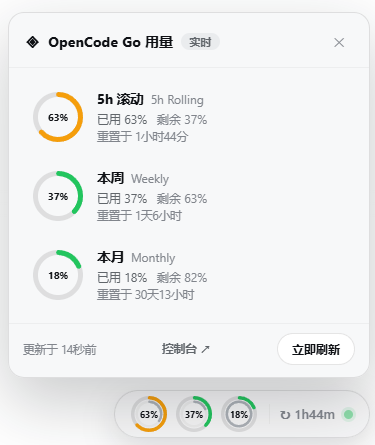
A glassy floating dock at the bottom-right corner (the web shell owns no bottom-right slot; mounted through a body portal):
↻3h25m) and a live health dot.Data and health are decoupled: when a refresh fails (timeout, API error), the dock keeps showing the last successful sample — the status dot turns yellow and a quiet "refresh failed, showing previous data" note appears in the panel footer. The display is never blanked; error / unconfigured states appear only before the first successful fetch.
The status dot and the manual refresh action reuse the shared
dsh-client-ui-primitives (StateDot / Button) so the dock's affordances
stay visually consistent with the rest of DSH. The dock also honors
prefers-reduced-motion (a reduced-motion environment skips the pop and ring
tweens and closes the panel without the exit animation), and the floating
badge / panel are offset by the viewport's safe-area insets so they never sit
under a notch or home indicator.
The plugin exposes no model-facing surface: the model never sees quota values, no prompt text or tool schema is added.
None — no model request, no injected tokens.
None — no request tokens added or replaced.
CLASSIFICATION EVIDENCE
系统优先读取 GitHub Topics,再与站内分类词典和词根规则比对。当前命中: quota-monitor。
sandbaseai
Local-first, self-hosted AI agent runtime and MCP bridge with sandboxed sessions, memory, credentials, audit/replay, and a local Console.

Han-1413141
Cost tracking for DeepSeek Harness: session and model costs, token usage, budgets, provider balances, and coding-plan quotas. Bilingual English/Chinese UI.

wssfk12138
DeepSeek Harness Token 余额监控插件:鲸鱼娘待机/扣费/复苏动画、峰谷计费、连续扣费飘字与会话费用统计。