
模型与 MCP
待识别

rea
morluto
Reverse engineer anything with agents, from app behavior down to native binaries.
PROJECT TOPICS
INSTALL REFERENCE
dsh plugin --profile web add github:xichen-62/dsh-power-menu
该命令指向仓库当前默认分支;尚无绑定当前 commit 的完整验证结果。
PROJECT README
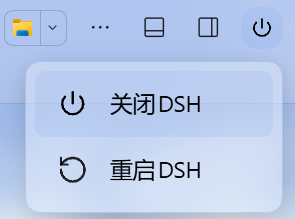
给 DeepSeek Harness 桌面版加一个右上角电源按钮:点开只有 关闭DSH 和 重启DSH 两项,省得每次改完插件/配置还要去系统托盘里翻「退出」。退出走应用自己的关停流程,不是从外部硬杀;有任务在跑还会先拦一下。
仅 Windows(macOS / Linux 用不了,原因见「兼容性」)· 只支持 DSH Desktop · 纯本地 · 除系统自带 PowerShell 外无外部依赖 · MIT
⭐ 如果这个小工具帮你省了点时间,欢迎点个 Star 支持一下,感谢~
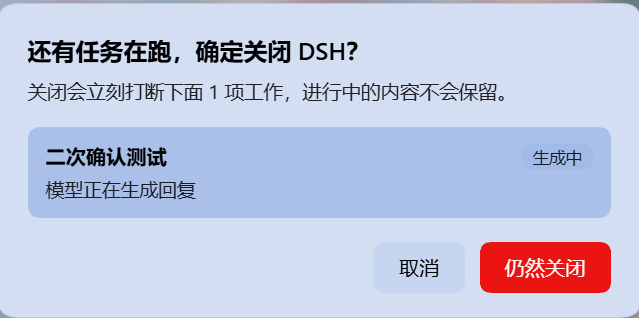
有任务在跑时,点下去之前会先拦一下:
DSH Desktop 关窗口只是收进托盘,真正退出或重启要走托盘菜单;而改插件、改配置之后又经常需要重启一次。这个插件把这两步搬到会话标题栏右上角:一个电源键,两项操作,点完就走。
顺带把「退出」这件事做正了:不是从外面 taskkill,而是请应用自己走完关停流程,Cookie 和会话日志都能正常落盘。
before-quit → Host shutdown),Cookie / LocalStorage 正常落盘,不重新启动。/tasks。有会话正在生成、有排队消息或有后台任务在跑时,弹出卡片列出会被打断的会话与任务,确认才动手;空闲时直接执行,不多问。↑ / ↓ / Home / End 在两项间移动,Enter / 空格执行,Esc 关闭,点菜单外部也能关。⚠️ 只能装在 Windows 版的 DSH Desktop 上。 非 Windows 系统里按钮能出现,但关闭和重启都执行不了——接口会直接返回 409。
重要:装完插件后,必须再运行一次
enable.ps1(或直接用下面的install.ps1),把dsh-power-menu补进 profile 的dsh.profile.bundles,然后重启 DSH。少了这一步,按钮会 404——这是 DSH 插件管理器只写dependencies、不写 bundles 的已知行为,不是插件本身的问题。
从仓库下载 ZIP 或 git clone 后,在目录里运行:
powershell -ExecutionPolicy Bypass -File .\install.ps1脚本会:清理旧的 link/junction 残留(避免 pnpm 的 ERR_PNPM_EPERM,界面上表现为「没有写入权限」)→ 用 DSH 自带 CLI 安装 → 补齐 dsh.profile.bundles → 提示重启。
GitHub 直连慢或不通时,改用镜像:
powershell -ExecutionPolicy Bypass -File .\install.ps1 -Mirror机器上没有 git 也能装:
install.ps1会先检查git;没有就自动从 GitHub Release 下载dsh-power-menu-0.1.21.tgz,再用本地文件安装,全程不调用 git(这正是ERR_PNPM_GIT_RESOLVE_FAILED的解法)。直连下不动会自动改走 gh-proxy 镜像;也可以用-TgzPath指定已经拷到本机的安装包,完全离线安装。脚本默认不改用户 PATH;需要让插件管理器以后也能解析便携 git 时,加
-Github -WritePath。下载 tgz 会优先用 Release 的SHA256SUMS.txt校验,离线包可用-Sha256 <hash>手动校验。
打开 DSH Desktop 的 插件 / 插件市场。
选择 添加插件,输入:
github:xichen-62/dsh-power-menu安装完成后,下载/克隆本仓库,运行 enable.ps1 补一次 bundles(这一步不能省):
powershell -ExecutionPolicy Bypass -File .\enable.ps1重启 DSH,并在 插件市场 → 已安装 里确认 dsh-power-menu 处于「启用中」。
如果装完点按钮报
HTTP 404,说明插件只进了dependencies、没进dsh.profile.bundles,宿主半没加载。运行仓库里的enable.ps1(右键使用 PowerShell 运行),它会先备份 profile,再把dsh-power-menu补进dsh.profile.bundles;然后重启 DSH。
dsh plugin --profile desktop add github:xichen-62/dsh-power-menu
powershell -ExecutionPolicy Bypass -File .\enable.ps1
dsh是 DSH 自带的 CLI;如果 PATH 里没有,请用 DSH 安装目录里的dsh/dsh.cmd。
git clone https://github.com/xichen-62/dsh-power-menu.git把插件链接进 desktop profile:
# Windows PowerShell
$profileDir = "$env:USERPROFILE\.dsh\profiles\desktop"
New-Item -ItemType Junction `
  -Path "$profileDir\node_modules\dsh-power-menu" `
  -Target "<你 clone 下来的目录>"
然后在 $profileDir\package.json 里:
dependencies 增加 "dsh-power-menu": "link:<你 clone 下来的目录>"dsh.profile.bundles 增加 "dsh-power-menu"重启 DSH 生效。这个插件没有构建步骤,改完 lib/ 里的文件重启即可。
注意:
link:安装会在node_modules里创建 junction。之后如果改用插件管理器(github:安装)升级同一个包,pnpm 的临时目录 rename 会撞上这个 junction,报ERR_PNPM_EPERM,界面上显示「没有写入权限」。遇到时先删链接再重装:cmd /c rmdir "$profileDir\node_modules\dsh-power-menu"(只删链接,不动 clone 的源码)。
| 动作 | 结果 | 需要手动重开? |
|---|---|---|
| 关闭DSH | 结束整个桌面应用,不重新启动 | 是 |
| 重启DSH | 结束应用 → 等端口释放 → 重新拉起 | 否,窗口自动回来 |
注意:空闲时点击即执行;只要有会话正在生成、有排队消息或有后台任务在跑,就会先弹出确认卡片,把要被打断的会话、任务和已运行时长列出来,确认后才动手。确认之后,两个动作都会中断正在进行的工作,请在点之前保存手头的事情。
桌面版的进程树大致是:
Electron 主进程
└── Host 子进程(dsh-desktop-host,ELECTRON_RUN_AS_NODE=1)
    └── 本插件
插件跑在 Host 里,不能直接调用 Electron 的 app.quit() / app.relaunch(),桌面版也没有给插件任何协作退出的 IPC。所以 Host 只负责“交接”,真正的进程切换交给一个分离的 helper;helper 也不再硬杀,而是先请主进程走它自己的退出链:
flowchart LR
  UI[电源菜单] -->|先问 GET /tasks| Host[Host 插件]
  Host -.->|有任务在跑| Ask[确认卡片] -.-> Host
  Host -->|写 handoff + spawn| Helper[detached helper]
  Helper -->|WM_ENDSESSION + WM_CLOSE| Main[Electron 主进程]
  Main -->|finishQuit| Disk[(Cookie / LocalStorage 落盘)]
  Main -.->|backend.close → host.stop| Host
  Host -->|application.shutdown| Log[(会话日志落盘)]
  Helper -->|等端口释放 + 清残留 + 重新拉起| NewMain[新的 Electron 主进程]
具体步骤:
/tasks。有任务在跑就先弹确认卡片,确认后才发 POST。%USERPROFILE%\.dsh\dsh-power-menu\,用 process.execPath + ELECTRON_RUN_AS_NODE=1 启动 lib/helper.cjs。Chrome_WidgetWin_1,属主是主进程),先 PostMessage(WM_ENDSESSION, wParam=1),再 PostMessage(WM_CLOSE)。桌面壳收到后置 sessionEnding = true:窗口关闭不再被拦截,before-quit 跳过任务确认,直接跑完 finishQuit → stopOperationReports → backend.close() → host.stop() → app.quit(),Cookie 和 LocalStorage 正常落盘。shutdown 后走自己的 application.shutdown,把会话日志正常落盘;Host 自身还有 5 秒退出兜底。taskkill /PID <主进程> /F,刻意不带 /T。ExecutablePath 全量枚举同一 exe 的残留进程(三轮重试 + 复查 sweep,排除自己和宿主),确认干净后用原可执行文件重新拉起,并确认新进程有真实窗口;失败重试三次,仍失败弹窗提示手动打开。Host 半注册四个仅限本机回环的接口:
POST /api/dsh-power-menu/shutdown
POST /api/dsh-power-menu/restart
GET  /api/dsh-power-menu/health
GET  /api/dsh-power-menu/tasks
/tasks 返回当前会被打断的工作:每个活动会话的标题、是否正在生成、排队消息数,以及它名下所有 running / stopping 的后台任务(含 label、进度、开始时间);没有归属的活动任务单独列在 ownerless 下。空闲时 active 为 false。
127.0.0.1 / ::1),校验 Host 必须是本机,拒绝 sec-fetch-site: cross-site,带 Origin 时必须与本机同源。dsh web),或者上一次关停还没走完。两种都不会重复触发。dsh web 下接口返回 409,不会去杀别的进程。%USERPROFILE%\.dsh\dsh-power-menu\。WM_ENDSESSION / WM_CLOSE)和 taskkill 兜底。session-end 事件触发退出链的,非 Windows 走的是 powerMonitor.on('shutdown')——那是系统级事件,外部插件没法模拟,也就没有「先请应用自己退」这条路可走。taskkill。engines.dsh 声明的是 >=0.2.0-rc.1,0.2.x 用到的接口(挂载槽位、/tasks 依赖的三个服务)逐项比对过是一致的;但只有 0.2.2-rc.3 是实测的,更早的版本请自行验证——旧版桌面壳如果没有对应的窗口事件处理,关闭会退回强杀:不会留下残留(helper 会按可执行文件路径兜底清扫),但过程是硬的。dsh-power-menu/
├── lib/
│ ├── index.js Host 半:四个回环接口 + 交接调度
│ ├── client.js 浏览器半:window.__ModuleLoader__ bundle
│ └── helper.cjs 分离的交接 helper
├── cordis.patch.yml bundle 插入层
├── package.json
├── docs/screenshot.png
└── README.md客户端 bundle 不是普通 ESM,必须用 window.__ModuleLoader__.load({ id, factory }) 格式;dsh.client.inject 声明 @deepseek-ai/dsh-client-ui-slots。
没有构建步骤,也没有运行时 npm 依赖。
提交前跑一次静态检查:
npm run check本地调试日志:%USERPROFILE%\.dsh\dsh-power-menu\power-menu.log 和 helper-*.log。
按钮没出现? 确认插件处于「启用中」,并重启过一次 DSH;按钮只出现在有会话标题栏的页面。
插件卡片上没显示介绍?
本地开发(link 安装)的插件,卡片不读 package.json 的 description,需要在卡片上点「添加备注」自己填。这是 DSH 插件管理器的行为,不是插件的问题。
重启后端口变了?
正常。DSH Desktop 每次启动用随机端口(--port 0),插件只负责拉起新实例,不假设端口不变。
DSH 装在中文路径 / 用户名含中文能用吗?
可以。插件不拼 cmd 字符串:启动用 spawn(exe, [], { cwd }),路径作为单个 argv 交给 Node 的 Unicode API;交接 JSON 和日志按 UTF-8 读写;helper 自带 --pathtest,会在“中文 + 空格”的临时目录里实测 UTF-8 读写和从中文路径启动 exe。安装脚本也按 UTF-8 BOM 保存。
点了没反应?
看 %USERPROFILE%\.dsh\dsh-power-menu\ 下的日志;dsh web 环境会返回 409(仅支持桌面版)。
为什么按钮不挂真实 slot?
DSH 的 conversation.session.header.corner 是单占用槽,已经被侧栏开关占用;conversation.session.header.utilities 会排在侧栏左侧;sidebar.footer.action 在左下角。要在不修改 DSH 的前提下保持右上角,只能把按钮挂进 headerCorner 的 DOM。代价是上游改头部结构时可能失效;插件用 MutationObserver 跟随,不再 500ms 轮询。
关闭/重启会跳过 profile 收尾吗?
0.1.19 起不再硬杀了。helper 会给主窗口发 WM_ENDSESSION + WM_CLOSE,让桌面壳自己走完 before-quit → finishQuit → backend.close() → host.stop() → app.quit(),Cookie / LocalStorage 正常落盘,Host 也自己 flush 会话日志。剩下的是插件自己 spawn 的子进程(computer-use、上下文插件、子 agent 之类)——它们不归 DSH 的关停流程管,主进程退完还可能留着,所以重启前会按 ExecutablePath 把同一 exe 的进程全量枚举一遍兜底。实测关闭 2.9 秒、重启 9.6 秒,全程没有强杀;只有兜底那一步会用到 taskkill,日志里会明确写出来。
装完点按钮报 HTTP 404?
说明宿主半没加载:插件只在 dependencies 里,不在 dsh.profile.bundles 里。运行仓库里的 enable.ps1,或手动把 dsh-power-menu 加进 profile 的 dsh.profile.bundles,再重启 DSH。0.1.9 起不再依赖 postinstall——pnpm 11 默认会拦截依赖的生命周期脚本,装不上钩子。
插件安装失败,提示「没有写入权限,无法安装」?
多半是之前用 link: 装过(node_modules\dsh-power-menu 是 junction),pnpm 升级时 rename 覆盖不了它,报 ERR_PNPM_EPERM,被安装器误读成权限问题。先删链接再重装:
cmd /c rmdir "$env:USERPROFILE\.dsh\profiles\desktop\node_modules\dsh-power-menu"或者直接运行 install.ps1,它会自动处理这一步。
GitHub 直连很慢 / 报网络错误?
用 install.ps1 -Mirror,或把安装来源换成 https://gh-proxy.com/https://github.com/xichen-62/dsh-power-menu.git。插件本身不联网,这只是下载阶段的网络问题。
装的时候报 ERR_PNPM_GIT_RESOLVE_FAILED / 这台电脑没装 git?
这不是插件的问题:github: 安装是 pnpm 的 git 依赖,pnpm 必须先调起系统里的 git 做 ls-remote,没有 git 就直接失败(界面上的 added 0 说明一个文件都没下载)。两条路:
跑 install.ps1:检测到没有 git 会自动改用 Release 里的 .tgz,不碰 git。
想保留 github: spec:跑 install.ps1 -Github,它会下载便携版 git;需要写进用户 PATH 时再加 -WritePath,之后 github: 和仓库 URL 都能装(重启 DSH 后插件管理器也生效)。
或者直接装 tarball(pnpm 走 HTTP 下载后本地解包):
dsh plugin --profile desktop add https://github.com/xichen-62/dsh-power-menu/releases/latest/download/dsh-power-menu-0.1.21.tgzGitHub 慢的话,在前面加 https://gh-proxy.com/ 走镜像;也可以把 tgz 下载到本机后用 dsh plugin --profile desktop add file:<路径> 安装。
dsh-power-menu,或者从 profile 的 dependencies / dsh.profile.bundles 里删掉,再删掉 node_modules 里的链接。%USERPROFILE%\.dsh\dsh-power-menu\ 下的日志与交接文件。见 CHANGELOG.md。
MIT © 2026 xichen-62
A small DSH Desktop plugin that adds a power button to the top-right of the session header. It opens a Windows-style menu with exactly two actions:
Both actions go through the app's own shutdown chain instead of a hard kill, and a confirmation card lists any running work before the transition.
Windows only. It drives the Windows WM_ENDSESSION window message; on macOS/Linux the equivalent is a system-level powerMonitor event that an external plugin cannot simulate, so there is no port to be made here. DSH Desktop only. No telemetry, no third-party dependencies — it posts the window message through the bundled PowerShell. The four HTTP routes are loopback-only and same-origin fenced.
Install from GitHub:
dsh plugin --profile desktop add github:xichen-62/dsh-power-menuor add github:xichen-62/dsh-power-menu in the DSH plugin manager, then run enable.ps1 and restart DSH. The one-click install.ps1 handles both the install and the dsh.profile.bundles registration, and cleans up a stale link: junction that would otherwise make pnpm fail with ERR_PNPM_EPERM ("No write permission; the plugin cannot be installed").
No git on the machine? The github: spec is a pnpm git dependency, so pnpm must spawn git and fails with ERR_PNPM_GIT_RESOLVE_FAILED when it is missing. install.ps1 detects that and installs the .tgz attached to the GitHub Release instead (no git involved); the tarball URL can also be passed to dsh plugin add directly.
If this saves you some time, a ⭐ star is much appreciated. Thanks!
MIT licensed.
CLASSIFICATION EVIDENCE
系统优先读取 GitHub Topics,再与站内分类词典和词根规则比对。当前命中: deepseek-harness。
morluto
Reverse engineer anything with agents, from app behavior down to native binaries.

deepseek-ai
DeepSeek Harness: Everything is a Plugin.

nexu-io
The 1st Collaborative AI Design Agent Workspace. Local-first and open source. Create motion, prototypes, websites, apps, dashboards, presentations, images, and videos with your team and AI agents. Share work, exchange feedback, and iterate together in one workspace.