
其他
完整应用

deepseek-harness
deepseek-ai
DeepSeek Harness: Everything is a Plugin.
PROJECT TOPICS
INSTALL REFERENCE
dsh plugin --profile web add github:xiaweiliang060035/dsh-opencode-go-usage
该命令指向仓库当前默认分支;尚无绑定当前 commit 的完整验证结果。
PROJECT README
简体中文 · English
A DeepSeek Harness web-GUI plugin that shows your OpenCode Go subscription usage in real time — a floating widget that tracks rolling / weekly / monthly quota for every API key in your pool, with color-coded progress bars and reset countdowns.
$DSH_HOME/.credentials.yaml (any OPENCODE_GO_KEY_<name> entries), so there is no hardcoded key count or name. Falls back to the single current key (OPENCODE_GO_API_KEY) when no pool exists.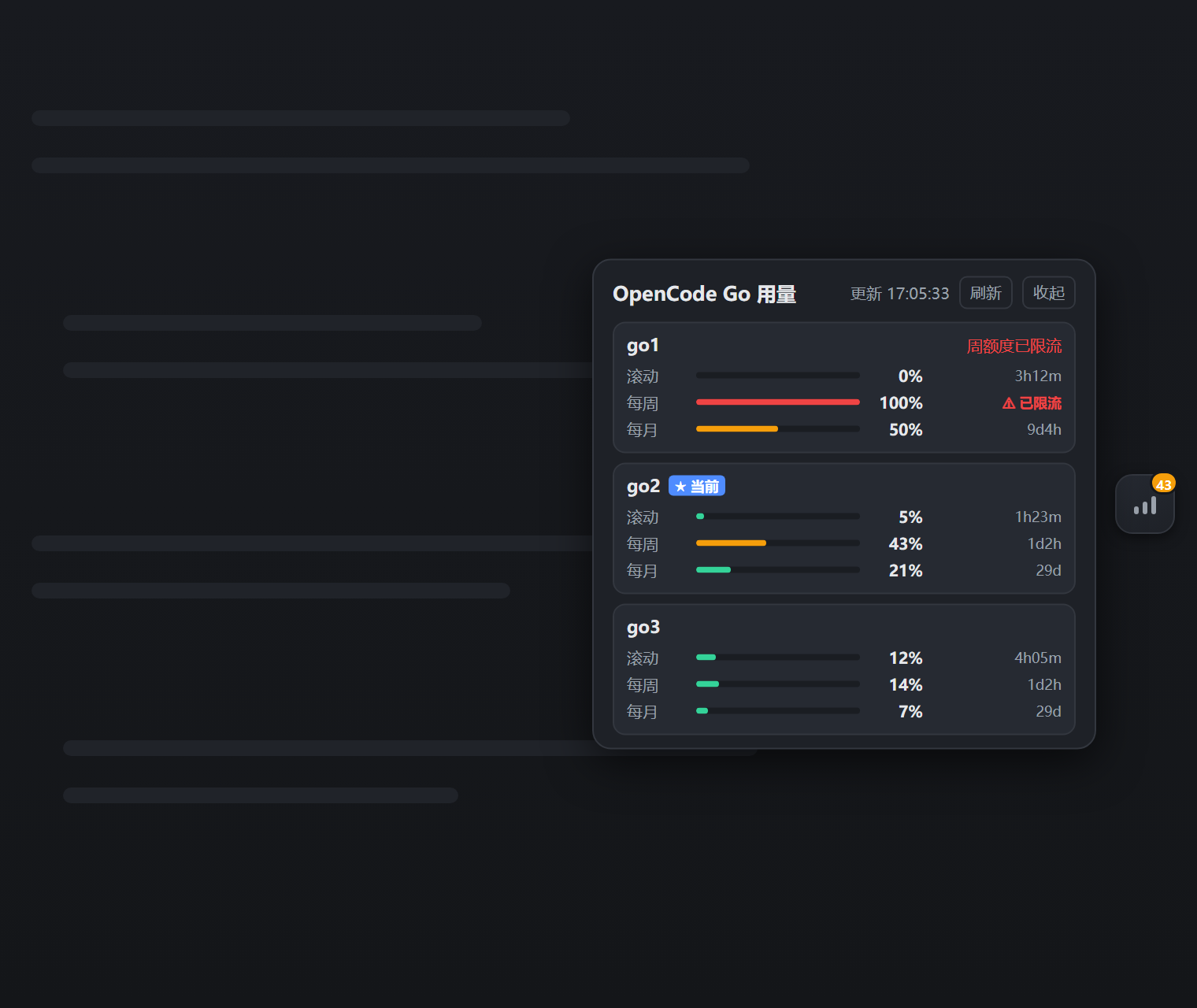
Host half (plain Node ESM):
config.keyNames if provided, otherwise by scanning .credentials.yaml for OPENCODE_GO_KEY_* entries.credentials service (environment → credentials file → .env layering).Authorization: Bearer <key>:GET https://opencode.ai/zen/go/v1/usage
Authorization: Bearer <API_KEY>Response example:
{
  "usage": {
    "rolling": { "status": "ok", "percent": 9,  "resetsAt": "2026-08-14T07:20:04.810Z" },
    "weekly":  { "status": "ok", "percent": 12, "resetsAt": "2026-08-17T00:00:00.810Z" },
    "monthly": { "status": "ok", "percent": 6,  "resetsAt": "2026-09-09T00:41:03.810Z" }
  }
}
The usage endpoint is not yet part of OpenCode's public documentation; it was discovered and verified via farion1231/cc-switch#6433. Parsing is defensive.
Client half (browser bundle) registers in the shell.overlay slot and polls the Host's web-server route /plugins/dsh-opencode-go-usage/snapshot. Keys never leave the Host.
dsh web profile mounts webServer, credentials, and timer, which this plugin needs).file: dependency (recommended)D:\tools\dsh-opencode-go-usage.package.json (e.g. $DSH_HOME/profiles/web/package.json), add to dependencies:"@xiaweiliang060035/dsh-opencode-go-usage": "file:D:/tools/dsh-opencode-go-usage"dsh.profile.bundles):"dsh": {
"profile": {
"bundles": [ "...existing...", "dsh-opencode-go-usage" ]
}
}cd $DSH_HOME/profiles/web
pnpm install
# restart dsh webThe bundle carries its own cordis.patch.yml (declared via dsh.bundle.patch), so the plugin row is composed automatically — no manual patch edit needed.
The package is published on npm as @xiaweiliang060035/dsh-opencode-go-usage:
cd $DSH_HOME/profiles/web
pnpm add @xiaweiliang060035/dsh-opencode-go-usage
Then add "@xiaweiliang060035/dsh-opencode-go-usage" to the profile's dsh.profile.bundles list and restart dsh web.
The plugin registers both a Host half (fetch + webServer route) and a Client half (browser bundle). A plain copy into
plugins/with a relative patch entry loads the Host half only — the floating widget needs the bundle mechanism above.
Tunables go in the plugin row's config (override it in your profile's cordis.patch.yml):
- id: opencode-go-usage
  config:
    keyNames: [go1, go2]      # optional: explicit key-pool names
    baseUrl: https://opencode.ai/zen/go/v1/usage   # optional
    refreshMs: 60000          # optional: poll interval (ms)
    timeoutMs: 15000          # optional: fetch timeout (ms)
    dshHome: ~                # optional: override the DSH home directory
hideCordisPanel: true # optional: hide the built-in "Cordis plugins" sidebar entry| Key | Default | Description |
|---|---|---|
keyNames |
auto-discovered | Explicit key-pool names (OPENCODE_GO_KEY_<name> in .credentials.yaml) |
baseUrl |
https://opencode.ai/zen/go/v1/usage |
The usage endpoint |
refreshMs |
60000 |
Host poll interval in milliseconds |
timeoutMs |
15000 |
Fetch timeout in milliseconds |
dshHome |
resolveDshHome() |
DSH home directory containing .credentials.yaml |
hideCordisPanel |
false |
Hide the built-in "Cordis plugins" sidebar entry (dynamic-plugin admin panel) |
Keys are read from $DSH_HOME/.credentials.yaml (the standard DSH credentials file). A pool looks like:
OPENCODE_GO_API_KEY: sk-opencode-…      # the currently active key
OPENCODE_GO_KEY_ACTIVE: go2             # which pool entry is active
OPENCODE_GO_KEY_go1: sk-opencode-…
OPENCODE_GO_KEY_go2: sk-opencode-…
OPENCODE_GO_KEY_go3: sk-opencode-…
Any OPENCODE_GO_KEY_<name> entry is discovered automatically — the number and names of keys are arbitrary. If you have only one key (no pool), just set OPENCODE_GO_API_KEY; the widget shows that single key.
| Symptom | Likely cause / fix |
|---|---|
Widget shows ! |
Snapshot fetch failed — confirm dsh web is running and /plugins/dsh-opencode-go-usage/snapshot responds |
Card shows Invalid key (401) |
That key is invalid or expired |
Card shows Network error |
Host cannot reach opencode.ai (proxy / offline / timeout) |
| Panel says "no keys configured" | .credentials.yaml has neither OPENCODE_GO_KEY_* nor OPENCODE_GO_API_KEY |
⚠ rate-limited |
That window's quota is exhausted server-side |
MIT
CLASSIFICATION EVIDENCE
系统优先读取 GitHub Topics,再与站内分类词典和词根规则比对。当前命中: 无有效分类标签。
deepseek-ai
DeepSeek Harness: Everything is a Plugin.

anywhere-labs
为 DeepSeek Harness (DSH) 插件生态打造的现代化桌面端解决方案。万物皆「插件」,桌面本身也是「插件」。

walkinglabs
Harness engineering beginner tutorial, from 0 to 1