
其他
完整应用

deepseek-harness
deepseek-ai
DeepSeek Harness: Everything is a Plugin.
PROJECT TOPICS
INSTALL REFERENCE
dsh plugin --profile web add github:xiaozhengdeng/dsh_omnivision
该命令指向仓库当前默认分支;尚无绑定当前 commit 的完整验证结果。
PROJECT README
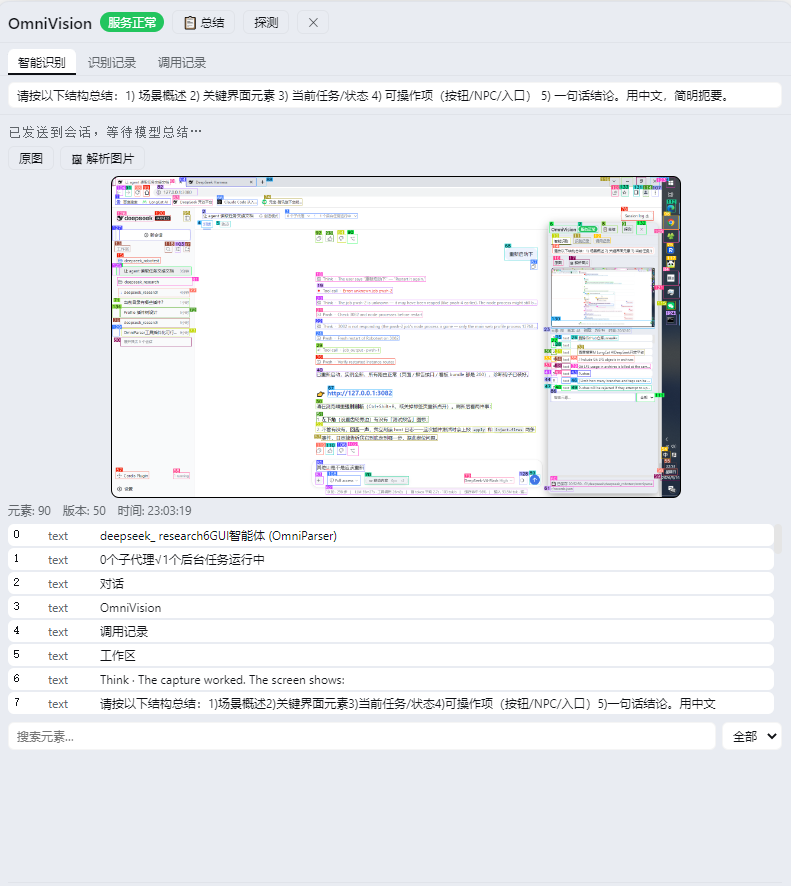
OmniVision is an OmniParser-powered GUI agent plugin for DeepSeek Harness. It turns the desktop or any image into structured elements (text + icons with pixel coordinates), so the model can see and operate the screen without multimodal vision.
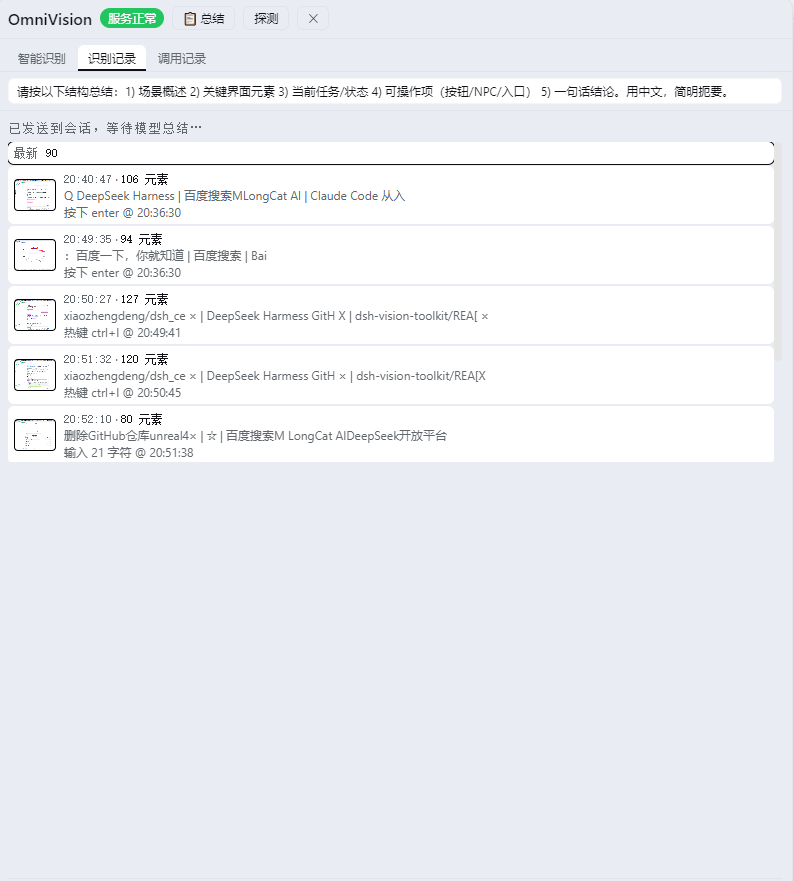
| Vision view (智能识别) | Recognition history (识别记录) |
|---|---|
 |
 |
| Feature | Description |
|---|---|
| 🖥 Screen recognition | Capture the desktop (or parse an image) and get interactive elements with pixel coordinates via OmniParser |
| 🖱 Desktop automation | Click, double-click, right-click, drag, type (unicode-safe), key, hotkey, scroll — by element id or raw x/y |
| 👁 Live vision dock | Real-time recognition view with SOM-annotated overlay, hover highlight, click-to-zoom |
| 🕘 Recognition history | Thumbnails per capture, diff vs latest (added / removed / moved) |
| 📋 One-click summary | Sends the recognized elements to the session for the model to summarize |
| 🖼 File parsing | Parse local images from the dock, bypassing model multimodal limits |
| 📊 Call log | Tracks every gui_* tool call and action for inspection |
The plugin registers these gui_* tools into the shared tools registry:
gui_capture — capture the desktop screen and run OmniParser to extract interactive elements (text + icons with pixel coordinates), refreshing the shared vision state and saving the SOM-annotated overlaygui_act — perform a real mouse/keyboard action on the desktop: click / double-click / right-click / move / type / press / hotkey / scroll / draggui_find — search the elements from the last capture by text or typegui_state — show the current vision state without parsinggui_verify — re-capture and check whether a text is present or absent, retrying until it settlesgui_task — execute a scripted multi-step UI plan with re-parse between steps and optional assertionsgui_open_app — launch an installed desktop app by name via its Windows AUMIDgui_parse_image — parse a third-party image (from a conversation attachment) into the shared vision statedsh plugin --profile web add dsh_omnivision
# or a local path:
dsh plugin --profile web add G:\deepseek\plugins\dsh_omnivisionRestart the web process after installing. The plugin loads as a profile bundle layer:
gui_* tools into the shared tools registry and serves the browser half over an HTTP route (/dsh-omnivision/<method>)shell.overlay and a toggle into the sidebar footerhttp://127.0.0.1:8000 (e.g. via G:\omni\OmniParser\start_server.bat)pyautogui for screenshots and input automationCall the gui_* tools from the model side; the OmniVision dock in the browser provides the visual surface:
| Control | Description |
|---|---|
| 智能识别 | Live element list + SOM-annotated image (hover to highlight, click to zoom) |
| 🖼 解析图片 | Pick a local image file to parse (bypasses model multimodal limits) |
| 📋 总结 | Send the current recognition info to the session for the model to summarize |
| 识别记录 | History with thumbnails + diff vs latest (added / removed / moved) |
| 调用记录 | Recent gui_* tool calls and action log |
| 探测 | Check OmniParser server connectivity |
pnpm build      # tsc (host) + tsc (client) + tsdown (client bundle)
pnpm typecheckMIT
OmniVision 是 DeepSeek Harness 的 OmniParser 驱动的 GUI 智能体插件。它把桌面或任意图片变成结构化元素(文本 + 图标 + 像素坐标),让模型无需多模态能力就能「看见」并操作屏幕。
| 智能识别视图 | 识别记录视图 |
|---|---|
|
|
| 功能 | 说明 |
|---|---|
| 🖥 屏幕识别 | 截取桌面(或解析图片),经 OmniParser 提取带像素坐标的可交互元素 |
| 🖱 桌面自动化 | 点击 / 双击 / 右键 / 拖拽 / 输入(Unicode 安全)/ 按键 / 热键 / 滚轮,按元素 id 或原始坐标操作 |
| 👁 实时识别 Dock | 实时识别视图 + SOM 标注图(悬停高亮、点击放大) |
| 🕘 识别记录 | 每次识别的缩略图 + 与最新对比(新增 / 移除 / 位移) |
| 📋 一键总结 | 把当前识别信息发到会话,由模型按提示词总结 |
| 🖼 图片解析 | 从 Dock 选择本地图片解析,绕开模型多模态限制 |
| 📊 调用记录 | 记录每次 gui_* 工具调用与动作,便于排查 |
插件向共享工具注册表注册以下 gui_* 工具:
gui_capture — 以原生分辨率截取桌面,运行 OmniParser 提取可交互元素(文本 + 图标 + 像素坐标),刷新共享视觉状态并保存 SOM 标注图gui_act — 在桌面上执行真实鼠标/键盘操作:点击 / 双击 / 右键 / 移动 / 输入 / 按键 / 热键 / 滚轮 / 拖拽gui_find — 按文本或类型搜索上一次识别的元素gui_state — 查看当前视觉状态(不重新解析)gui_verify — 重新截屏解析,反复确认某文本出现或消失gui_task — 按脚本执行多步 UI 计划,步骤间重新解析并支持断言gui_open_app — 通过 Windows AUMID 按名称启动已安装的桌面应用gui_parse_image — 解析会话中的第三方图片(附件)进入共享视觉状态dsh plugin --profile web add dsh_omnivision
# 或本地路径:
dsh plugin --profile web add G:\deepseek\plugins\dsh_omnivision安装后重启 web 进程。插件作为 profile bundle 层加载:
gui_* 工具注册进共享 tools 注册表,并通过 HTTP 路由(/dsh-omnivision/<method>)为浏览器半提供数据shell.overlay,侧栏底部挂开关按钮http://127.0.0.1:8000 的 OmniParser FastAPI 服务(如 G:\omni\OmniParser\start_server.bat)pyautogui(截图与输入自动化)模型侧直接调用 gui_* 工具;浏览器里的 OmniVision Dock 提供可视化操作:
| 控件 | 说明 |
|---|---|
| 智能识别 | 实时元素列表 + SOM 标注图(悬停高亮、点击放大) |
| 🖼 解析图片 | 选择本地图片文件解析(绕开模型多模态限制) |
| 📋 总结 | 把当前识别信息发到会话,由模型按提示词总结 |
| 识别记录 | 历史缩略图 + 与最新对比(新增 / 移除 / 位移) |
| 调用记录 | 最近 gui_* 工具调用与动作日志 |
| 探测 | 检查 OmniParser 服务连通性 |
pnpm build      # tsc (host) + tsc (client) + tsdown (client bundle)
pnpm typecheckMIT
CLASSIFICATION EVIDENCE
系统优先读取 GitHub Topics,再与站内分类词典和词根规则比对。当前命中: 无有效分类标签。
deepseek-ai
DeepSeek Harness: Everything is a Plugin.

anywhere-labs
为 DeepSeek Harness (DSH) 插件生态打造的现代化桌面端解决方案。万物皆「插件」,桌面本身也是「插件」。

walkinglabs
Harness engineering beginner tutorial, from 0 to 1