
其他
完整应用

deepseek-harness
deepseek-ai
DeepSeek Harness: Everything is a Plugin.
PROJECT TOPICS
PROJECT README

A DeepSeek Harness web-GUI plugin that adds OpenCode Go and DeepSeek API entries to the Settings sidebar:
No more tab-hopping to opencode.ai or platform.deepseek.com to check your quota.
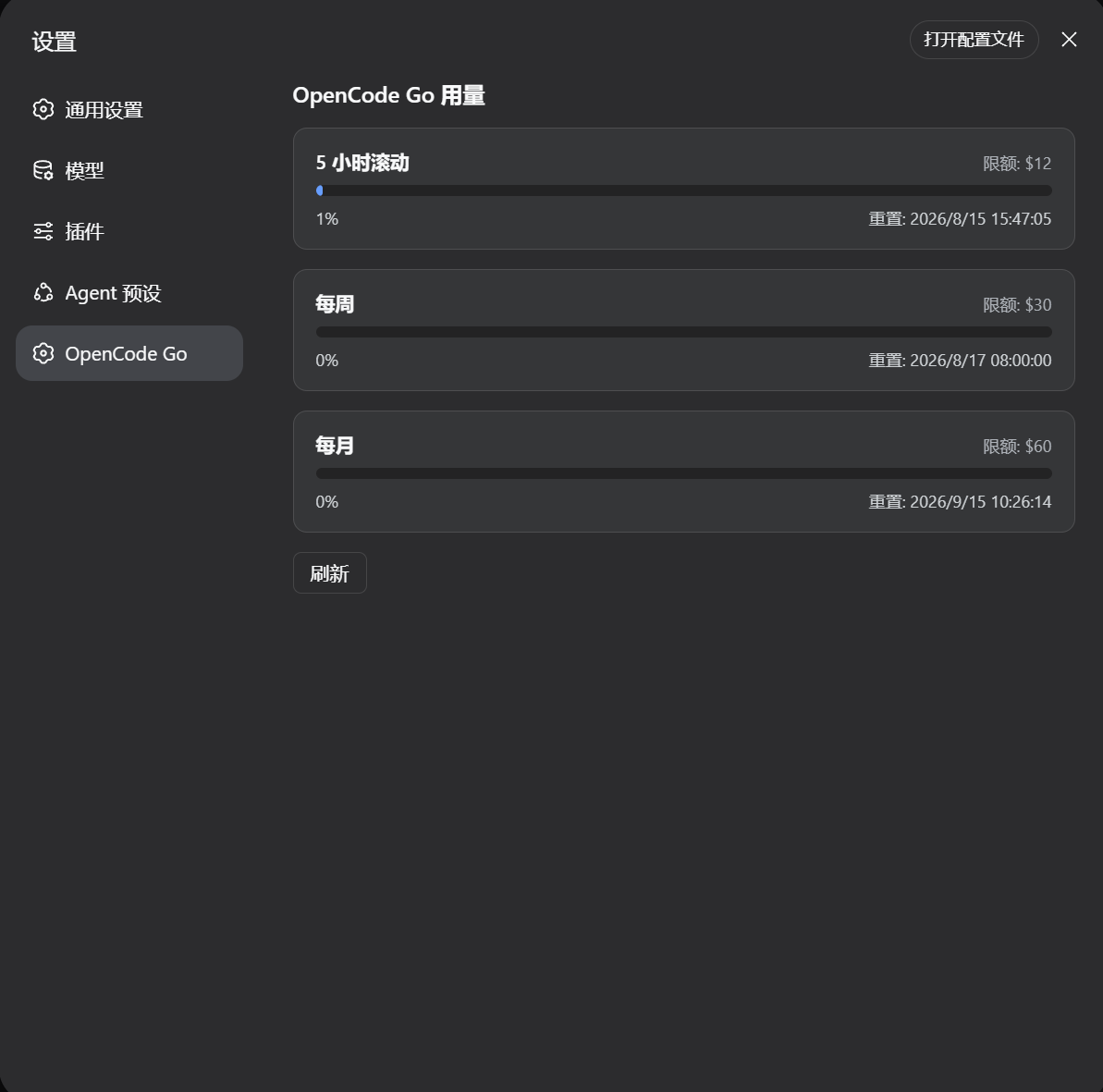
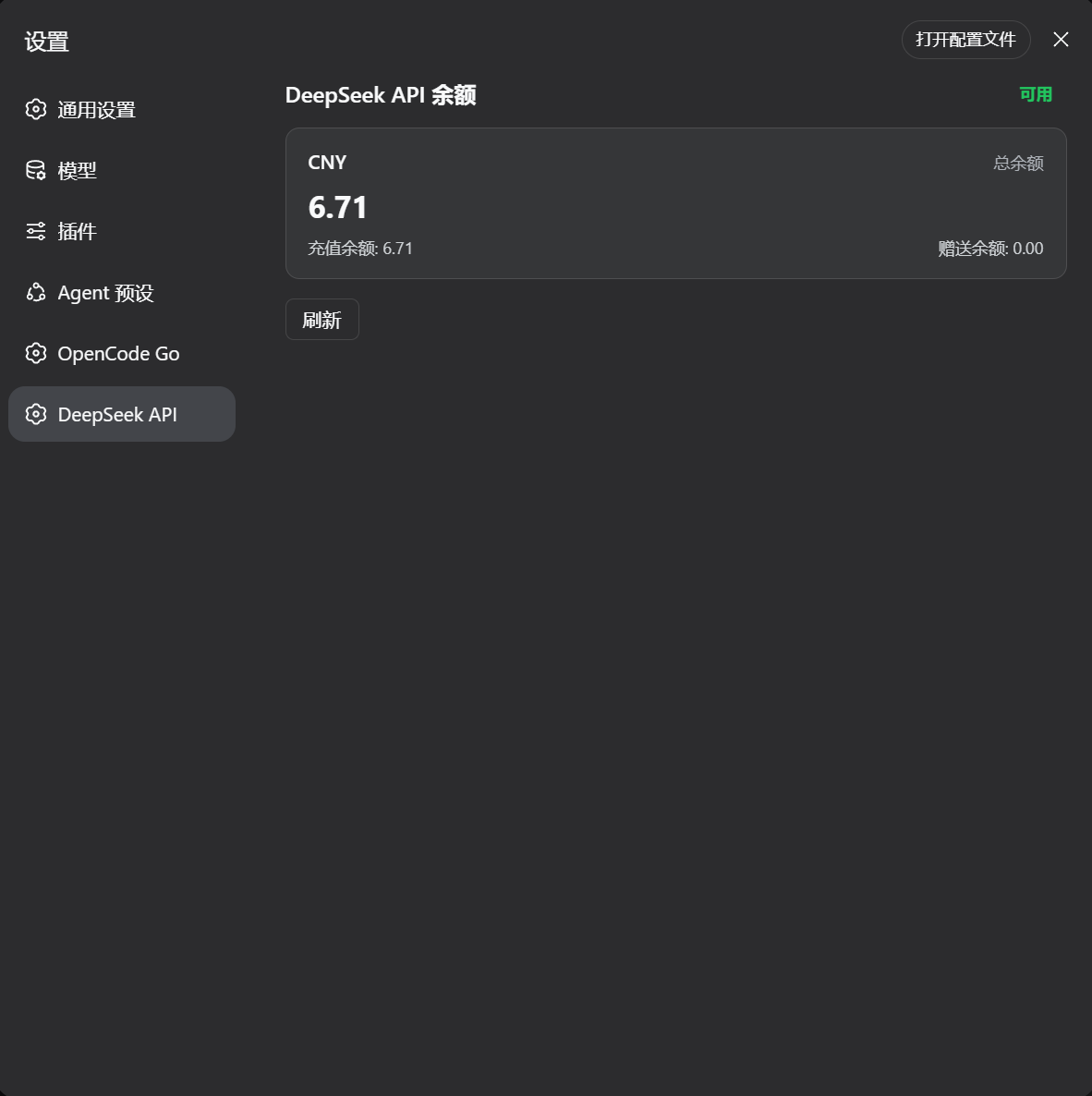
settings.section contributions)opencodeUsage/usage + opencodeUsage/deepseekBalance read the API keys and call the official endpointsOPENCODE_GO_API_KEY / DEEPSEEK_API_KEY) with a fallback to OpenCode's auth.json for the Go keydsh plugin --profile web add github:xiaomao66666/dsh-deepviewAdd the plugin row to your profile's patch layer ($DSH_HOME/profiles/web/cordis.patch.yml):
- insert:
    - id: deepview
      name: 'dsh-deepview'
Restart dsh web so the host half and the served client bundle pick up the plugin. The plugin needs the standard web bundle composition (the api-gateway client Remote and the settings.section slot) — the default dsh web profile has both.
Host-side tunables live on the plugin row in cordis.yml:
- id: deepview
  name: dsh-deepview
  config:
    baseUrl: https://opencode.ai/zen/go/v1/usage          # default
    deepseekBaseUrl: https://api.deepseek.com/user/balance # default
timeoutMs: 15000 # default| Key | Default | Meaning |
|---|---|---|
baseUrl |
https://opencode.ai/zen/go/v1/usage |
The OpenCode Go usage endpoint. |
deepseekBaseUrl |
https://api.deepseek.com/user/balance |
The DeepSeek balance endpoint. |
timeoutMs |
15000 |
Fetch timeout in milliseconds. |
GET https://opencode.ai/zen/go/v1/usage
Authorization: Bearer <API_KEY>
<API_KEY> is the Anthropic-compatible OpenCode Go key (sk-opencode-…). The endpoint returns:
{
  "usage": {
    "rolling": { "status": "ok", "percent": 9,  "resetsAt": "2026-08-14T07:20:04.810Z" },
    "weekly":  { "status": "ok", "percent": 12, "resetsAt": "2026-08-17T00:00:00.810Z" },
    "monthly": { "status": "ok", "percent": 6,  "resetsAt": "2026-09-09T00:41:03.810Z" }
  }
}
percent is 0–100; resetsAt is ISO-8601. The endpoint is not yet in OpenCode's public docs.
GET https://api.deepseek.com/user/balance
Authorization: Bearer <API_KEY>
<API_KEY> is your DeepSeek platform key (sk-…). This is an official, documented endpoint (Get User Balance). It returns:
{
  "is_available": true,
  "balance_infos": [
    {
      "currency": "CNY",
      "total_balance": "110.00",
      "granted_balance": "10.00",
      "topped_up_balance": "100.00"
    }
  ]
}OPENCODE_GO_API_KEY ($DSH_HOME/.credentials.yaml)~/.local/share/opencode/auth.json → the opencode-go entry (fallback opencode) with type: "api"For the DeepSeek panel: DSH credentials seam / environment DEEPSEEK_API_KEY ($DSH_HOME/.credentials.yaml).
Works on macOS, Linux, and Windows. The plugin is plain ESM with no native binaries or build step, and both halves (Host and Client) are platform-independent.
| Platform | API key resolution |
|---|---|
| macOS / Linux | ✅ ~/.local/share/opencode/auth.json is exactly where the OpenCode CLI stores it — works out of the box |
| Windows | Use OPENCODE_GO_API_KEY (credentials seam or environment) for best results; an auth.json in the same relative location is also read |
Requirements on any platform: Node.js + DeepSeek Harness, and the API keys. The OpenCode Go panel additionally needs the opencode-go model configured in Settings → Models.
A dual-face (Host + Client) plugin. The Host publishes the opencodeUsage Typert Remote service (methods usage and deepseekBalance); the Client mounts it, registers the settings.section entries, and renders the pages. Communication rides the harness /api RPC carrier.
| File | Role |
|---|---|
index.js |
Host half — OpencodeUsageGateway (TypertRemoteService, service key opencodeUsage; methods usage() + deepseekBalance()) |
typert.host.js |
Hand-written Typert host manifest, registered via exports["./typert"] |
client.js |
Browser bundle in window.__ModuleLoader__.load format — mounts the Remote, registers the section, renders the page |
package.json |
Dual-face declaration: main + exports["./client"] + exports["./typert"] + dsh.client |
The plugin is plain ESM and needs no build step. Host files import @deepseek-ai/* peers; the client bundle is hand-written in the lazy-CJS format the harness client loader serves under /plugins.
Local iteration: dsh plugin --profile web add file:<this-folder> copies the package into the profile (file: is copied, not linked) — re-run the command after editing source files, then restart dsh web.
MIT
CLASSIFICATION EVIDENCE
系统优先读取 GitHub Topics,再与站内分类词典和词根规则比对。当前命中: 无有效分类标签。
deepseek-ai
DeepSeek Harness: Everything is a Plugin.

walkinglabs
Harness engineering beginner tutorial, from 0 to 1

anywhere-labs
为 DeepSeek Harness (DSH) 插件生态打造的现代化桌面端解决方案。万物皆「插件」,桌面本身也是「插件」。