
模型与 MCP
待识别

rea
morluto
Reverse engineer anything with agents, from app behavior down to native binaries.
PROJECT TOPICS
INSTALL REFERENCE
dsh plugin --profile web add github:xiaohai-78/dsh-modes
该命令指向仓库当前默认分支;尚无绑定当前 commit 的完整验证结果。
PROJECT README
English | 中文
Mode manager for DeepSeek Harness (dsh). It adds a Modes page to the Web interface's Settings, where you switch what each agent mode can do, edit each mode's system prompt and the tool descriptions the model reads, manage skills per mode (saved versions, new skills, and imports from Codex, Claude Code, or a folder), create your own modes from templates, and merge built-in updates in one click after a dsh upgrade.
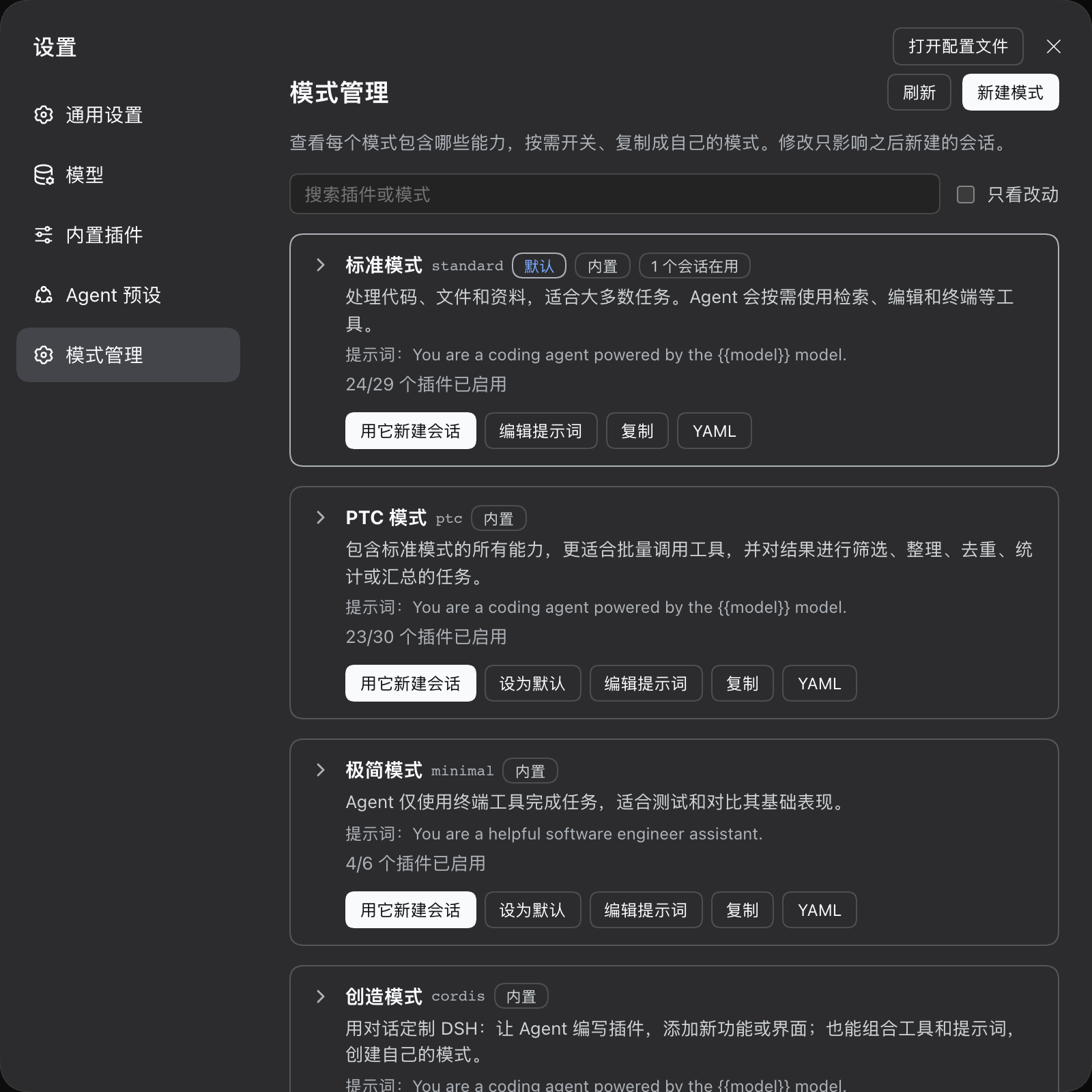
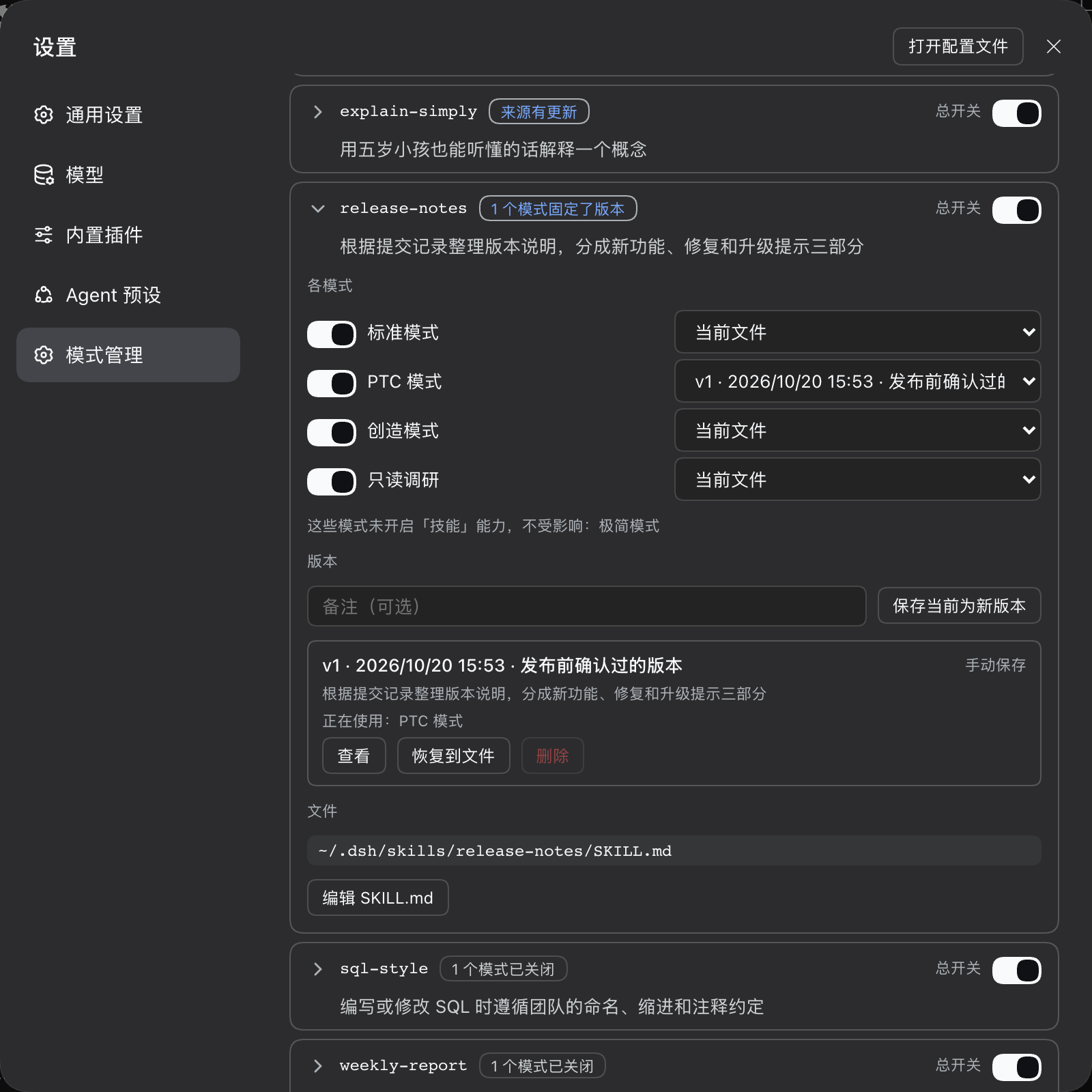
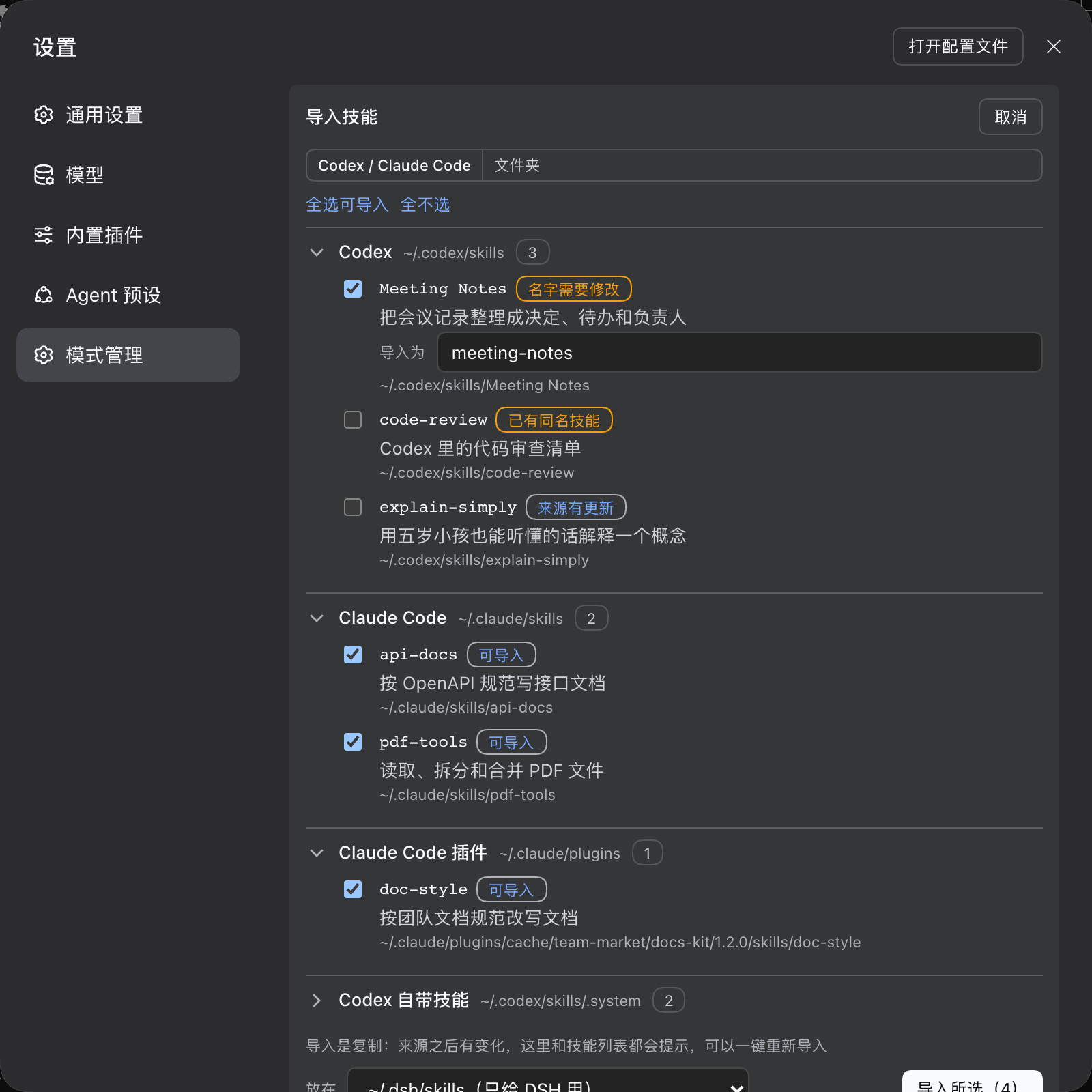
You need the dsh Web interface (dsh web). See Compatibility for supported versions.
dsh plugin --profile web add dsh-modesIf you run dsh from source, run pnpm dsh plugin --profile web add dsh-modes in the source folder instead. After installing, restart dsh web and open Settings → Modes.
Each mode is one card:
Click a card to open it. It has three tabs: Capabilities, Prompt, and All plugins.
| Group | Capabilities |
|---|---|
| What it can do | Run commands, Files (with a separate Allow file changes switch), Web, Subagents and workflows, Extend itself (plugin management, plugin market, plugin API lookup) |
| How it works | Plan mode, To-do list, Session goals, Skills, Ask you, Deliverables, Reminders |
| Context | Workspace instructions (AGENTS.md, CLAUDE.md, and similar), Time awareness, Context compaction |
{{model}} with a click, and the editor checks them as you type. Preview full system prompt shows everything the model receives..md files.The In chat section has two switches that save as soon as you click them. They apply to sessions created afterwards:
mode_prompt tool, and asks for your approval before every save.Open Settings → Modes → Tool descriptions. It rewrites the description of a tool: the text that tells the model what the tool does and when to use it. The tool's own definition is never changed, so the built-in text always comes back.
Open Settings → Modes → Skills. It lists every skill the modes find, with its description and file. When Skill Manager (dsh-mode-skills) is installed, a note says that its sidebar page shows these same settings; it saves through this plugin.
~/.dsh/skills, read by DSH only, or ~/.agents/skills, shared with other agent tools), and the modes it starts on in. It writes <folder>/<name>/SKILL.md and opens it in the editor.~/.codex/skills, ~/.claude/skills, and Claude Code plugins under ~/.claude/plugins, or, under Folder, the skills in a folder you name (a skill folder, or a folder of skill folders; a path in quotes, as Windows' Copy as path gives it, works too). Each line says whether it is ready, already imported, changed at its source, named like an existing skill (import it under another name, or replace that skill after a version of it is saved), or named in a way DSH would ignore (it is imported under the suggested name, and the copy's name is rewritten). Skills shipped with Codex are listed folded and unticked, because they use Codex's own tools..git, and .DS_Store are left out. When the source changes later, the skill's line shows Source changed; Import again from the source in its opened part replaces the copy after saving the current files as a version.SKILL.md; Restore to file copies it over the current files and keeps files the version lacks; Delete is refused while a mode uses the version.node_modules belong to DSH or a plugin; you can turn them off per mode and save versions, but not edit or restore their files. Skills in ~/.agents/skills are shared with other agent tools, and the page says so before you edit one.Lists every plugin in the mode, for when you need to adjust them one by one:
| Start from | What it can do | Good for |
|---|---|---|
| Develop | Same as the Standard mode | Everyday coding |
| Write | Read and write files, workspace instructions, to-do list, deliverables, skills, context compaction, asking you, time; no terminal | Documents and drafts |
| Chat | Web, context compaction, asking you, time; no files or terminal | Questions and conversation |
| Read-only research | Read and search files, web, workspace instructions, to-do list, skills, context compaction, asking you, time; cannot change files or run commands | Reading code and research |
| Copy a mode | Same as the mode you copy | Small changes to an existing mode |
Each template comes with a starter prompt in Chinese or English, following the interface language. The name and ID are filled in for you, and you can change both.
The page checks for a newer version of this plugin and can install it.
dsh-modes, at most once every 12 hours. The request names only the package. Turn it off with Check for updates automatically at the bottom of the page; Check now still works. Development installs (link:) are never checked.latest release is offered, never a prerelease, and the tarball address must be this package's file on the registry that answered.dsh web again; desktop app: quit and reopen). Running sessions are not affected, and your modes and edits stay. In some DSH versions the plugin is replaced on the spot, and the page asks you to reload. The banner shows the command that goes back to the old version. The next time you open the page it says Upgraded to the new version until you dismiss it. If the profile already holds that release (installed earlier and not loaded yet), the banner says it is installed and loads when you restart dsh.dsh plugin --profile web add github:xiaohai-78/dsh-modes instead of a button.https://registry.npmjs.org/dsh-modes/-/dsh-modes-<version>.tgz, or run dsh plugin --profile web add dsh-modes@latest in a terminal. Without @latest the command does nothing, because DSH keeps the version it installed./ menu in the composer keeps its list until the page reloads./ menu shows it after a page reload.cordis.patch.yml, so other windows using the same profile see them too. The Desktop app uses a different profile and is not affected.| dsh version | Result |
|---|---|
0.2.0-rc.2 (npm latest) |
Works. This dsh version provides no localized plugin names, so the plugin shows each plugin's official name instead |
0.2.1-alpha.3 |
Works |
0.2.1-rc.1 (npm next) |
Works. rc.1 adds a plugin market tool to the built-in modes; modes you changed show "The built-in mode was updated", and syncing adds it switched off |
Every version above was installed and tested, including checks of the actual requests sent to the model through a local mock model. The dsh APIs this plugin uses are not stable yet, so other versions may need changes.
I changed a switch or the prompt, but the chat did not change. Changes apply to sessions created afterwards. Try New session with it. Only a mode with Live prompt on applies its prompt text to running sessions.
A mode stopped working after a dsh upgrade. Open its card. If it reports plugins that cannot load, click Turn these plugins off. If it says the built-in mode was updated, click Sync built-in update.
I made a mess. How do I go back?
I asked the model to change its prompt, and nothing happened. Allow prompt changes in chat only applies to sessions created after you turned it on. Also, if dsh's approval policy is "never" (for example in unattended runs), saves are refused.
Where does the plugin keep its data?
cordis.patch.yml..dsh-modes/ folder in the profile directory.dsh plugin --profile web remove dsh-modesModes this plugin changed keep working after the uninstall. Every row it adds to a built-in mode is saved with a condition that switches the row off once the package is gone, and a mode with Live prompt also gets an official persona row with the same prompt that runs only then. After the uninstall:
.dsh-modes/ folder in the profile directory stays, so installing again brings every setting back. Delete it to clean up.Rows saved by version 0.8.0 or earlier have no such condition. Upgrade and start dsh once before you uninstall: on start, the plugin adds the condition to every built-in mode it changed. If a mode already stopped working after an uninstall (it is missing from the mode list, or a new session reports agent-preset/invalid: ... never started), install the plugin again, or switch to another mode.
mode_prompt reads and writes only the opening prompt text.<project>/.dsh/skills, <project>/.agents/skills) depend on a session's workspace and are not listed.name, description, whenToUse, metadata, disable-model-invocation, and user-invocable; other fields, such as Claude Code's allowed-tools or model, have no effect. A skill that relies on another tool's own tools (for example Codex's image generation) is imported but may not work in DSH.$CODEX_HOME/skills (default ~/.codex/skills), $CLAUDE_CONFIG_DIR/skills (default ~/.claude/skills), and skills/<name>/SKILL.md up to six levels below ~/.claude/plugins, keeping the most recently changed copy of a plugin cached in several versions. Project skills such as <project>/.claude/skills are imported through Folder. A skill as a single <name>.md file is not listed.subagent) appears after a session of that mode has made its first request.<available_tools> list, still shows the built-in text. The tool definitions sent to the model carry your edit.tool-descriptions.json once and again after each save from the page. Restart dsh after editing it by hand. A damaged file is reported and never overwritten.Before changing the plugin, read AGENTS.md, docs/requirements.md, docs/adr/, and GLOSSARY.md.
| File | Role |
|---|---|
index.js |
Host plugin. Serves POST /api/dsh-modes and the dshModes service the two modules below use. Edits to built-in modes are written as a profile override of the mode's row through configEditor.edit(); plugin display metadata comes from pluginInventory.list() |
container.js |
Custom-mode container: keeps the presets list in its config and calls agentPresets.register() for each entry |
rebase.js |
Three-way merge for syncing built-in updates: takes the built-in plugin list from your last save as the base and merges your changes onto the latest built-in list. On conflict, your value wins |
tool-descriptions.js |
The row that applies tool description edits: mounted inside a mode, listens to system-prompt/assemble first in its chain, and replaces the description of the edited tools in the tool list of every request |
tool-edit.js |
Pure planning for tool description edits: validation, batch edits with conflict checks, restores, history, and the per-mode tool list |
skill-policy.js |
The skill policy row: mounted inside a mode, it registers a skill provider in the mode's scope that lists an entry nobody may invoke for each hidden skill and the saved version for each pinned one, at rank -1000 |
skill-store.js |
Pure rules for skill settings: merging the all-modes list into a mode, batch changes, version ids, which modes need the row, and reading SKILL.md frontmatter |
skill-files.js |
Copies a skill into a version directory, restores one over the current files, and writes files through links |
skill-import.js |
Finds skill folders in Codex, Claude Code, and a named folder; reads a candidate's frontmatter; fingerprints, copies, and replaces skill folders; writes a new skill's SKILL.md |
update.js |
Version check and upgrade helpers without DSH services: version comparison, how the profile depends on the package, the registries to ask, and validation of the registry's tarball address |
state.js |
Files in the profile's .dsh-modes/ folder: state.json (sync baselines, plus which built-in mode and template each custom mode came from), history.json (prompt history), tool-descriptions.json (tool description edits and their history), settings.json (the update check switch, and the note an upgrade leaves for the new version), and skills.json (skill settings, the details each skill had when last seen, and the version index; the versions' files are in skill-versions/<skill>/<version>/). Writes go to a temporary file first and then replace the original |
install-guard.js |
Keeps a changed built-in mode loading after an uninstall: saves each row of this plugin's modules with a !!js disabled condition that is true once dsh-modes no longer resolves, and puts an official persona row with the same prompt after a live persona, with the opposite condition. Custom modes get no conditions, since they go away with the plugin |
live-persona.js |
The persona row for Live prompt: replaces the mode's @deepseek-ai/dsh-persona row and registers the same two prompt sections, reading the latest saved text every time the prompt is assembled |
prompt-tool.js |
The mode_prompt tool: mounted as a row inside a mode, so only that mode's sessions see it; asks the user for approval through tools/pre-execute before writing |
client.js |
The Web settings page (Chinese and English) |
cordis.patch.yml |
Inserts the index.js and container.js host rows |
Actions of /api/dsh-modes:
list, read, prompt, history, usage, tools, updateStatus, upgradeStatus, skills, readSkillFile, readSkillVersion.setSkillModes (a batch of { preset, skill, enabled?, pin? } items), setSkillGlobal, saveSkillVersion, restoreSkillVersion, deleteSkillVersion, writeSkillFile.toggle, followPlatform, applyRows, resetRow.reset, sync, repair, create, update, remove, setDefault.setPrompt, setLive, setPromptTool.setUpdateCheck, dismissUpgraded, upgrade (starts the install and answers at once), cancelUpgrade.setToolDescriptions (a batch of { preset, tool, text, expected? } items, answered with one result per item), restoreToolDescriptions (items, presets, or all).prefix (opening) and suffix (closing) of the mode's persona row. With complete: true, the opening text is the whole system prompt.0.2.0-rc.2 still has {{cwd}}, which 0.2.1-alpha.2 removed. dsh resolves variables strictly, and one wrong variable makes every step of that mode fail, so saves (including saves from chat) check them first.prompt-conflict instead of overwriting.system-prompt/assemble output carries the tool definitions sent to the model. The row replaces description there, after the listeners it wraps have run, so another plugin does not rewrite an edit. The registry's definitions are not touched, which is why a restore gives back the exact built-in text..dsh-modes/tool-descriptions.json keeps, per mode, each edited tool as { text, base }, where base is the built-in text at the time of the edit, plus the last 100 changes. The row reads it on every model step.agentPresets.acquireScope(id) mounts a mode's plugins in a scope the registry releases again, and tools.schemas(scope) lists its tools without a session. A scan is reused for five minutes while the mode's rows are unchanged; Refresh scans again.dsh-modes-tool-descriptions with config.preset set to the mode; restoring the last edit removes it. Copying a mode points the copied row at the new mode.skill-filesystem row, so the policy row registers in the same scope with rank -1000. A hidden skill gets an entry with modelInvocable and userInvocable false, which removes it from the model's catalog and from the / menu; a pinned skill gets an entry whose body is the saved version and whose resourceBase is the saved copy.invalidate, and tool-skill appends a replacement catalog on the next model step. Earlier catalogs stay in the history.$DSH_HOME/skills or $DSH_AGENTS_HOME/skills (defaults ~/.dsh/skills and ~/.agents/skills), the user roots the filesystem provider scans. DSH watches every folder in a skill root, and Windows cannot rename a watched folder. So on Windows a copy is written straight into its folder with SKILL.md last, and a replacement overwrites the files in place (SKILL.md last) and removes the ones the source lacks; elsewhere a copy is written beside its final folder and renamed into it, and a replacement is copied first and swapped in. A linked folder is never replaced. skills.json records each import as skills.<name>.imported with the source folder, its source kind, and two fingerprints: one of file paths, sizes, and modification times, and one of paths and contents, so an unchanged source is recognised without reading its files.agentPresets.acquireScope(id) and skills.snapshot({ scope }) give each mode's skills and tools.schemas(scope) whether the mode has the skill tool, without a session. The web profile turns the host's own skill-filesystem row off, so no unhidden copy exists outside the modes; the page therefore remembers each skill's details while it is visible.<registry>/dsh-modes/latest with the process fetch, so DSH's outbound proxy applies. The registries come from pluginManager.registries() (the configured one, then its fallbacks), and the answer is reused for 12 hours (30 minutes after a failure).dependencies['dsh-modes'] in the profile's package.json: a version or tag (registry), a tarball address (tarball), a git address (git), or a path (link). The plugin manager's own record is not used, because 0.2.0-rc.2 does not report it.pluginManager.installBundle(tarballAddress, { requestId }). A tarball address does not name the installed package, so the manager accepts it over an installed package, and it restores the manifest and lockfile when the install fails or is cancelled. The Host does not wait for it: the page polls upgradeStatus every second. When the installer replaces the plugin during the install, the page sees an unknown action or an idle state and asks for a reload.npm testRuns the unit tests of the three-way merge, the tool description planner, the description row, the version check helpers, the upgrade flow against a fake plugin manager, the skill settings, version files, skill policy row, and skill import (folder listing, fingerprints, copies that leave out outside links, renames, and replacements), the uninstall conditions (the rows they are added to, and how they evaluate with and without the package), and that both languages of the page have the same text. What each feature must do, and how it was verified against real DSH versions, is in docs/requirements.md.
See CHANGELOG.md.
CLASSIFICATION EVIDENCE
系统优先读取 GitHub Topics,再与站内分类词典和词根规则比对。当前命中: deepseek-harness。
morluto
Reverse engineer anything with agents, from app behavior down to native binaries.

deepseek-ai
DeepSeek Harness: Everything is a Plugin.

nexu-io
The 1st Collaborative AI Design Agent Workspace. Local-first and open source. Create motion, prototypes, websites, apps, dashboards, presentations, images, and videos with your team and AI agents. Share work, exchange feedback, and iterate together in one workspace.