
Agent 与会话
插件

OpenViking
volcengine
Self-evolving Context Database for AI Agents. Unify Agent Memory, Knowledge RAG and Skills.
PROJECT TOPICS
INSTALL REFERENCE
dsh plugin --profile web add github:xiaogu619520/dsh-plugin-task-panel
该命令指向仓库当前默认分支;尚无绑定当前 commit 的完整验证结果。
PROJECT README
优雅的任务摘要与上下文用量监控浮动面板(DeepSeek Harness 专属插件)。
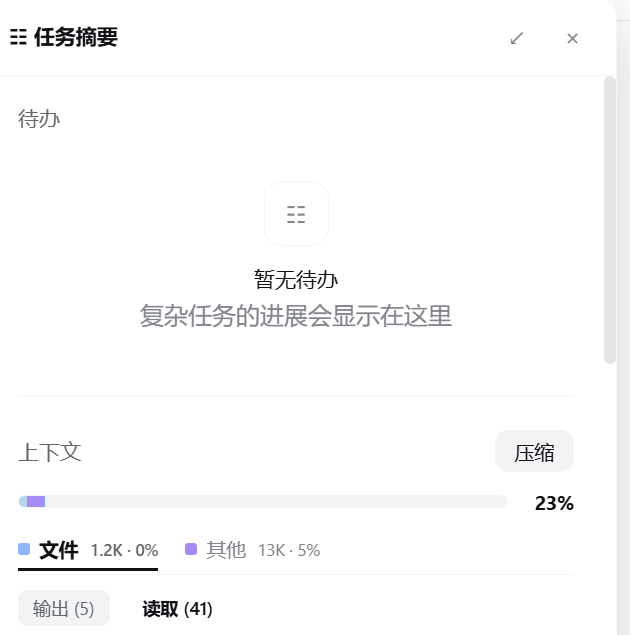
在任意 DeepSeek Harness 会话中,直接把下面这句话(或本仓库链接)发给 AI,AI 会全自动为你配置并启用插件:
帮我安装并启用这个 DSH 插件:https://github.com/xiaogu619520/dsh-plugin-task-panel.gitAI 将自动完成:克隆插件到 Profile 目录、配置
cordis.patch.yml注入点、建立依赖关系并热加载生效。
📋 待办事项实时跟踪 (Todo Tracking)
todo_write 任务清单。pending、in_progress 进行中、completed 已完成)。📊 上下文与 Token 精细化分析 (Context & Token Breakdown)
1.2K · 0%)。13K · 5%)。🎨 极致交互体验 (Interactive UI/UX)
Ctrl + Alt + B(或 Mac 上的 Cmd + Alt + B)快速显示/隐藏面板。如果你偏好手动配置,请按以下步骤操作:
克隆插件到桌面 Profile 目录:
cd ~/.dsh/profiles/desktop/plugins
git clone https://github.com/xiaogu619520/dsh-plugin-task-panel.git
在 ~/.dsh/profiles/desktop/cordis.patch.yml 中添加插件注入点:
insert:
  task-panel-surface:
    package: dsh-plugin-task-panel
在 ~/.dsh/profiles/desktop/package.json 中声明依赖:
{
  "dependencies": {
    "dsh-plugin-task-panel": "file:./plugins/dsh-plugin-task-panel"
  }
}
重启 DeepSeek Harness 即可生效。
| 快捷键 | 功能 |
|---|---|
Ctrl + Alt + B / Cmd + Alt + B |
打开 / 关闭任务摘要面板 |
CLASSIFICATION EVIDENCE
系统优先读取 GitHub Topics,再与站内分类词典和词根规则比对。当前命中: context-monitor、context-summary。
volcengine
Self-evolving Context Database for AI Agents. Unify Agent Memory, Knowledge RAG and Skills.

EverMind-AI
One portable memory layer for every AI agent: local-first, Markdown-native, user-owned, and self-evolving across apps, tools, and workflows.

freestylefly
Prompt as Code | GPT-Image2 工业级提示词引擎与模板库,470+ 个案例逆向工程,20+ 套工业级模板,并提炼出Skills,持续更新中