
模型与 MCP
待识别

rea
morluto
Reverse engineer anything with agents, from app behavior down to native binaries.
PROJECT TOPICS
INSTALL REFERENCE
dsh plugin --profile web add github:xavier711/dsh-plugin-deepseek-usage
该命令指向仓库当前默认分支;尚无绑定当前 commit 的完整验证结果。
PROJECT README
A DeepSeek usage panel plugin for the DeepSeek Harness Web GUI. It adds a 「Usage / 用量」 entry at the bottom of the left sidebar showing:
GET /user/balance (total, topped-up, granted).usage records) and shows: today / last 7 days / all time, a 7-day chart (switchable to 30 days / 12 months, stacked by token type, with a lifetime / peak / streak summary line), a token-activity heatmap covering the last 6 months (one square per day; switchable between daily / weekly / cumulative — a column is one week, days without usage stay blank; hovering a column highlights it and shows that week's full breakdown), today's token composition, per-model statistics (locally hosted and third-party models count tokens but are never priced — only calls served by the official DeepSeek API carry a cost), and per-workspace statistics (a workspace is the session's project directory; a collapsible panel expands each workspace into its own session records, and subagent sessions count toward their parent workspace).holidays.json in this repository, refreshed every 6 h, with the 2026 State Council schedule built in as an offline fallback), and the 2026-09-10 12:00 flash-series price cut (off-peak ¥1 input / ¥0.02 cache hit / ¥4 output, peak doubled). V4 Pro keeps its own peak/off-peak rates — its 2026-09-14 retirement was cancelled on 2026-09-11, so it is not billed as flash. The sidebar entry and the panel header show a live current-period indicator (peak/off-peak, with the active time window and the next transition).sessionPersistence seam the running harness exposes: the current snapshot-list + open(id,'read') handle API, or the older header-list + inspect() API. The panel no longer comes up empty on a newer harness.Note: DeepSeek's API does not expose an account-level usage endpoint (all candidate paths return 404 in practice). The usage data therefore comes from your local session logs — which contain the exact
usagevalues returned by the official API for every request.
The panel opens from the 「用量」 entry at the sidebar foot. All figures below are synthetic sample data — no real balance, keys, tokens, or session content.
| Dark theme | Light theme |
|---|---|
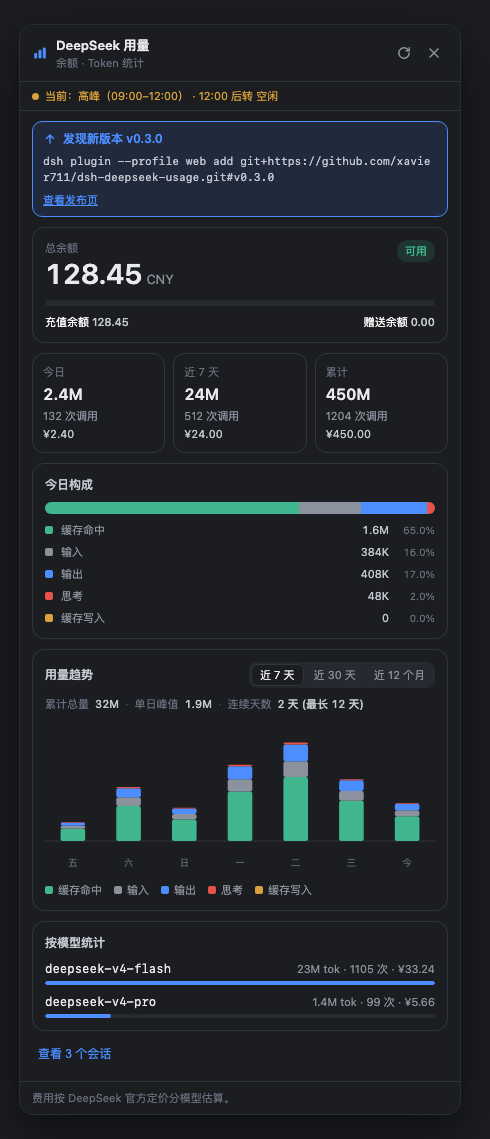 |
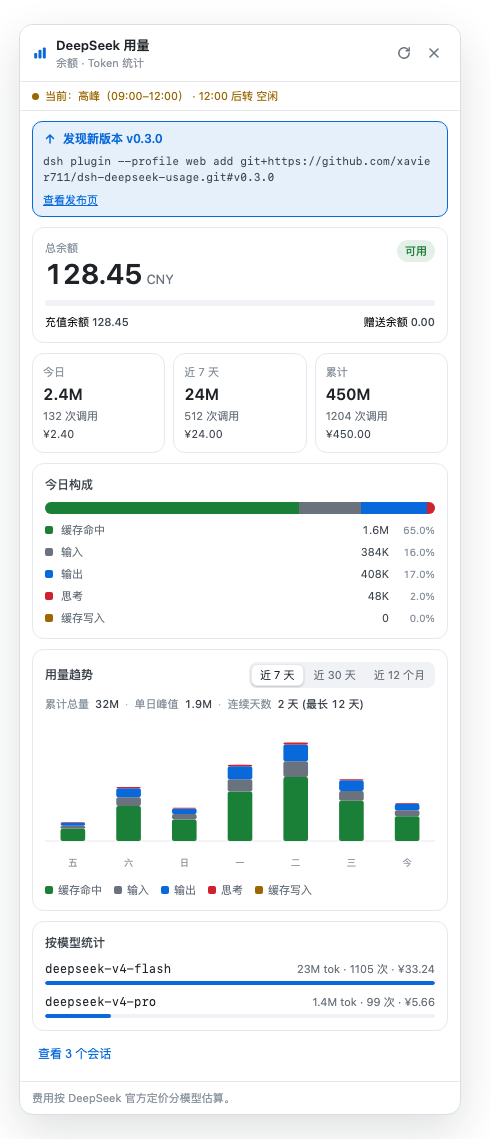 |
You need Node.js first (download from nodejs.org).
Paste this into a terminal:
dsh plugin --profile web add git+https://github.com/xavier711/dsh-deepseek-usage.git#v0.7.1Don't have dsh installed globally? Use this instead (npx downloads it on first run):
npx --yes @deepseek-ai/dsh plugin --profile web add git+https://github.com/xavier711/dsh-deepseek-usage.git#v0.7.1Tip: if the installer complains that
pnpmis missing, runnpm install -g pnpmand retry.
git clone https://github.com/xavier711/dsh-deepseek-usage.git
cd dsh-deepseek-usage
./install.sh # auto-uses npx when dsh is not on PATHdsh plugin --profile web add @xavier711/dsh-deepseek-usage@0.5.0Ctrl+C in the terminal running dsh web, then run dsh web again (or npx --yes @deepseek-ai/dsh web).Because the package declares
dsh.bundle, the plugin row is activated automatically — no manual config editing.
Add a line to ~/.dsh/.credentials.yaml (replace sk-xxxx with your key):
DEEPSEEK_API_KEY: sk-xxxxOr set the DEEPSEEK_API_KEY environment variable. Without a key, local usage statistics still work; the balance card just shows a hint.
dsh plugin --profile web remove @xavier711/dsh-deepseek-usageThen restart dsh web and refresh the page.
The plugin never embeds an API key (no key material in the package). The key is resolved at runtime from the recipient's own machine — ~/.dsh/.credentials.yaml or the environment — and only on the host (server) side; the browser bundle never sees it. Safe to share.
lib/index.js       host half — /dsh-usage/balance + /dsh-usage/local + /dsh-usage/period routes
lib/client.js      browser half — sidebar action + panel (hand-built bundle, no build step)
cordis.patch.yml   the plugin's own patch layer (dsh.bundle — auto-activated on install)
install.sh one-shot installerOverride row config by id in ~/.dsh/profiles/web/cordis.patch.yml:
- id: deepseek-usage
  config:
    balanceTtlMs: 60000        # balance cache TTL (ms)
    maxSessions: 100           # most-recent sessions to replay
    sessionConcurrency: 4      # parallel session-log reads
    balanceTimeoutMs: 10000    # balance request timeout
    localTtlMs: 30000          # local-usage cache TTL (ms); keeps signal-driven badge refreshes cheap
    newPricingAt: 1786896000000      # peak/off-peak pricing effective date (2026-08-17 00:00 Beijing)
    weekendOffPeakAt: 1787414400000  # weekends all-day off-peak rule effective date (2026-08-23 00:00 Beijing)
    holidayOffPeakAt: 1789747200000  # statutory-holiday off-peak rule effective date (2026-09-19 00:00 Beijing)
    holidayCalendarUrl: "https://raw.githubusercontent.com/xavier711/dsh-deepseek-usage/main/holidays.json"
                                     # maintained holiday calendar, fetched every 6 h; null disables it
    holidayCalendarTtlMs: 21600000   # how long a fetched calendar is reused (ms)
    holidayWorkdays: []              # escape hatch: days billed by hour even if weekend/holiday (empty by rule)
    holidayRanges:                   # optional override; when set it wins over the remote calendar and
      - { name: 中秋节, start: "2026-09-25", end: "2026-09-27" }   # disables the fetch entirely
      - { name: 国庆节, start: "2026-10-01", end: "2026-10-07" }
    peakHours: [[9,12],[14,18]]      # Beijing peak windows
    # pricing: per-model rates (CNY per 1M tokens); an entry may carry
    #          eras: [{ at, peak, offPeak }] for rates that change from a
    #          moment on (e.g. the 2026-09-10 12:00 flash price cut). V4 Pro
    #          carries no era: it is not billed as flash — see the source repo
Holidays move every year — and you don't have to do anything. The State Council publishes the next year's schedule late in the current one, so the plugin reads
holidays.jsonfrom this repository (6-hour cache). The maintainer adding the new year to that one file is the entire yearly step: installed plugins pick it up on their next refresh, with no release and no user action. Precedence is yourholidayRanges→ remoteholidays.json→ the built-in 2026 table, so a local override or a broken download never leaves you without a calendar; a malformed file is discarded whole rather than half-applied. If the calendar does not cover the current year, the panel says so instead of quietly over-estimating holidays. Make-up working weekends need no entry — they are calendar weekends and are already off-peak.
Everything above is also editable without touching YAML: open sidebar → 插件 (Plugins) →
@xavier711/dsh-deepseek-usage → the deepseek-usage row → 配置. The form is generated
from the plugin's own config schema, so DSH validates every value and writes it into the
same cordis.patch.yml row shown above — a saved field is an ordinary override, and
clearing a field restores the built-in default. Restart dsh web after saving: a
config-only change is written to the profile immediately but is not hot-reloaded by the
host. Fields are grouped as performance and refresh, holiday calendar, windows and
region (advanced) and pricing overrides (advanced); the JSON fields (pricing,
peakHours, holidayRanges, holidayWorkdays) take the same structures documented
below. Per-model rate overrides only skew the local estimate — official billing is
unaffected.
npm installs: run dsh plugin --profile web update @xavier711/dsh-deepseek-usage
(or re-add with the new version: ... add @xavier711/dsh-deepseek-usage@X.Y.Z).
Git installs: you installed a pinned snapshot, so updates are not automatic — but you don't need to check for them: the plugin queries the GitHub releases feed (hours-cached) whenever you open the usage panel and shows a 「New version available」 banner.
Click 「Update now」 in that banner and the plugin installs the new version for you — no terminal involved. When it finishes the panel says so; if the interface still looks unchanged, restart the app. (The install itself is done by the harness's plugin manager: the panel asks it to install this package at the new tag, and nothing else.)
Two cases keep the copyable command instead of the button: a DSH build without
that plugin manager, and a link: development checkout (where re-installing
would replace your working tree with a tagged copy). Either way the command is
right there in the banner:
dsh plugin --profile web remove @xavier711/dsh-deepseek-usage
dsh plugin --profile web add git+https://github.com/xavier711/dsh-deepseek-usage.git#v0.7.1I see dsh: warning: ... declares no dsh.bundle — installed as a plain dependency
You installed an older snapshot of the repository (pnpm caches git
dependencies by commit, so an install that happened before this package
declared dsh.bundle keeps the old version). Fix it by reinstalling from
the pinned tag:
dsh plugin --profile web remove @xavier711/dsh-deepseek-usage
dsh plugin --profile web add git+https://github.com/xavier711/dsh-deepseek-usage.git#v0.7.1
Then restart dsh web and refresh the page.
The 「用量」 entry does not appear after installing
Make sure the web server was restarted after the install (Ctrl+C in the
dsh web terminal, then run it again) and that you hard-refresh the browser
page (Cmd/Ctrl+Shift+R).
GET /dsh-usage/balance — { ok, isAvailable, currency, totalBalance, grantedBalance, toppedUpBalance, ... }GET /dsh-usage/local — { ok, sessionCount, errorSessions, pricing, buckets: { today, week, total }, days: [...7], models: [...], workspaces: [...], sessions: [...] } — each workspace entry is { path, name, sessionCount, subagentSessionCount, buckets: { today, week, total }, sessions: [...] } (sessions without a working directory group under path: null); each session row carries workspace and subagent (pricing includes newPricingAt, weekendOffPeakAt, holidayOffPeakAt, peakHours)GET /dsh-usage/period — { ok, now, period: 'peak'|'offPeak'|'flat', range: [start, end] minutes-of-day, nextAt, nextPeriod, peakHours, weekendOffPeakAt, holidayOffPeakAt, offPeakDay, offPeakReason: 'weekend'|'holiday'|null, holiday, calendar, timezoneOffsetMinutes } — current Beijing peak/off-peak classification for the sidebar badge and the panel header; nextAt/nextPeriod describe the next actual period change (weekends and holidays skip to the next working day's first peak start), offPeakDay/offPeakReason/holiday say whether today is an all-day off-peak day and which rule makes it one, and calendar reports which holiday calendar is in force ({ source: 'config'|'remote'|'builtin', updatedAt, publisher, years, currentYear, coversCurrentYear, url, error })CLASSIFICATION EVIDENCE
系统优先读取 GitHub Topics,再与站内分类词典和词根规则比对。当前命中: deepseek、deepseek-harness。
morluto
Reverse engineer anything with agents, from app behavior down to native binaries.

deepseek-ai
DeepSeek Harness: Everything is a Plugin.

nexu-io
The 1st Collaborative AI Design Agent Workspace. Local-first and open source. Create motion, prototypes, websites, apps, dashboards, presentations, images, and videos with your team and AI agents. Share work, exchange feedback, and iterate together in one workspace.