
模型与 MCP
待识别

rea
morluto
Reverse engineer anything with agents, from app behavior down to native binaries.
PROJECT TOPICS
INSTALL REFERENCE
dsh plugin --profile web add github:wumouren114/dsh-sidebar-shelf
该命令指向仓库当前默认分支;尚无绑定当前 commit 的完整验证结果。
PROJECT README
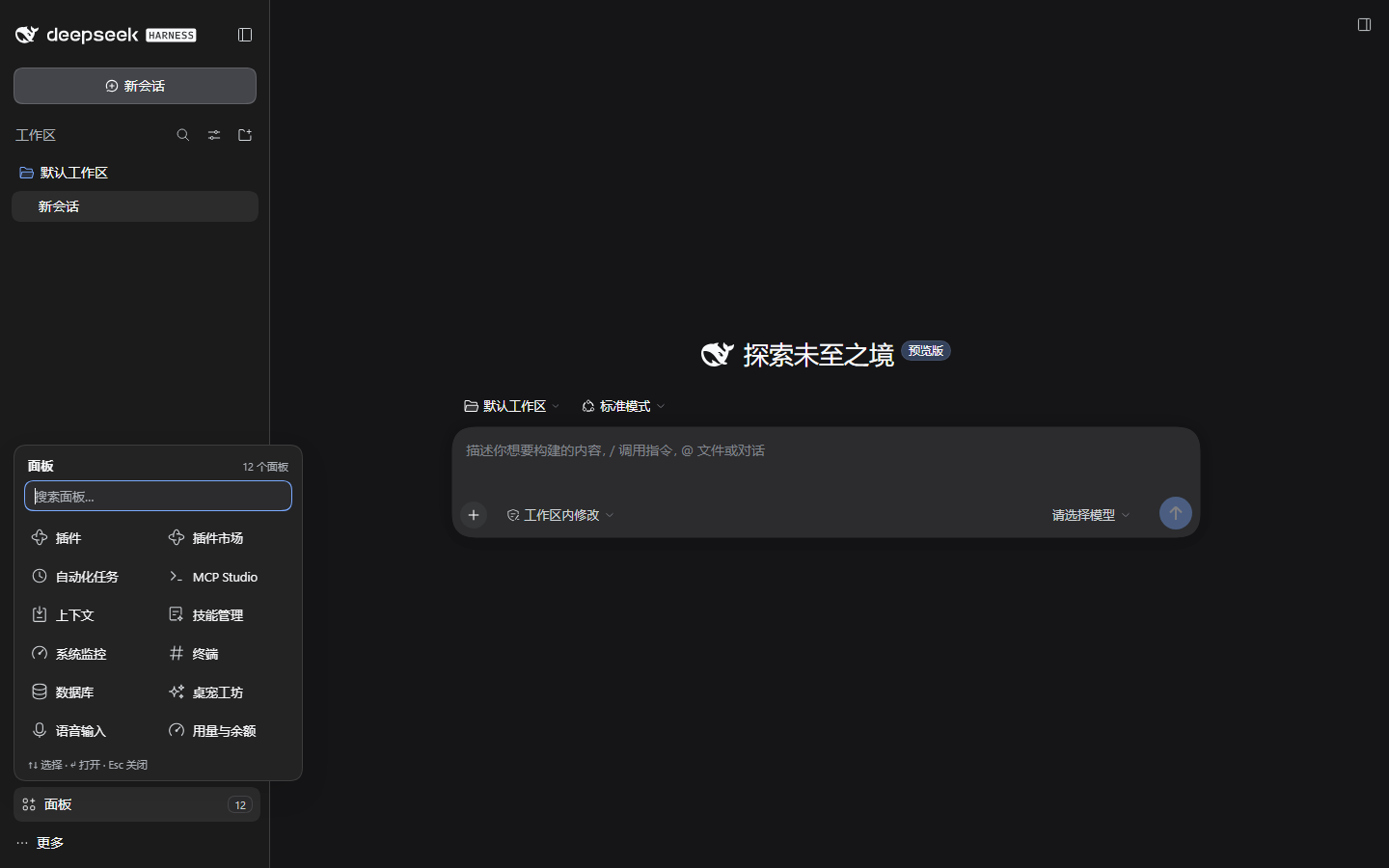
Give the DSH sidebar back its space. Every left-sidebar panel entry folds into one quiet shelf that sits exactly where the panels used to be — above the workspace. Open a panel only when you need it.


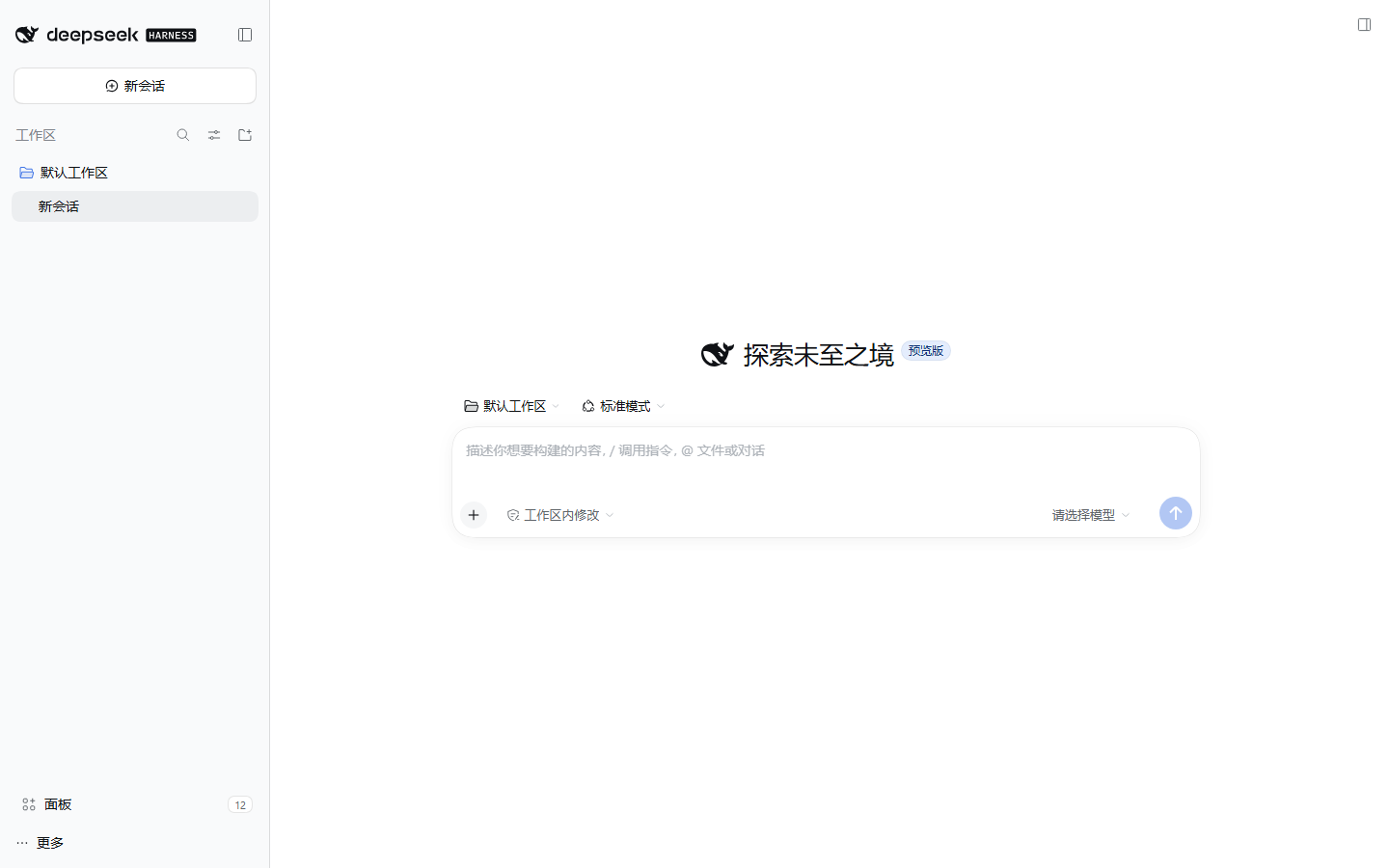
The DSH Web/desktop sidebar stacks its brand row, New Session, every global panel entry, the workspace list, and Settings. Each plugin that adds a panel adds a row to that column — plugin manager, plugin market, schedules, MCP studio, context, skills, system monitor. Ten rows is roughly 400px, and the workspace area is squeezed to a couple of conversations.
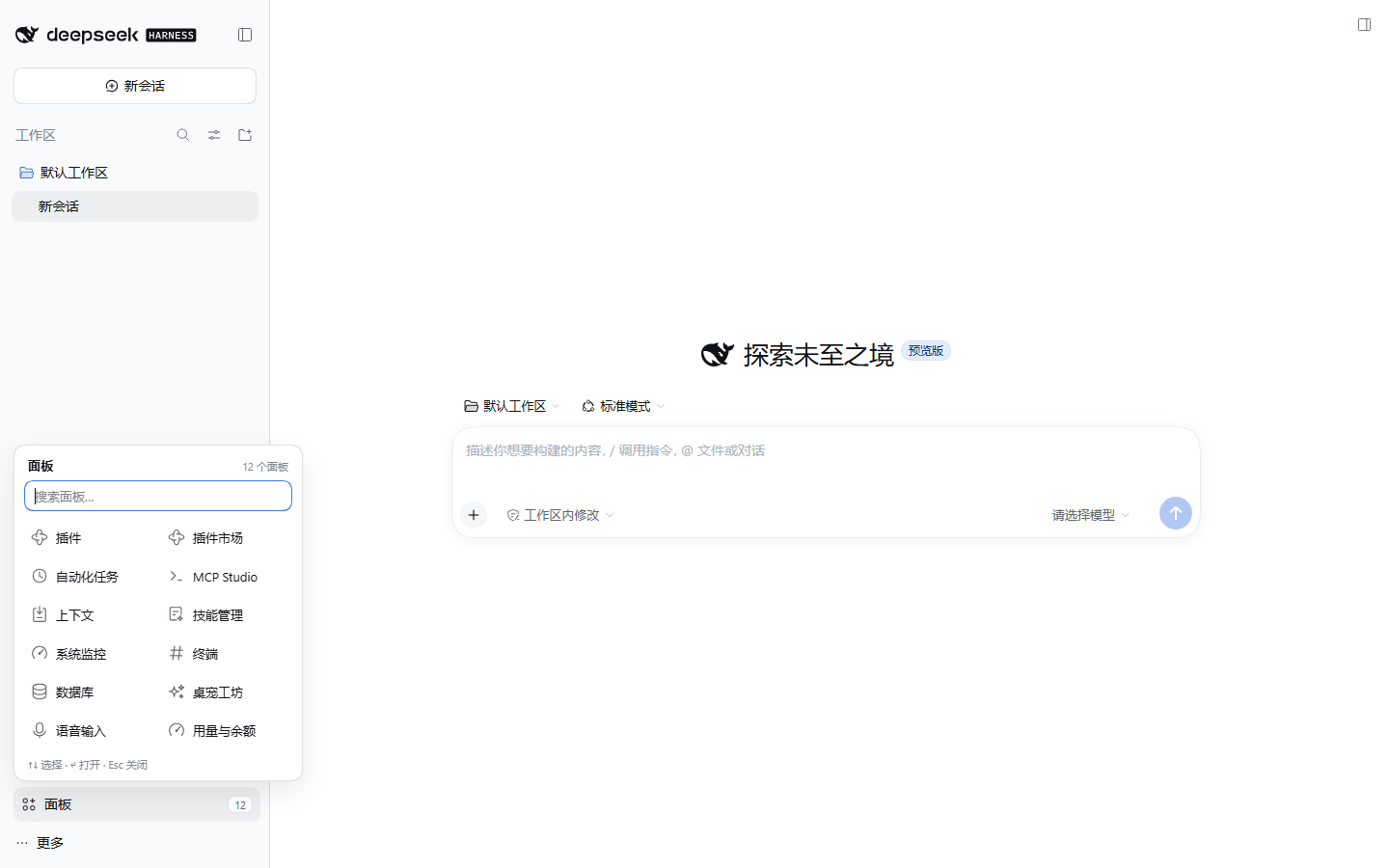
dsh-sidebar-shelf folds all panel entries into a single row in that same column, right above the workspace, and brings any panel back on demand.
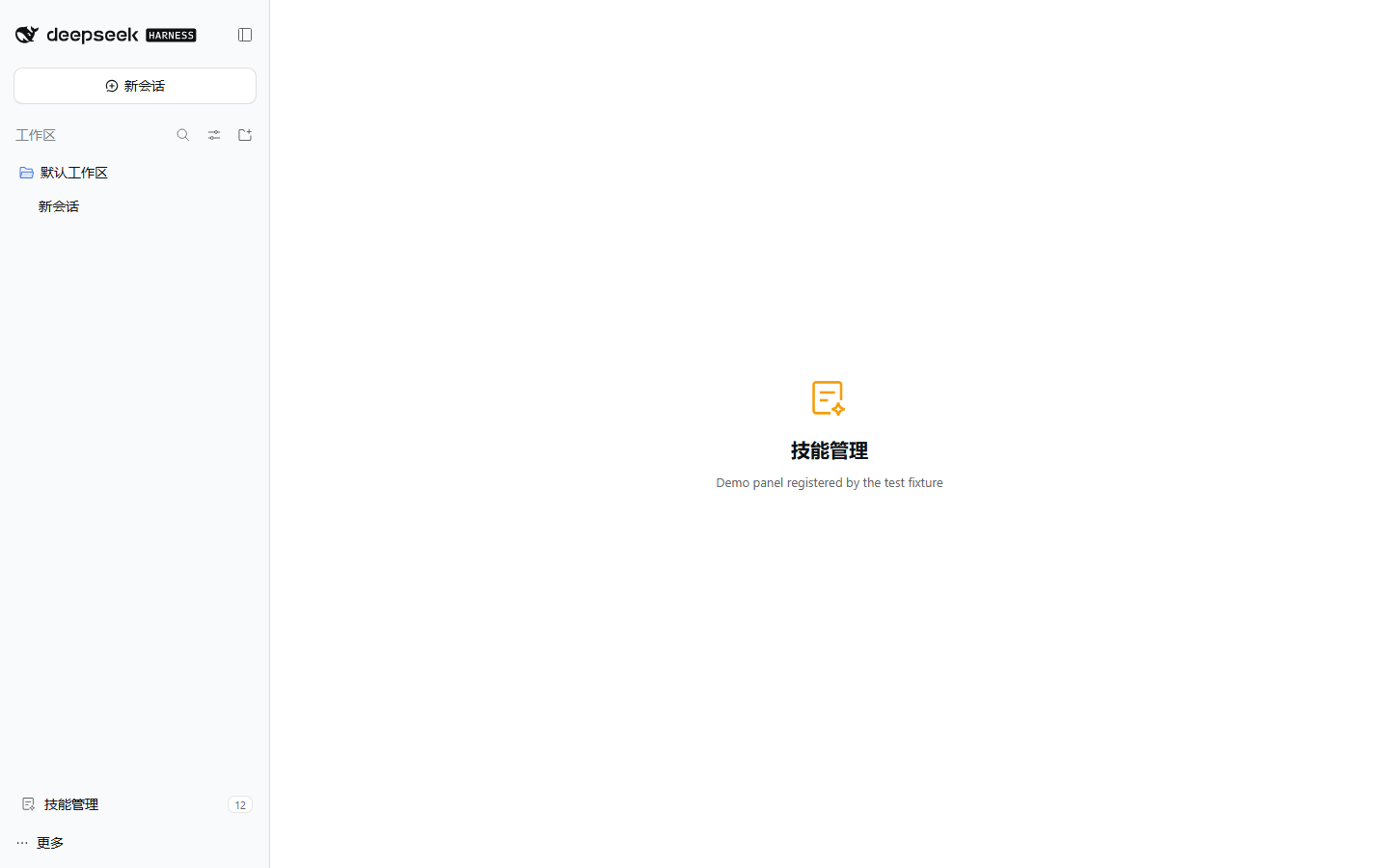
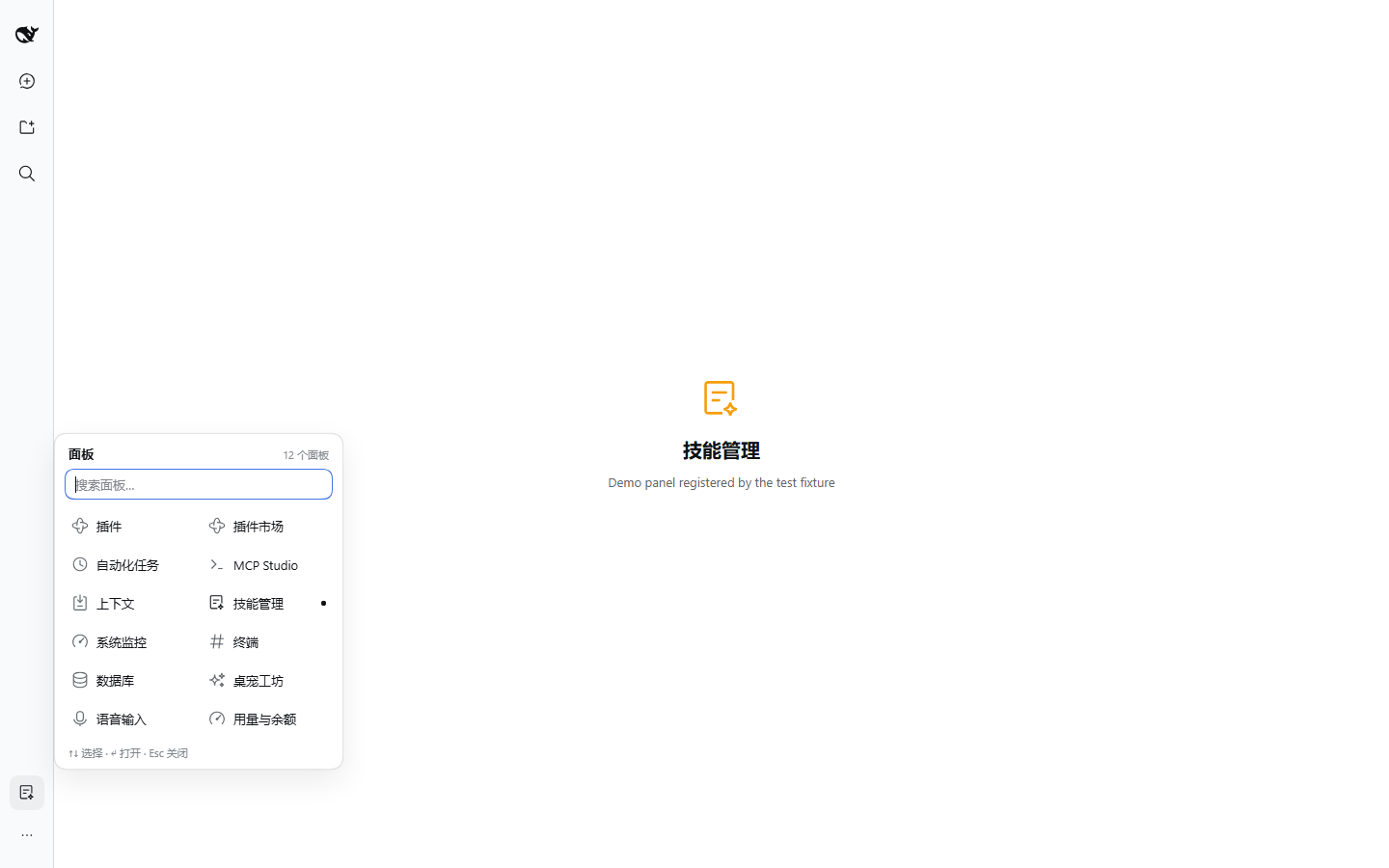
data-dsh-*-entry convention used by dsh-webchat, taskboard and ssh) are hidden in place and listed in the same shelf with their own icon, label and active state; choosing one clicks their own button, so their toggle keeps working.↑/↓ to move, Enter to open, Esc to close, and plain typing filters.--dsw-alias-* / --dsw-radius-* / --dsw-shadow-* tokens; follows light and dark themes.| Panel open | Rail | Dark |
|---|---|---|
 |
 |
 |
Requires DSH (DeepSeek Harness) with the web profile — the desktop app uses the same client.
# straight from GitHub (no build step, no allowBuilds approval)
dsh plugin --profile desktop add github:wumouren114/dsh-sidebar-shelf

# or from a local clone
git clone https://github.com/wumouren114/dsh-sidebar-shelf.git
dsh plugin --profile desktop add ./dsh-sidebar-shelf
desktop is the profile name in this repository's examples; substitute web, tui, or whatever profile you run. After installing, enable the plugin in Settings → Plugins (it is added to dsh.profile.bundles) and reload the page.
Verify: the whole panel column becomes one Panels row between New Session and 工作区 / Workspace. Click it — every registered panel is there, including "Plugins". Picking one opens it and closes the shelf.
This package ships a hand-written
lib/client.js: there is noprepare/postinstallscript, so a GitHub install never stops at pnpm'sERR_PNPM_GIT_DEP_PREPARE_NOT_ALLOWEDorERR_PNPM_IGNORED_BUILDS.
Requirements: DSH 0.2.x client, Node.js ≥ 20 for the CLI that installs it.
DSH's left sidebar is owned by @deepseek-ai/dsh-client-ui-sidebar. Third-party plugins cannot re-declare that list, but the shell publishes a small, stable contract:
| Contract | Use |
|---|---|
sidebar.panellist slot (root scope, list) |
Every panel registers an icon component with id / order / label. The shelf registers one entry of its own here (order: -1000) and reads the rest of the registry as its data source. |
| The registered row's DOM | The shell wraps our icon in its own row: a <button class="panelRow"> directly inside <nav> on DSH 0.2.1, wrapped in a .panelEntry div on 0.2.2. The plugin marks the nav child and the button separately, then intercepts the button's click in the capture phase. |
ctx.layout.selectPanel(id) |
The official way to open a panel; the shelf never fakes a click on another row. |
ctx.layout.panelInfo |
The selected-panel source, used for the active marker inside the shelf. |
Concretely, lib/client.js:
sidebar.panellist entry (id: dsh-sidebar-shelf-entry, order: -1000, label 面板 / Panels);<nav> (the button itself on 0.2.1, the .panelEntry wrapper on 0.2.2), marks both, and attaches a capture-phase click handler — this both opens the shelf and stops the shell from calling selectPanel on an id that has no main panel;[data-dsh-shelf="on"] > *:not([data-dsh-shelf-row]) { display: none !important } — the list element itself stays mounted, so the row keeps the shell's native position, spacing and rail geometry;data-dsh-*-entry), hides them in place and lists them at the top of the shelf with their own icon, label and data-active state; choosing one calls that row's own click();ctx.slots.entriesOfSlot("sidebar.panellist") for the remaining shelf contents, mirrors the sidebar's own sort (order, then registration order), and renders each panel's own icon component (wrapped in an error boundary that falls back to an initial);ctx.layout.selectPanel(id) when a registered panel tile is chosen.Nothing else is touched: no workspace rows, no brand row, no Settings, no host-side behavior, no DSH files. Unmounting the plugin removes the marker, the handler and the stylesheet, and the native rows come back.
0.2.1-rc.3 and 0.2.2-rc.3, Windows, Chromium 1440×900 — 23/23 end-to-end checks on each: placement above the workspace, sibling-only hiding, search, keyboard, panel switching, active marker, Escape, adoption of a DOM-injected data-dsh-*-entry row (hidden in place, listed first, own click handler runs, active state reflected), 56px rail, dark theme, no page errors.node test/smoke.mjs — 10 manifest/bundle/wiring checks, no dependencies.The screenshots above were produced by test/e2e.cjs against a throwaway profile; the panels in them come from a test-only fixture (test/demo-panels), not from shipped code.
Browse other plugins / Create your plugin). The Plugins panel is still one click away in the shelf.convention** (asdsh-webchat`, taskboard and ssh do). A plugin that injects a row without that marker stays in the sidebar.dsh-toomuch-plugins, dsh-sidebar-organizer); pick one.node test/smoke.mjs # static + wiring checks, no browser
node test/e2e.cjs <dsh-web-url> # real UI checks + screenshots (needs puppeteer-core)test/e2e.cjs expects NODE_PATH to point at a node_modules that contains puppeteer-core, and a Chromium/Edge binary (override with DSH_SHOT_BROWSER). The repo has no build step: lib/client.js is the shipped bundle.
MIT © wumouren114 — see LICENSE.
CLASSIFICATION EVIDENCE
系统优先读取 GitHub Topics,再与站内分类词典和词根规则比对。当前命中: deepseek-harness。
morluto
Reverse engineer anything with agents, from app behavior down to native binaries.

deepseek-ai
DeepSeek Harness: Everything is a Plugin.

nexu-io
The 1st Collaborative AI Design Agent Workspace. Local-first and open source. Create motion, prototypes, websites, apps, dashboards, presentations, images, and videos with your team and AI agents. Share work, exchange feedback, and iterate together in one workspace.