

其他
完整应用

deepseek-harness
deepseek-ai
DeepSeek Harness: Everything is a Plugin.
PROJECT TOPICS
PROJECT README
🌐 Languages: 中文 · English · 日本語 · 한국어 · Español · Français · Deutsch


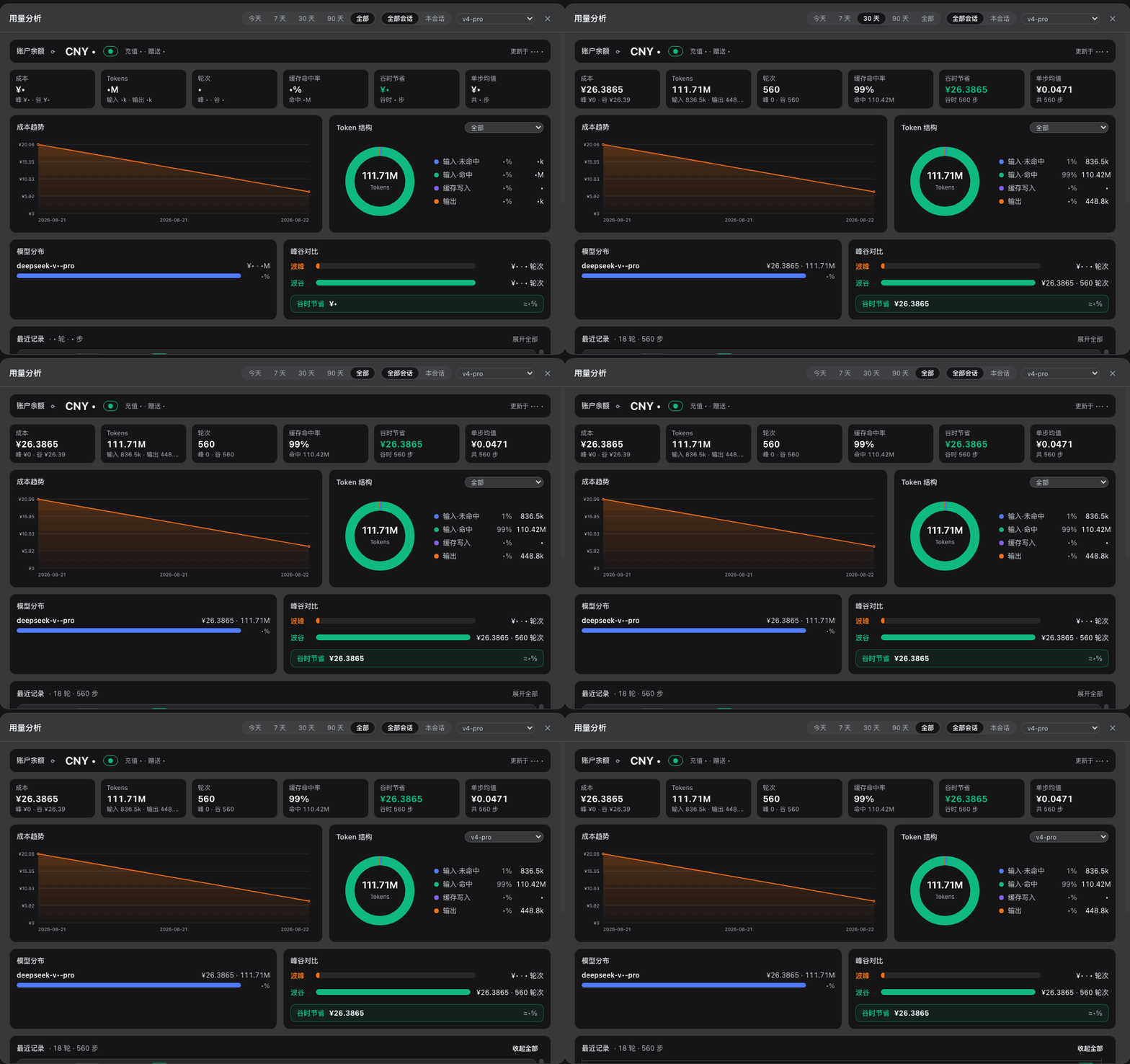
给 DeepSeek Harness Web(dsh web)输入框下方加一行峰谷计费坞,点击展开完整的用量分析仪表盘:跨会话的 token / 成本 / 模型 / 峰谷数据自动落盘,并提供全局筛选与多维图表。
峰谷分时计费:按北京时间峰时(9:00–12:00 / 14:00–18:00,仅工作日)与谷时(半价)计价;周末(周六、周日)全天按谷时计费(DeepSeek 新规,2026-08-23 起生效,历史账单自动修复重算)。坞上实时显示当前时段、进度条、距下次调价倒计时(周末显示「周末谷时」徽章,倒计时直达周一 9:00 峰时)、会话累计 / 本轮成本与账户余额(60 秒自动刷新,走官方 /user/balance 代理,API Key 不出浏览器)。

历史落盘:每一步 token / 成本 / 模型 / 峰谷自动写入 ~/.dsh/storages/usage-history.jsonl,跨会话、跨重启保留(软上限 4 万条自动裁旧)。
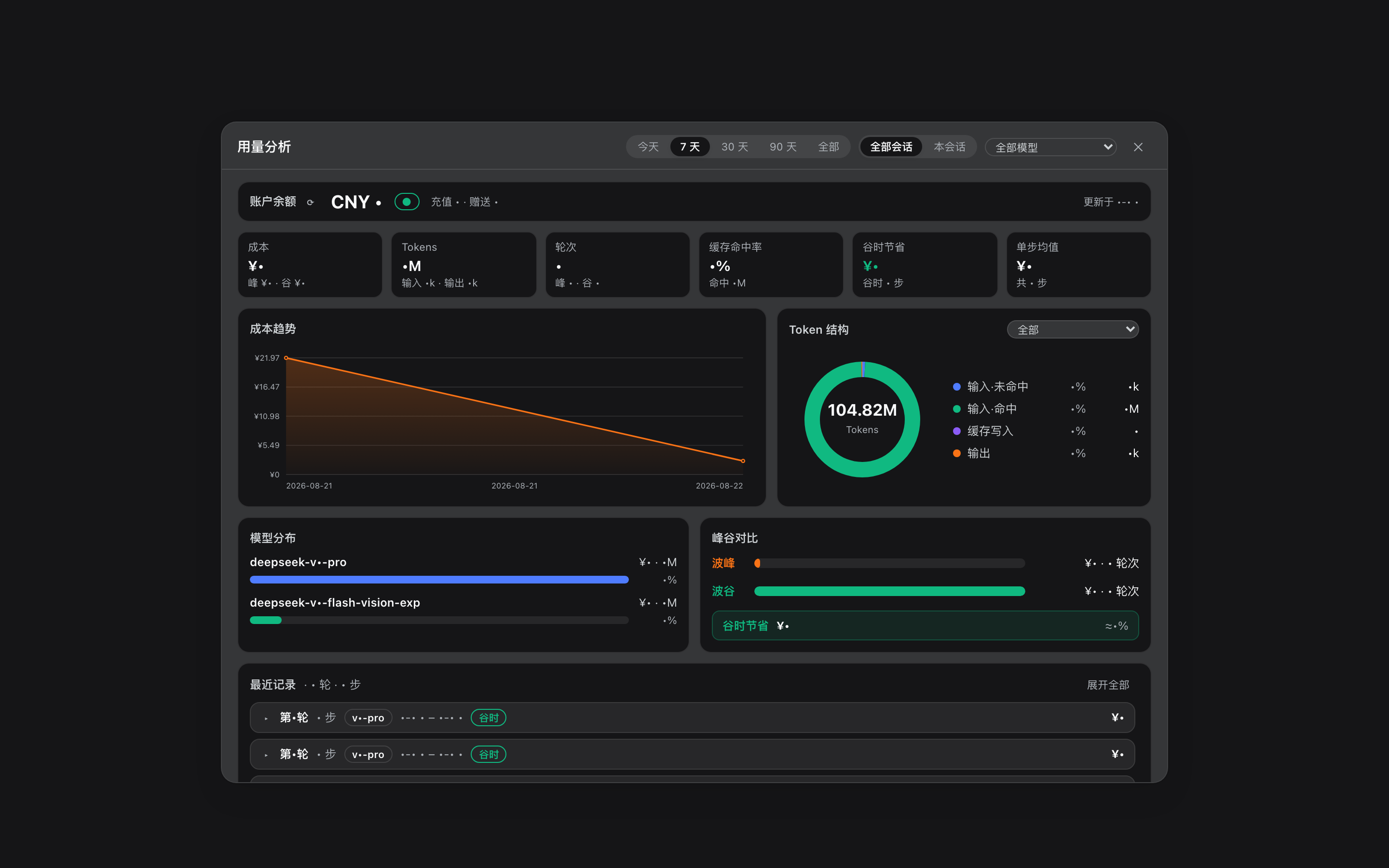
全局筛选:面板顶部的全局选项,所有图表与统计卡实时联动——
按日期查看:点击成本趋势图上的任意一天,仪表盘即下钻到该日——统计卡、模型分布、峰谷对比、Token 结构、最近记录全部切到当日,并额外给出分时分布(24 小时成本柱状图,峰时区间底色标记)与当日会话排行;日期条支持前一天/后一天切换,到「今天」为止,并可一键退出按日期视图。切换日期走客户端摘要缓存,即时渲染不闪烁。
统计卡:成本(含峰/谷拆分)、Tokens(含输入/输出)、轮次(含峰/谷)、缓存命中率、谷时节省、单步均值。
分析图表:
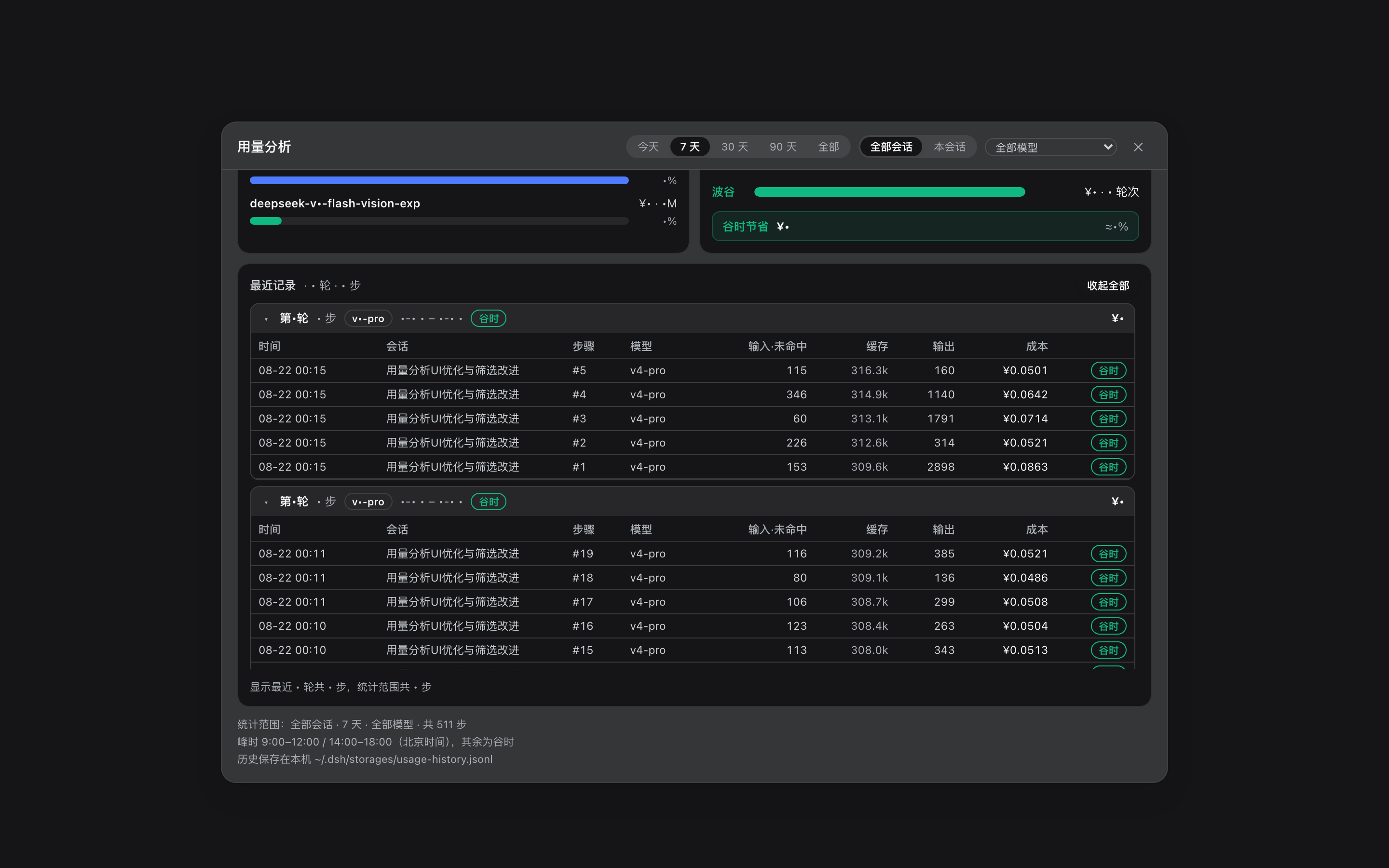
最近记录:最近 20 轮的全部步骤(默认折叠、按轮分组,轮标题带模型徽章、峰谷与成本,支持展开/收起全部,区域内滚动);按日期视图显示当日全部轮次(最多 60 轮),跨会话时轮标题带会话标签。
点外部关闭:面板通过 React portal 渲染,点击面板外任意位置或按 Esc 关闭。
0.1.1-rc.1 的 web profile需要 pnpm(
dsh plugin把参数原样转发给 pnpm,在 profile 目录里执行)。 没有的话先装:corepack enable pnpm(Node 自带 corepack)或npm install -g pnpm。
一条命令,直接安装 GitHub Release 里的 tarball(实测可用):
dsh plugin --profile web add https://github.com/woosh2010/dsh-usage-dashboard/releases/latest/download/deepseek-ai-dsh-client-ui-usage.tgz包声明了 dsh.bundle.patch,dsh plugin 会自动把 @deepseek-ai/dsh-client-ui-usage 写进 profile 的 dsh.profile.bundles 列表并挂载为 ui-usage 条目。然后重启 dsh web 并刷新浏览器。
从方式二/三切换过来:先删掉
~/.dsh/profiles/web/cordis.patch.yml里手工添加的ui-usageinsert 行,否则 bundle patch 与手工 insert 的条目 id 会重复冲突。
下载安装包(Releases 里的 tgz,或 curl -LO <上面的 URL>;也可以 git clone 后 npm pack 自建)。
在 tgz 所在目录执行(注意路径前的 ./ 或绝对路径,直接写文件名会被 pnpm 当成 npm 包名):
dsh plugin --profile web add ./deepseek-ai-dsh-client-ui-usage.tgz解压 tarball 到 profile 的解析路径:
mkdir -p ~/.dsh/profiles/node_modules/@deepseek-ai/dsh-client-ui-usage
tar -xzf deepseek-ai-dsh-client-ui-usage.tgz --strip-components=1 \
  -C ~/.dsh/profiles/node_modules/@deepseek-ai/dsh-client-ui-usage
在 ~/.dsh/profiles/web/cordis.patch.yml 增加条目:
- insert:
    - id: ui-usage
      name: '@deepseek-ai/dsh-client-ui-usage'
重启 dsh web,刷新浏览器。
从源码目录直接使用:
lib/client.js由服务器按文件直读,客户端改动刷新浏览器即生效;lib/index.js(host 端路由/存储)改动需要重启dsh web。
dsh web 启动报 "declares no dsh.bundle"现象:重启 dsh web 报错退出:
profile bundle "@deepseek-ai/dsh-client-ui-usage" declares no dsh.bundle in its package.json原因(按出现频率排序):
dsh.client、没有 dsh.bundle)挡住了新版解析。
本包 v0.4.0 声明了 dsh.bundle.patch,注册进 bundles 完全合法;但 dsh 从 profile 目录解析包名时,
~/.dsh/profiles/web/node_modules/@deepseek-ai/ 里的软链(指向 web/packages/ 下旧版源码目录)
优先于 ~/.dsh/profiles/node_modules/@deepseek-ai/(共享 scope)里的新文件——
校验读到的还是旧版 → 报 declares no dsh.bundle。常见于从旧版手动安装(源码复制进 web/packages/)升级的场景。dsh.profile.bundles(手动编辑 profile 的 package.json,且解析命中版本无 dsh.bundle 声明)。
bundle 注册请交给 dsh plugin add 自动完成,不要手改。解决:
清理旧版残留:删除或替换 ~/.dsh/profiles/web/packages/dsh-client-ui-usage
及其在 ~/.dsh/profiles/web/node_modules/@deepseek-ai/ 下的软链,
确保任何解析路径命中的都是声明了 dsh.bundle 的 v0.4.0。
执行官方命令重装(会自动修正 bundle 注册与依赖):
dsh plugin --profile web add https://github.com/woosh2010/dsh-usage-dashboard/releases/latest/download/deepseek-ai-dsh-client-ui-usage.tgz若此前用 profile 的 cordis.patch.yml 手写 insert 挂载过本包,与 bundles 注册二选一
(推荐保留官方 bundles 注册,删除手写 insert),避免重复挂载冲突。
重启 dsh web,浏览器硬刷新。
换机/重装时同样注意:本仓库 install-plugins.sh 一类的本地脚本通常把旧版源码装进
web/packages/并用软链挂载,升级本插件前请先移除旧版,否则会触发上面的解析遮蔽问题。
若安装后仍有疑问,可在本机跑下面脚本模拟 dsh 启动时对 bundles 的校验
(检查每个 bundle 是否声明 dsh.bundle、client 包是否误入 bundles):
node -e '
const fs=require("fs"),path=require("path");
const D=path.join(process.env.HOME,".dsh/profiles/web");
const j=JSON.parse(fs.readFileSync(path.join(D,"package.json"),"utf8"));
let ok=true;
for(const n of j.dsh.profile.bundles){
  const m=JSON.parse(fs.readFileSync(require.resolve(n+"/package.json",{paths:[D]}),"utf8"));
  const has=!!(m.dsh&&m.dsh.bundle);
  console.log((has?"✓":"✗")+" "+n+" "+m.version); if(!has)ok=false;
}
const bad=["@deepseek-ai/dsh-client-ui-usage","@deepseek-ai/dsh-client-ui-gitpush"]
  .filter(n=>j.dsh.profile.bundles.includes(n));
if(bad.length)console.log("✗ client 包误入 bundles:",bad),ok=false;
console.log(ok?"✅ 预检通过":"❌ 预检失败"); process.exit(ok?0:1);
'部署后运行:
node verify.mjs # 默认 http://127.0.0.1:3080,可传 baseUrl 参数脚本会检查:下发的客户端文件与部署文件一致、modelsAll 与每模型 token 结构、会话/模型过滤、最近 20 轮、各模型 mix 求和等于总量、day 参数按日期下钻(24 小时分时桶 + 当日会话聚合)。
~/.dsh/storages/usage-history.jsonl,软上限 4 万条自动裁旧;模型未知的记录会在投影缓存可用后自动修复(重新计价);2026-08-23 起周末按谷时计价,历史周末账单自动重算。lib/client.js 与 lib/index.js 的 PRICE_TABLE(元/百万 tokens,峰谷两档;缓存命中按命中价、写入按输入价),以及峰谷时段规则(工作日 9:00–12:00 / 14:00–18:00 峰时,其余与周末全天谷时)。DeepSeek 调价后同步改这两处即可。谷时节省 = 谷时累计成本。docs/screenshots/ 里的截图来自真实运行中的 dsh web(余额数字已打码)。重新生成:
# 1. 启动无头 Chrome(调试端口 9222)
"/Applications/Google Chrome.app/Contents/MacOS/Google Chrome" \
  --headless=new --remote-debugging-port=9222 --remote-allow-origins=* \
  --user-data-dir=/tmp/dsh-shot-profile --window-size=1440,900 about:blank

# 2. 截取(可设置 DSH_CONV 指定侧栏会话名)
node scripts/screenshots.mjs dock
node scripts/screenshots.mjs dashboard
node scripts/screenshots.mjs recent会话+轮次 分组);客户端摘要缓存,切换日期即时渲染;周末全天谷时计费(DeepSeek 2026-08-23 新规):周末显示「周末谷时」徽章、倒计时直达周一峰时、历史周末账单自动重算。turns 参数)、统计卡副信息与更紧凑布局、点击外部关闭(portal + 遮罩)、最近记录默认折叠。CLASSIFICATION EVIDENCE
系统优先读取 GitHub Topics,再与站内分类词典和词根规则比对。当前命中: 无有效分类标签。
deepseek-ai
DeepSeek Harness: Everything is a Plugin.

anywhere-labs
为 DeepSeek Harness (DSH) 插件生态打造的现代化桌面端解决方案。万物皆「插件」,桌面本身也是「插件」。

walkinglabs
Harness engineering beginner tutorial, from 0 to 1