

其他
完整应用

deepseek-harness
deepseek-ai
DeepSeek Harness: Everything is a Plugin.
PROJECT TOPICS
INSTALL REFERENCE
dsh plugin --profile web add github:wkscc310/dsh-client-ui-cpa-quota
该命令指向仓库当前默认分支;尚无绑定当前 commit 的完整验证结果。
PROJECT README



English | 中文
A DSH (DeepSeek Harness) Web UI plugin that shows CLIProxyAPI quota right where you look: a native-styled ring beside the model picker, and a CPA-management-style settings card listing every account's quota windows in one place.
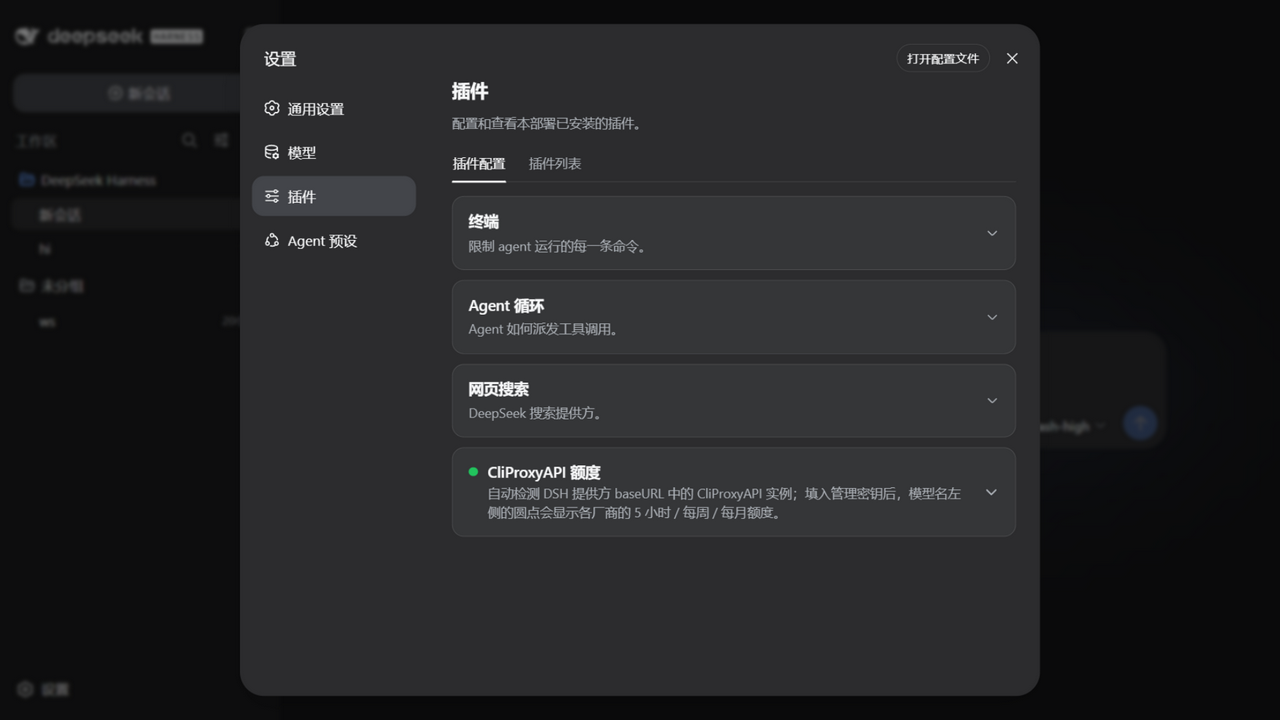
baseURLs — no model lists, no config file required.localStorage.The settings card stays collapsed like the built-in ones — plain title/description, expand for the details.
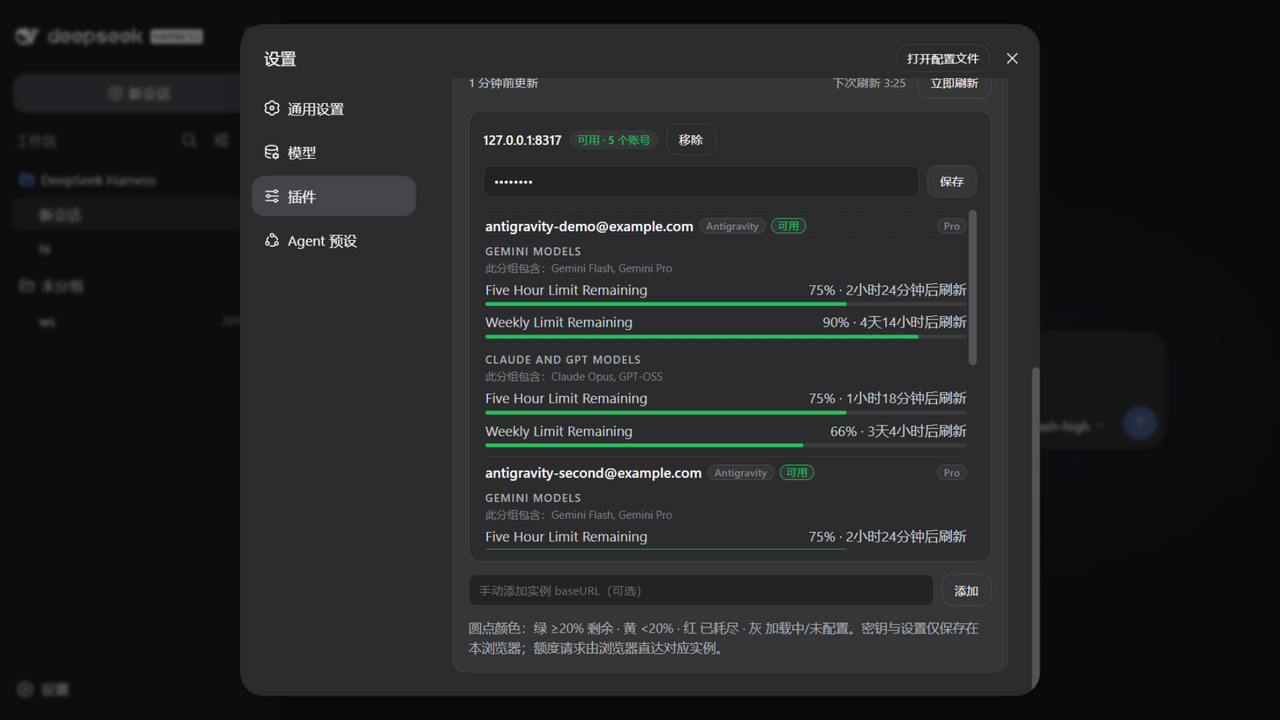
Expand it and every account of every instance is listed with its subscription plan, provider badge, and all quota windows (5-hour / weekly / monthly) — not filtered by the current model. (Demo data from tests/mock-cpa.mjs.)
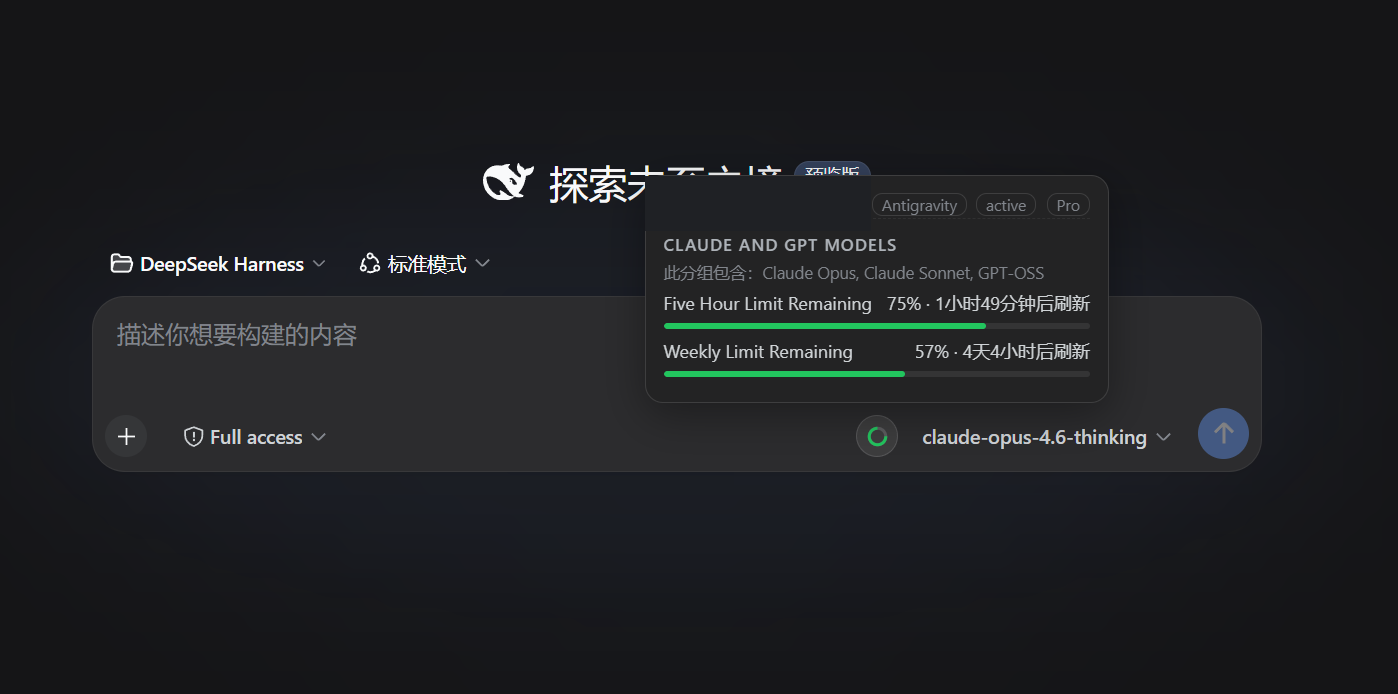
Hover the ring next to the selected model for matching accounts, providers, plans, windows, and reset times.
baseURL values from DSH providers automatically; no model list to maintain.baseURL as CLIProxyAPI and never leaves an empty ring on ordinary OpenAI-compatible endpoints.5-hour → weekly → monthly → daily; the ring uses the first available window in that order.dsh 0.1.1-rc.2, 0.1.2-rc.1, 0.1.5-rc.2 and 0.1.6-alpha.1 — the last one live, ring and hover card included; 0.1.5+ needs plugin ≥ 0.8.5 because those hosts changed the model button's markup); the plugin only registers in the Web UI.baseURL points at the corresponding CPA instance.localStorage; YAML-managed keys remain in the YAML file.The plugin declares a dsh.bundle manifest and is published to npm, so one command installs and activates it — no config editing, no git, no build:
dsh plugin --profile web add dsh-client-ui-cpa-quotaPrefer the installer? It also handles networks where GitHub is flaky, falls back to copying when pnpm is unavailable, and migrates older installs:
$p=Join-Path $env:TEMP 'dsh-cpa-install.ps1'; Invoke-WebRequest -UseBasicParsing -Uri 'https://raw.githubusercontent.com/wkscc310/dsh-client-ui-cpa-quota/main/install.ps1' -OutFile $p; powershell -NoProfile -ExecutionPolicy Bypass -File $pcurl -fsSL https://raw.githubusercontent.com/wkscc310/dsh-client-ui-cpa-quota/main/install.sh -o /tmp/dsh-cpa-install.sh && sh /tmp/dsh-cpa-install.shRestart the DSH Web host, then open:
Settings → Plugins → CliProxyAPI QuotaExpand the card, paste the management key for each instance, and reopen the model picker.
After updates, just run the same
dsh plugin add(or the installer) again and restart the host.
git clone https://github.com/wkscc310/dsh-client-ui-cpa-quota.git "$HOME/.dsh/plugins/dsh-client-ui-cpa-quota"
dsh plugin --profile web add "$HOME/.dsh/plugins/dsh-client-ui-cpa-quota"git clone https://github.com/wkscc310/dsh-client-ui-cpa-quota.git "$env:USERPROFILE\.dsh\plugins\dsh-client-ui-cpa-quota"
dsh plugin --profile web add "$env:USERPROFILE\.dsh\plugins\dsh-client-ui-cpa-quota"Without the dsh CLI (or without pnpm), copy the plugin into the profile's node_modules instead — a symlink will not work, because Node resolves imports from the link target's real path:
mkdir -p "$HOME/.dsh/profiles/web/node_modules"
cp -R "$HOME/.dsh/plugins/dsh-client-ui-cpa-quota" "$HOME/.dsh/profiles/web/node_modules/"
A copy install does not activate the bundle layer, so the loader entry must be added by hand to ~/.dsh/profiles/web/cordis.patch.yml (Windows: %USERPROFILE%\.dsh\profiles\web\cordis.patch.yml). If the file still contains the fresh-profile placeholder [], replace it with the entry:
- insert:
    - id: ui-cpa-quota
name: dsh-client-ui-cpa-quotaAuto-discovery is usually enough. To pin instances or keep management keys in YAML:
- insert:
    - id: ui-cpa-quota
      name: dsh-client-ui-cpa-quota
      config:
        refreshMinutes: 5
        instances:
          - baseURL: https://your-cpa.example
            managementKey: your-management-key
          - baseURL: https://another-cpa.example/v1
            managementKey: another-management-key
The browser settings card overrides YAML. refreshMinutes is clamped to at least one minute; do not commit management keys to a public repository.
| Provider | Upstream source | Typical windows |
|---|---|---|
| Codex / OpenAI | wham/usage |
5-hour, weekly, or monthly |
| Claude | OAuth usage/profile | weekly, monthly |
| Antigravity | retrieveUserQuotaSummary, falling back to fetchAvailableModels |
5-hour, weekly, monthly |
| Gemini CLI | Google quota endpoint | 5-hour, weekly, daily |
| Kimi | /coding/v1/usages |
provider-defined |
| xAI / Grok | billing, with a paid-account health fallback | weekly, monthly |
| Other CPA providers | auth-file status and recent activity | provider-defined |
baseURL index from DSH llm.providers and settings.describe, normalizing away the protocol, www., and a trailing /v1.<baseURL>/v0/management/usage-statistics-enabled for each provider base.management/unauthorized, or a CPA-shaped 2xx, identifies CLIProxyAPI. Typical 404s, other responses, and network failures are not added as quota instances.That is why a model using an ordinary OpenAI-compatible baseURL has no empty ring. An auto-detected CPA without a management key gets a gray ring and a settings hint.
Plain JavaScript, no build step.
node --check lib/client.js && node --check lib/index.js
node tests/smoke.mjs        # full logic + settings-card render harness
node tests/mock-cpa.mjs     # optional: a fake CPA on http://127.0.0.1:8317 (key: mock-key)
Point the plugin's manual instance input at the mock to see a full five-account demo without a real CPA. CI runs the syntax checks and the smoke test on Ubuntu and Windows for every push and pull request.
baseURL must point at CLIProxyAPI rather than an upstream official API, and the management API must be enabled. The ring is per model — switch models and it follows.localStorage only. Quota requests go straight from the browser to each instance; the DSH host never sees your keys.usage-statistics-enabled: true) — the in-use detection reads CPA's per-request usage queue and needs that toggle on. Everything else works without it.CLASSIFICATION EVIDENCE
系统优先读取 GitHub Topics,再与站内分类词典和词根规则比对。当前命中: 无有效分类标签。
deepseek-ai
DeepSeek Harness: Everything is a Plugin.

anywhere-labs
为 DeepSeek Harness (DSH) 插件生态打造的现代化桌面端解决方案。万物皆「插件」,桌面本身也是「插件」。

awesome-dsh-plugin
A curated list of plugins for DeepSeek Harness (dsh) · DeepSeek Harness 插件精选列表