
其他
完整应用

deepseek-harness
deepseek-ai
DeepSeek Harness: Everything is a Plugin.
PROJECT TOPICS
PROJECT README
在 DeepSeek Harness 内部管理 dsh web 服务 —— 日常操作无需再开终端。Manage the dsh web service from inside DeepSeek Harness — no terminal needed for day-to-day operations.



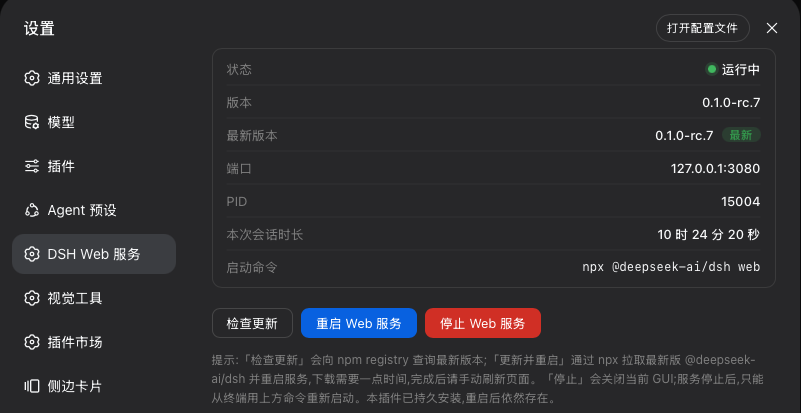
npx 拉取最新 @deepseek-ai/dsh 并自动重启。# 从 GitHub 直接安装:
dsh plugin --profile web add github:wiyi/dsh-web-service-manager
# 发布 npm 后也可以:
dsh plugin --profile web add dsh-web-service-manager重启一次 web 服务,然后打开 设置 → DSH Web 服务。
宿主半提供 GET /dsh-web-manager/status、GET /dsh-web-manager/check、POST /dsh-web-manager/restart、POST /dsh-web-manager/update、POST /dsh-web-manager/stop;写操作要求同源请求。
重启与更新使用小型看门狗链:替换实例以独立进程会话(detached: true)启动,先于旧进程退役。因为 SIGTERM 会让 harness 销毁整个组合 —— 包括所有托管子进程;只有脱离进程组的替换实例能在这场清理中存活下来。
npx @deepseek-ai/dsh web。@deepseek-ai/dsh through npx and restarts on it.# Directly from this repo:
dsh plugin --profile web add github:wiyi/dsh-web-service-manager
# Or, once published to npm:
dsh plugin --profile web add dsh-web-service-managerRestart the web service once, then open Settings → DSH Web 服务.
The host half serves GET /dsh-web-manager/status, GET /dsh-web-manager/check, POST /dsh-web-manager/restart, POST /dsh-web-manager/update, and POST /dsh-web-manager/stop. Mutating routes require a same-origin request.
Restart and update use a small watchdog chain: the replacement instance is spawned in its own process session (detached: true) before the current process is retired — on SIGTERM the harness disposes its whole composition, including every managed child process, and a detached replacement is the only child that survives that cleanup.
npx @deepseek-ai/dsh web.MIT
CLASSIFICATION EVIDENCE
系统优先读取 GitHub Topics,再与站内分类词典和词根规则比对。当前命中: 无有效分类标签。
deepseek-ai
DeepSeek Harness: Everything is a Plugin.

anywhere-labs
为 DeepSeek Harness (DSH) 插件生态打造的现代化桌面端解决方案。万物皆「插件」,桌面本身也是「插件」。

walkinglabs
Harness engineering beginner tutorial, from 0 to 1