WeShop for DeepSeek Harness
An AI visual workspace for e-commerce creation, built into DeepSeek Harness.
 [
[ ]()
[
]()
[ ]()
]()

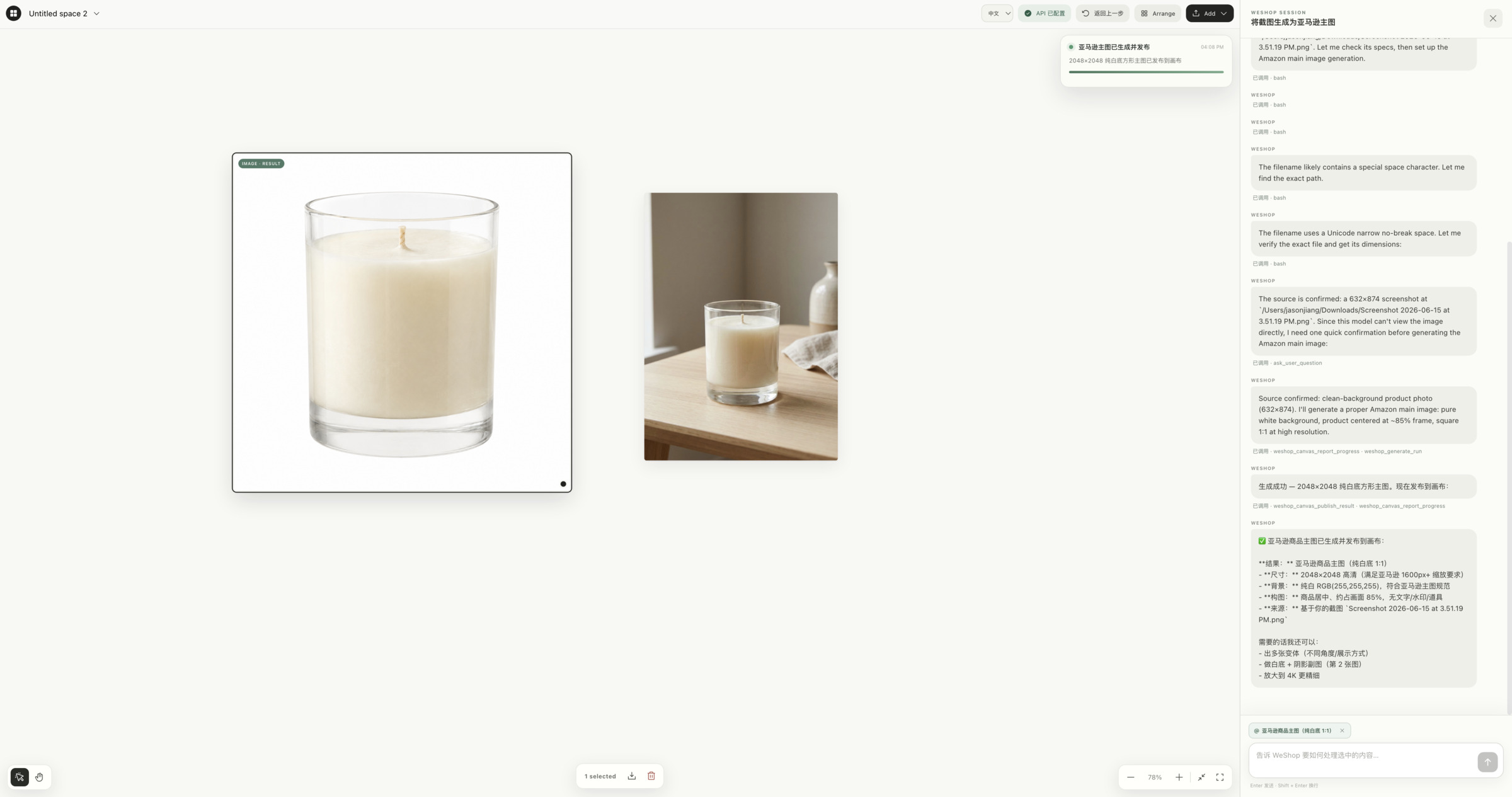
Select products, models, or reference images on an infinite canvas.
Describe the result you want in natural language, and watch it appear right next to the conversation.
Read the Chinese README · Get a WeShop API Key · Contact us
[!IMPORTANT]
Compatible with DeepSeek Harness v0.1.0-rc.8 and later. WeShop is verified with Harness's native dsh plugin workflow, which creates the Web profile and enables the plugin bundle automatically.
[!IMPORTANT]
Install DeepSeek Harness before installing this plugin. This repository is a Harness plugin, not a standalone application.
📖 What is WeShop for DeepSeek Harness?
WeShop for DeepSeek Harness brings WeShop's e-commerce visual workspace directly into DeepSeek Harness, so creative work happens on the same infinite canvas as your conversation instead of a separate tool.
It is built for workflows like:
- Turning a product shot into a clean, on-brand main image or lifestyle scene
- Trying garments and accessories on a model with virtual try-on
- Swapping, extending, or cleaning up backgrounds without leaving the chat
- Batching photography, edits, and short video from a single natural-language brief
✨ Highlights
- 🧩 Native plugin architecture: Native Cordis Host and browser plugin; no MCP child process required.
- 🖼️ Infinite canvas: Marquee multi-selection, grouped movement, undo, download, delete, zoom, and pan.
- 💬 Synchronized conversation: Harness chat stays in sync with the canvas, with
@ references for selected items.
- 🤖 Bundled preset & Skills: Ships with the
weshop-canvas agent preset and WeShop Skills, ready on first use.
- ⚡ Automatic publishing: Generated images, video, audio, and text land directly on the canvas — no manual download/re-upload.
- 🔐 Secure API Key handling: Configure in the canvas or via
WESHOP_API_KEY; the key never reaches browser state or the model.
- 🌐 Bilingual interface: Chinese and English, with automatic locale detection and manual switching.
- 📦 Portable install: Packages as a single
.tgz for installation on any machine running Harness.
🧩 DSH ecosystem
- Works alongside dsh-web-ui: The canvas overlay and sidebar entry follow the host UI conventions used by dsh-web-ui, including its skins, so WeShop stays accessible without competing with the surrounding interface.
- Available in dsh-market: Install dsh-market to browse and install WeShop from Settings → Plugin Market alongside other DeepSeek Harness plugins.
💡 Why WeShop?
| Pain Point (Traditional) |
The WeShop Workspace |
| Tool-switching: product photos, edits, and video each live in a different app. |
One canvas: photography, try-on, background replacement, edits, and video happen in the same space as your conversation. |
| Manual round-trips: generate somewhere else, then download and re-upload. |
Automatic publishing: results are added straight to the canvas as soon as they're ready. |
| Prompt-only workflows: hard to point at this product or this reference image. |
Spatial selection: select items on the canvas and reference them with @ right in chat. |
| Opaque key handling: unclear where credentials are stored. |
Restricted local storage: your API Key is saved by the local Harness Host and never returned to the browser or model. |
🚀 Getting Started
Before you begin
Install Node.js. We recommend the current DeepSeek Harness release: it includes a native plugin manager and creates the Web profile automatically.
First installation
With Harness closed, run one command:
npx @deepseek-ai/dsh plugin --profile web add weshop-dsh-plugin
This installs WeShop, creates the Harness Web profile when needed, and enables its bundle automatically. No GitHub account, access token, pnpm configuration, or manual file editing is required.
Then restart Harness:
npx @deepseek-ai/dsh web
Create or open a task, then choose the WeShop Canvas preset. The preset is installed automatically on first activation.
Install through dsh-market
If you use the community plugin market, install it once and restart Harness:
dsh plugin --profile web add dshmarket
Then open Settings → Plugin Market, search for WeShop, and install it there.
Update WeShop
For the simplest update, close Harness and run:
npx @deepseek-ai/dsh plugin --profile web update weshop-dsh-plugin
If you already use the public npm package, this also works:
cd ~/.dsh/profiles/web
pnpm update weshop-dsh-plugin
Upgrading from an older WeShop install or older Harness release?
Start Harness once with npx @deepseek-ai/dsh web, close it, then run npx weshop-dsh-plugin setup. It replaces legacy .tgz, @weshop/dsh-canvas, @weshop/dsh-weshop-2-0, and @weshopai/dsh-weshop-2-0 installs. Afterwards, use the update command above.
Advanced: build a portable archive
Access to this private repository is required.
git clone git@github.com:weshopai/weshop-dsh-plugin.git
cd weshop-dsh-plugin
corepack enable
pnpm install --frozen-lockfile
pnpm build
pnpm pack
This creates a versioned file such as weshop-dsh-plugin-1.0.2.tgz.
Install it into the Harness Web profile:
PLUGIN_TARBALL="/absolute/path/to/weshop-dsh-plugin-1.0.2.tgz"
npx @deepseek-ai/dsh plugin --profile web add "$PLUGIN_TARBALL"
⚙️ Configure WeShop OpenAPI
Open the canvas and select Configure API Key in the top bar. The key is saved by the local Harness Host with restricted file permissions and is never returned to the browser, canvas state, or model.
You may instead provide the key before starting Harness:
export WESHOP_API_KEY="your-key"
npx @deepseek-ai/dsh web
Get a key from WeShop OpenAPI.
🏗️ Development
pnpm install --frozen-lockfile
pnpm build
pnpm pack --dry-run
Package entry points and runtime contributions:
lib/index.js — Cordis Host plugin, tools, Skills, routes, and private configuration.lib/client.js — browser canvas and synchronized conversation UI.cordis.patch.yml — bundle composition entry.presets/weshop-canvas/ — bundled WeShop agent preset.skills/ — bundled canvas and WeShop OpenAPI instructions.
🔒 Portability & Security
- The package contains compiled Host and browser entries, presets, Skills, and required assets.
- The target computer must already have a working Harness Web profile.
- API Keys and generated local assets are intentionally excluded from the package and must be configured on each machine.
- Canvas data is stored locally by the browser; it is not embedded in the installation archive.
🤝 Contact
For support or partnerships, email hi@weshop.ai.
📄 License
This software is available under the MIT License.
Built with ❤️ by the WeShop AI team.


