
模型与 MCP
待识别

rea
morluto
Reverse engineer anything with agents, from app behavior down to native binaries.
PROJECT TOPICS
INSTALL REFERENCE
dsh plugin --profile web add github:weicy98/dsh-permission-remote
该命令指向仓库当前默认分支;尚无绑定当前 commit 的完整验证结果。
PROJECT README
把一台 Linux 或 macOS 机器上的目录做成 DeepSeek Harness(DSH)工作区。标准会话里的 bash、read、write、edit、read_image、glob、grep 在那台机器上执行;启用可选工具时,apply_patch、str_replace_editor 也在那台机器上执行。只读、工作区可写、完全放开和单次放宽,仍用当前会话的 Permissions 与审批卡片。
前置:DSH >=0.2.2-rc.1 <0.3.0、web profile、Node >= 22.5。仓库:weicy98/dsh-permission-remote。
# 从 GitHub
dsh plugin --profile web add github:weicy98/dsh-permission-remote

# 或从 npm
dsh plugin --profile web add dsh-permission-remote

# 或本机目录
dsh plugin --profile web add /绝对路径/dsh-permission-remote
不需要改 profile 的 pnpm-workspace.yaml;SSH 库随插件带上,安装时没有要批准的构建脚本。装完重启 dsh web 并硬刷新页面。设置里会出现 SSH 主机,左侧栏上方也会多一个 SSH 主机 图标,两个入口是同一份界面和配置。
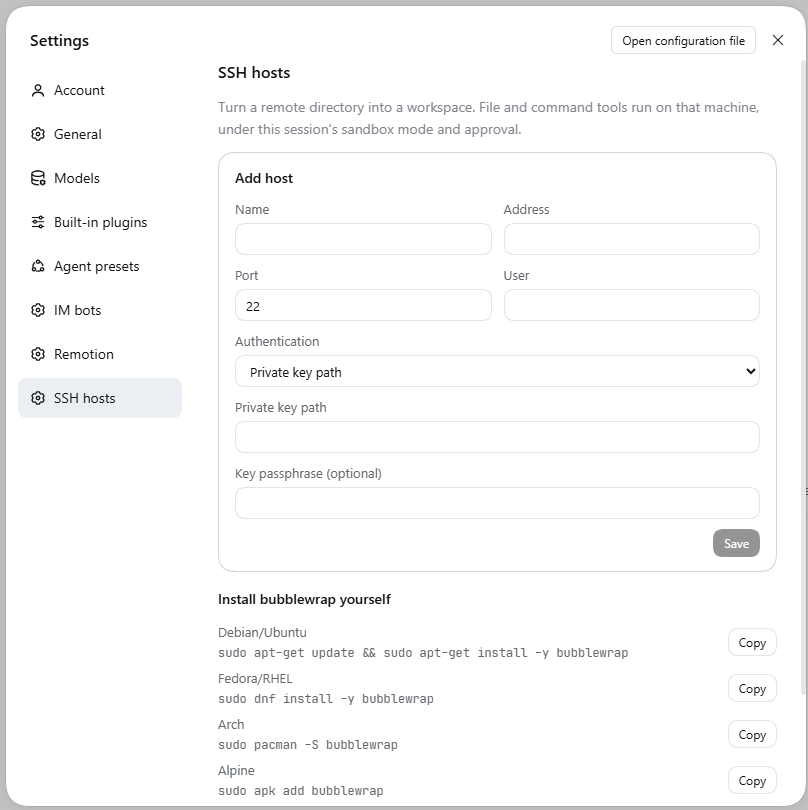
true。glob / grep 需要 rg,连接时会自动上传对应架构的二进制,主机行也有「安装 ripgrep」按钮。Linux 上受限命令需要 bubblewrap,主机行可代为安装(sudo -n),也提供可复制的发行版命令;macOS 使用系统自带的 sandbox-exec。安装与下载源细节见详细说明。@ 补全仍扫本机占位目录,右侧文件树列出远端目录。每台主机的设置都在卡片上的编辑对话框里。某项偏离默认值时,卡片会显示一个标签,点标签直接打开对话框。
控制其他工作区的会话用 ssh_exec / ssh_write / ssh_upload / ssh_download / ssh_copy 操作这台主机时放不放行:
| 选项 | 行为 |
|---|---|
| 每次询问 | 执行命令、写文件和传文件各要一次 danger-full-access 审批(默认) |
| 不再询问 | 直接执行,不弹卡。卡片上显示琥珀色标签「远程调用免审批」 |
| 禁止调用 | 这台主机拒绝所有远程命令和写入。卡片上显示灰色标签「远程调用已禁止」 |
读取远端文件(ssh_read)不受这个设置影响。下载算写入:它会在运行 DSH 的机器上落盘,所以和其它写入一起走这道闸门,而不是随读取放行。
远端工作区里的 bash 用哪一套环境变量:
| 选项 | 行为 |
|---|---|
| SSH 登录环境 | 沿用 SSH 登录时拿到的变量,通常只有 /etc/environment 里那几个(默认) |
| 读取 bash 启动脚本 | 捕获一次启动文件导出的变量,写到远端 ~/.dsh-permission-remote/login-env.sh 再 source。卡片上显示「重新读取环境」按钮 |
会读 /etc/profile、~/.bash_profile / ~/.bash_login / ~/.profile、/etc/bash.bashrc、~/.bashrc,丢弃输出,最多 10 秒;超时或失败时沿用 SSH 环境,不反复重试。PWD、OLDPWD、SHLVL 不缓存,~/.zshrc 不读,别名和函数不保留。ssh_exec 固定用 bash -lc,不受这个设置影响。缓存与重读细节见详细说明。
「远端根目录」是本地存放所有远端工作区占位目录的位置,默认 ~/.dsh/remote,可用 DSH_SSH_REMOTE_ROOT 覆盖。改目录请用「保存并迁移」:目标为空时整棵复制,已有内容时合并并可选择保留目标或覆盖;工作区里的会话会一并重注册。迁移细节、旧版本受损会话的手工恢复步骤见详细说明。
「主机配置备份」可导出/导入主机列表(不含口令和私钥口令)。「导入并合并」只更新文件里真正出现的字段;地址变化会清掉旧口令和旧指纹。导入后请重新测试连接、按需重填口令。
| 档位 | 文件写入 | bash |
|---|---|---|
read-only |
拒绝 | 有可用 runner 时在约束下执行;没有则 SANDBOX_UNAVAILABLE,命令不跑 |
workspace-write |
只允许打开时的工作区根和远端临时目录 | 同上。可写根不跟着 cd 变 |
danger-full-access |
按远端登录用户执行 | 不包壳 |
模型带 sandbox_permissions 和一句话理由重试时,仍走现有审批。批准只放宽这一次调用。workspace-write 的文件写入在远端沙箱进程里完成:内容先进入同目录的临时文件,再 mv -f 换成目标文件;中途断开留下的是临时文件,原来的内容还在。
远端工作区里的 run_code / workflow 会在 SSH 主机上执行,使用的是宿主机安装的同版本官方 @deepseek-ai/dsh-ptc-runtime-node worker(process.js),不是插件自研的运行器。
process.env 与本地 PTC 一样为空;相对路径和 process.cwd() 都在远端工作区。function-body、persistent-in-memory 的 REPL,以及 vm-script(scriptPersistence 开启时保留状态);保留状态按 state owner 留在 SSH 主机进程内。node:module 的 registerHooks,该主机需要 22.15+(或 23.5+、24+);下限由上传的 worker 字节推导,太旧会在 run_code 里直接报出来)。插件把官方 worker 按 hash 上传到 ~/.dsh-permission-remote/ptc/<hash>/,不因升级而重复上传。普通工作区(目录在你这台电脑上)也可以让模型操作一台已配置的 SSH 主机。可用工具:ssh_hosts、ssh_exec、ssh_read、ssh_write、ssh_upload、ssh_download、ssh_copy、ssh_workspace。
| 工具 | 作用 |
|---|---|
ssh_hosts |
列出主机 id、名称、地址、用户、运维策略和指纹是否已信任 |
ssh_exec |
在那台机器上执行 bash -lc,可选绝对路径 workdir 和 timeoutMs |
ssh_read |
读取远端文件,1 MiB 上限,按行分页;支持 ~/ |
ssh_write |
临时文件加 mv -f 原子替换远端文件,保留权限位 |
ssh_upload |
把一个本机文件传到远端,原子替换 |
ssh_download |
把远端一个文件取回本机,原子替换并置为 0600 |
ssh_copy |
在远端两台主机之间(可同一台)直接复制一个文件,字节不经过运行 DSH 的这台机器 |
ssh_workspace |
给已有主机、以某个远端目录创建工作区 |
每台主机在设置里有远程运维策略:
| 策略 | 读取 ssh_read(以及 ssh_copy 的源端) |
命令、写入、上传、下载、跨主机复制、添加工作区 |
|---|---|---|
| 询问(默认) | 允许 | 只在本会话是 danger-full-access 时直接执行;否则第一次被拒,带理由重试后弹一次审批 |
| 信任 | 允许 | 直接执行,不弹审批 |
| 禁止 | 拒绝 | 拒绝 |
要点:
O_NOFOLLOW)。ssh_upload / ssh_download / ssh_copy 会先弹一次「大文件传输」审批,批准后仅本次不设字节上限,不改设置;字节填 0 表示不设字节上限。上传和跨主机复制按约 1 MiB 的字节预算保持在途,下载仍逐块读。设了正数超时时,到点报 TimeoutError 并写明毫秒数;即使超时填 0,mkdir / mv 控制命令仍有固定 30 秒上限。超时可能仍完成落盘,失败可能留下同目录临时文件。ssh_copy 是远端工作区里搬运文件的唯一直接方式。 那里的会话没有「运行 DSH 的这台机器」上可用的文件路径:ssh_upload / ssh_download 的 local_path 一律指这台机器,占位路径(~/.dsh/remote/...)在本机只是空目录骨架,传进去会在审批之前就被拒绝并提示改用 ssh_copy。源端按 ssh_read 放行(deny 和未信任拒绝、不需要额外审批),目标端按写入审批。同一条文件复制到它自己、以及两端任一端是 / 都会被拒绝。maxConnections 默认 4,目前只在插件配置里可改);因此跨主机复制要求 maxConnections 至少为 2,同主机复制只占一条。一条连接只有在关闭时才还槽,而复制期间第一条连接不可能关闭,所以 ssh_copy 会先按「源/目标是否已在池里」算出还需要几条新连接,空闲槽不够就直接报「连接槽不足」,不会卡在排队里等一个永远不会释放的槽;这一步在审批卡之前,连目标腿之前还会再查一次。其它运维调用仍按原来的方式排队:配置了超时的话,那个调用会按自己的超时先返回,排队位置留给下一个调用者(不会波及同主机上已经在用的连接);超时填 0 时只能等连接释放或手动取消。ssh_exec 用 bash -lc,sudo 只能免密(sudo -n);只支持直连 Linux/macOS,不支持跳板机和 Windows 远端。传输上限、超时、符号链接与 ssh_workspace 的细节见详细说明。
远端工作区里的侧栏终端连的是那台服务器,不是本机:标签名带主机名(lo · zsh),shell 列表来自远端。
bash。MaxSessions 10)。working_directory;断线即结束,不自动重连。terminal_open 在远端打开持久 shell:cwd 先改写成这台主机的占位路径,再交给官方工具。terminal_send / terminal_read / terminal_list 仍操作已经打开的会话。非 danger-full-access 时 argv 是官方 confine 产出的 bwrap 或 sandbox-exec。前台进程组按主机共用一条探测通道,请求级取消不会拆掉其他会话(被放弃的命令跑完之前,同主机的下一次查询排在它后面,最长 5 秒);超时会重建该主机的探测通道;capturePid 和信号投递走一次性 exec;inspectForeground 读不到正数进程组时返回空并退回提示符/静默;signalForeground 在 pid 文件有效而 tpgid 非正数时改打记录 pid,探测整体失败时回退到缓存的远端 pid,不再抛错拆会话。inputWaiting 固定为 false,所以精确的 stdin 等待不会成立,REPL/密码提示通常只能靠提示符证据或约 3 秒静默判定,最坏到 30 秒超时。前台组已经退出、信号没有打中时,会话保持打开。关闭时会清掉还能归到这棵进程树上的子进程。@ 补全仍扫本机占位目录;右侧文件树列出远端,但自动刷新不可用。远端 bash 结束后属性缓存会清掉;侧栏、运维工具和运行代码改过的文件,手动刷新后属性仍可能滞后约 5 秒。用户上传的非图片文件会先复制到远端 ~/.dsh-permission-remote/uploads/,单文件大小和超时跟着设置页的「单次传输上限」和「单次传输超时」;默认 1 GiB、默认不设超时。字节填 0 表示不设字节上限。复制分段进行,按约 1 MiB 的字节预算保持在途。超过上限的对话附件会记一条警告并被跳过,这一轮对话继续,该附件不会变成远端路径(对话上传没有审批环节)。present 可用。 快照目录能打开时,插件把远端文件分段复制到本机的内容寻址快照(<占位根>/.deliverables/<sha256>/<文件名>),再用快照路径调用官方 present。快照目录打不开时退回整段缓冲,单文件仍不超过 256 MiB。卡片和预览拿到的是本机副本;远端原文件不动,快照只读、不可变,改过内容再交付不会顶掉旧卡片。上限跟随设置页的单次传输上限,另有 256 MiB 快照硬顶;任一文件失败整次拒绝。卸载不删已交付的快照;快照按 30 天过期,全部快照合计上限 1 GiB。细节见详细说明。dsh-tool-fs 的工具层。 read、write、edit、read_image、apply_patch 的 schema、校验和审批由 DSH 提供;插件只实现远端 ctx.fs 的 writeText/editText/patchText 等后端方法,不会把文件写到本机 placeholder。apply_patch / str_replace_editor。 两者默认都关着,由组合配置决定是否启用了 @deepseek-ai/dsh-tool-fs 的 applyPatch 或挂载 @deepseek-ai/dsh-tool-str-replace-editor;启用后在远端执行,遵守同一套 Permissions、审批和沙箱,整补丁先预检、失败不回滚。细节见详细说明。bash;pwsh、powershell、cmd 会被工具过滤和守卫挡住。minimal 这类完整 persona 不会被改写。AGENTS.md / CLAUDE.md 及其 .local 时走文件系统接口,占位路径读到远端那份;$DSH_HOME 下的全局文件仍是本机。process.env 为空,支持 per-call、persistent-in-memory 和 vm-script(scriptPersistence)。npm install
npm test
npm run test:ci # 官方工具探针缺失时直接失败,CI 用这个
npm run typecheck
npm run buildlib/ 是安装入口,改完源码需要重新构建。npm run test:ci 需要本机装有 DSH 0.2.2;npm test 在找不到时会把官方工具集成用例跳过。
SSH remote workspaces for the DSH web GUI. On a workspace created from Settings → SSH hosts, the standard tools bash, read, write, edit, read_image, glob, and grep run on that Linux or macOS host; when enabled, the optional apply_patch and str_replace_editor tools run there too. The session keeps its existing Permissions selector and approval card.
Requires DSH >=0.2.2-rc.1 <0.3.0, the web profile, and Node >= 22.5. Source: weicy98/dsh-permission-remote.
dsh plugin --profile web add github:weicy98/dsh-permission-remote   # GitHub
dsh plugin --profile web add dsh-permission-remote                  # npm
dsh plugin --profile web add /absolute/path/to/dsh-permission-remote # local
No pnpm-workspace.yaml edit; the SSH library ships inside the plugin and install asks for no build-script approval. Restart dsh web and hard-refresh. SSH hosts appears in Settings and as a sidebar icon — one UI over one configuration.
true once under a read-only sandbox profile.glob / grep need rg (uploaded automatically, or install it from the host row). On Linux, confined commands need bubblewrap — installable from the host row with sudo -n. macOS uses sandbox-exec.bash run on the remote host; the left file list and @ completion still walk the local placeholder tree.Both settings live in the host's edit dialog; the card shows a label when one leaves its default.
Remote call approval (default: ask each time) — for ssh_exec / ssh_write / ssh_upload / ssh_download / ssh_copy from a session in another workspace:
| Option | Behaviour |
|---|---|
| Ask each time | One danger-full-access approval per command, write, or transfer (default) |
| Do not ask | Runs directly; amber label |
| Block calls | Refuses every remote command and write; grey label |
ssh_read needs no approval unless the host is set to Block calls, which refuses reads too. A download counts as a write because it lands on the machine running DSH.
Environment source (default: SSH login environment) — which variables a remote bash runs with:
| Option | Behaviour |
|---|---|
| SSH login environment | Keeps what SSH logged in with (default) |
| Read bash startup files | Captures exported variables once, writes ~/.dsh-permission-remote/login-env.sh, and sources that file; the card offers Re-read environment |
Reads /etc/profile, the first of ~/.bash_profile / ~/.bash_login / ~/.profile, then /etc/bash.bashrc and ~/.bashrc, discarding output, capped at 10 s. PWD / OLDPWD / SHLVL are not cached, ~/.zshrc is not read, aliases and functions are not kept. ssh_exec stays bash -lc. Details: detailed notes.
Remote root directory (default ~/.dsh/remote, overridable with DSH_SSH_REMOTE_ROOT) is where placeholders live. Use Save and migrate to move it; sessions are re-registered and the old tree is kept. Host configuration backup exports/imports the host list without passwords or key passphrases; Import and merge only applies fields the file actually contains. Migration and recovery: detailed notes.
| Mode | File writes | bash |
|---|---|---|
read-only |
refused | runs under the available runner; SANDBOX_UNAVAILABLE without one |
workspace-write |
only the workspace root captured at open time plus remote temp dirs | same; the writable root does not follow cd |
danger-full-access |
runs as the remote login user | no sandbox wrapper |
A model retry carrying sandbox_permissions plus a justification still goes through the normal approval and widens only that call.
In a remote workspace, run_code / workflow executes on the SSH host using the host's exact official @deepseek-ai/dsh-ptc-runtime-node worker (process.js), not a plugin-authored runner.
process.env is empty, exactly like local PTC; relative paths and process.cwd() are on the remote workspace.function-body, persistent-in-memory REPL, and vm-script with scriptPersistence are supported; retained state stays in the SSH host process keyed by state owner.registerHooks from node:module, so that host needs 22.15+ (or 23.5+, 24+); the floor is derived from the uploaded worker bytes and an older Node is reported by run_code). The plugin uploads the official worker by hash to ~/.dsh-permission-remote/ptc/<hash>/ and reuses it across runs.upstream-ptc-upgrade skill, and npm run upgrade:ptc runs the probe, offline, and (with --live) real-host gates before recording anything.An ordinary local workspace can operate a configured SSH host with ssh_hosts, ssh_exec, ssh_read, ssh_write, ssh_upload, ssh_download, ssh_copy, and ssh_workspace. Each host has an ops policy:
| Policy | ssh_read (and a copy's source side) |
Command, write, upload, download, cross-host copy, workspace registration |
|---|---|---|
| Ask (default) | allowed | only a danger-full-access session runs directly; otherwise denied once, then one approval on retry with a justification |
| Trust | allowed | runs without a prompt |
| Deny | denied | denied |
Ops calls are not wrapped in the remote workspace sandbox — the target is usually outside the local workspace. Trusting a host also trusts it with local files a session uploads. Transfers are single files, no recursion or resume; symlinks, FIFOs, and devices are refused (a symlink is refused at check time; SFTP v3 has no O_NOFOLLOW). Ceiling 1 GiB and no deadline by default; installations that saved the old 32 MiB / 120 s values keep them until changed in Settings. A transfer above the ceiling asks for one one-time large-transfer approval; approval lifts the byte ceiling for that call only, without changing the setting. A byte ceiling of 0 means no ceiling. Uploads and cross-host copies keep about 1 MiB of bytes in flight; downloads still read one chunk at a time. A positive timeout reports TimeoutError with the millisecond count; 0 means no deadline.
ssh_copy moves one file between two SSH hosts. It is the direct way to move a file out of a remote workspace: that session has no usable path on the machine running DSH, so ssh_upload / ssh_download cannot serve it — their local_path always names the machine running DSH, and a placeholder path is refused before the approval prompt with a pointer at ssh_copy. A copy's source side follows ssh_read (a deny or untrusted source is refused, no approval), its target side follows ssh_write. Copying a file onto itself, and / on either end, are refused. A cross-host copy holds one connection to each host at the same time (the pool's maxConnections, default 4, currently set only in the plugin config), so it requires maxConnections of at least 2; a same-host copy uses one. A slot is returned only when its connection closes, and the first connection cannot close while the copy is streaming, so ssh_copy first counts how many new connections it needs (hosts already in the pool need none) and fails fast with "connection slots" when too few are free — before the approval card, and again before the target leg. Other ops calls still queue as before: a configured timeout releases that caller while the queue position is handed to the next one instead of failing the host's other channels, and with timeout 0 it waits until a connection frees or the call is cancelled. Details: detailed notes.
The right sidebar's terminal on a remote workspace connects to that host: the shell menu lists the remote shells and each tab is named after the server.
bash for permission-mode-aware commands.MaxSessions 10).working_directory; a dropped connection ends the terminal.terminal_open on a remote workspace opens a persistent shell there. Its cwd is rewritten to this host's placeholder before the official tool runs. terminal_send / terminal_read / terminal_list still operate on sessions that are already open. Outside danger-full-access the argv is the official confine result (bwrap or sandbox-exec). Foreground checks share one probe channel per host, with per-request cancellation isolation (a cancelled probe is drained before the next one, so a query on the same host can wait behind it for up to 5 s); capturePid and signal delivery use one-shot execs. inspectForeground returns empty when it cannot see a positive process group; signalForeground falls back to the recorded pid when the pid file is valid but tpgid is non-positive, and to the cached remote pid when the probe itself fails instead of tearing down the session. Because inputWaiting is always false, an exact stdin wait never settles; REPL/password prompts rely on prompt evidence or about 3 s of silence, up to the 30 s timeout. A signal that misses, because that group has already exited, leaves the session open. Closing the session also signals the descendants still visible on that process tree.@ completion still use the local placeholder tree; the right file tree lists the remote directory but cannot auto-refresh. A remote bash drops the attribute cache when it exits; files changed from the sidebar, ops tools, or Run Code can still lag ~5 s on manual refresh. Non-image uploads are copied to ~/.dsh-permission-remote/uploads/ and follow the transfer ceiling and timeout on the settings page: 1 GiB and no deadline by default. A byte ceiling of 0 means no ceiling. The copy keeps about 1 MiB of bytes in flight. An over-ceiling attachment is skipped with a warning and the turn continues; that attachment is not published as a remote path (chat uploads have no approval step).present works by copying the remote file into a content-addressed local snapshot (<placeholder root>/.deliverables/<sha256>/<name>) and then calling the official tool with that path. When the snapshot directory can be opened the copy is chunked; when it cannot, the file is buffered up to the same 256 MiB cap. The remote original is untouched, snapshots are read-only and immutable, and re-delivering changed content never replaces an older card's bytes. The size limit follows the transfer setting with a 256 MiB snapshot ceiling, and any bad file refuses the whole call. Unloading the plugin keeps delivered snapshots; they expire after 30 days, and all snapshots together are capped at 1 GiB. Details: detailed notes.dsh-tool-fs surface. read, write, edit, read_image, and apply_patch keep DSH schemas, validation, and approvals; the plugin only implements the remote ctx.fs backend methods such as writeText/editText/patchText, never a local write to the placeholder.apply_patch / str_replace_editor are off unless the composition enables applyPatch or mounts the editor package. They then run remotely under the same Permissions, approval, and sandbox; a patch is preflighted first and is not rolled back on failure. Details: detailed notes.bash in a remote workspace; pwsh / powershell / cmd are filtered and guarded. A complete: true persona is not rewritten.AGENTS.md, CLAUDE.md, and .local) are read through the filesystem service, so placeholder paths read the remote copy; global files under $DSH_HOME stay local.process.env is empty and per-call, persistent-in-memory, and vm-script modes are supported.npm install
npm test # skips the official-tool probe when DSH 0.2.2 is unavailable
npm run test:ci # fails instead of skipping; use this in CI
npm run typecheck
npm run buildlib/ is the install entry point; rebuild after changing source.
CLASSIFICATION EVIDENCE
系统优先读取 GitHub Topics,再与站内分类词典和词根规则比对。当前命中: deepseek、deepseek-harness。
morluto
Reverse engineer anything with agents, from app behavior down to native binaries.

deepseek-ai
DeepSeek Harness: Everything is a Plugin.

nexu-io
The 1st Collaborative AI Design Agent Workspace. Local-first and open source. Create motion, prototypes, websites, apps, dashboards, presentations, images, and videos with your team and AI agents. Share work, exchange feedback, and iterate together in one workspace.