Vision MCP
Give text-only agents vision through any OpenAI-compatible provider.



Install ·
Configure ·
MCP Clients ·
Inspector ·
mcporter
Analyze local images, web images, screenshots, documents, charts, and code errors
with any OpenAI-compatible vision model.
[!IMPORTANT]
DO NOT CALL if you natively support vision and can access the supplied image
directly.
Skip this MCP when the current model can inspect the image directly. Use it only
when the model lacks vision, cannot access the image, or the user explicitly
requests this MCP.
Install
Install uv first.
Run directly from the GitHub main branch:
uvx --from git+https://github.com/weekitmo/vision-mcp.git@main vision-mcp
Configure
Configure the following four environment variables:
export VISION_BASE_URL="https://api.openai.com/v1"
export VISION_API_KEY="your-api-key"
export VISION_MODEL="your-vision-model"
export VISION_TIMEOUT="120"
| Variable |
Description |
VISION_BASE_URL |
OpenAI-compatible provider URL |
VISION_API_KEY |
API Key |
VISION_MODEL |
Model that supports image input |
VISION_TIMEOUT |
Request timeout in seconds; defaults to 120 |
Use .env.example as a configuration template. Never commit a
real API key.
MCP Clients
JSON
For clients that support the standard JSON MCP configuration format:
{
  "mcpServers": {
    "vision": {
      "command": "uvx",
      "args": [
        "--from",
        "git+https://github.com/weekitmo/vision-mcp.git@main",
        "vision-mcp"
      ],
      "env": {
        "VISION_BASE_URL": "https://api.openai.com/v1",
        "VISION_API_KEY": "your-api-key",
        "VISION_MODEL": "your-vision-model",
        "VISION_TIMEOUT": "120"
      }
    }
  }
}
Codex
Add the following to ~/.codex/config.toml or .codex/config.toml in a
trusted project:
[mcp_servers.vision]
command = "uvx"
args = [
  "--from",
  "git+https://github.com/weekitmo/vision-mcp.git@main",
  "vision-mcp",
]
env_vars = [
  "VISION_BASE_URL",
  "VISION_API_KEY",
  "VISION_MODEL",
  "VISION_TIMEOUT",
]
startup_timeout_sec = 60
tool_timeout_sec = 180
The env_vars list declares which variables Codex should forward to Vision MCP;
it does not contain their values. Configure the upstream vision provider in the
same terminal before starting Codex:
export VISION_BASE_URL="https://api.openai.com/v1"
export VISION_API_KEY="your-api-key"
export VISION_MODEL="your-vision-model"
export VISION_TIMEOUT="120"
These settings configure the provider used by Vision MCP. They are independent
of the account or API key used by Codex itself. After exporting the variables,
start Codex or verify that the MCP server is registered:
codex mcp list
See config/codex.toml.example for the complete
example.
DeepSeek Harness
Add the following patch entry to
$HOME/.dsh/profiles/web/cordis.patch.yml:
# Your patch layer for this dsh profile, applied after every bundle layer:
# a top-level YAML array of loader patch entries (id-targeted config
# overrides, disables, and insert lists; `!!js` expressions allowed).

# Vision MCP server (stdio). Exposes tools as mcp__vision__*.
# Image understanding / OCR via an OpenAI-compatible vision Chat Completions API.
# docs: https://github.com/weekitmo/vision-mcp
- insert:
    - id: mcp-vision
      name: '@deepseek-ai/dsh-mcp-client'
      config:
        serverName: vision
        transport: stdio
        command: uvx
        args:
          - '--from'
          - 'git+https://github.com/weekitmo/vision-mcp.git@main'
          - vision-mcp
        env:
          VISION_BASE_URL: 'https://api.openai.com/v1'
          VISION_API_KEY: !!js process.env.VISION_API_KEY
          VISION_MODEL: !!js process.env.VISION_MODEL
          VISION_TIMEOUT: '120'
Export VISION_API_KEY and VISION_MODEL before starting DeepSeek Harness.
Change VISION_BASE_URL if the vision model is hosted by another
OpenAI-compatible provider.
Grok
Add the following to ~/.grok/config.toml or the project's
.grok/config.toml:
[mcp_servers.vision]
command = "uvx"
args = [
  "--from",
  "git+https://github.com/weekitmo/vision-mcp.git@main",
  "vision-mcp",
]
enabled = true
startup_timeout_sec = 60
tool_timeout_sec = 180

[mcp_servers.vision.env]
VISION_BASE_URL = "https://api.openai.com/v1"
VISION_API_KEY = "your-api-key"
VISION_MODEL = "your-vision-model"
VISION_TIMEOUT = "120"
Grok does not use Codex's env_vars list. It uses
[mcp_servers.vision.env] to configure the MCP process environment directly.
The expected variable name is VISION_BASE_URL, not VISION_API_BASE_URL.
To avoid storing the API key directly in TOML, reference environment variables
that are available when Grok starts:
[mcp_servers.vision.env]
VISION_BASE_URL = "${VISION_BASE_URL}"
VISION_API_KEY = "${VISION_API_KEY}"
VISION_MODEL = "${VISION_MODEL}"
VISION_TIMEOUT = "${VISION_TIMEOUT:-120}"
These settings configure the provider used by Vision MCP. They are independent
of the account or API key used by Grok itself. Do not commit a project-level
.grok/config.toml that contains a real API key. Verify the configuration with:
grok mcp list
See config/grok.toml.example for the complete
example.
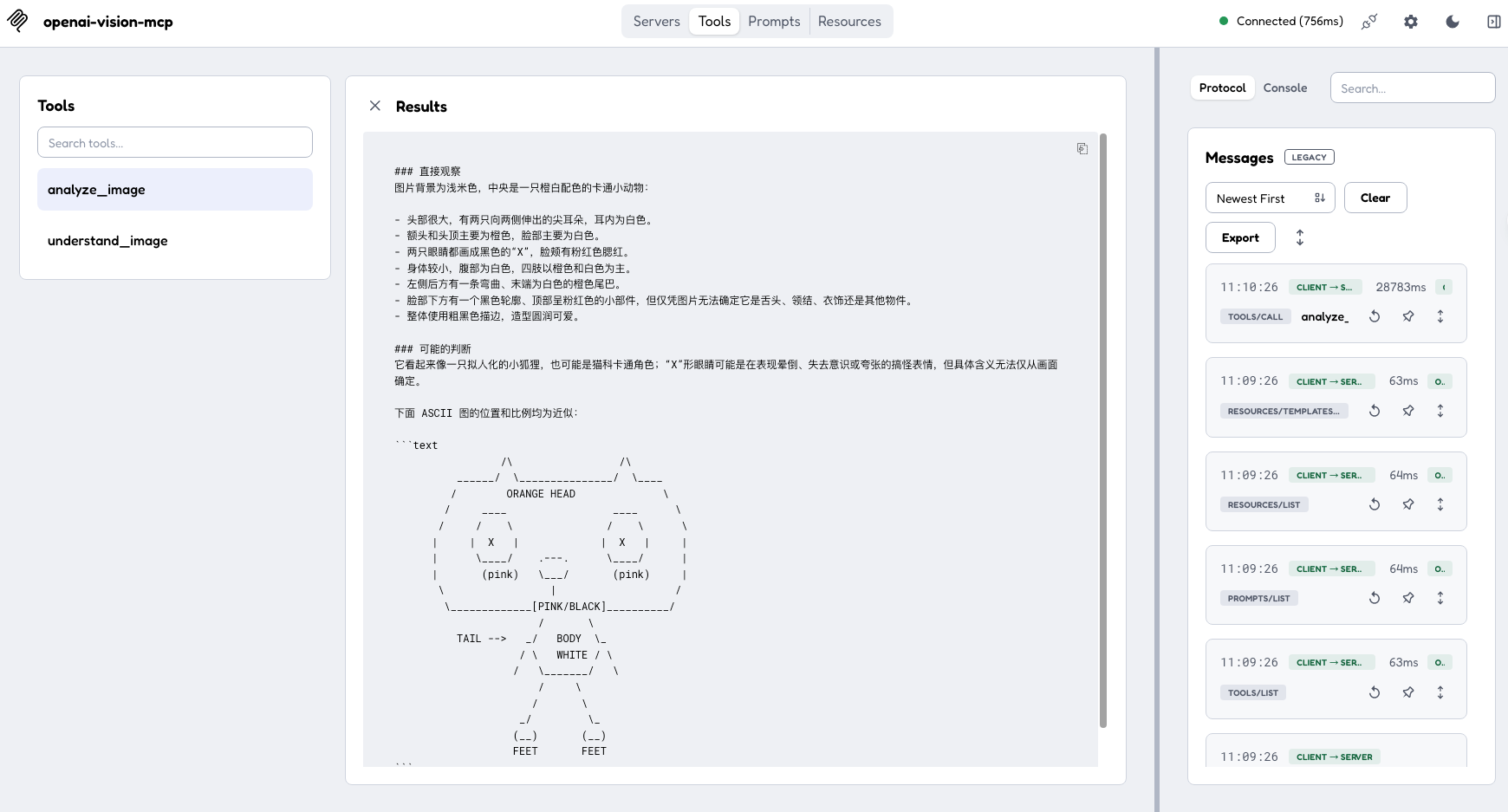
Inspector
Start MCP Inspector with:
./scripts/test-ui.sh
The script pins @modelcontextprotocol/inspector@2.1.0.
In Inspector:
- Open
vision-local.
- Enter the four
VISION_* settings under Environment Variables.
- Connect to the server.
- Open
Tools.
- Select
analyze_image or understand_image.
- Enter the image path and prompt, then run the tool.
Inspector stores its local configuration in .inspector/mcp.json, which is
excluded from Git.
mcporter
Initialize the project configuration:
./scripts/setup-mcporter.sh
Inspect the available tools:
mcporter list vision --schema --all-parameters
Analyze one image:
mcporter call vision.analyze_image \
  image=/absolute/path/to/screenshot.png \
  prompt="Extract all text from this image" \
  mode=ocr \
  detail=high \
  --timeout 120000
Compare multiple images:
mcporter call vision.understand_image \
  --args '{
    "images": [
      "/absolute/path/before.png",
      "/absolute/path/after.png"
    ],
    "prompt": "Compare the differences between these images",
    "mode": "compare"
  }' \
  --timeout 120000 \
  --output json
Read the built-in documentation resources:
mcporter resource vision
mcporter resource vision vision://docs/quickstart
mcporter resource vision vision://docs/tools
Tools
analyze_image
Analyze a single image. This tool is suitable for Inspector, mcporter, and
command-line calls.
image       Local path, HTTP(S) URL, or data URL
prompt      Question or instruction for the model
mode        Analysis mode
ascii_mode  Whether to represent layouts with ASCII
detail      Image input detail level
max_tokens  Maximum output length
understand_image
Analyze or compare multiple images. This tool also supports clients that use
different image argument formats.
images      List of images
prompt      Question or instruction for the model
mode        Analysis mode
ascii_mode  Whether to represent layouts with ASCII
detail      Image input detail level
max_tokens  Maximum output length
Available modes:
auto · describe · ocr · document · ui · chart · compare ·
spatial · code
PNG, JPEG, WEBP, and GIF are supported. Each call accepts up to 10 images.
From Source
For development or debugging:
git clone https://github.com/weekitmo/vision-mcp.git
cd vision-mcp
uv sync --frozen
uv run vision-mcp
Run from source in an MCP client:
{
  "mcpServers": {
    "vision": {
      "command": "uv",
      "args": [
        "--directory",
        "/absolute/path/to/vision-mcp",
        "run",
        "--frozen",
        "vision-mcp"
      ],
      "env": {
        "VISION_BASE_URL": "https://api.openai.com/v1",
        "VISION_API_KEY": "your-api-key",
        "VISION_MODEL": "your-vision-model",
        "VISION_TIMEOUT": "120"
      }
    }
  }
}
License
MIT


