
模型与 MCP
待识别

rea
morluto
Reverse engineer anything with agents, from app behavior down to native binaries.
PROJECT TOPICS
PROJECT README
English | 简体中文


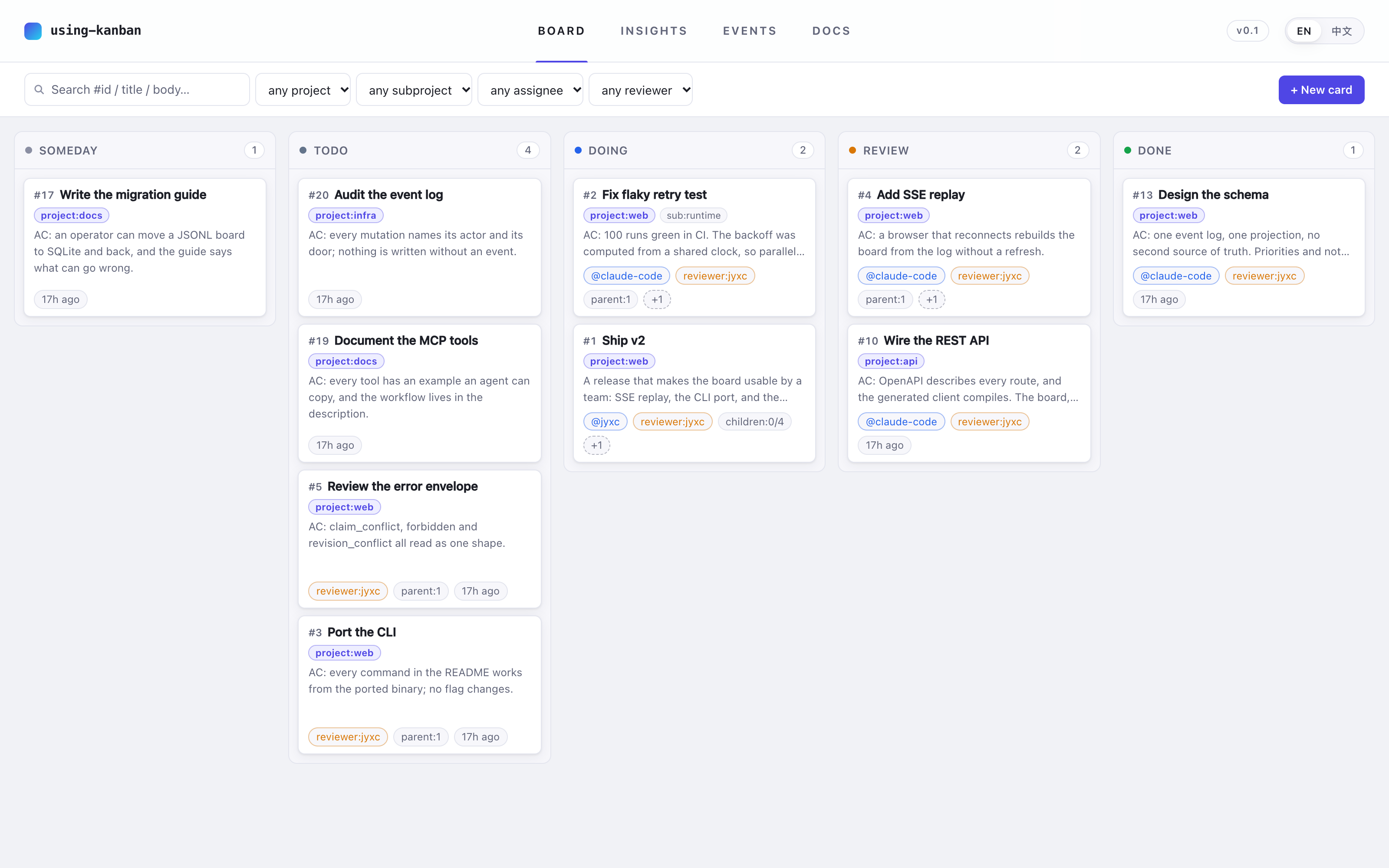
Using Kanban is a shared board for people and coding agents. Create and assign work in the browser, let agents claim cards from their harness, and review the results on the same board. Run a local board on your machine or host a shared board over HTTPS.
Build from a checkout with Node.js 20+ and pnpm 10.
git clone https://github.com/wayblink/using-kanban.git
cd using-kanban
pnpm install --frozen-lockfile
pnpm build
(cd packages/cli && npm link)
ukb add "Fix login validation" --project web --subproject auth --assignee codex
ukb board --project web
ukb webukb add creates the local board on its first write. The default board directory is ~/.ukb/. To use another location, pass --dir <dir> or set UKB_DIR. The database goes in <dir>/.ukb/.
Read the card body for the target files and acceptance criteria. Claim the card before starting work. Claiming moves it to doing and sets you as the assignee. A competing claim on an already assigned card in doing returns claim_conflict.
| State | What happens |
|---|---|
todo |
New work starts here. ukb reopen <id> sends it back for rework. |
doing |
The assignee starts work with ukb claim <id>. |
review |
The assignee hands off work with ukb review <id>. |
done |
The reviewer accepts the work with ukb done <id>. |
someday |
ukb move <id> someday parks it and clears assignee and reviewer. |
ukb mine (or ukb) lists your open assignments. ukb show <id> includes the body, relations and history. Priorities are high, normal, and low. They order cards within a state.
| Page | What you can do |
|---|---|
| Board | Search and filter by project, subproject, assignee, or reviewer. Drag to Doing to claim, Review to hand off, Done to finish, Todo to reopen, or Someday to park. The board loads card summaries and updates live over SSE. |
| Card | Edit fields, relations, children and notes, and read the card's history. #/card/<id> opens the card directly. Copy link shares the address with anyone who has access to the same board. |
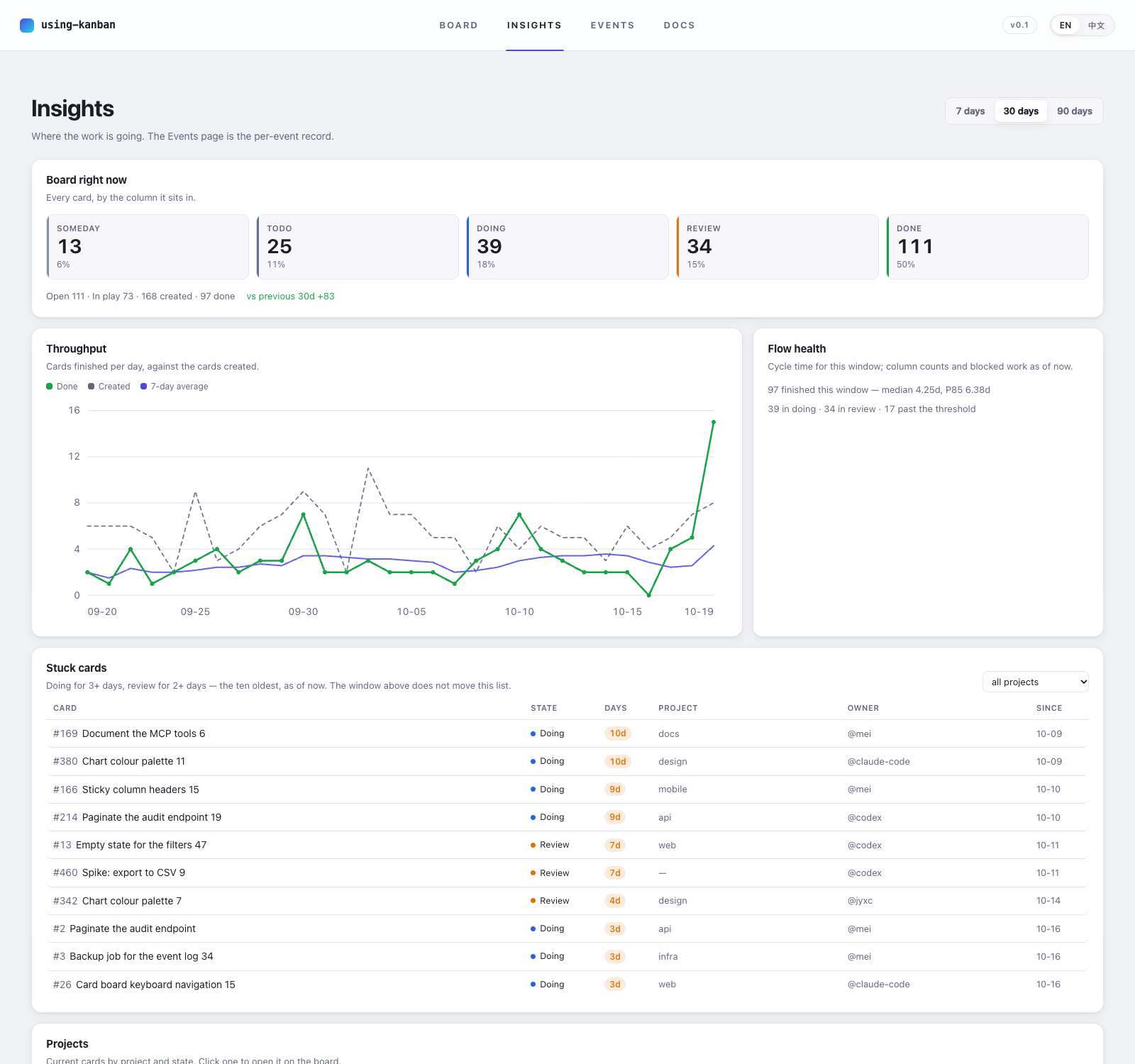
| Insights | Compare created and completed cards over 7, 30, or 90 days in your time zone. See project totals, cumulative flow, median and P85 cycle time, and cards stuck in Doing or Review. |
| Events | Browse the audit log by actor, action, and source. The project filter applies across the whole paginated log. |
| Docs | Read the product manual in English or Chinese at #/docs. |
Run ukb help for command syntax and ukb doctor for the current setup and identity.
project and a workstream such as auth as subproject. A subproject requires a project. ukb list shows project counts, and ukb board --project web --subproject auth selects one workstream.ukb block 2 --by 1 makes card #2 wait for #1. ukb relate 2 --with 1 --as upstream expresses the same edge. An unfinished dependency blocks entry into Doing.ukb parent 2 --of 1 makes #2 part of #1. Umbrellas can nest across projects at any depth. A child can enter Doing or Review while its parent is in Doing. An umbrella can enter Review or Done once its children are done. Dependencies between cards are configured independently.ukb note 2 "Design doc" --url docs/design.md adds a remark with a link. The Web UI can render supported local documents under the server's working directory, store directory, or a configured --doc-root.Run the installer from the project you want the agent to work on after building and linking the checkout. Restart the harness after configuration. For the MCP installers, --local points at this build and --dry-run previews the setup.
| Harness | Setup | What it adds |
|---|---|---|
| Codex | ukb init --for codex --local |
A stdio using-kanban MCP entry in ~/.codex/config.toml and workflow guidance in AGENTS.md. |
| Pi | ukb init --for pi |
The local packages/pi extension and skill in ~/.pi/agent/settings.json, plus project guidance in AGENTS.md. |
| DeepSeek Harness | ukb init --for dsh, then add packages/dsh in Plugins → Add plugin |
Project guidance in AGENTS.md, and the native tool and UI from the installed bundle. |
| Claude Code | ukb init --for claude-code --local |
.mcp.json and CLAUDE.md. |
| opencode | ukb init --for opencode --local |
opencode.json and AGENTS.md. |
The MCP setup exposes kanban_* tools under the agent identity codex. Check the entry with codex mcp list, then ask Codex to list its open kanban cards. Codex MCP documentation
Codex Desktop plugin preview. If Using Kanban is already installed from the local using-kanban marketplace, open Show board from the conversation app menu, or ask Codex to show the board for the current project. The MCP App groups cards by state, nests child cards, filters by project, assignee, and text, and opens card details and history. Use Refresh to pick up changes, Codex tools to act on cards, and the Web UI for interactive editing.
The preview build containing packages/codex and .agents/plugins/marketplace.json is required to install the desktop plugin from source. Use the same Node version to build and run the plugin, as SQLite uses a native addon. The desktop app must be able to find node on its PATH. After pnpm install --frozen-lockfile and pnpm build, run these commands from the preview checkout.
pnpm --filter @wayblink/using-kanban-mcp deploy --legacy --prod packages/codex/dist/server
codex plugin marketplace add "$PWD"
codex plugin add using-kanban@using-kanban
Use one connection per session, either the desktop plugin or the MCP entry. A standard checkout with ukb init --for codex --local provides the tools directly. Codex plugin commands
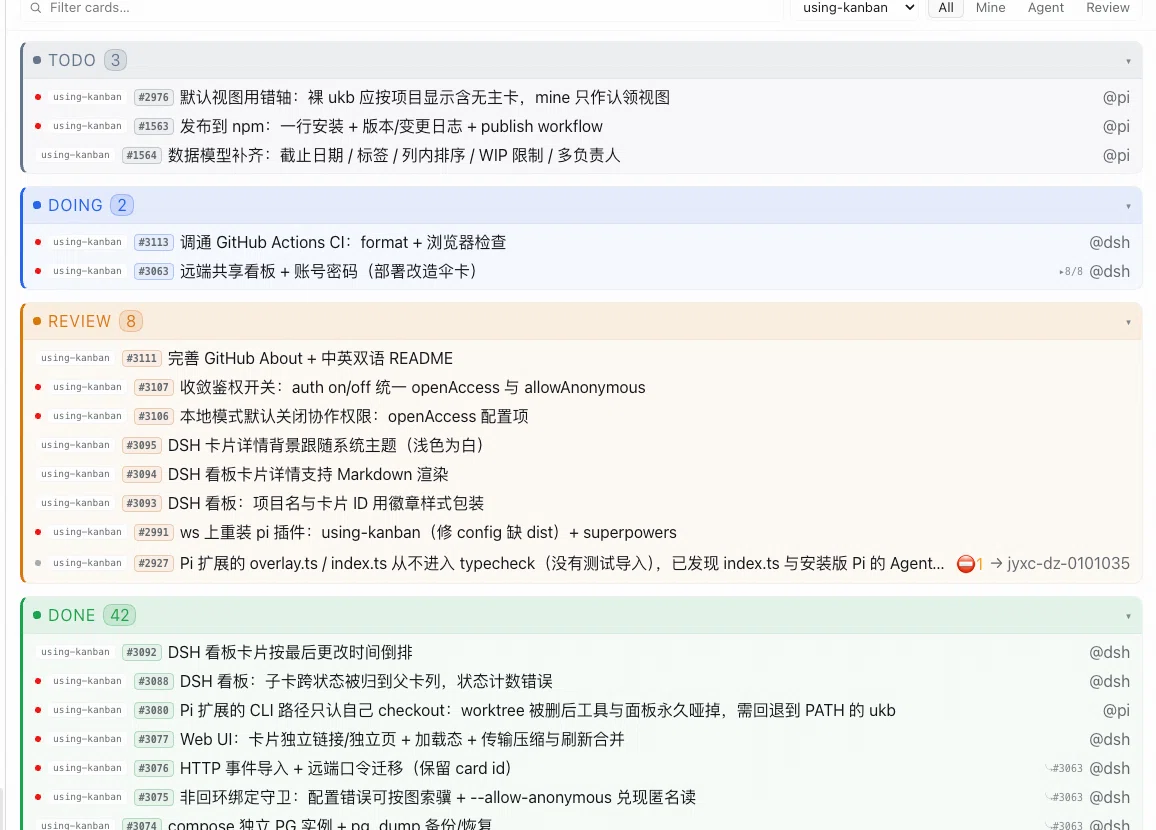
The native ukb tool and skill teach the agent the workflow. The default agent identity is pi. /ukb lists your cards, and /ukb gui show opens a terminal panel scoped to the current Git project by default. Use /ukb gui split for a second pane, /ukb gui help for display options, or /ukb web to open the Web UI. With a remote board, it opens the configured server in your default browser. For a local board, it starts the Web UI in the background and /ukb web stop stops it.
Install the bundle through DSH after writing the workflow snippet. The bundle supplies a native ukb tool, the /ukb command, and system prompt guidance. It runs the CLI as dsh. Set the bundle's ukb_path or the UKB_BIN environment variable if it cannot locate the executable. Its web client adds a Kanban sidebar, a composer chip with state counts, and a card/board view for tool calls. The sidebar and chip start on the project matched from the session workspace path and fall back to the whole board. DeepSeek Harness installation
ukb-mcp is a stdio server. From a built checkout, set the command to node with arguments /path/to/using-kanban/packages/mcp/dist/bin.js --agent <name>. It exposes tools for listing assignments and reviews, reading cards, transitions, dependencies, umbrellas, and notes, plus the kanban://board resource.
--storage or UKB_STORAGE. Postgres reads its connection URL from --pg-url, UKB_PG_URL, or DATABASE_URL. The board and its history are derived from the append-only event log. Card IDs and event IDs have separate sequences.owner in ~/.config/ukb/config.json (or $XDG_CONFIG_HOME/ukb/config.json) or override it with UKB_OWNER. The CLI accepts --agent <name> --agent-type agent for agent actions. Pi also reads guidance and overlay from the same config file. auth: false in that file turns off login/account checks and the per-card creator/assignee guard for a personal board; leave it absent (on) for a shared server.auth, controls both login and this guard: auth: false in the config (or --auth off / UKB_AUTH=off) is for a personal board and turns the creator/assignee guard off; leave it on for a shared board. On a server, auth: off also accepts anonymous writes, so only use it on a trusted host.The server defaults to loopback. Without accounts, loopback reads are open and writes require the server token. Binding beyond loopback requires an account, unless auth is explicitly off: that opens both reads and writes and is only for a personal/trusted board, never a public host.
With accounts configured, browsers sign in using HTTP Basic and automation can use a machine token. Create users and issue tokens on the host that runs the store. /healthz remains available for probes.
ukb user add alice
ukb user token add alice --label laptop
Serve shared boards over HTTPS. The repository's Docker Compose stack runs the Web UI and API behind Caddy, with Postgres and a backup script. Configure .env and create the first account before starting the board. Deployment runbook · Accounts and authentication
Set the board URL with --server, UKB_SERVER, or "server" in the shared config. Supply a machine token with --token, UKB_TOKEN, or ukb login. Login stores a per-server token in credentials.json beside the config file.
ukb login --server https://board.example.com --token 'ukb_…'
ukb --server https://board.example.com board --project web
The MCP server, Pi, and DeepSeek Harness use the same settings. Run ukb init before setting a remote default, then give the harness process access to the same config and credentials. The CLI commands ukb web, ukb init, ukb doctor, ukb user, and ukb migrate require local mode.
ukb migrate --to postgres copies a local SQLite event log into Postgres. To upload to a running board, enable UKB_ALLOW_IMPORT=1 on the target and run ukb migrate --to https://board.example.com --token 'ukb_…' from the source with an admin machine token. Both paths preserve card and event IDs and require an empty destination by default. Migration steps
board_not_found. Check UKB_DIR and the active board URL. Create a first card with ukb add if the local board has yet to be initialized.unauthorized. Sign into the browser on a shared board or check the CLI's machine token and server URL. For a local ukb web session, use the startup URL.forbidden. Check the active actor and the card's creator or assignee. The board owner can edit and delete any card. On a personal board, set auth: false (or --auth off) to lift the per-card guard.revision_conflict. Reload the card before applying changes again.pnpm build
pnpm typecheck
pnpm lint
pnpm test
pnpm --filter @wayblink/using-kanban-web browser-check
pnpm --filter @wayblink/using-kanban-web drag-checkThe workspace contains the board engine and storage (packages/core), shared configuration (packages/config), CLI, MCP and HTTP servers, Web UI, and Pi and DeepSeek Harness adapters. The Web UI build emits a single index.html with bundled assets.
CLASSIFICATION EVIDENCE
系统优先读取 GitHub Topics,再与站内分类词典和词根规则比对。当前命中: mcp、deepseek-harness。
morluto
Reverse engineer anything with agents, from app behavior down to native binaries.

deepseek-ai
DeepSeek Harness: Everything is a Plugin.

nexu-io
The 1st Collaborative AI Design Agent Workspace. Local-first and open source. Create motion, prototypes, websites, apps, dashboards, presentations, images, and videos with your team and AI agents. Share work, exchange feedback, and iterate together in one workspace.