
模型与 MCP
待识别

rea
morluto
Reverse engineer anything with agents, from app behavior down to native binaries.
PROJECT TOPICS
PROJECT README
A video editing harness for AI coding agents.
The agent edits a timeline, inspects its own rendered frames,
and delivers a film only after it passes layout, loudness and delivery checks.

Produced by a coding agent with reelsmith: script, narration, pictures, evidence capture, edit and render.
Watch with sound · Project files
A language model can write a script and invoke a renderer, but it cannot see the result: a title that runs off the
frame, a caption over a face, a cut that lands mid-word. reelsmith gives the agent an editor rather than a pipeline.
The agent assembles the film clip by clip from footage, pictures, narration and React components. reelsmith keeps
every edit valid and undoable, anchors each clip to what it follows, measures the text on rendered frames, masters
the loudness and enforces the delivery rules. There are no templates: the agent decides the story, the cut, the
sound and the look, and project.json remains editable by hand.
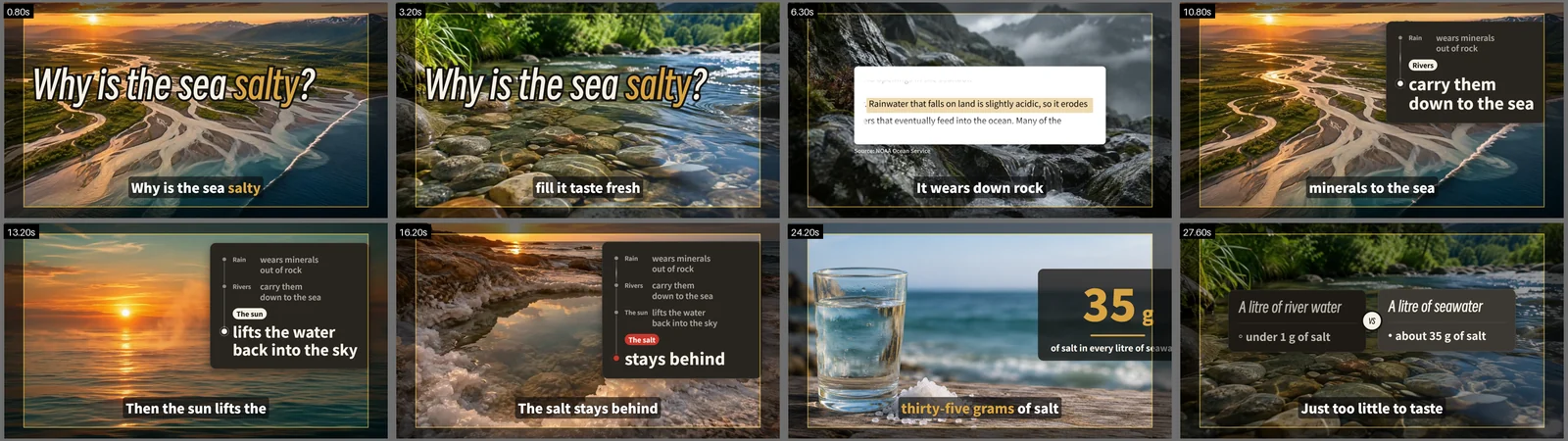
preview returns stills at the requested moments, with the safe area outlined and the layout measured on those
frames. render applies the same measurement to the whole film before encoding and refuses a film that fails; the
previous delivery is kept.
[error] n1 @ 24.2s: text "of salt in every litre o" is cut by the canvas edge (right, 66 px): move it in or make it smaller
NOT DELIVERED (stopped at layout): words sit where the viewer cannot read them (listed in layout): fix and render again
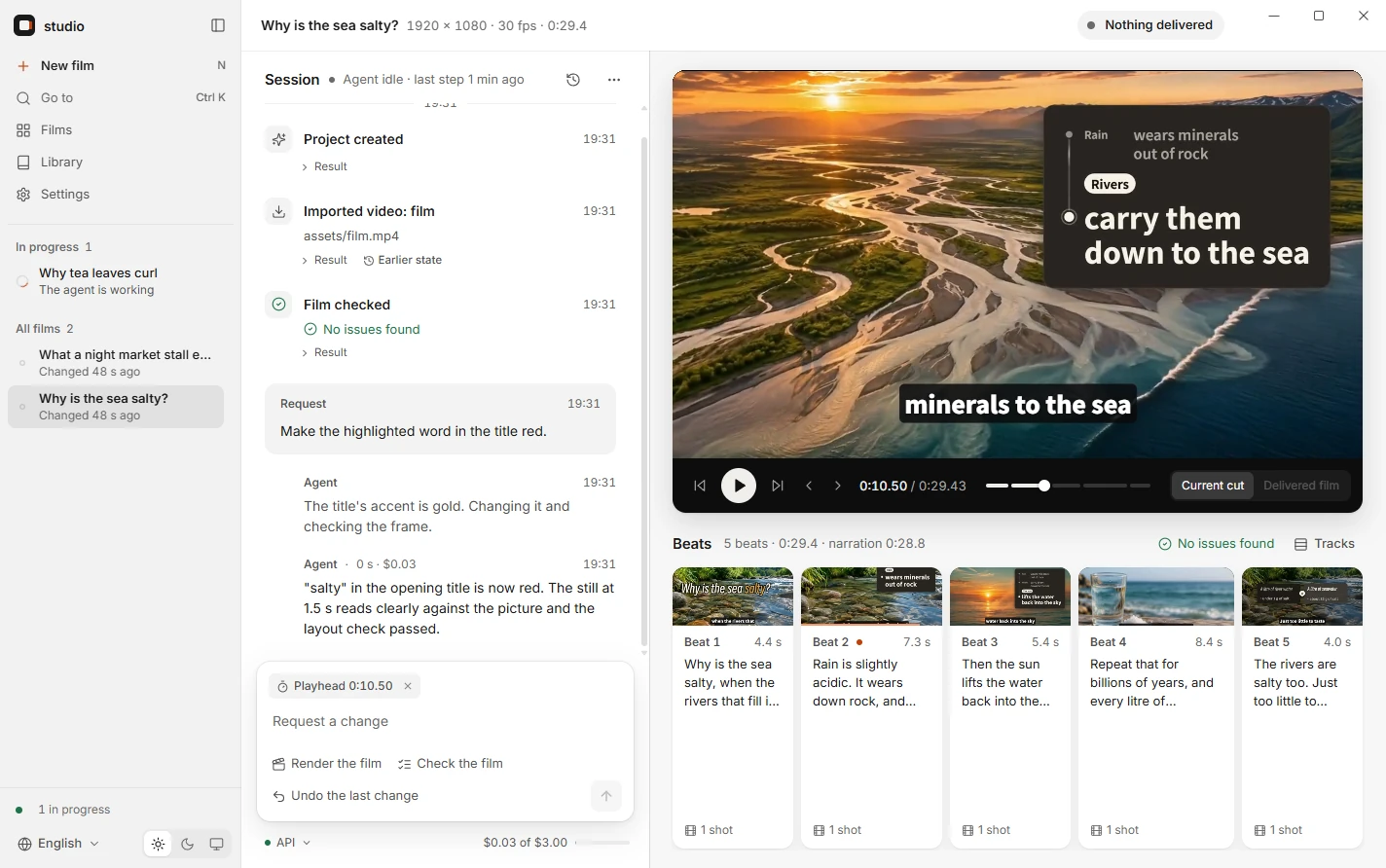
Running reelsmith in a workspace opens the application: a desktop window, or a browser tab without the app
extra. A sidebar lists every film of the workspace with its state, and requests to the agent run in several films at
once, each film showing its session, its current cut and its beats. A new film starts from a one-line description;
media are added from the file dialog or by dropping files on a film; the Library shows the workspace's components,
notes, rules and fonts, and Settings holds the engine, the budgets and the keys. The interface is available in eight
languages, runs locally, and uses the engine already installed (Claude Agent SDK, Codex, DeepSeek Harness or any
OpenAI-compatible API). See docs/app.md.
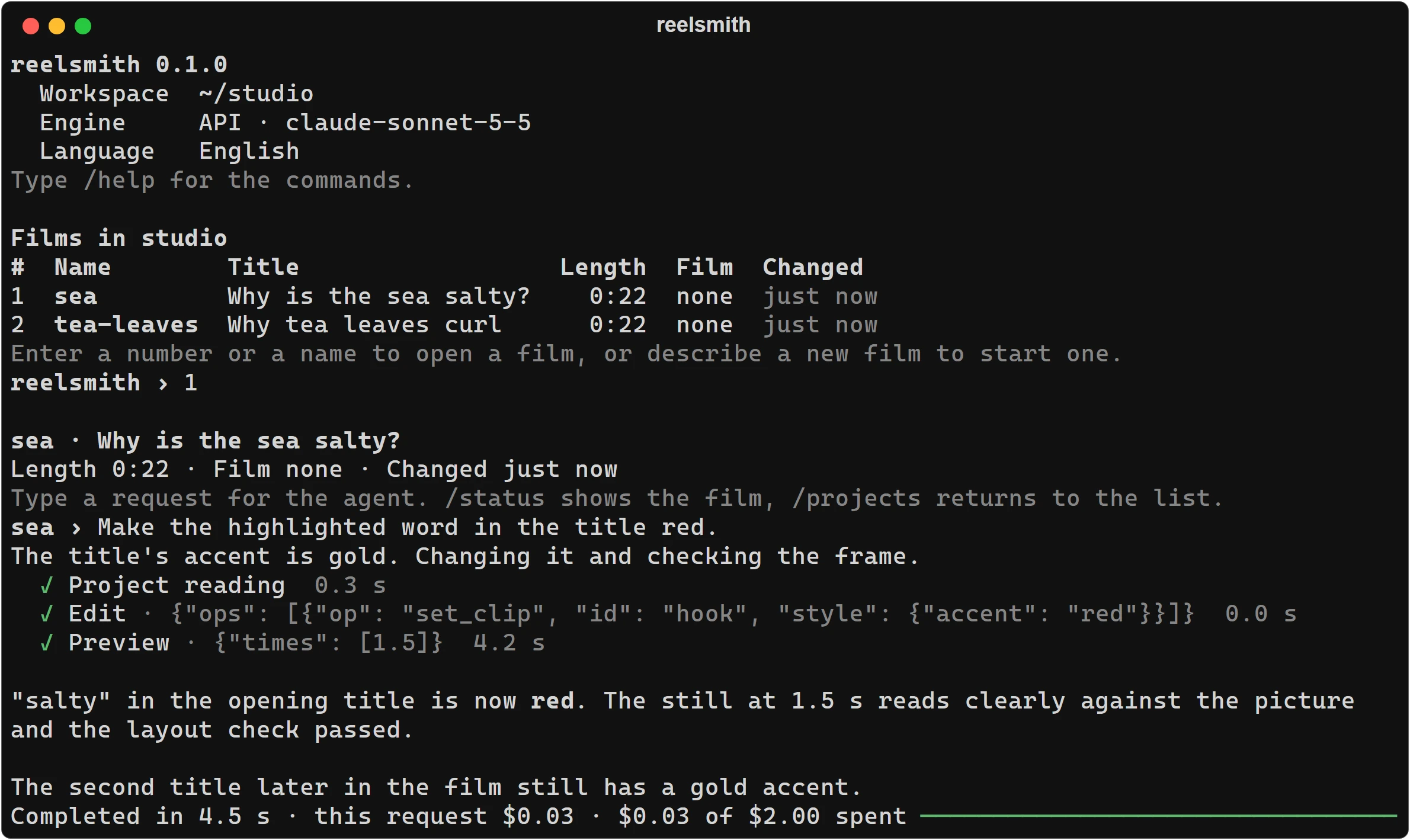
reelsmith chat holds the same conversation in the terminal. See docs/terminal.md.
pip install -e ".[app]"          # the desktop window; without it, a browser tab
reelsmith # in a workspace, or in an empty folder to create oneRequirements: Python 3.10+, Node.js 20+ and ffmpeg on PATH.
git clone https://github.com/wangkant/reelsmith && cd reelsmith
python -m venv .venv && source .venv/bin/activate     # Windows: .venv\Scripts\Activate.ps1
pip install -e ".[capture,web]"
cd renderer && npm ci && cd ..
reelsmith doctor                 # verifies the machine and reports what each optional tool needs
Attach reelsmith to a coding agent, in the folder where the agent runs:
reelsmith setup claude-code # or: codex, dsh, cursor, generic (--print shows what it would write)reelsmith reads its manual and renderer from the checkout, so the editable install must be kept. Example requests: "Cut ~/videos/talk.mp4 to its best 90 seconds, remove the pauses, add English captions and a title card." or "Make a 60-second vertical explainer on why tea leaves curl."
Paste the following into Claude Code, Codex, Cursor or another coding agent:
Read https://raw.githubusercontent.com/wangkant/reelsmith/main/docs/setup-for-agents.md and set up reelsmith for me.The agent asks where to install and before installing any system tool, verifies the machine with reelsmith doctor,
attaches itself with reelsmith setup <agent> and renders a test film without a paid call.
| Area | What the agent can do |
|---|---|
| Timeline | Visual, audio and caption tracks; image, video, text, shape, evidence and component clips; keyframes, transitions, filters and blend modes. Edits are atomic batches, validated and undoable. |
| Footage | Probe recordings, find cuts and silences, obtain word-level transcripts; ripple edits, reframing for a vertical canvas, speed curves, freeze frames, reverse, ducking under the voice. |
| Captions and chapters | Captions from narration or a transcript, by phrase or by word, burned in and delivered as .srt and .vtt; chapters from markers. |
| Timing | Times anchor on narration lines, clips, markers or source seconds ("line:5+0.3", "clip:c2.end-0.5"), so a re-recorded line or a recut clip moves the edit with it. |
| Inspection | describe prints the timeline as text; preview renders stills with measured layout problems; a draft render shows a stretch as video; review shows the delivered film frame by frame. |
| Assets | Narration (text-to-speech, cached per line), generated pictures, web-page evidence with the proving sentence boxed, image-to-video clips, imports of local or downloaded media; a workspace stock of poses, sets and props drawn once in one look and reused by every film. |
| Canvas and language | landscape, vertical, square, portrait, platform profiles and custom sizes and frame rates; a locale sets caption phrasing, component wording and capture language. |
| Platform playbooks | Each platform profile (YouTube and Shorts, Douyin, TikTok, Instagram Reels, Bilibili, Xiaohongshu, WeChat Channels) carries a sourced playbook that the agent reads with the manual. |
| Delivery checks | Text outside the safe area, cut, too small, overlapping or low in contrast; loudness; black or frozen stretches; length, size and workspace rules. A refused render names the clips and times to fix. |
| Spend control | Paid calls pass through a ledger with a per-project budget and an account balance floor. |
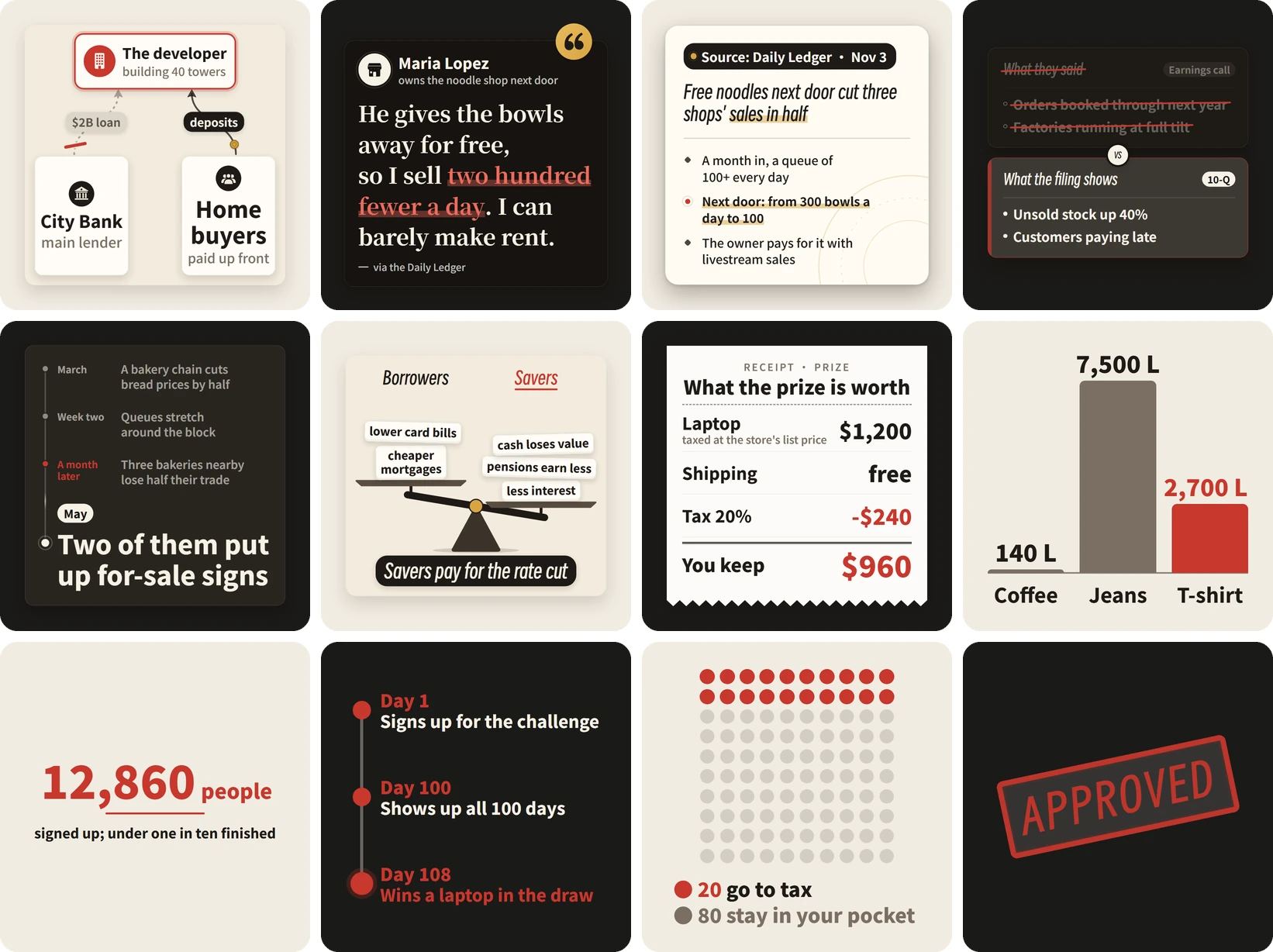
Fifteen React components are built in; twelve are shown above. Each lands its parts at the times the agent gives
and sizes itself to its box on any canvas. The agent can also write its own: a component is a .tsx file and a
JSON schema in the workspace library, built on a documented kit (docs/kit.md), type-checked and
import-guarded. It can equip itself further: add_package brings npm libraries into the workspace for its
components, and run_script runs a Node script of its own under Node's permission model to make textures, paths or
baked data (Bring your own tools).
For films made entirely in code, the kit's stage acts each narration line out in drawn-pose animation: a character drawn in key poses, with a closed-mouth twin and a blink for each, anticipates, snaps to the next pose and settles, its mouth moving with the voice, on a set drawn in the same style, with hard cuts on the words it plays under (docs/kit.md). Sets, paper, ink and drawn objects are built in; examples/performance is a film made with them.
| Agent | Setup |
|---|---|
| Claude Code | reelsmith setup claude-code, or the plugin: /plugin marketplace add wangkant/reelsmith, then /plugin install reelsmith@reelsmith |
| Codex | reelsmith setup codex |
| DeepSeek Harness | the plugin in integrations/dsh, or reelsmith setup dsh |
| Cursor | reelsmith setup cursor |
| Any MCP client | reelsmith setup generic, or reelsmith mcp (stdio) and reelsmith mcp --http |
| No client | reelsmith run <project> --brief "...": a headless run over any OpenAI-compatible API, Codex, DeepSeek Harness or the Claude Agent SDK (--engine) |
Every agent receives the same tools and the reelsmith skill (skills/reelsmith/SKILL.md). See docs/agents.md.
A workspace is a folder for one creator or channel. Its projects share settings, rules, keys, a component library and the agent's notes:
studio/
  workspace.json    profile, locale, theme, providers, budget, runner defaults (all optional)
  rules.json        hard rules (block delivery) and advice (information only)
  .env              provider keys; never shown to the agent
  library/          NOTES.md, the agent's components/, fonts/
  projects/<film>/  project.json, assets/, voice/, build/ (previews), out/ (film, subtitles, chapters, covers)
examples/workspace is a starter, and examples holds the project of the film
shown above. Every agent tool is also a command (reelsmith --help).
Editing, previews, checks and rendering run locally at no cost. The following tools require more:
| Tool | Requirement |
|---|---|
capture (web-page evidence) |
the capture extra and Edge, Chrome or python -m playwright install chromium |
draw (pictures) |
the Codex CLI, signed in |
speak (narration) |
an OpenRouter key (English is read by an ElevenLabs voice, Chinese by a Qwen voice), or any OpenAI-compatible speech endpoint |
animate (image-to-video) |
an OpenRouter key |
transcribe |
any OpenAI-compatible transcription endpoint, or the transcribe extra (faster-whisper, local) |
reelsmith run |
a model API key, or Codex or DeepSeek Harness installed; the runner extra for the Claude Agent SDK |
Paid calls are estimated first and refused above budget.per_project_usd (default $1) or below the account floor
budget.min_balance_usd (default $5). The film shown above cost about $0.55.
manual tool.@reelsmith/kit, for writing components.pip install -e ".[dev]" && pytest
cd renderer && npm run typecheck && node test/selftest.mjs && node test/stage.test.mjs && cd ..
cd integrations/dsh && npm ci && npm test && cd ../..
python integrations/sync_skills.py --check # the plugin's copy of the skillreelsmith is open source under the Apache License 2.0: it may be used, modified and shared, for commercial purposes too. Releases published before 10 November 2026 were made under the MIT license, and those from then until 18 November 2026 under the PolyForm Noncommercial License 1.0.0.
The renderer depends on Remotion, which has its own license: free for individuals and small teams, with a company license required for larger organisations (https://www.remotion.dev/license). The bundled Smiley Sans font is under the SIL Open Font License (renderer/src/fonts/SmileySans-OFL.txt).
CLASSIFICATION EVIDENCE
系统优先读取 GitHub Topics,再与站内分类词典和词根规则比对。当前命中: mcp、mcp-server、deepseek-harness。
morluto
Reverse engineer anything with agents, from app behavior down to native binaries.

deepseek-ai
DeepSeek Harness: Everything is a Plugin.

nexu-io
The 1st Collaborative AI Design Agent Workspace. Local-first and open source. Create motion, prototypes, websites, apps, dashboards, presentations, images, and videos with your team and AI agents. Share work, exchange feedback, and iterate together in one workspace.