
模型与 MCP
待识别

rea
morluto
Reverse engineer anything with agents, from app behavior down to native binaries.
PROJECT TOPICS
INSTALL REFERENCE
dsh plugin --profile web add github:wangjiaxi/dsh-scheduled-send
该命令指向仓库当前默认分支;尚无绑定当前 commit 的完整验证结果。
PROJECT README
在 DSH 的输入框里,把一条消息排到将来的某个时刻。
它不改发送按钮的功能,只把发送按钮本身做成飞书那种带箭头的分体按钮:宿主那颗蓝色发送圆钮的左边,接上一个同色的 ▾ 半段,两者拼成一颗胶囊——
┌───────────┬─────┐
│     ▾     │  ▷  │   ← 一个控件:左半边开「定时消息」,右半边照常发送
└───────────┴─────┘定时发送;顺手给了 10 分钟后 / 30 分钟后 / 1 小时后 / 明天 9:00 四个预设
输入框右下角:蓝色的 ▾ 和发送键拼成一颗胶囊,左边照常是模型选择器。
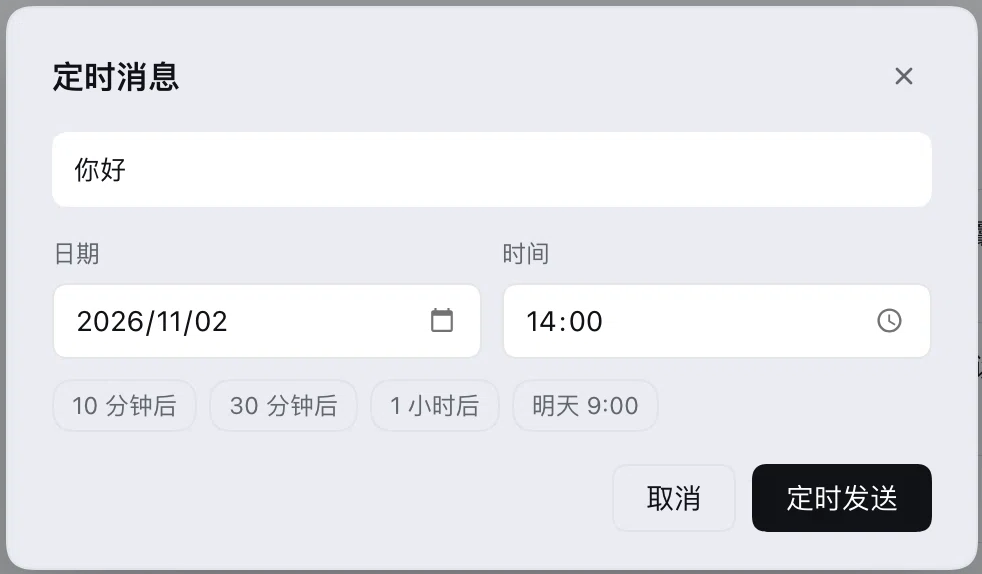
点 ▾ 打开:正文预览、日期、时间、四个预设,底部「取消 / 定时发送」。
# 从 GitHub
dsh plugin --profile web add github:wangjiaxi/dsh-scheduled-send

# 从本地目录(开发时用,link 方式,改文件即时生效)
dsh plugin --profile web add /path/to/dsh-scheduled-send

# 从 npm(发布之后)
dsh plugin --profile web add dsh-scheduled-send@latest
装完刷新页面,发送按钮就变成那颗分体胶囊了。
包声明了
dsh.bundle.patch,dsh plugin add会自动把它写进dsh.profile.bundles,不用手改cordis.patch.yml。
输入框工具栏里没有「发送按钮之后」的插槽,conversation.input.right 渲染在 .standardControls 里、模型选择器之前。所以 ▾ 半段的定位是三步 CSS:
order: 999 —— 在自己那个容器里排到最后(模型选择器之后);position: relative; right: -24px —— 平移出去吃掉中间的空隙。这个数是从渲染结果量出来的:.trailing 的 12px 间距 + 中间那个 0 宽空槽又贡献 12px。宁可多移,因为多出来的部分会钻到发送按钮底下被盖住,而少移就会留缝;[data-composer-card] button[class*="_primary"]{border-radius:0 999px 999px 0}),两半就合上了;同一个选择器把里面的上箭头 rotate(90deg) 变成朝右,另一条规则在它的左缘上画那道竖分隔线(位置永远正好在接缝处)。这三条都是纯外观、可失败的:任何一条在 DSH 升级后匹配不到,功能都还在,只是胶囊接缝处多两个直角、或者箭头仍然朝上。匹配的锚点是 [data-composer-card](宿主自己的稳定标记)+ _primary 类名后缀(CSS Modules 命名),不是哈希全名。
定时发送 → 输入框清空,▾ 上出现一个小白点到点之后,宿主把这条消息作为用户消息投进会话;会话空闲就立刻开始这一轮,正忙就排在下一条。
DSH 自带的 schedule_* 是给模型的提醒:到点投递的是一段 [SCHEDULE REMINDER] 提醒帧,会话里显示成「自动化任务」,模型看到的是「有条提醒」而不是「用户说了句话」。
本插件投的是用户自己的消息:source.kind === 'user',走的是输入框回车那条宿主路径(ctx.sessionController.prompt),所以会话日志、界面、上下文里看到的都是一条普通的用户发言。
两者不冲突:需要「提醒模型」用 schedule_create,需要「替我把这句话在 9 点发出去」用这个箭头。
┌──────────── 浏览器 ────────────┐        ┌──────────── 宿主 ────────────┐
│ 箭头 → 对话框                  │        │ 每秒扫一次队列               │
│  POST /create {sessionId,      │  ───▶  │ 到点 → sessionController     │
│    text, dueAt, timeZone}      │        │        .prompt({mode:'queue'})│
│  列表 / 撤销                   │  ◀───  │ 队列存 tasks.json            │
└────────────────────────────────┘ └──────────────────────────────┘$DSH_HOME/storages/dsh-scheduled-send/tasks.json(写临时文件再 rename),插件 HMR、宿主重启后按绝对时间重建ctx.sessionController.prompt({ mode: 'queue' }) —— 会自动恢复冷会话、做附件与模型能力校验、把消息写进会话日志clientTimeZone 带给宿主,因此换时区不会把已排的条目挪位前缀 /dsh-scheduled-send/api(同源、走浏览器的登录 cookie),脚本和自测都能直接用:
| 方法 | 路径 | 请求 | 返回 |
|---|---|---|---|
| GET | /info |
— | { ok, name, version, queued } |
| POST | /list |
{ sessionId } |
{ ok, items } |
| POST | /create |
{ sessionId, text, dueAt, timeZone? } |
{ ok, item } |
| POST | /cancel |
{ id } |
{ ok, removed } |
| POST | /fire |
{ id } |
{ ok } — 立刻投递,自测 / 补发用 |
dueAt 是 epoch 毫秒,必须晚于现在、且在一年以内;timeZone 省略也可以。
窄屏(≤767px)或检测到 dsh-web-mobile 的环占位时,不拼胶囊,退回成发送键左边的一个 28px 图标按钮——因为移动端插件会把工具栏间距压到 3px,还会在发送键左边插一个 18px 的隐藏占位(把上下文环搬过去),这时候再往右贴 24px 既贴不严、又会压住那个环。
对话框在 ≤560px 时改成从底部升起的抽屉:占满宽度、圆角只留上面两个、按钮加高到 40px、输入框字号 16px(低于 16px 时 iOS 一聚焦就会把整页放大)。≤400px 时日期与时间改成上下排。
webServer 与 sessionController 两个宿主服务(Web / 桌面版的标配)dsh web 直接暴露到公网node --check index.js
node --check client.js
node scripts/validate.mjs # 等同于 npm run validatescripts/validate.mjs 检查的是加载器真正会读的东西:manifest、bundle patch、exports、locale 元信息、图标、客户端注册 id。CI 也跑同一套(.github/workflows/validate.yml)。
想不等到点就看投递效果:POST /fire { id }。
MIT
Turns the composer send button into a Feishu-style split control: a same-blue ▾ half joins the left edge of the shipped send button, so one blue capsule offers schedule on the left and send on the right. Pick a date and time, hit Schedule, and the host delivers that message into the conversation at that moment — closing the tab, switching sessions, or restarting the host does not cancel it.
conversation.input.right and is pinned to the send button with three CSS-only tweaks (order, a relative -8px shift, matching border-radius plus a rotate(90deg) on the shipped arrow); each degrades to "still works, slightly off" if a DSH upgrade changes the markupctx.sessionController.prompt({ mode: 'queue' }), so what lands in the session log is an ordinary user message (source.kind === 'user'), not a [SCHEDULE REMINDER] frame$DSH_HOME/storages/dsh-scheduled-send/, rebuilt on load from absolute epoch milliseconds; failures retry every 60 s, five timesdsh plugin --profile web add github:wangjiaxi/dsh-scheduled-sendHTTP surface: GET /dsh-scheduled-send/api/info, POST /{list,create,cancel,fire}.
CLASSIFICATION EVIDENCE
系统优先读取 GitHub Topics,再与站内分类词典和词根规则比对。当前命中: deepseek-harness。
morluto
Reverse engineer anything with agents, from app behavior down to native binaries.

deepseek-ai
DeepSeek Harness: Everything is a Plugin.

nexu-io
The 1st Collaborative AI Design Agent Workspace. Local-first and open source. Create motion, prototypes, websites, apps, dashboards, presentations, images, and videos with your team and AI agents. Share work, exchange feedback, and iterate together in one workspace.