
模型与 MCP
待识别

rea
morluto
Reverse engineer anything with agents, from app behavior down to native binaries.
PROJECT TOPICS
INSTALL REFERENCE
dsh plugin --profile web add github:wangjiaqizero/dsh-session-hud
该命令指向仓库当前默认分支;尚无绑定当前 commit 的完整验证结果。
PROJECT README
A desktop floating HUD for DeepSeek Harness (DSH).
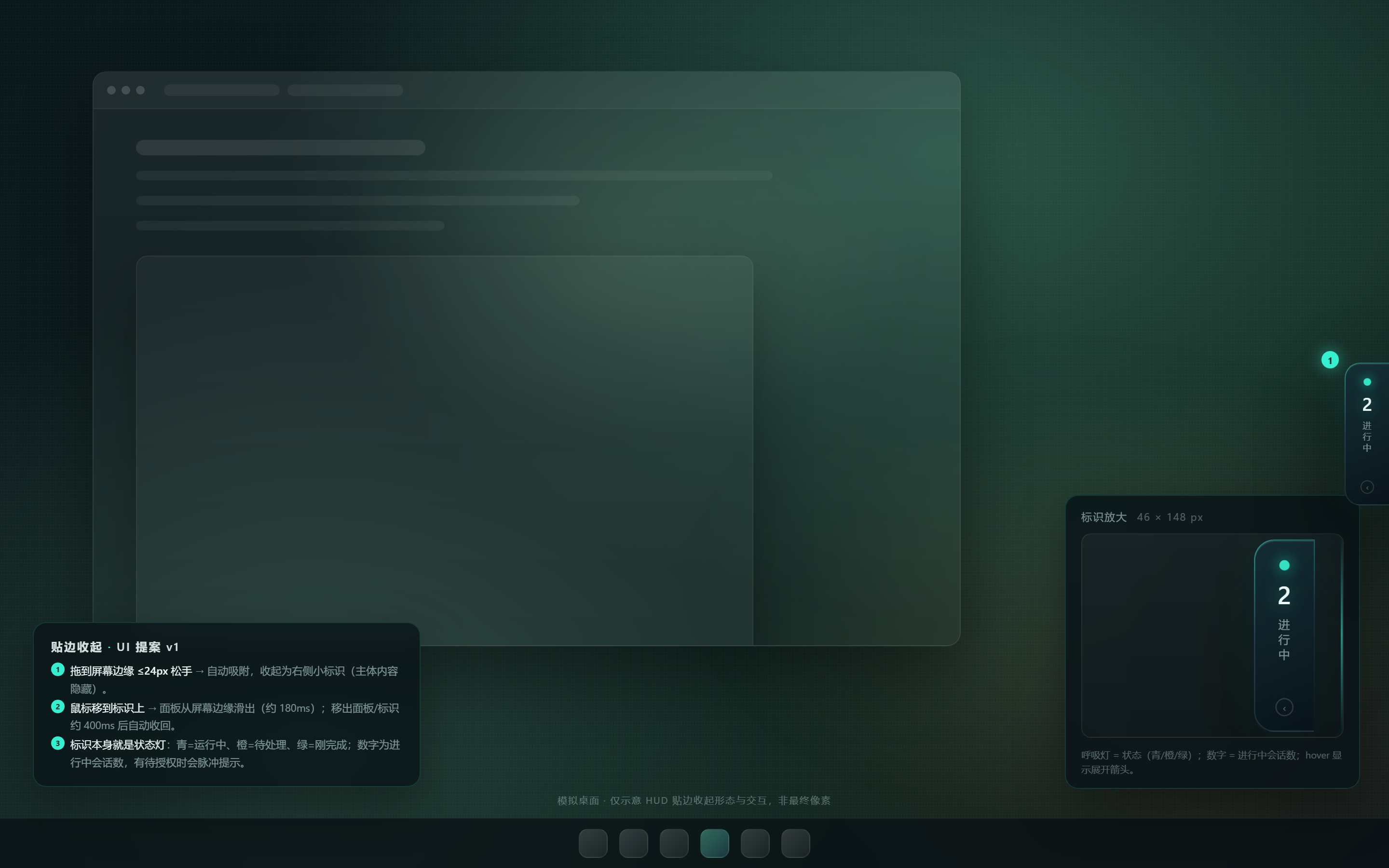
When you minimize DSH, a small glass window stays on top of your desktop and shows the live status of your sessions — which one is running, which one is waiting for your approval, which one just finished. Click a row and DSH comes back to that exact session. Move the window to a screen edge and it collapses into a slim marker that expands on hover, so it never gets in your way.
Windows 10/11 · DSH desktop 0.2.x · first use downloads the Electron runtime once (~110 MB).
dsh web build has no desktop window
to follow).dsh plugin --profile desktop add dsh-session-hudor install it from the DSH Plugins → Discover tab once the plugin is listed.
Then restart DSH. A "mobile window" button appears in the sidebar footer; click it (or minimize DSH) to show the HUD.
The overlay window is a real Electron window, so the first time it is shown the plugin downloads the Electron runtime into:
%USERPROFILE%\.dsh\session-hud\runtime\It tries the npmmirror mirror first and falls back to the official Electron GitHub release. If your network cannot reach either, point the plugin at an existing Electron runtime:
$env:HUD_ELECTRON_PATH = "C:\path\to\electron.exe"(or copy the extracted electron-v44.7.0-win32-x64 folder into the runtime
directory above).
| Action | How |
|---|---|
| Show / hide | Sidebar footer button, or let it follow the DSH window |
| Open a session | Click a row in the HUD |
| Answer an approval | Click 允许 / 拒绝 on the approval card |
| Edge dock | Drag the window within 24 px of the left/right/top edge |
| Expand docked HUD | Hover the edge marker (or click it) |
| Undock | Drag the expanded panel's title bar back into the screen |
| Follow mode | Footer 「跟随」 chip (on = follow the DSH window) |
| Opacity / always-on-top | Footer controls |
127.0.0.1:41333–41342. Nothing is
sent to the network; there is no telemetry. The only network request is the
one-time Electron runtime download.HUD_DEBUG=1) and are content-free by design: session
identifiers and absolute paths are redacted before anything is written.%USERPROFILE%\.dsh\session-hud\. Delete that folder to reset everything.dsh plugin --profile desktop remove dsh-session-hudThe runtime cache and settings in %USERPROFILE%\.dsh\session-hud\ are kept so that
re-installing does not download the runtime again. Remove that folder manually if you
want to reclaim the space and reset the HUD.
desktop profile,
then restart DSH. While DSH is visible the HUD stays hidden by design — minimize DSH
or click the sidebar button.%USERPROFILE%\.dsh\session-hud\logs\hud-host.log, then either retry
(/hud/restart from the client, or restart DSH) or set HUD_ELECTRON_PATH.%USERPROFILE%\.dsh\session-hud\userdata\overlay-state.json to reset the geometry.npm test # overlay self-tests (Node 20+, no Electron needed)
npm run check # syntax check of every entry pointLayout:
index.js            host half: session collection + local HTTP bridge + overlay supervisor
client.js           DSH client half: sidebar toggle, window-state reporting, open-session
runtime.js          Electron runtime resolver / one-time downloader
overlay/            the Electron window (main, preload, renderer)
launcher/           Electron app entry that loads overlay/
focus-dsh-window.ps1 Win32 helper: restore/foreground the DSH windowMIT. See LICENSE.
CLASSIFICATION EVIDENCE
系统优先读取 GitHub Topics,再与站内分类词典和词根规则比对。当前命中: deepseek-harness。
morluto
Reverse engineer anything with agents, from app behavior down to native binaries.

deepseek-ai
DeepSeek Harness: Everything is a Plugin.

nexu-io
The 1st Collaborative AI Design Agent Workspace. Local-first and open source. Create motion, prototypes, websites, apps, dashboards, presentations, images, and videos with your team and AI agents. Share work, exchange feedback, and iterate together in one workspace.