
模型与 MCP
待识别

rea
morluto
Reverse engineer anything with agents, from app behavior down to native binaries.
PROJECT TOPICS
INSTALL REFERENCE
dsh plugin --profile web add github:vioeveann/dsh-avatar-frame
该命令指向仓库当前默认分支;尚无绑定当前 commit 的完整验证结果。
PROJECT README

DeepSeek Harness 的界面插件:在每轮 AI 回复左侧显示角色头像和可编辑的 ID,并可以把回复朗读出来——用系统语音,或者调用你自备的 TTS 服务(默认本机地址,也支持局域网/远程);也可以在设置里一键启动、停止那个服务进程。
插件不附带任何语音模型、参考音频或服务;音色由你自己运行的服务提供,接口见 docs/tts-contract.md。

形象
朗读

其他
localStorage,不上传、不联网(除非你把服务地址指向远程)。dsh-avatar-frame,从 npm 拉取,最省事)、GitHub 仓库地址(https://github.com/vioeveann/dsh-avatar-frame)或本地目录路径;包名已发布到 npm:dsh-avatar-frame(国内可走 registry.npmmirror.com 镜像)。
装不上怎么办
git,机器连不上 github.com 就会报 ERR_PNPM_GIT_RESOLVE_FAILED。先验证:git ls-remote https://github.com/vioeveann/dsh-avatar-frame;不通就配代理,或在 hosts 里给 github.com 指定一个可用 IP;git 和 npm:直接下载 最新 Release 的源码 zip → 解压 → 添加插件时填解压后的本地目录(也可以走 Code → Download ZIP);npm config get registry 确认走的是官方源。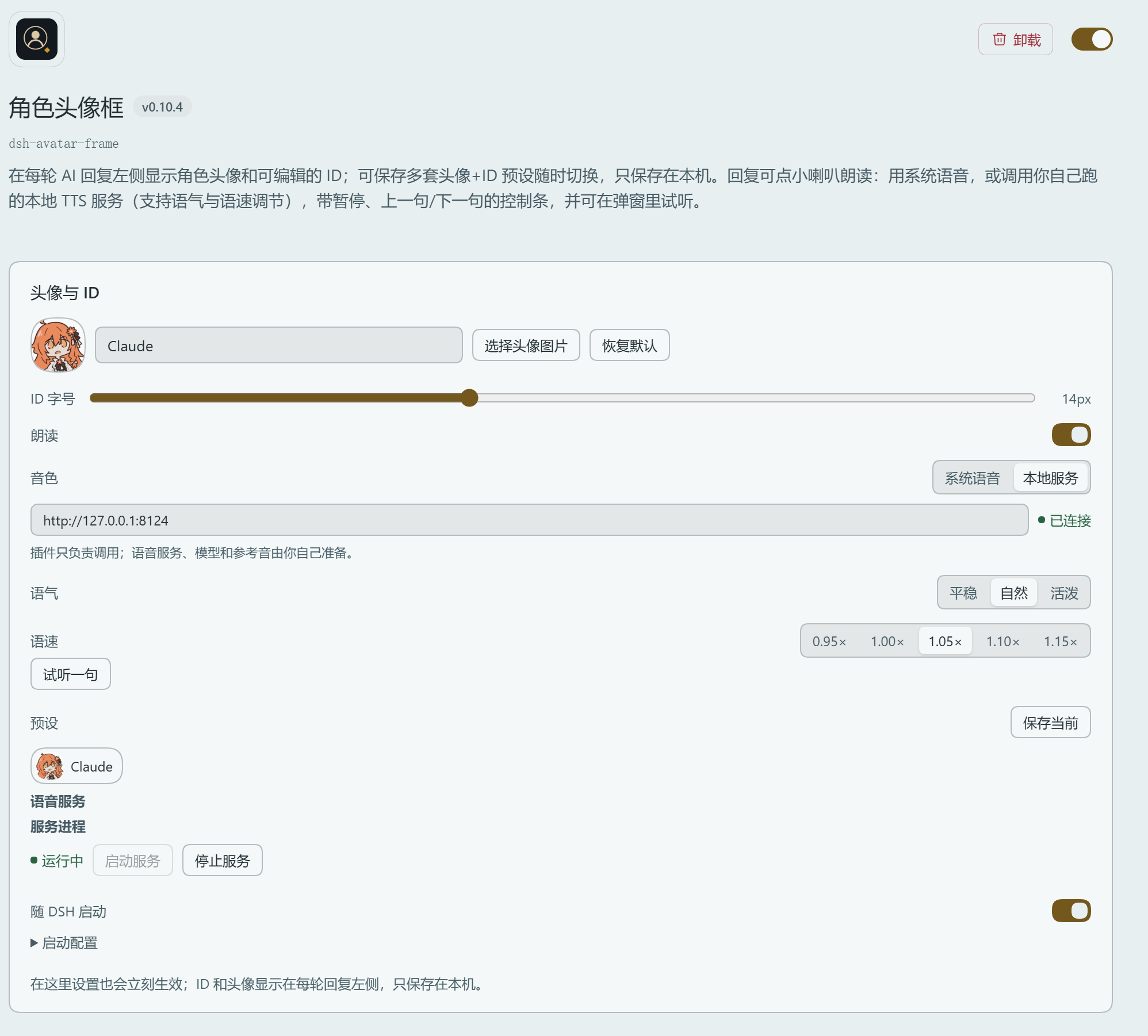
插件本身不下载模型、不附带参考音频、不启动任何服务。它只做两件事:用系统语音读,或者调用你给的 HTTP 服务。
默认地址 http://127.0.0.1:8123,可在面板、插件详情页或设置页修改,旁边会显示「已连接 / 未连接」的实时状态。服务不可用时会自动退回系统语音;状态点在离线时每 2.5 秒重试一次,连上后每 30 秒静默保活一次,中途挂掉也会自己变红。
「系统语音」用的是浏览器能看到的系统音色,列表由系统和你用的客户端决定:
Natural 的项;如果下拉框里只有老音色,说明系统里没有、或者当前客户端拿不到——这时候更实际的办法是用「自备语音服务」:要么跑下面那个示例(微软在线音色),要么接你自己训练的模型。
先用一个示例跑通:仓库里带了一个最小实现,用微软 Edge 的在线语音:
pip install edge-tts
python examples/simple_tts.py          # 监听 127.0.0.1:8123
然后把服务地址填成 http://127.0.0.1:8123,点小喇叭。想要自己的音色,把示例里的 synthesize() 换成你的引擎即可。
一键启动服务(可选):插件的宿主端可以替你启动那个进程,入口两处——设置 → 角色头像 → 语音服务,以及插件详情页的同名区块。
KEY=VALUE)。启动命令 "F:\tts\python.exe" server.py
工作目录 F:\tts
环境变量 HF_HOME=F:\tts\hf-cache想直接用仓库里的示例服务试这个功能:启动命令 = python examples/simple_tts.py,工作目录 = 本仓库所在目录。
几点要说清楚:
接口契约:完整说明见 docs/tts-contract.md。
GET  /health
  -> 200 {"ok": true, "model": "任意字符串"}

POST /tts
  {"text": 要读的文本, "speed": 1.05, "tone": "normal"}
  -> 200,Content-Type 为音频(audio/wav、audio/mpeg 均可)
需要允许 CORS(Access-Control-Allow-Origin: * 并响应 OPTIONS 预检)。tone 是建议值,不认识就忽略;speed 范围 0.7–1.3。
试听没声音时:插件会先直连你填的地址,1.5 秒内没有响应就自动改由 DSH 宿主进程转发(日志在 ~/.dsh/storages/dsh-avatar-frame/debug.log)。设置页的试听按钮旁会显示「试听中 n/m」或失败原因。
启动失败时先看这一条:设置页「启动配置」下面会显示进程退出前的输出。如果看到
PermissionError: [WinError 10013] 以一种访问权限不允许的方式做了一个访问套接字的尝试说明端口被 Windows 的保留端口段占住了(Hyper-V / WinNAT 会在重启后划走若干段,用 netsh interface ipv4 show excludedportrange protocol=tcp 查看)。换一个不在保留段里的端口(例如 18124),服务端和插件地址一起改即可。
入口:设置 → 角色头像。所有设置都存在本机浏览器的 localStorage:
| 键 | 内容 |
|---|---|
dsh-avatar-frame/image/v1 |
头像图片(data URL) |
dsh-avatar-frame/id/v1 |
ID 文本 |
dsh-avatar-frame/size/v1 |
ID 字号 |
dsh-avatar-frame/presets/v1 |
预设列表 |
dsh-avatar-frame/speech/v1 |
朗读开关 |
dsh-avatar-frame/engine/v1 |
引擎(system / clone) |
dsh-avatar-frame/endpoint/v1 |
服务地址 |
dsh-avatar-frame/rate/v1 / tone/v1 |
语速 / 语气 |
dsh-avatar-frame/lang/v1 |
界面语言(zh / en,不写则跟随 DSH) |
同一个浏览器的多个窗口之间会同步。换电脑、清缓存会丢,插件没有云同步。
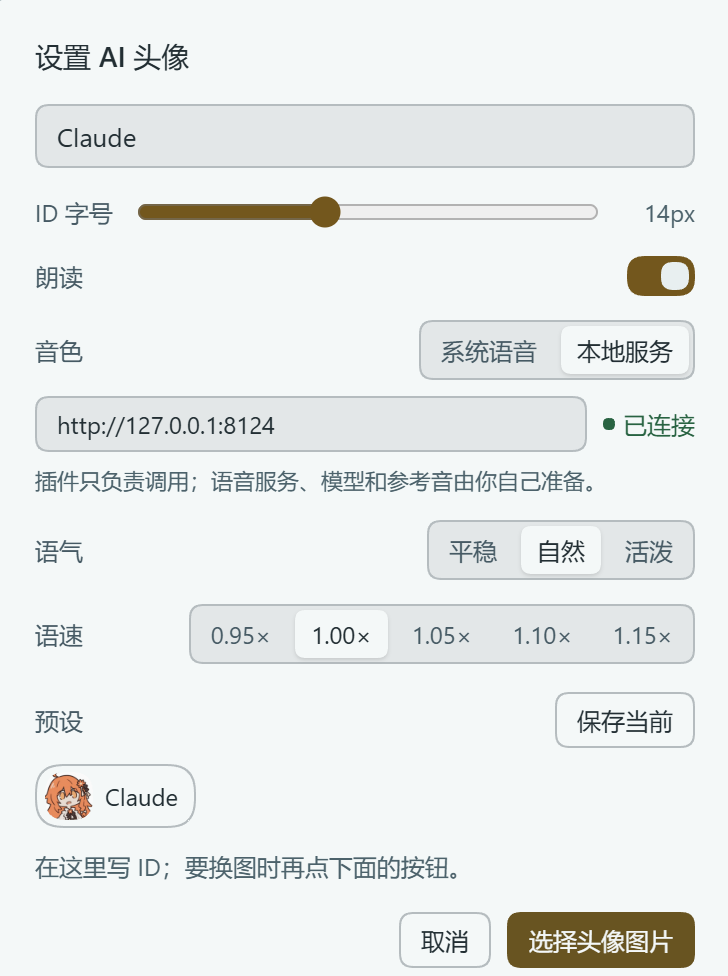
设置页(设置 → 角色头像)和插件详情页是同一套设置,界面见上面的「插件详情页」;点头像的弹窗则是最常用的那几项。
localStorage。~/.dsh/storages/dsh-avatar-frame/(配置 + 最多 300 行日志);在系统临时目录写一个启动脚本,服务停止时删除。/dsh-avatar-frame/service 只接受本机同源请求和桌面版 DSH 自己的页面(dsh-app://app);跨站请求、text/plain 形式的请求都会被拒绝。127.0.0.1 / localhost / ::1)。要连局域网或远程服务,必须在语音服务设置里显式打开「允许远程语音服务地址」,否则宿主代理拒绝转发。~/.dsh/storages/dsh-avatar-frame/ 里的配置和日志;想清干净就手动删这个目录。turn-process 的其他插件会冲突;.
├── package.json # bundle 元信息与前端入口声明
├── cordis.patch.yml # 插件装配
├── index.js # 宿主端:语音服务的启动/停止与配置(同源路由)
├── client.js # 前端:界面、播放、设置页(单文件、无构建)
├── locale/ # zh / en 文案与插件描述
├── icon.svg
├── README.md
├── CHANGELOG.md
├── LICENSE
├── docs/ # 接口契约、截图、发布步骤
└── examples/simple_tts.pyclient.js 无构建、无依赖(React 由宿主提供),改完刷新即可;index.js 只在 DSH 启动时加载。发布流程见 docs/releasing.md。
代码以 MIT 发布。插件不包含任何语音模型、参考音频或音色文件;你用到的模型、参考音频、第三方语音服务的许可与版权需自行确认,请勿把他人声音素材随本插件分发。
An avatar frame and read-aloud plugin for DeepSeek Harness: a character portrait and an editable ID beside every assistant reply, with read-aloud through the system voice or your own TTS service (local by default, LAN/remote optional) — the plugin can also start and stop that process for you.
It ships no voice model, no reference audio and no service. Your voice comes from a service you run; the contract is in docs/tts-contract.md.
The frame
Read aloud
The rest
localStorage; nothing is uploaded unless you point the endpoint at a remote host.dsh-avatar-frame), its GitHub URL (https://github.com/vioeveann/dsh-avatar-frame), or a local directory path;The package is published on npm as dsh-avatar-frame — installing by that name is the simplest route.
If installation fails
git; if your machine can't reach github.com it fails with ERR_PNPM_GIT_RESOLVE_FAILED. Check with git ls-remote https://github.com/vioeveann/dsh-avatar-frame, then use a proxy or point github.com at a reachable IP in your hosts file;git and npm entirely: download the source zip from the latest release, unzip it, and point "Add plugin" at the unzipped local directory (the Code → Download ZIP route works too);npm config get registry — it must be the official registry.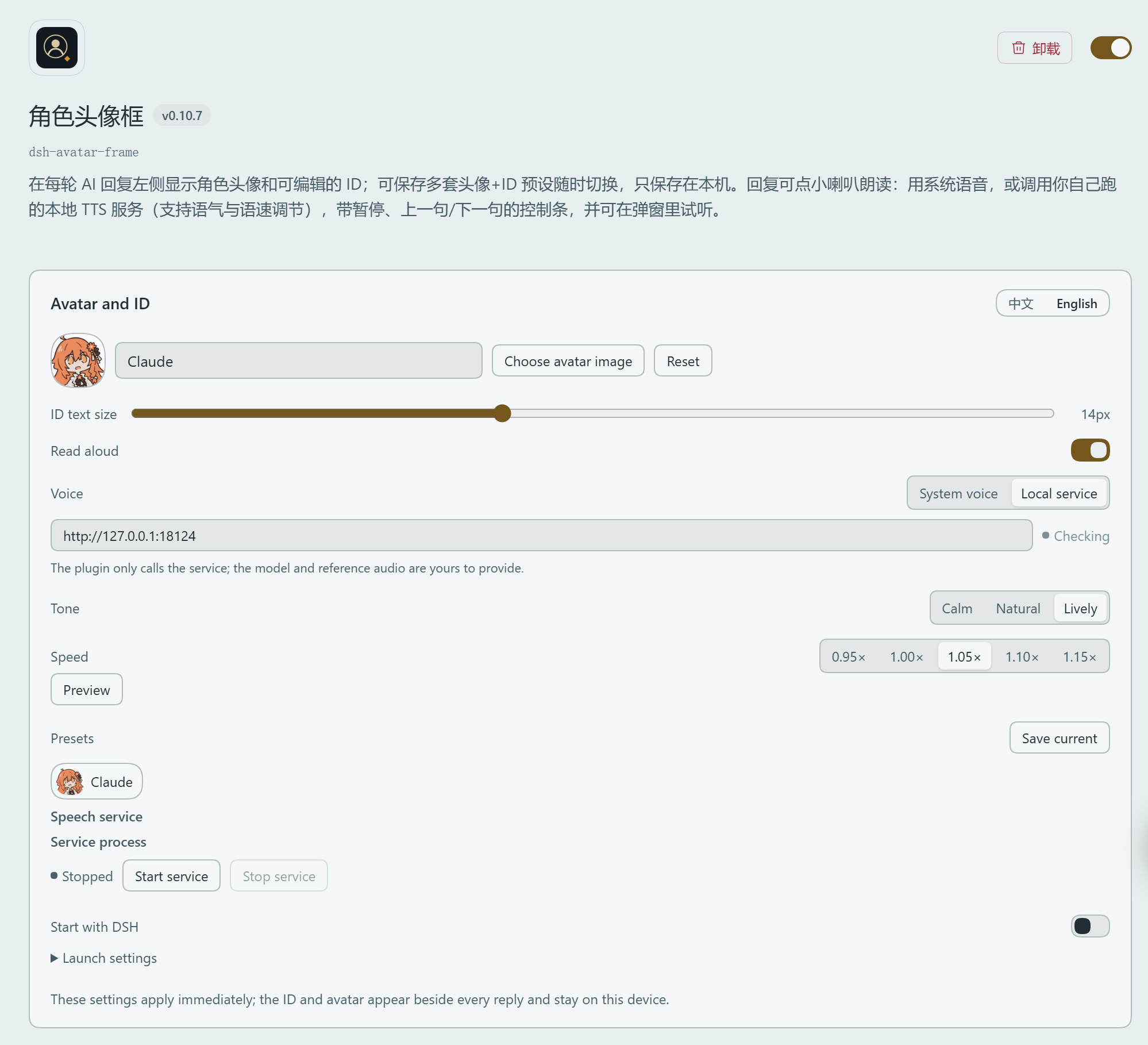
The plugin never downloads a model or bundles a voice. It either uses the system voice or calls an HTTP service you provide. The default address is http://127.0.0.1:8123 and can be changed in the panel, the plugin page or the settings page; a status dot shows connected / not connected and retries every 2.5 seconds, so start the service and watch it turn green — no refresh needed.
The System voice option lists the voices your system exposes to the browser:
Natural;If only legacy voices show up, the more practical route is a custom speech service: run the example below (Microsoft online voices) or point the plugin at your own model.
Try it with the bundled example (Microsoft Edge online voices):
pip install edge-tts
python examples/simple_tts.py          # listens on 127.0.0.1:8123
Point the plugin at http://127.0.0.1:8123 and click the speaker. To use your own voice, replace synthesize() in that file with your engine.
One-click service start (optional). The host half can launch the process for you; the same block exists in Settings → Character avatar → Speech service and on the plugin page:
KEY=VALUE environment lines.The command is yours: the plugin does not ship a service, it only executes and supervises that child process. Its lifetime follows DSH, and if something is already listening the plugin says so instead of starting a second copy.
Contract: GET /health → {"ok": true, "model": "..."}; POST /tts with {"text", "speed", "tone"} → audio (audio/wav or audio/mpeg). CORS with an OPTIONS preflight is required. Full details: docs/tts-contract.md.
Settings → Character avatar. Every key lives in this browser's localStorage: image, id, size, presets, speech, engine, endpoint, rate, tone, lang — all under the dsh-avatar-frame/…/v1 prefix. Windows of the same browser stay in sync; clearing site data resets it, and there is no cloud sync.
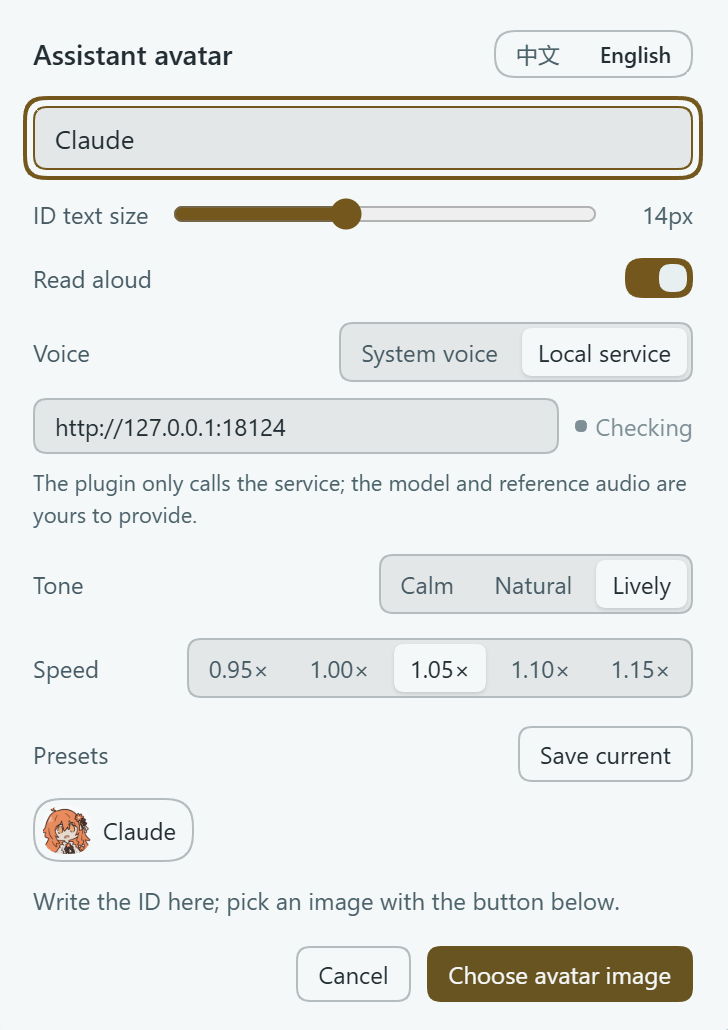
The settings page (Settings → Character avatar) and the plugin page edit the same settings — see the plugin page screenshot above; the avatar popup exposes the most-used few.
localStorage.~/.dsh/storages/dsh-avatar-frame/ (config plus a log capped at 300 lines); write one launch script into the system temp directory and remove it when the service stops./dsh-avatar-frame/service only accepts same-origin requests from this machine and the desktop app's own page (dsh-app://app); cross-site requests and text/plain requests are rejected.127.0.0.1 / localhost / ::1). LAN or remote services require explicitly enabling "allow a remote speech service"; otherwise the host proxy refuses to forward.~/.dsh/storages/dsh-avatar-frame/; delete that folder if you want it gone.turn-process;MIT. The repository contains no voice model, reference audio or voice data; licenses for the models, audio and services you use are your responsibility.
CLASSIFICATION EVIDENCE
系统优先读取 GitHub Topics,再与站内分类词典和词根规则比对。当前命中: deepseek、deepseek-harness。
morluto
Reverse engineer anything with agents, from app behavior down to native binaries.

deepseek-ai
DeepSeek Harness: Everything is a Plugin.

nexu-io
The 1st Collaborative AI Design Agent Workspace. Local-first and open source. Create motion, prototypes, websites, apps, dashboards, presentations, images, and videos with your team and AI agents. Share work, exchange feedback, and iterate together in one workspace.