dsh-trace
See what happened inside a DSH conversation.
中文 · npm · Usage guide · Report a bug
A community plugin for DeepSeek Harness. Follow model and tool calls on one timeline, inspect their input and output, and manage optional local Trace recording from Settings.
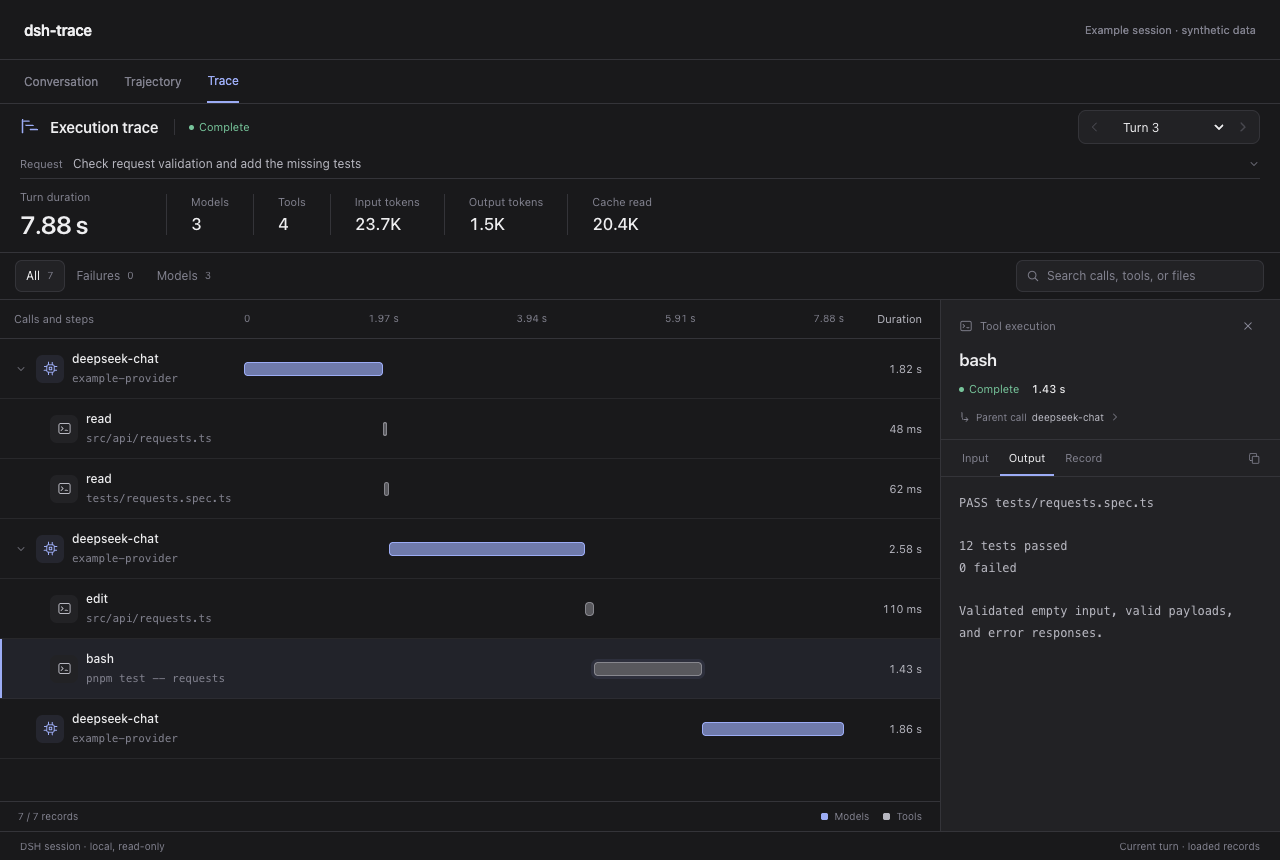
The real Trace components, shown with synthetic example data. Timings and counts are illustrative.
Install
In DSH Desktop → Plugins → Add plugin, enter:
@vibeinging/dsh-trace-viewer
Install and enable it. Open any conversation and select the Trace tab. No source checkout or build is needed.
For a DSH Web profile:
dsh plugin --profile web add -w @vibeinging/dsh-trace-viewer
dsh --profile web
Compatibility: tested with DSH SDK 0.2.1-rc.2, Cordis 4.0.5 and the host's React 18.3.1. Keep the official Trajectory provider enabled. Other DSH versions need verification. If a new Host component stays unavailable, quit DSH normally and reopen it. Close Desktop before managing its profile with the CLI.
Find the part that matters
| You want to… |
Use… |
| Find where a turn spent its time |
A shared model/tool waterfall with recorded durations |
| Understand a tool call |
Its input, output, error and declared parent call |
| Compare a turn's recorded usage |
Input/output tokens and cache reads; missing values stay unavailable |
| Find a failed step |
Search and failure filters that preserve parent context |
| Follow an active or long conversation |
Live updates, turn selection and earlier-history loading |
| Read without the composer taking space |
Focus view; drafts are preserved and pending approvals remain accessible |
The viewer reads DSH's existing session data. You can use it immediately, with extra recording left off. It follows the host's theme and Chinese/English language setting.
Control your Trace data
Open Settings → Trace data. The sidebar shortcut is hidden by default; you can enable it there.
- Recording defaults to off. Enabling it records future committed events across the current Host's sessions; it does not backfill history.
- Choose model calls, tools, failures/interruption and compaction separately. Model response text and tool arguments/results are separate, opt-in switches.
- Copies stay under the profile's
data/dsh-trace-viewer/. Default retention is 30 days, checked every 24 hours while the Host runs.
- Preview manual cleanup before confirming it. Cleanup skips active or changed segments and only removes this plugin's copies, preserving original DSH sessions.
Content may contain user input or file contents. Content switches affect future writes and are not general redaction rules. Previously recorded content remains until cleaned up. Full settings and data semantics →
Update or remove
Use the same DSH plugin page or profile used for installation:
dsh plugin --profile web add -w @vibeinging/dsh-trace-viewer@latest
dsh plugin --profile web remove -w @vibeinging/dsh-trace-viewer
Removing the plugin does not erase its saved copies. To switch from an earlier local development install, replace its link: dependency with the npm package in the same profile; keep only one copy of this package enabled.
Scope
The workbench covers the current conversation. Cross-session search, run comparison, and browsing/exporting recorded copies are not available yet. Child-agent detail depends on what DSH exposes. It does not change model requests or replace the host's telemetry backend.
Develop and contribute
git clone https://github.com/vibeinging/dsh-trace.git
cd dsh-trace
pnpm install --frozen-lockfile --ignore-scripts
pnpm run check
Node.js ^22.19.0 or >=24.0.0; pnpm 11.7.0. Development · Contributing · Changelog · Security
Independent community project, maintained separately from DSH. BSD-3-Clause; bundled TanStack Virtual retains its MIT notice. The old yiTrace exporter is archived and is not required.


