
模型与 MCP
待识别

rea
morluto
Reverse engineer anything with agents, from app behavior down to native binaries.
PROJECT TOPICS
INSTALL REFERENCE
dsh plugin --profile web add github:tzzs/dsh-idle-power
该命令指向仓库当前默认分支;尚无绑定当前 commit 的完整验证结果。
PROJECT README
English · 简体中文
Hibernate or shut down Windows once every task in your DeepSeek Harness Host has finished — with a 60-second countdown that fills the whole window and can be cancelled.
Long agent runs usually end when you have walked away. This plugin lets you say "shut the machine down when everything is actually done", then keeps its promise safe: it waits for all agents, subagents and background jobs in this Host, shows a full-window countdown, and voids itself the moment new work appears.
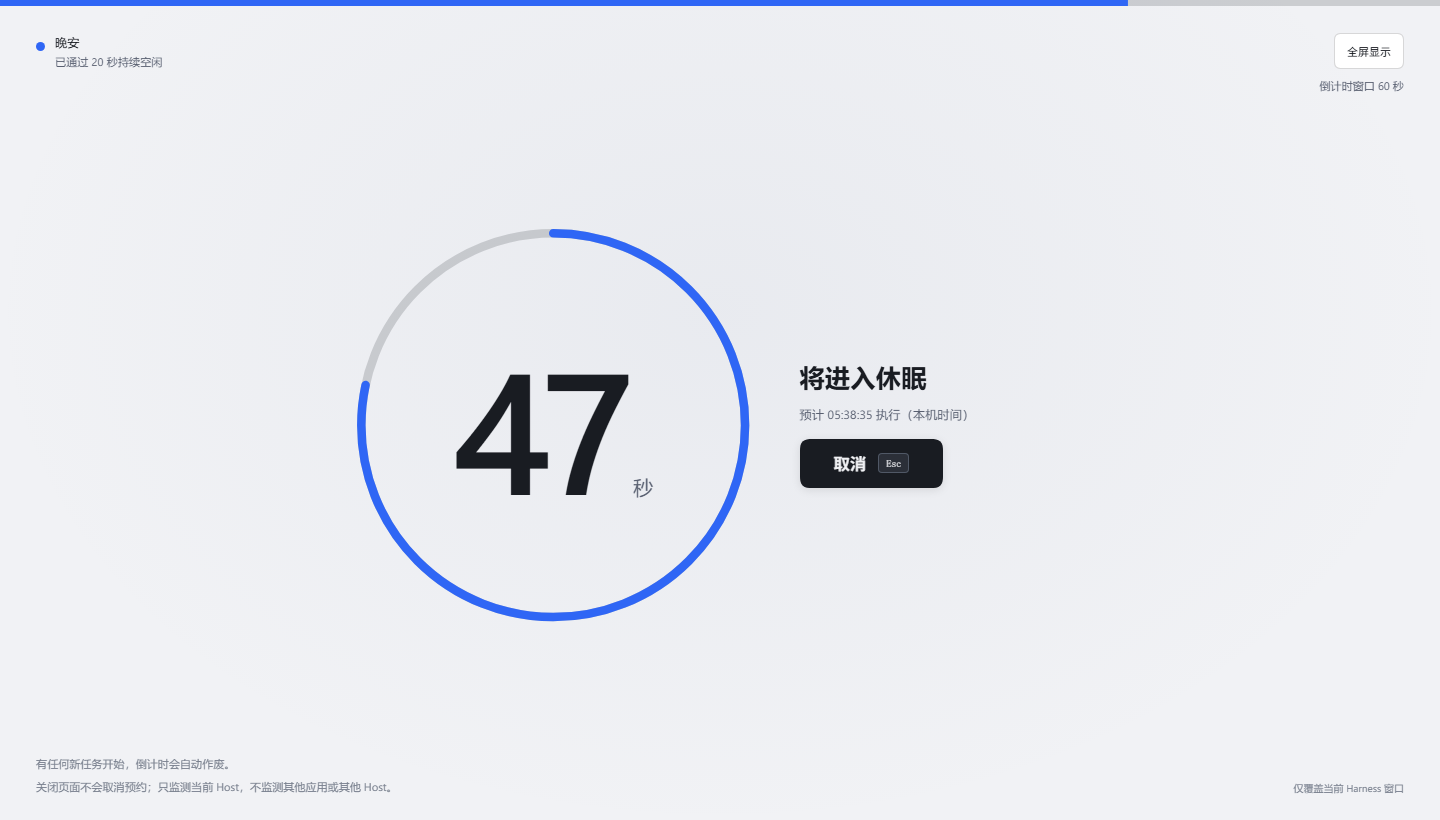
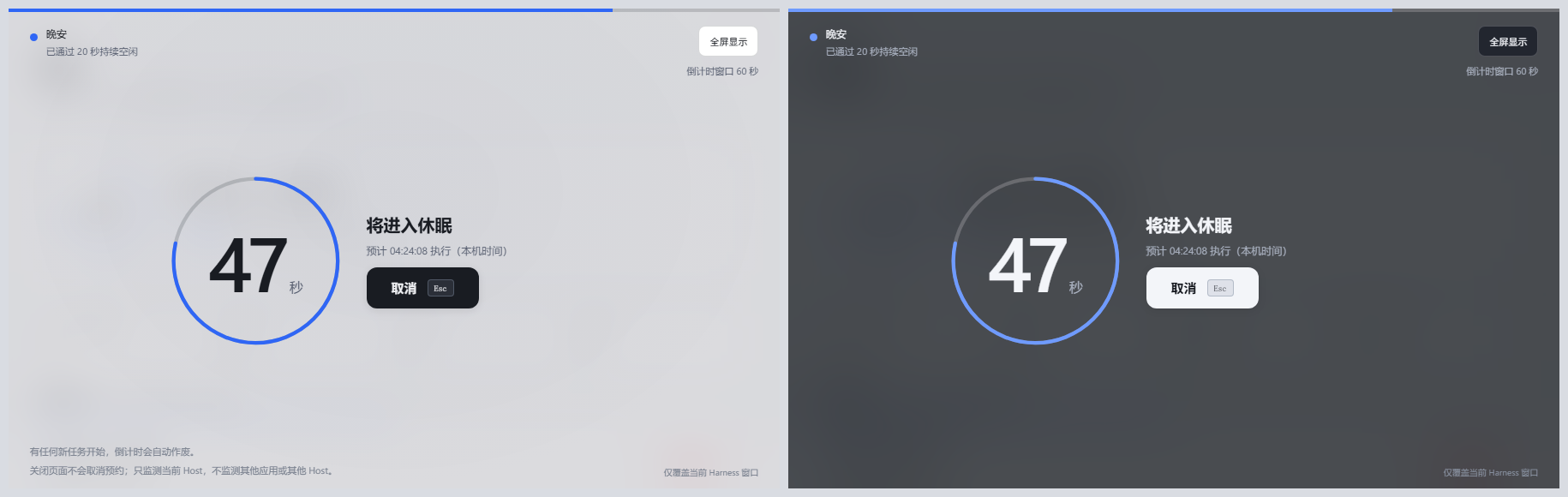
The background is switchable from the panel: solid (default, above), frosted glass, and gaussian blur:
| Choose what happens | While it waits |
|---|---|
 |
The sidebar entry names the live state: Schedule shutdown, Waiting · 3 tasks running, 42s to shutdown. |
Turning off a machine in the middle of an agent run is the interesting problem here, so the plugin is built around not doing that.
It treats the whole Harness as busy if any of these is true:
| Checked | Why |
|---|---|
agent.status === 'running' |
an agent is taking a turn |
agent.inbox.nextTurn / .nextStep non-empty |
work has been queued but not started — the hand-off gap |
a job is running or stopping |
a shell/background job is alive, including ones owned by a session |
| subagents and workflow children | they are ordinary live agents, so one status check covers them |
Then:
Cancel button (Esc works too).409, so the UI can never imply a cancellation that did not happen.The countdown is the only undo you get. shutdown /s /t 0 runs immediately and shutdown /h has no shutdown /a counterpart, so the plugin does not rely on a Windows-provided reversal window — it provides its own.
Arming is always an explicit, human action. There is no model-facing tool, so the assistant can never decide to power off your machine.
| Mode | Command | What you get |
|---|---|---|
shutdown (default) |
shutdown /s /t 0 /f |
Powers off. DSH conversations are still on disk. |
hibernate |
shutdown /h /f |
Writes the memory image to disk. Next boot restores every open window and unsaved edit. |
Switch modes from the panel; the sidebar entry renames itself to match (Schedule shutdown / Schedule hibernate).
Fast Startup note. If Windows Fast Startup is enabled,
shutdown /sis a hybrid shutdown: the kernel state is saved and the next boot resumes it. The browser half cannot reliably detect that system setting, so the panel does not claim it is on; it warns instead that apps will be forced closed and unsaved work may be lost. A true cold boot needspowercfg /h off(admin, permanent) — this plugin deliberately does not touch your system settings.
The countdown is no longer a small centred card: the whole Harness window becomes one countdown screen, with information spread to its corners so it stays readable from across the room.
vmin (readable on 4K, high-DPI and 200% zoom), wrapped by a ring driven by the fractional remainder so it sweeps instead of stepping once a second.Esc works from anywhere. The tab title also carries the remaining seconds — the taskbar is often visible on every monitor, which makes this the one cross-screen cue that needs no permission.A web overlay can only paint inside the Harness window's own screen; it cannot draw on another display. The desktop Harness also denies every window.open and exposes no display-enumeration or always-on-top API to plugins, so the plugin never opens a window without an explicit click. Three layers of handling:
| Case | Behaviour |
|---|---|
| Any screen size / DPI / zoom, ultrawide, high magnification | dvh + vmin + clamp + wrapping flex, no fixed card width: no horizontal scroll or clipping. Short windows shrink the dial automatically and Cancel always stays above the fold. |
| Window spanning two screens (dead centre may land on the bezel) | The top rail spans the whole window; when multiple screens are detected, "Timer position" appears top-right and can pin the hero to the left or right half. |
Multiple screens detected (screen.isExtended) |
A "Show on other screens" button appears. Clicking it tries the Window Management API for per-screen geometry and opens one lightweight mirror window per other screen; cancelling in any window stops the power action. |
Mirrors are best-effort: they work in the browser-hosted Harness; the desktop build denies the pop-ups, in which case the overlay states the limitation plainly (move the Harness window to the screen you are watching, or span both screens and use "Timer position") and keeps the full-window countdown. Mirrors are driven from the main window through DOM APIs — no scripts loaded, no new Host routes, no change to the authentication boundary — and are closed when the countdown ends.
The countdown is still owned by the Host. Closing the page or a mirror window does not cancel the reservation.
Three presets, switched from the panel (applied immediately, remembered by the Host across reloads), with backgroundStyle in cordis.patch.yml deciding the default after a Host restart.
| Preset | Look | How contrast is kept |
|---|---|---|
solid (default) |
Opaque surface; the Harness window behind is fully hidden | Surface and label tokens are the host's own pair, so both themes get maximum contrast |
glass |
Translucent + blur + saturation; the window behind shows through faintly | A 66%-opaque surface over a dimmed, blurred layer keeps body contrast above 6:1 in both themes |
blur |
34 px gaussian blur over a dark scrim with light text; an immersive dark warning | Host tokens are replaced inside this subtree with a fixed light-on-dark pair, independent of the current theme |
All three change only the overlay itself: the blur token overrides are scoped to the .ipa-scrim subtree and never leak into the rest of Harness. Translucency uses color-mix() and falls back to the opaque surface when an engine does not support it, so there is never a half-transparent unreadable state.
The plugin is a regular DSH bundle: an npm package that ships a cordis.patch.yml and a dsh.client entry.
Option A — Plugins page (recommended). Open the Plugins page in Harness and install the bundle dsh-idle-power (or the spec github:tzzs/dsh-idle-power). It writes the dependency and adds the bundle to your profile for you.
Option B — edit the profile by hand. In your profile's package.json, list the package and add it to the bundle list:
{
  "dependencies": { "dsh-idle-power": "github:tzzs/dsh-idle-power" },
  "dsh": { "profile": { "bundles": ["dsh-idle-power"] } }
}
Then install dependencies in the profile directory and restart Harness.
Either way, a restart or a plugin reload is required — the Host half registers its routes when it loads.
The entry lives at the bottom of the sidebar, next to Settings:
⏻ Schedule shutdown          idle
⏻ Waiting · 3 tasks running  armed, work still running
⏻ 42s to shutdown            counting down
⏻ Executing power action     command committed, no longer cancellable
⏻ Failed                     non-zero exit; open the panel for the reason
Click it, pick a mode, press the action button. While a reservation is live the same button becomes Cancel.
The panel also states:
20 s continuously idle → 60 s cancellable countdown, plus "closing this page does not cancel; other apps and Hosts are not monitored".Keyboard: Esc closes the panel or cancels the countdown, ↑/↓/Home/End move between modes, and Tab cycles between the cancel and multi-screen buttons inside the countdown instead of escaping the dialog.
Collapsed to the 56 px rail the entry degrades to an icon. On Windows the entire sidebar foot is hidden while collapsed (host behaviour) — expand the sidebar (Ctrl+B) to reach it.
Set these on the plugin row in your profile's cordis.patch.yml:
| Option | Default | Meaning |
|---|---|---|
countdownSeconds |
60 |
Countdown length, clamped to 5–3600 |
quietSeconds |
20 |
Required quiet period, clamped to 3–3600 |
defaultMode |
'shutdown' |
'hibernate' or 'shutdown' |
backgroundStyle |
'solid' |
Countdown background: 'solid' / 'glass' / 'blur'; an unknown value falls back to 'solid' |
shutdownCommand |
'shutdown' |
Power command; resolved via PATH when the plugin loads |
A mode or background you pick in the UI is remembered by the Host (it survives a page reload) and resets to defaultMode / backgroundStyle when the Host restarts.
The browser half talks to the Host over five authenticated routes. Each route checks Host and Origin, sec-fetch-site, and the auth cookie. Rejected requests receive 403 or 401. If the connection service is unavailable, the routes return 503.
| Method | Path | Purpose |
|---|---|---|
GET |
/idle-power/state |
mode, phase, remaining seconds, background style, live task counts |
POST |
/idle-power/arm |
reserve; body { "mode": "hibernate" \| "shutdown" } |
POST |
/idle-power/cancel |
cancel a reservation or a running countdown |
POST |
/idle-power/mode |
change the mode while no reservation is active |
POST |
/idle-power/background |
change the background only; body { "backgroundStyle": "solid" \| "glass" \| "blur" } |
Once the power command is committed, /arm, /cancel, /mode and /background all answer 409 execution-in-progress. A stale arm or a /mode request while a reservation is active returns 409 reservation-changed. To change the mode of an active reservation, use /arm to start a new quiet period.
/background is a pure appearance preference and deliberately does not touch the reservation state machine: it never bumps the internal revision, so changing the background can never make an in-flight arm look superseded.
Execution happens in the Host, not the browser. Closing the tab does not stop a countdown; that is deliberate — a browser-side timer would never fire if the browser crashed. The trade-off is that an armed reservation keeps running while Harness is open.
shutdown.exe is the only backend; on other platforms the plugin reports "unsupported" instead of pretending.agents and webServer. jobs is optional — without it the plugin still runs, it just cannot see background jobs.npm testTwo dependency-free harnesses drive the real code with stand-ins, so the suite can run on any machine without powering anything off:
test/host.test.mjs — the state machine against fake agents, fake jobs and a subprocess that records argv instead of executing. Covers the busy predicate, a missing registry, quiet behaviour, countdown voiding, both command lines, cancellation, failure reporting, the mode and background routes, background config fallback for unknown values, and the races: mutations refused once execution is committed, a background change that must not disturb a pending arm, a cancel beating a slow arm upload, a stale lookup unable to overwrite a cancellation, and a suspend that overshoots the deadline re-arming instead of firing.test/client.test.cjs — renders the real client.js components with a minimal React stand-in and asserts on the produced tree: both entry layouts, every panel state (loading / offline / registry unavailable / executing / failed), the per-kind task breakdown, the three background presets and their disabled states, the full-screen countdown's information hierarchy and progressbar semantics, the emitted data-background with fallback for unknown values, the progress ring's geometry and edge cases, multi-screen detection and mirror degradation, dismissal, cancel-failure feedback, expanded-state ARIA, and prefers-reduced-motion coverage.The Host tests also cover trust-check failures, unavailable connection services, stale mode changes, and a suspend while the executable lookup is in flight. The client tests cover keyboard access to all countdown controls.
The plugin only takes effect on Windows, but the state machine and the browser half are platform independent, so the suite runs on Windows, Ubuntu and macOS runners (.github/workflows/ci.yml, three operating systems × Node 20 and 24). To make that possible the Host half takes the platform as an injectable parameter instead of reading the global:
apply(ctx, config, environment) takes a third argument used only by the tests; passing { platform: 'linux' } exercises the unsupported-platform branch on any machine.cordis.patch.yml) cannot reach that switch: a platform: linux key in the config is ignored, so a mis-copied config cannot disable the plugin on Windows. That is pinned by an assertion.The host suite used to carry an if (process.platform !== 'win32') skip, which meant the whole suite only passed on Windows. Linux and macOS runners now execute the same assertions for real instead of skipping them.
For an interactive motion preview, open docs/preview.html?panel=1&live=1 in a browser. It uses local mock state for mode/background selection, scheduling and cancellation, and offers a simulated countdown. It sends no Host requests and never executes a power command.
The motion takes inspiration from DesignBookmark Motion: the panel settles open from its trigger; mode and background highlights travel between Host-confirmed selections; checkmarks draw in. Countdown digits update in place on a fixed baseline, with no per-second displacement or flashing, and stay readable during the final red warning. The progress rail uses transform rather than changing layout width. All decorative motion respects prefers-reduced-motion, while time and cancellation keep working.
docs/preview.html without live=1 is a dependency-free static preview: it renders the real client.js components and real stylesheet in a browser without triggering a power action. Query parameters switch states, e.g. ?s=6&mode=shutdown&multi=1 for the urgent state and the multi-screen controls, ?bg=glass / ?bg=blur for the backgrounds, ?panel=1 for the panel, ?dark=1 for the dark theme; docs/backgrounds.html puts frosted glass and gaussian blur side by side on one page.
Neither suite replaces looking at the page, and neither proves that shutdown really powers the machine off — that needs a human clicking the button.
MIT
CLASSIFICATION EVIDENCE
系统优先读取 GitHub Topics,再与站内分类词典和词根规则比对。当前命中: deepseek、deepseek-harness。
morluto
Reverse engineer anything with agents, from app behavior down to native binaries.

deepseek-ai
DeepSeek Harness: Everything is a Plugin.

nexu-io
The 1st Collaborative AI Design Agent Workspace. Local-first and open source. Create motion, prototypes, websites, apps, dashboards, presentations, images, and videos with your team and AI agents. Share work, exchange feedback, and iterate together in one workspace.