
模型与 MCP
待识别

rea
morluto
Reverse engineer anything with agents, from app behavior down to native binaries.
PROJECT TOPICS
INSTALL REFERENCE
dsh plugin --profile web add github:tyouter/dsh-notes
该命令指向仓库当前默认分支;尚无绑定当前 commit 的完整验证结果。
PROJECT README
@tyouter/dsh-notes 1.1.3 — a quiet page for thinking, inside DeepSeek Harness. Typeset as you type,
AI completion and immersive writing, a searchable history, and an AI board that answers from your own
notes. See CHANGELOG.md for what this release contains.
The package is on npm: @tyouter/dsh-notes — a DSH bundle that carries the host half, the web panel and the agent presets it needs, so one install is complete.
dsh plugin --profile <name> add @tyouter/dsh-notesThen add @tyouter/dsh-notes to dsh.profile.bundles in the profile's package.json if your
installer does not do it for you, and restart. The plugin appears in the sidebar and the plugin
inventory as Notebook.
From a checkout instead:
git clone https://github.com/tyouter/dsh-notes.git
cd dsh-notes
npm run build          # writes client.js from src/
# then install the directory through Plugin Manager / install_bundle
Requirements: a DSH build with node:sqlite (Node 24 ships it). No other runtime dependency is
installed; everything under lib/ is first-party.
Dedicated to: thinkers who love to think and enjoy the pure beauty of words.
A minimal writing plugin I built for myself, because:
All we do is three things:
Typed Markdown is rendered, not shown as source: headings, lists and task boxes,
quotes, rules, tables with aligned columns, and images. A picture is never
uploaded — paste it into the page (or Ctrl+V after a screenshot) and the bytes
land in <notebook>/assets/, named by their content hash, with one line in the
note pointing at them.
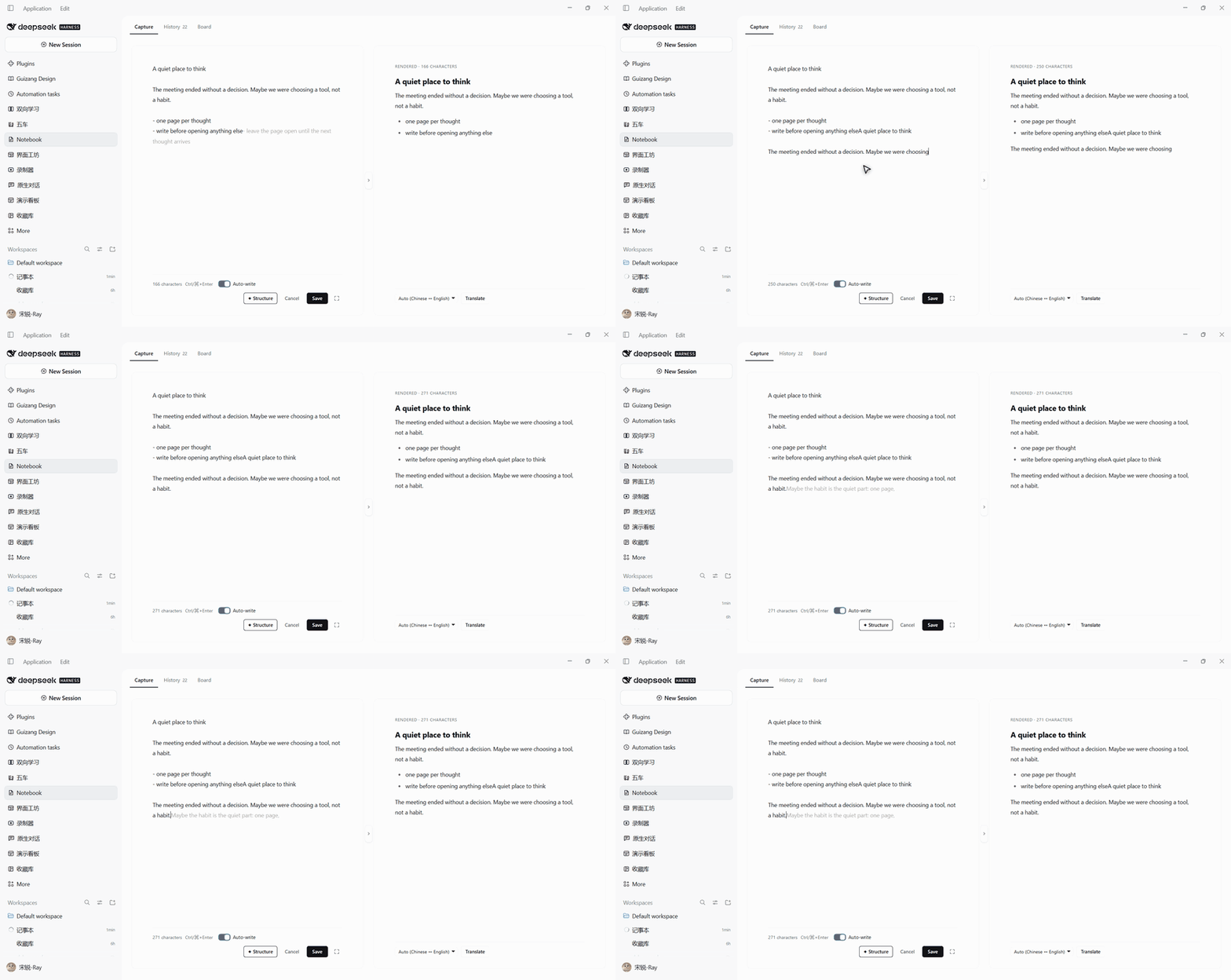
Capture
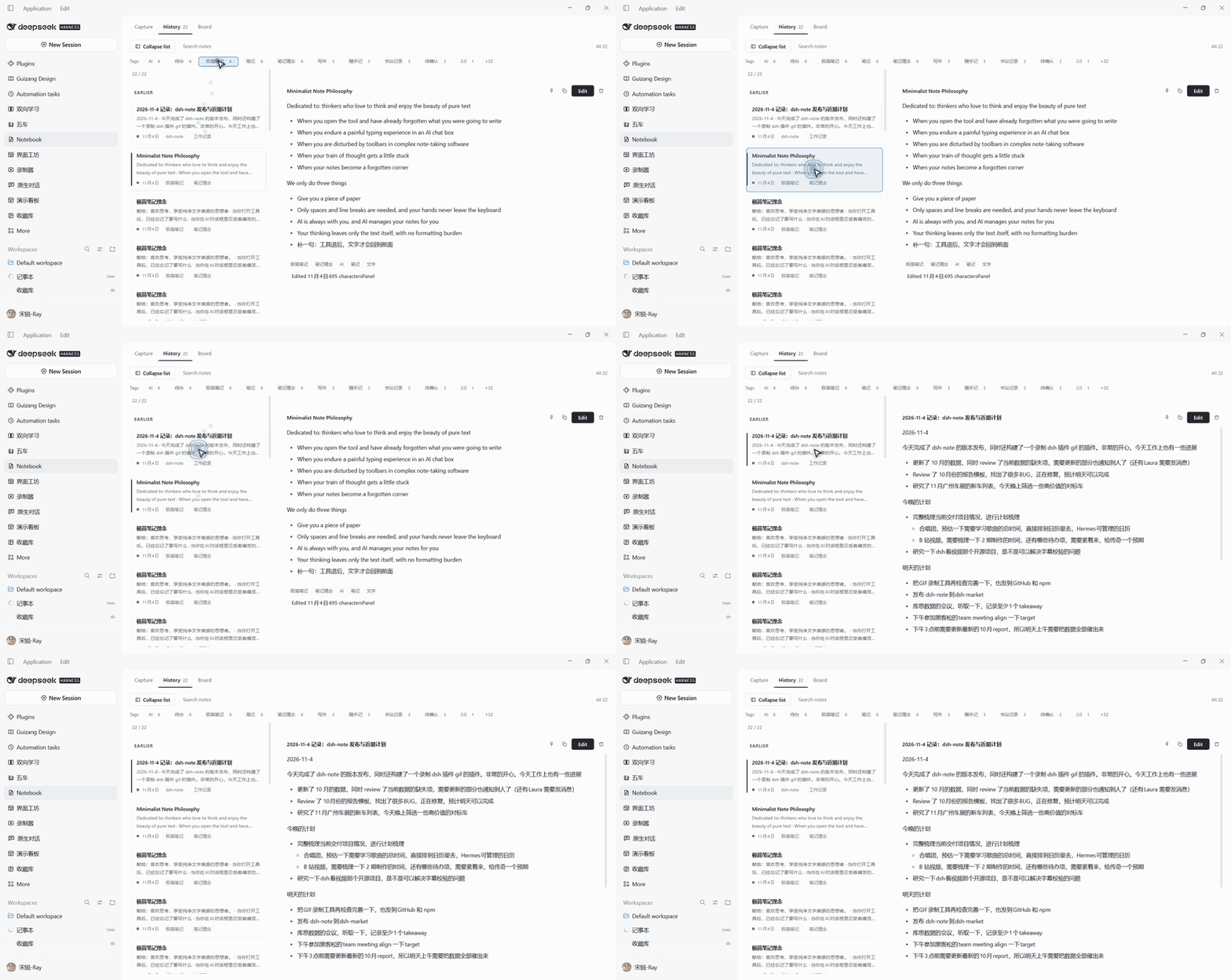
History
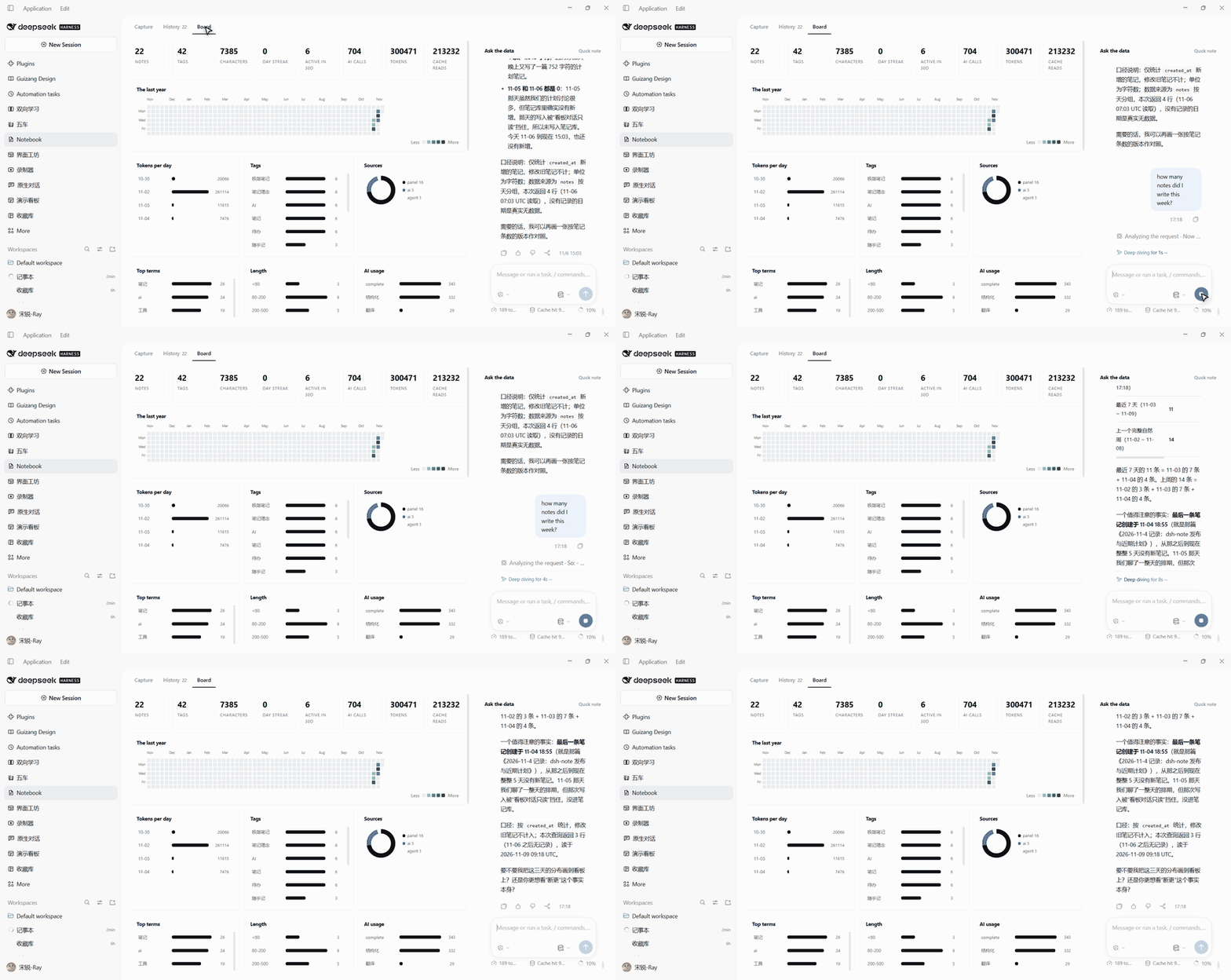
Board
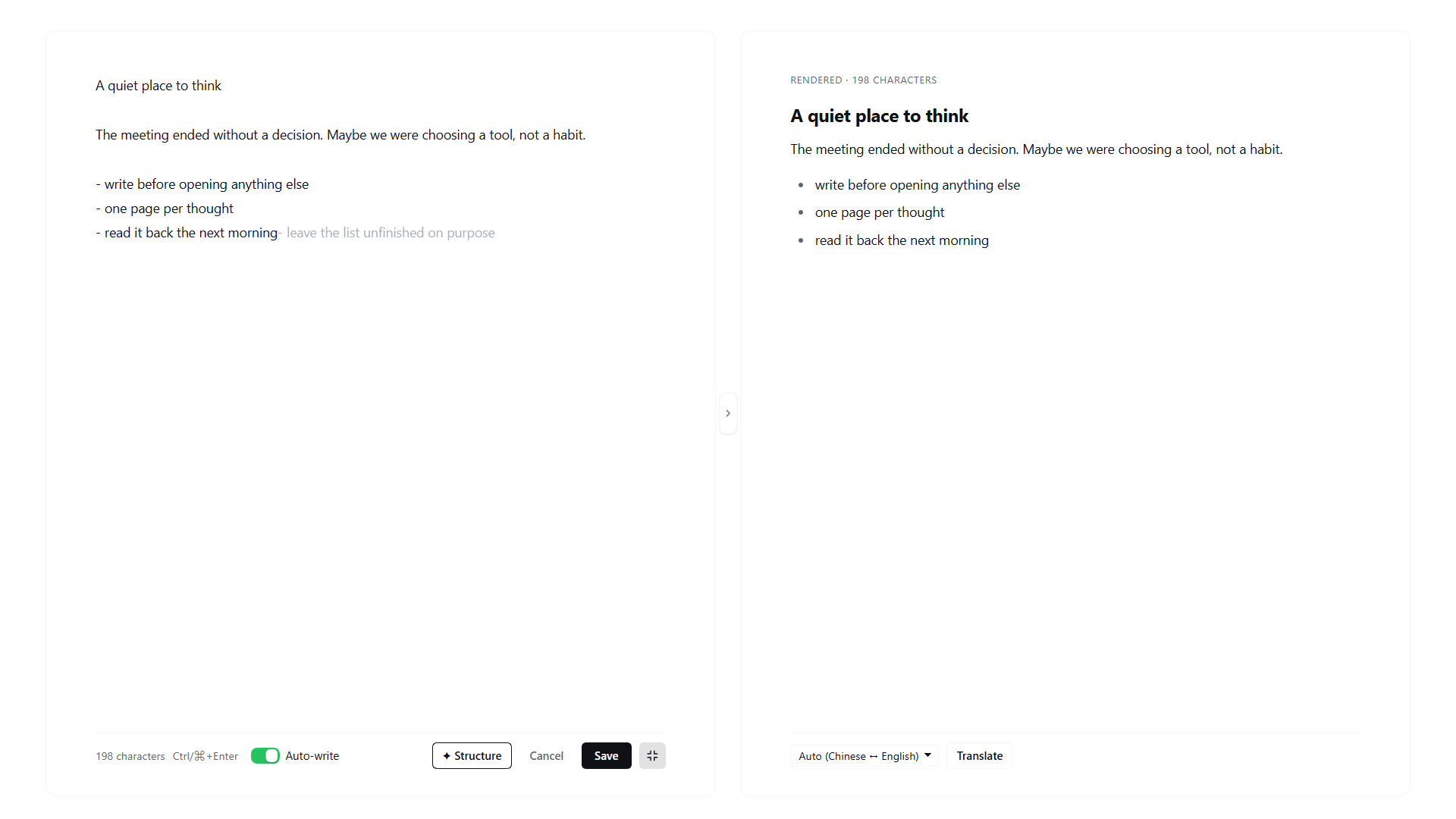
Immersive — the page alone, on the whole screen
notes-vault/ in the workspace (configurable with notesPath),
plus a disposable SQLite projection rebuilt from them. Deleting the database loses nothing.llm service, so they use whatever
provider and key the rest of DSH already uses.notes_analyze,
dashboard_chart and the notes tool — so asking it for a page creates one, in place. It cannot
delete: that stays a human action, done from History where a deleted note is still recoverable.| Tab | What it is |
|---|---|
| Capture | One box, two pages. The right page is Format, running live on every keystroke; the toolbar's Structure button adds an AI rewrite beside it. |
| History | The grouped history: two-line cards, a draggable list column, Markdown rendering, search and tags. Edit mounts the capture box — source on the left, the laid-out result on the right — so there is one editor, not two. |
| Board | Statistics over the notebook and its usage, plus the host's native conversation running the notes-board agent preset. |
| Action | Input | Lands in | Changes language |
|---|---|---|---|
| Format | the note, always | right page, live (no request, no button) | no |
| Structure | the note; the selection when there is one | an AI draft on the right page (Apply / Save / Translate) | never |
| Translate | the AI draft in place, or the note itself (selection, else whole) from the live preview | a draft edit / a proposal with Apply | yes |
| Apply | draft or proposal | back into the source, replacing only the range | — |
Format is deterministic (formatLocally), which is why it needs no button and no
model: separators, numbering, blank lines and stray stars are normalised, wording is
never touched, and the pass is idempotent. Saving a note writes the laid-out text, so
the right page is a promise rather than a hint. A selection in the editor highlights
the same lines in the preview; translate then works on that span.
Capture also works outside the panel: Alt+N or the small notebook icon in the
composer tool row opens a floating capture card, and /note 内容 saves a note
straight from the chat box.
notes.json is the source of truth: human-readable, diffable, and safe under
OneDrive. Everything else is derived.
<workspace>/notes-vault/
  notes.json      live notes (source of truth)
  trash.json      deleted notes, kept as a safety net
  links.json      which session belongs to the notebook
  events.jsonl    append-only instrumentation: AI calls, UI actions, charts
  dashboard.json  charts pinned to the dashboard
  assets/         pictures a note points at, named by their content hash
  index.db        SQLite projection of the above, for the query tools
notesPath in cordis.patch.yml changes the directory; a relative path anchors
on the default workspace from the registry, not on whichever session calls
first.
History lists two things: the notebook, and what was deleted out of it. The switch sits at the top of the list, with a count on each side.
Deleting lives on the right mouse button. Right-click a note for open, delete, select all and invert; right-click inside a selection and the action applies to the whole selection. Ctrl/⌘-click adds one note to the selection, Shift-click takes a range, and a selected row is marked on its left edge. Every deletion — one note or forty — goes through a dialog that says how many notes are going and names them, and nothing is deleted until that dialog is confirmed.
The note itself is not lost at that point: it moves to trash.json. The trash
view reads a deleted note back as a page, puts it back with one click (or many),
and deletes for good only through the same dialog. trash/purge and
trash/empty are the only routes that drop a body.
A note's title renders at 26px in the page. That is on purpose: the largest heading inside a body is 19px, so a title cannot be mistaken for the page's own first section.
The plugin's settings page owns two things beyond the writing partner: where a second copy of the notebook goes, and whether earlier versions of a note are kept.
| Destination | What it is |
|---|---|
| Folder | a directory this machine can see — a mapped NAS share, a Nextcloud/Dropbox/oneDrive folder, an external disk |
| WebDAV | the same tree over HTTPS, which is what most NAS boxes expose (https://nas.local:5006/notes) |
Either way the destination receives a restorable tree, and the notebook is never read back from it — this is a backup, not a merge:
notes.json            the whole notebook, restorable by copying one file back
trash.json            the recycle bin
notes/<id>.md         one plain Markdown file per note, readable in any editor
assets/<name>         the pictures, byte for byte
history/<id>/<st>.md  the kept versions, when history is on
sync.json             path → sha256, so the next run only writes what changed
A run is debounced behind each save, serialised, and never fails the save: an unreachable NAS is a status line on the settings page, not a lost note. Mirror deletions is the one switch that removes anything on the far side, and it only ever removes files this engine wrote itself.
History is local and independent of the backup: with Keep versions on, every
save first writes the body it is about to replace into <notebook>/history/<id>/,
named by the UTC instant (20261111T101530-412.md). Version count is capped per
note, the newest are kept, and the clock button in the History tab opens the list
with a restore per row — a restore records the version it replaces, so it is
undoable too.
The WebDAV password is stored in plain text in settings.json, beside the notes,
and the password field says so. There is no keychain to borrow here.
The distinction matters, and getting it wrong is what made an earlier version send a truncated text dump into a prompt.
Structuring (/notes/api/enhance/stream) — a single streamed model call.
No session, no tools. start, delta…, done with {title, body, tags}.
Reasoning effort is set to off; measured ≈0.5 s to first token.
Completion (/notes/api/complete) — the next sentence, asked for only after typing
stops for a second; the note's own repeated wording answers without a request.
The dashboard chat — a real agent session on the notes-board preset,
rendered with the host's own Conversation component. It has tools, so it
queries instead of guessing:
| Tool | What it does |
|---|---|
notes_query |
one guarded SELECT against index.db (read-only, single statement, ≤500 rows, ? params) |
notes_analyze |
preset aggregates: by_tag, by_source, by_day, by_hour, lengths, terms, ai_usage, timeline |
dashboard_chart |
add/replace a pinned chart on the dashboard |
notes |
read and write the notes themselves |
The panel only creates the session (POST /notes/api/session/create) and
renders it. Delivery, streaming, tool cards and approvals are the framework's:
the user types into the native composer, so no turn is ever pushed by hand.
lib/db.js maintains a SQLite projection (index.db) with four tables:
| Table | Contents |
|---|---|
notes |
one row per note, body is the full text |
note_tags |
one row per (note, tag), so tags are a GROUP BY |
events |
every AI call and UI action, with latency and outcome |
messages |
the dashboard conversation transcript, keyed by (session_id, seq) |
Two rules keep it honest:
index.db and it rebuilds from the JSON on the
next read. A cache must never hold data the files do not.node:sqlite ships with the app's own runtime (Node 24). If it is ever missing,
the query tools disable themselves and say so; the rest of the notebook works.
Every AI call appends one line to events.jsonl — kind, characters, elapsed time,
time to first token, success. UI beacons (POST /notes/api/event) record what the
user did: tab switches, note opens, AI calls, chart removals. The dashboard
conversation is ingested into messages on each poll, keyed by sequence number so
re-reading is idempotent.
That is what the 「AI 使用」tile and the average-first-token figure come from, and what lets the assistant answer "what did I ask you last week".
| File | Role |
|---|---|
index.js |
Host half: the notes service, tools, command, data plane. |
lib/store.js |
The notebook files: notes, trash, links, search. |
lib/db.js |
The SQLite projection and its guarded queries. |
lib/text.js |
Term extraction (non-overlapping CJK bigrams, English words). |
lib/analytics.js |
Pure statistics for the dashboard. |
lib/events.js |
The event log and the pinned-chart store. |
lib/llm.js |
Streamed model call, reasoning-effort selection, timing. |
lib/chat.js |
The translate stream (whole note or numbered lines). |
lib/prompt.js |
Prompts and parsers: structuring, translation. |
lib/tools.js |
Tool adapters: query, analyze, chart, notes, enhance. |
lib/api.js |
/notes/api routes, including the SSE streams. |
src/head.js |
Browser prologue: i18n, api helpers, formatting, Markdown, styles. |
src/board.js |
Dashboard: chart renderers, statistics view, and the editor behaviours (spaces, Backspace, completion). |
src/panel.js |
Panel: tabs, capture, history, session shell, mount points. |
build.mjs |
Concatenates the three sources into client.js. |
tools/check-sources.mjs |
Parses the browser sources the way build.mjs wraps them. |
tools/fix-encoding.mjs |
Repairs a CJK string written through a byte-mangling pipeline. |
test/host.mjs |
Store, prompts, event log, chart store, tool adapters. |
test/prompts.mjs |
Structuring and completion prompts, term extraction. |
test/api.mjs |
The whole data plane in-process, including both SSE streams. |
test/render.mjs |
Slot wiring, tabs, dashboard, history editor and completion wiring. |
test/markdown.mjs |
Markdown rendering, snippets, tags, the drawer switch. |
This directory is its own git repository; the first commit is the baseline the rest of the work is measured against.
node tools/check-sources.mjs     # syntax check for the factory-bodied sources
node build.mjs                   # src/*.js -> client.js
node --check client.js
node tools/fix-encoding.mjs      # repair double-encoded CJK (only after a bad write)
The suites, in the order they are usually run:
| Suite | What it covers |
|---|---|
test/host.mjs |
store, analytics, API routing |
test/prompts.mjs |
structuring prompt, Markdown parsing, title rules |
test/api.mjs |
routes end to end with a fake model |
test/render.mjs |
component trees (Capture, History, Board) |
test/markdown.mjs |
rendering, snippets, tags, outline markers |
test/document.mjs |
whole documents: coverage repair, index-aligned assembly, typography gate |
test/typing.mjs |
the 极简写 keyboard flows, simulated slowly: spaces, nesting, Backspace |
test/layout.mjs |
dock layout contract + a preview page for the composer pinning |
test/corpus.mjs |
live run against the app: 17 inputs → structure → render → translate |
client.js is generated from src/ by build.mjs. It is committed, because the host loads it
as the package's ./client export: a fresh clone therefore works without a build step, and
npm run build is only needed after editing src/. prepare/prepack rebuild it on install and
publish. exports/ holds generated previews and is ignored.
MIT — see LICENSE.
Built with DeepSeek Harness. The plugin was written in a
conversation with it — design, code, tests, the recorded clips and this README — and the same harness runs
its suites. Commits carry Co-Authored-By: DeepSeek Harness <noreply@deepseek.com> as the record.
src/, then node build.mjs. node --check src/panel.js fails by design
(the files are factory bodies); use node tools/check-sources.mjs.STYLES and the i18n dictionaries live in a template literal. A backtick in
a CSS comment, or a ${ in prose, silently truncates the string.Get-Content -Raw reads them as ANSI and Set-Content writes UTF-8, which double-encodes
every CJK string. Use the file tools, or Node with explicit UTF-8.Config export: a profile-installed bundle resolves only its own
dependencies, so no schema library is imported.commands, webServer, layout, llm,
agentDefaultModel, sessionController, sessions) are read through
ctx.get(...), never ctx.<name>: cordis throws on an undeclared property read.notes.board.conversation child slot; that declaration is
what makes the framework inject SessionProvider + renderSlot.children array before rendering the panel.notes is used by both the sidebar icon and the main panel; select
the panel by slot name in tests, not by key.--dsw-alias-* token; literal colors appear only in
icon.svg… with one deliberate exception: the contribution matrix uses GitHub's
exact five-step green ramp (--dshn-heat-0..4, with GitHub's dark variant under
prefers-color-scheme: dark). Opacity over an accent colour cannot reproduce
that ramp, and matching it is the point — so it is pinned, in one place, and
named here rather than hidden.One column per week, one cell per day, a year of days. Intensity is quantised by
quartiles of the non-zero counts, as GitHub does, not by a ratio to the peak:
a notebook with one note a day therefore shows one light shade rather than
painting every day in the darkest green. The busiest day is always the darkest.
src/board.js (Heatmap) draws it; lib/analytics.js (calendarYear) supplies a
Sunday-aligned series so the renderer needs no date arithmetic.
CLASSIFICATION EVIDENCE
系统优先读取 GitHub Topics,再与站内分类词典和词根规则比对。当前命中: deepseek-harness。
morluto
Reverse engineer anything with agents, from app behavior down to native binaries.

deepseek-ai
DeepSeek Harness: Everything is a Plugin.

nexu-io
The 1st Collaborative AI Design Agent Workspace. Local-first and open source. Create motion, prototypes, websites, apps, dashboards, presentations, images, and videos with your team and AI agents. Share work, exchange feedback, and iterate together in one workspace.