
其他
完整应用

deepseek-harness
deepseek-ai
DeepSeek Harness: Everything is a Plugin.
PROJECT TOPICS
PROJECT README
中文说明见 README.zh.md。




@tr1v3r/dsh-proxy is a DeepSeek Harness plugin that routes every
in-process outbound request — LLM providers, web_search / web_fetch,
streamable-http MCP — through an HTTP(S) CONNECT or SOCKS5 proxy, and lets
you flip the proxy on, off, or to another server at runtime, with zero
restarts, either from the Web Settings → General → Network proxy control or
by editing the dsh-proxy entry in the profile's cordis.patch.yml (hot-reloaded).
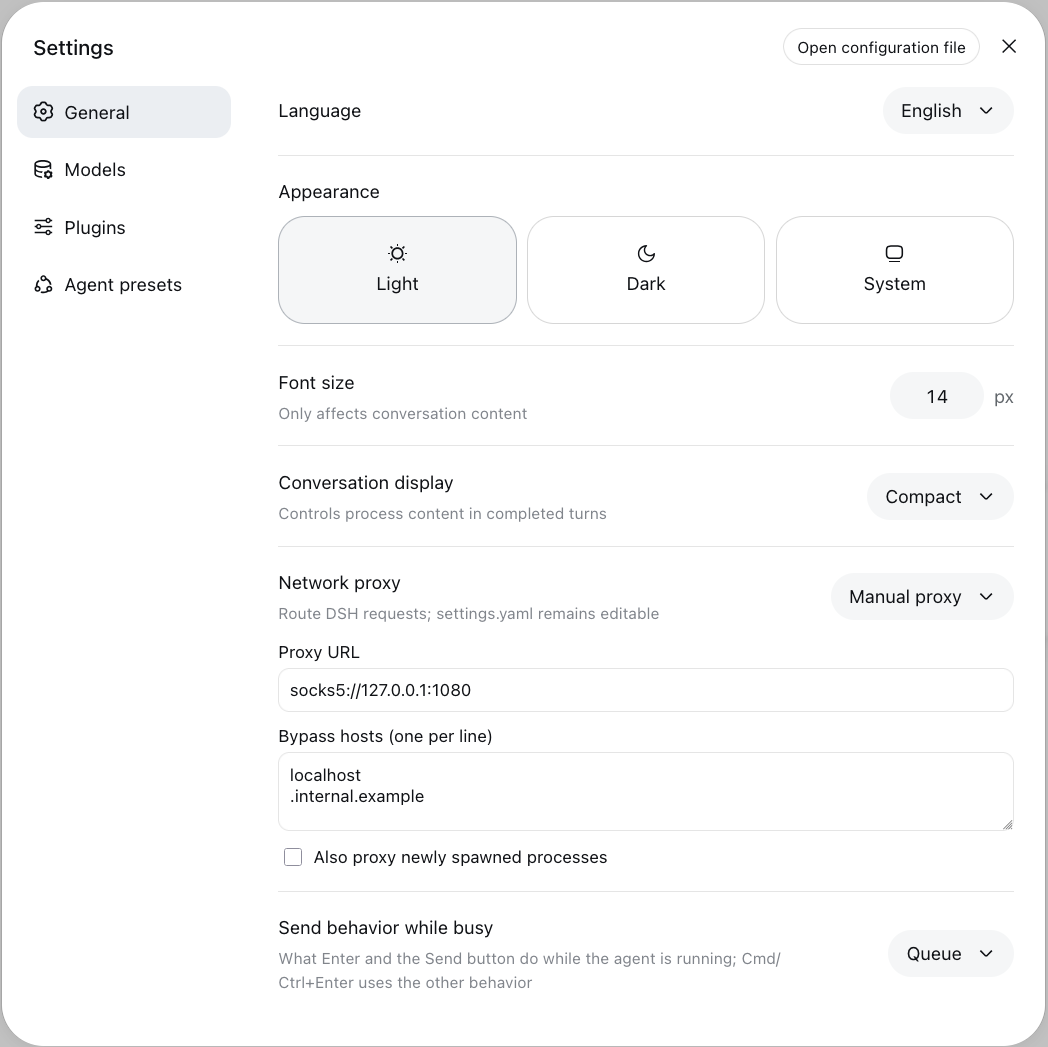
The GIF above uses real screenshots from an isolated DSH Web profile: the sidebar
proxy icon, Direct / Follow system / Manual quick switcher, and Settings → General
→ Network proxy with the host-applied route snapshot. The endpoint is illustrative;
the snapshot is not a connectivity test. For the separate terminal routing-engine
demo, run node scripts/demo.mjs after install.
DSH and pi-ai issue requests through globalThis.fetch, which reads undici's
well-known global dispatcher slot (Symbol.for('undici.globalDispatcher.1')).
The plugin owns that slot:
http(s):// proxy → EnvHttpProxyAgent (CONNECT tunneling for https)socks5:// proxy → undici's built-in Socks5ProxyAgent (URL credentials
supported; socks5h:///socks:// normalize to it; DNS resolves remotely)noProxy rules → both paths route through one RoutingDispatcher, so HTTP
and SOCKS share identical matcher semantics (undici-style: bare entries
match the host and dot-boundary subdomains; host:port pins a port; *
bypasses everything; a leading dot or *. prefix is accepted as a synonym
of the bare entry). In manual mode, ambient NO_PROXY/HTTP_PROXY env
vars are deliberately ignored by the dispatchers — exported env only steers
child processes, so in-process routing is fully determined by the profile
entry config. system mode is the opposite: it follows the ambient proxy —
HTTP_PROXY/HTTPS_PROXY/ALL_PROXY/NO_PROXY env vars, falling back to
the macOS System Settings proxy (scutil --proxy) — re-detected each time
the section is applied, not continuously polled.With exportEnv: true (default) the switch also exports
HTTP_PROXY/HTTPS_PROXY/ALL_PROXY/NO_PROXY into the dsh process, so
child processes spawned after the switch (bash-tool curl/git, stdio MCP
servers) follow the same proxy. Variables you set yourself at boot are never
clobbered, and everything is restored on disable/unload. While loopback bypass is
on (the default), the exported NO_PROXY also gains the loopback defaults
(localhost,127.0.0.1,::1, merged and deduplicated with your rules); with
bypassLoopback: false your list is exported unchanged.
Retired dispatchers close gracefully and are force-destroyed after 30 s, so
switching away actually tears down old keep-alive connections. In-flight
requests get that same 30-second grace period (RETIRE_DESTROY_MS); a
streaming response that is still running ~30 s after you flip the switch is
interrupted when the retired dispatcher's sockets are force-destroyed.
Proxy URLs with embedded user:pass@ credentials are stored in
plaintext on disk — in the profile's cordis.patch.yml and the settings
persistence — and are protected only by file permissions. With the default
exportEnv: true, the credentials are also propagated into the dsh process
as HTTP(S)_PROXY env vars, so every child process spawned afterwards
carries them (ps -E on Linux/macOS or /proc/<PID>/environ can reveal
them to the same user; other users generally need root or comparable
privileges to read them, depending on platform permission settings).
No new config option is introduced for this; if
your credentials are sensitive, prefer pointing dsh-proxy at a local,
unauthenticated proxy entry (e.g. http://127.0.0.1:7890 in front of an
authenticated upstream) instead of embedding user:pass@ in the URL.
In the target profile directory (~/.config/dsh/profiles/<name>/):
Add the dependency and bundle in package.json:
{
  "dependencies": {
    "@tr1v3r/dsh-proxy": "^0.2.5"
  },
  "dsh": {
    "profile": {
      "bundles": ["@deepseek-ai/dsh-base", "@tr1v3r/dsh-proxy"]
    }
  }
}
(Merge the bundle into your existing dsh.profile.bundles list.)
Install:
dsh plugin --profile <name> install --no-frozen-lockfileRestart dsh once to mount the plugin; afterwards never again — switching happens through settings.
In the Web profile, use the icon-only Proxy status control in the sidebar footer (above Settings) to check the selected mode on hover/focus or in its menu and switch between Direct, Follow system, and Manual proxy without leaving the main screen. The menu uses the same settings namespace and updates when the profile patch changes externally. The tooltip shows the manual endpoint with credentials masked; Follow system reflects the selected mode, not a guarantee that the host detected a usable proxy (consult DSH logs for the effective route). A missing manual URL cannot be activated from the quick menu. To edit the URL, bypass hosts, or child-process export, open Settings → General → Network proxy.
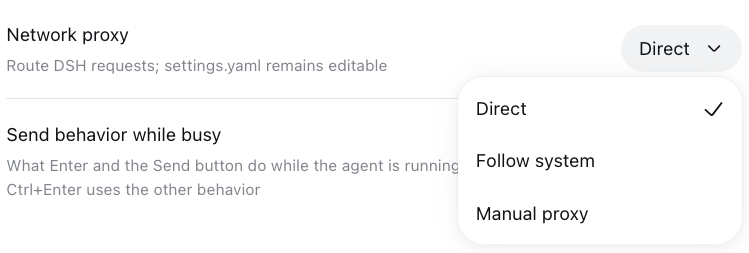
In Settings → General → Network proxy, select Direct,
Follow system, or Manual proxy from the dropdown; mode changes apply immediately,
without an Apply button. In Manual mode, enter an HTTP(S)/SOCKS5 URL and bypass
hosts (one per line); text fields save on blur, while the child-process env switch
saves on change. Invalid URLs are not saved. The UI writes the same dsh-proxy
profile entry. Editing the profile patch remains supported and refreshes the UI; a
revision fence prevents a stale edit from silently overwriting an external change.
The selector offers all three routing modes:
Alternatively, add this override to
~/.config/dsh/profiles/<name>/cordis.patch.yml (hot-reloaded, no restart).
If the file already contains entries, append this item to the YAML list, or edit
the existing dsh-proxy item.
The mode key picks direct, system, or manual:
- id: dsh-proxy
  config:
    mode: manual                           # direct | system | manual
    proxy: socks5://127.0.0.1:1080         # manual only — http://…, https://…,
                                           # socks5://user:pass@host:1080, socks5h://…
    noProxy:                               # manual only — optional bypass list
      - localhost
      - .internal.example
      - registry.corp:443
    bypassLoopback: true                   # manual + system — loopback stays direct
                                           # (false to proxy it)
    exportEnv: true                        # manual only — also set HTTP(S)_PROXY for children
mode |
behavior |
|---|---|
direct |
No proxy — everything goes out directly (same as the old enabled: false). |
system |
Follow the host's proxy, detected each time the section is applied: HTTP_PROXY/HTTPS_PROXY/ALL_PROXY/NO_PROXY env vars everywhere, falling back to the macOS System Settings network proxy (scutil --proxy) when env is unset. It re-detects on settings save, not continuously; Windows registry, Linux-desktop and PAC are not yet covered. proxy/noProxy/exportEnv are ignored. |
manual |
Route through the proxy URL with the optional noProxy bypass list (same as the old enabled: true). |
enabled: true/false still works as a deprecated alias for
manual/direct when mode is omitted:
- id: dsh-proxy
  config:
    enabled: true                          # ≡ mode: manual
    proxy: http://127.0.0.1:7890
Every save re-routes immediately. The plugin logs each switch:
dsh-proxy: routing global fetch via socks5://***@127.0.0.1:1080, noProxy 3 rule(s)
dsh-proxy: following system proxy (http://127.0.0.1:7890, noProxy 3 rule(s))
dsh-proxy: direct (mode: direct)
(Userinfo in the proxy URL is redacted in logs. system mode follows the
ambient env/OS proxy, so it never writes those env vars itself.)
The General settings row can read the host's last applied default route through an optional, authenticated Connection Fetch route. It shows the selected mode, source, separately redacted HTTP/HTTPS endpoints, bypass policy, generation and stable apply/fallback code. Refresh explicitly after a save if the host has not applied that revision yet. Unsupported/disconnected hosts show “unavailable”; normal settings and quick switching still work without this capability.
This is not a connectivity/health test or a per-request trace. direct restores
the original dispatcher, which another plugin may have configured; it does not
guarantee physical direct access. system reports the last installed result,
not a fresh OS/environment detection. NO_PROXY and loopback policy may bypass
individual requests. No arbitrary URL probe, provider request, credentials or
full proxy URL is sent by this status feature. Provider-aware diagnostics remain
deferred until adapters expose an explicit effective-target/security contract.
When exporting NO_PROXY with loopback bypass enabled, only identical trimmed
entries are deduplicated, preserving user spelling and order and appending any
missing standard defaults: localhost, 127.0.0.1, ::1. Case, trailing-dot
and IPv6-bracket variants remain separate; for example, 127.0.0.1. must not
remove 127.0.0.1, nor [::1] remove ::1. External clients do not necessarily
share the in-process hostname matching rules (curl treats these IP variants
differently). No cross-client equivalence is assumed for localhost variants
either. Suffix/wildcard/port rules and other addresses are not canonicalized.
bypassLoopback: false still exports the literal user list without defaults or
deduplication; each child client interprets that list itself. The broader
in-process loopback detection is unchanged.
| Traffic | Routed? |
|---|---|
LLM providers via pi-ai (zai-coding-cn, custom openai-compatible routes, …) |
✅ |
dsh-llm-deepseek (deepseek-official) |
✅ |
web_search / web_fetch |
✅ |
| streamable-http MCP servers | ✅ |
stdio MCP servers, bash-tool subprocesses (curl, git, …) |
✅ via exported env, for processes spawned after the switch |
Loopback destinations (localhost, 127.0.0.0/8, ::1, 0.0.0.0) |
❌ direct by default; set bypassLoopback: false to proxy them |
| pi-ai Bedrock route | ⚠️ AWS SDK manages its own proxying (HTTPS_PROXY env is honored there) |
| Built-in browser host / browser downloads | ❌ separate process, configure the browser itself |
Also note: child processes already running when you flip the switch keep the env they were spawned with; undici's SOCKS5 agent is currently marked experimental upstream.
npm install
npm test                      # unit + local e2e: HTTP proxy, SOCKS5, noProxy, hot-switch, env
node scripts/boot-probe.mjs   # boots a real DSH tree and switches through Settings
node scripts/boot-probe.mjs --web # also tests authenticated status GET + auth/Origin fences
The boot probe checks actual runtime capabilities before listening, creating
its throwaway home or booting. DSH >= 0.1.7-rc.1 is the verified reference,
not a version gate: the install anchor, imports and required exports (including
createRuntimeResolution / PluginPackages) must be present. Missing roots,
modules and capabilities produce actionable preflight errors instead of a late
TypeError. You need not upgrade your global install; use a scratch directory:
ROOT=$(mktemp -d)
npm install --prefix "$ROOT" @deepseek-ai/dsh@0.1.7-rc.1
DSH_ROOT="$ROOT" node scripts/boot-probe.mjs
Run these commands from this repository's root. DSH_ROOT names the install
anchor containing package.json; dependency resolution supports hoisted scratch
installs as well as package-local dependencies. Without it, the probe resolves
the real dsh executable on PATH and preflights that installation.
PROBE_HOME, if supplied, must be an existing parent directory. The probe owns
and cleans only a unique temporary child, never that parent or its contents.
Inherited proxy variables are cleared in the probe process. All routing checks
use local servers; no provider/model request is made.
MIT © tr1v3r
CLASSIFICATION EVIDENCE
系统优先读取 GitHub Topics,再与站内分类词典和词根规则比对。当前命中: 无有效分类标签。
deepseek-ai
DeepSeek Harness: Everything is a Plugin.

anywhere-labs
为 DeepSeek Harness (DSH) 插件生态打造的现代化桌面端解决方案。万物皆「插件」,桌面本身也是「插件」。

walkinglabs
Harness engineering beginner tutorial, from 0 to 1