dsh-tui


An open-source terminal front door for DeepSeek Harness (dsh).
@tomowang/dsh-tui is an out-of-tree mode bundle: it stacks on @deepseek-ai/dsh-base exactly like the shipped dsh-web-app and dsh-headless bundles do, but drives the agent from your terminal instead of a browser. The package is both a Cordis plugin (terminal input and presentation) and a dsh bundle (dsh.bundle.patch in package.json points at cordis.patch.yml); everything else — model adapters, tools, session persistence, sandbox and approval policy — stays in dsh-base and remains patchable underneath.
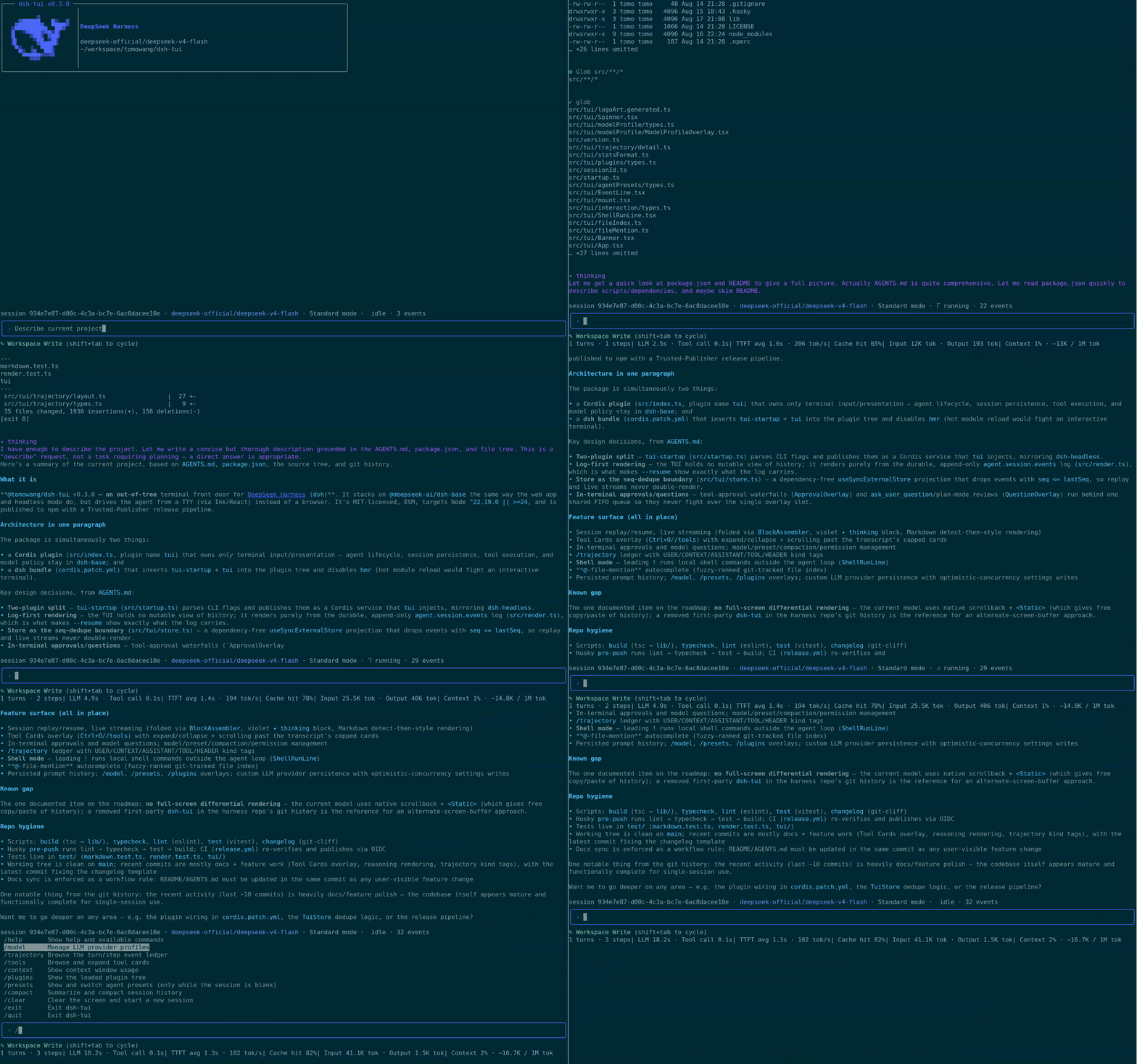
How it works
- The TUI renders only from the durable session log: it replays
agent.session.snapshotEvents() on startup and follows session/event live, so --resume shows the exact history the log carries — the harness's "model-visible ⟺ logged" invariant does the heavy lifting.
- The interface runs full-screen in the terminal's alternate screen buffer, with an application-owned transcript viewport (scroll with the mouse wheel/trackpad,
PageUp/PageDown) that auto-follows new output until you scroll up.
- Line input maps to the agent inbox:
agent.followup() while idle, agent.steer() while a turn is running, Ctrl+C cancels the running turn.
tui-startup parses this app's flags (everything after the launcher's own) through dsh-cmdline and publishes them as an ordinary Cordis service; the runner row reads them via the bundle patch, mirroring dsh-headless.- Both stdin and stdout must be real TTYs; the plugin fails loud instead of degrading, so pipes keep using
dsh --profile headless.
Features
- Status bar — session id, active LLM provider/model, current agent preset, live run state with spinner, queued-message count, and logged event count.
- Stats line — turn/step counts, LLM/tool wall time, TTFT and decode tok/s, cache-hit %, billed tokens, and a compact context-usage summary; sections hide themselves until there's data.
/model provider management — switch the active model by picking from a provider's catalog, and add, edit, or delete custom LLM providers (route, base URL, API key, model discovery) without leaving the terminal.- Agent presets — start a fresh session on a given preset with
--agent-preset, or browse and switch presets from /presets (fixed once the session's first turn has run).
- Session inspectors —
/trajectory for a turn/step event ledger with a detail view and filtering, /context for a context-window usage breakdown, /plugins for the loaded Cordis plugin tree and fiber state.
- Collapsed tool calls with a live spinner — a running tool call shows as a single spinner line in the prompt area; once its result lands, it settles into one collapsed
✓/✖ transcript line rather than an inline multi-line card.
- Tool Cards overlay —
/tools or Ctrl+O opens a scrollable browser over the session's tool calls/results, each shown expanded to its full presentation by default (Enter/Space collapses a card back to its title).
- Reasoning display — a model's reasoning/thinking content never floods the screen: an animated
✦ thinking line stands in for it while still streaming, and it collapses to a one-line ✦ think · … summary ahead of the visible answer once settled in the transcript; the full text is always available via /trajectory.
- Markdown rendering — assistant text with an unambiguous Markdown signal (fenced code, headers, lists, blockquotes, rules, tables, links, bold/strikethrough, inline code) is styled for the terminal; plain prose passes through untouched.
- Permission preset cycling —
Shift+Tab cycles read-only / workspace-write / danger-full-access / custom, shown live in the prompt area.
- In-terminal approvals and questions — a tool call parked on an
ask permission decision is answered right in the terminal (allow once / reject), and ask_user_question/plan-mode's plan review present as an option list with multi-select and free-text "Other…", esc to skip. A desktop notification (OSC 9 — the same mechanism Claude Code's own CLI uses) fires once whenever such a wait starts, so terminals that support it (Ghostty, Kitty, iTerm2 with escape-sequence alerts enabled) can flag it while you're looking elsewhere; terminals without OSC 9 support just ignore it.
- Plan mode —
/plan [message] enters plan mode (optionally steering a first message under it), /plan off leaves it; a model-proposed plan lands in the existing question flow as an Approve/Keep-planning review.
- Goal mode —
/goal <objective> sets a long-running goal shown as a live dock strip (phase + objective, hiding on completion like the web portal); /goal clear|edit <objective>|pause|resume manages it, and automatic continuation rounds keep running in this same session while the goal is active and armed.
- Docked subagent switcher — whenever at least one subagent in the current batch is running, a solid/hollow-circle strip docks directly below the composer (Claude Code CLI-style):
←/→, while the prompt is empty, switch which transcript the main scroll region shows — main, or any subagent child, latest-spawned first — without hiding the composer or the strip itself, and Esc returns to main. A running child additionally carries a live spinner beside its circle, independent of which one is currently selected — solid/hollow marks navigation (what you're looking at), the spinner marks activity (what's still working), so the two never get confused with each other. With more than 4 children, a dim ‹N/N› count marks whatever the visible window doesn't fit, sliding to keep whichever one is open inside it as you cycle. The strip is a live indicator of the current batch of active work, not a permanent log — it disappears once everything settles and nothing is being viewed.
- Manual compaction —
/compact summarizes and compacts session history on demand.
- Session rename —
/rename <title> sets an explicit title; bare /rename generates one from the conversation so far via one on-demand model call, as a kebab-case slug (Claude Code CLI's own convention, e.g. fix-auth-bug) rather than the harness's own natural-language default. The accepted title also shows right-aligned in the prompt box's own top border, alongside the terminal window/tab title.
- Session resume —
/resume <sessionId> switches to a persisted session in a fresh screen (falling back to a brand-new session with a notice on an unknown id); bare /resume opens a picker of this working directory's past sessions instead — newest first, each with its folded title where one landed.
- Persisted prompt history — submitted lines are saved across processes and
/clear (in $DSH_HOME/dsh-tui/history.jsonl, ~/.dsh/… by default), recalled with ↑/↓.
- Readline-style input — word/line motion, kill/yank-style deletes, multi-line drafts, and shell-like double-press
Ctrl+C/Ctrl+D to exit.
- Shell mode — a leading
! on an empty prompt (Claude Code's convention) switches Enter to run the line as a local shell command instead of sending it to the agent; the prompt border turns yellow for the duration, and output streams into the transcript without touching the session log.
@-file-mention autocomplete — typing @ opens a fuzzy-filtered dropdown of repo files (git ls-files, or a bounded walk outside a git repo); Tab/Enter inserts the picked path at the cursor.- Update hint — a best-effort startup check against the npm registry shows a persistent dock line with the upgrade command once a newer
@tomowang/dsh-tui is published; any network failure or timeout is silent.
- Terminal window/tab title — once the session gets a title (a short first-message summary, when the profile composes
dsh-session-title), the terminal's title bar shows <session title> — dsh-tui; it stays dsh-tui before that or without the service mounted.
- Full-screen scrollable transcript — the interface owns the terminal's alternate screen buffer rather than growing native scrollback, with mouse wheel/trackpad and
PageUp/PageDown scrolling and an auto-follow-the-bottom transcript; the last screenful is flattened back into your terminal's normal scrollback on exit. /trajectory remains the tool for browsing further back than the viewport shows.
- Every overlay degrades to a plain notice instead of failing the whole TUI when its backing service isn't mounted in a given profile.
Install
Requires Node ^22.19 || >=24 and a DEEPSEEK_API_KEY.
# 1. Install the dsh launcher
npm install -g @deepseek-ai/dsh

# 2. Create the profile and install this bundle into it
#    (dsh reconciles the profile manifest's "dsh.profile.bundles" list
#    automatically, appending any installed dependency that declares
#    dsh.bundle.patch — no manual package.json edit needed)
dsh plugin --profile tui add @tomowang/dsh-tui

# 3. Run
dsh --profile tui
dsh --profile tui --resume <sessionId>           # reopen a persisted session
dsh --profile tui --resume                       # pick a past session from a list, newest first
dsh --profile tui --agent-preset <presetId>      # start a fresh session on a given preset
dsh --profile tui --dump-config                  # inspect the composed plugin tree
Any row --dump-config prints — the model adapter, tool set, sandbox policy, this TUI's own config — can be overridden from the profile's cordis.patch.yml without touching this package. --agent-preset is a dsh-launcher flag (parsed by tui-startup, not --dump-config above) that only applies to a fresh session; it's ignored together with --resume, and is a no-op with a startup notice on profiles that don't mount dsh-agent-preset-registry. The bundle ships the same four presets as the Web portal (Standard, PTC, Minimal, Creator), vendored under presets/. --resume with no id opens the same session picker as bare /resume below.
Terminal commands
| Input |
Effect |
| any text |
follow-up while idle, steering while a turn runs |
/help |
show available commands and keyboard shortcuts |
/model |
manage LLM provider profiles: pick the active model from a provider's catalog (s opens the picker; ↑/↓ select, Enter activates, Esc backs out), add/edit/delete a custom provider |
/presets |
view and switch agent presets (fixed once the session's first turn has run) |
/trajectory |
browse the turn/step event ledger with a detail inspector and filter |
/tools |
browse and expand tool cards past their collapsed transcript line |
/context |
show context-window usage as a bar-chart breakdown |
/plugins |
show the loaded Cordis plugin tree and fiber state |
/plan [message] |
enter plan mode, optionally steering message as the first step under it |
/plan off |
leave plan mode |
/goal [objective] |
set a long-running goal (or, with no argument, show the current goal) |
/goal clear / /goal edit <objective> / /goal pause / /goal resume |
clear, reword, pause, or resume the current goal |
/compact |
summarize and compact session history |
/rename [title] |
set an explicit session title; with no argument, generates one from the conversation so far |
/resume [sessionId] |
switch to a persisted session by id; with no argument, opens a picker of this directory's past sessions |
/clear |
flush the current session and start a new one |
/exit, /quit |
cancel, wait for idle, flush the session, exit |
Keyboard shortcuts
| Key |
Effect |
mouse wheel/trackpad, PageUp/PageDown |
scroll the transcript; auto-follows new output again once you're back at the bottom |
Ctrl+C |
cancel a running turn; on an idle empty line, press twice within 2s to exit |
Ctrl+D |
forward-delete; on an idle empty line, press twice within 2s to exit |
Shift+Tab |
cycle the permission preset (read-only / workspace-write / danger-full-access / custom) |
Ctrl+O |
open the Tool Cards overlay; ↑/↓ select a card, Enter/Space expand or collapse, PgUp/PgDn/Home/End scroll an expanded card, Esc/q/Ctrl+O close |
! (on an empty prompt) |
enter shell mode: Enter runs the line as a local shell command; Esc/backspace-on-empty exits back to normal mode |
@ |
open the file-mention dropdown; ↑/↓ to move, Tab/Enter to insert the path, Esc to dismiss |
←/→ (empty prompt) |
with the docked subagent switcher showing, move to the previous/next session (main, then each subagent child) |
Esc (viewing a subagent, empty prompt) |
return to the main transcript |
/resume (bare) |
open the session picker; ↑/↓ select, Enter resumes the selected session, Esc/q closes without resuming |
Tab |
in /command mode, autocomplete the highlighted command |
↑ / ↓, Ctrl+P / Ctrl+N |
recall prompt history, or move within a multi-line draft |
Shift+Enter, Alt+Enter, trailing \ + Enter |
insert a newline instead of submitting |
Home/Ctrl+A, End/Ctrl+E, Ctrl+B/Ctrl+F/arrows |
readline-style character and line motion |
Alt+Left/Alt+Right, Ctrl+Left/Ctrl+Right |
move by word |
Ctrl+K/Ctrl+U, Ctrl+W/Alt+Backspace, Alt+D |
kill to line end/start, kill word back/forward |
Develop
pnpm install
pnpm run build        # tsc → lib/
pnpm run typecheck
pnpm run lint
pnpm run test
To try a local checkout inside a profile, point the profile's dependency at this directory (dsh plugin --profile tui add /path/to/dsh-tui) and rebuild before each run — profiles load the built lib/ under plain Node.
Releasing
CHANGELOG.md and GitHub Release notes are generated from Conventional Commits via git-cliff. To cut a release: bump version in package.json, run pnpm run changelog, commit as chore(release): vX.Y.Z, then git tag vX.Y.Z && git push && git push --tags. The tag push triggers CI to build, create the GitHub Release, and publish to npm. See AGENTS.md for the full flow.
License
MIT


